-
-
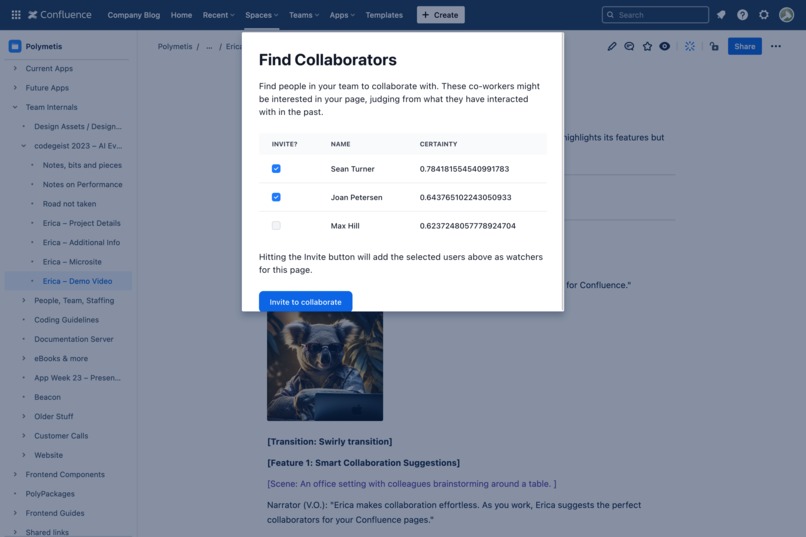
Erica knows who will be most interested in your content and helps you share with them directly.
-
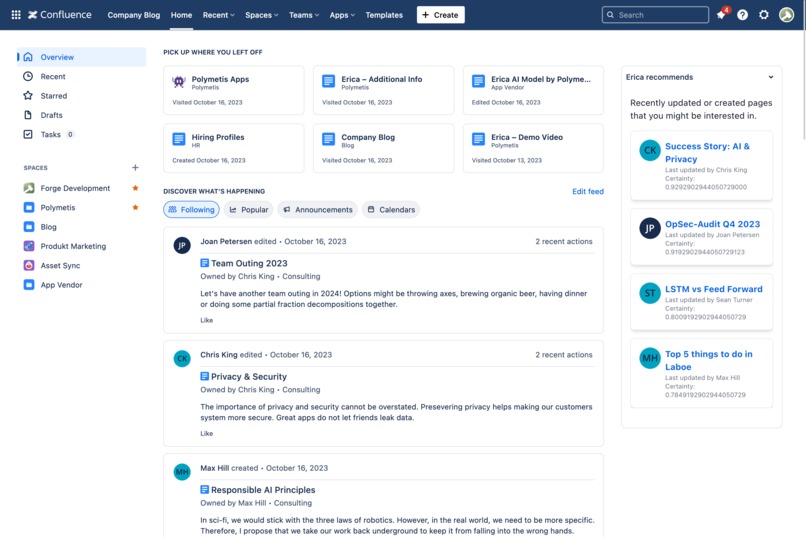
Personalized feed on Confluence homepage, just like Instagram or LinkedIn.

Inspiration
We love Confluence and its many collaboration features. Mentioning your colleagues, share pages or even just following all updates a co-worker makes – these features allow us to keep up with what's going on. But all of these features require that we know who to follow and with whom to share our pages. In large teams and teams that grow quickly that's a problem – especially with more and more work going remote.
We wanted to address this with Erica and add a dash of serendipity to the Confluence experience. By analyzing with which pages users interact, Erica can provide users a personalized feed of recent changes based on what they might be interested in the most. And when sharing a page, Erica can make recommendations on who might be interested in a particular Confluence page.
What it does
Erica offers two key features:
Smart Collaboration Suggestions Erica intelligently suggests collaborators for Confluence pages based on users' past interactions. This feature streamlines teamwork, making it easier to connect with the right people at the right time.
Personalized Updates Similar to the familiar feeds on social platforms like Instagram and LinkedIn, Erica provides users with a personalized feed of recently updated Confluence pages. This feature ensures that users stay informed and engaged with the content that matters most to them.
Erica also respects users' privacy. No data is exported to 3rd parties, everything stays within the user's browser and Confluence.
How we built it
Above building any functionality, we had one rule for building Erica:
No data can be sent to third parties, including us.
This rule meant that AI APIs as well as Large Language Models such as ChatGPT were out. We would have to do everything ourselves, including training the model. We decided to train AI models that are tailored to the Confluence content of our users. More specifically, we would let admins train a model per space. Models can be retrained at any time and we recommend doing so regularly, depending on how much change happens in a space.
The models themselves are Neural Networks that we create and train with Brain.js. To encode a Confluence page we use a number of transformations before feeding the prepared page to Google Universal Sentence Encoder. For each page we feed to the model, we also feed it a list of users who have interacted with that page as the output. The result is a model that takes a Confluence page as an input and returns a list of users with a prediction each of how likely each user is to interact with that page. Once that model has been trained, it can be used in various ways. First, we make that model accessible to users by adding a "Share with Erica" button to Confluence pages. But we also wanted an AI-powered news feed for Confluence, so we added a macro for a personalized space-wide feed and we added a feed of Erica's recommendations to the Confluence Home page.
Challenges we ran into
Training an AI model takes a lot of computing power. Really a lot. We quickly discovered that Forge's function invocations are not particularly suited for AI tasks. And due to our one rule we couldn't upload all the data to our own infrastructure and train the models there. That left us with only one place to train our models: The user's browser!
Fortunately for us, browsers have come a long way since the early days of the internet. There's a wealth of machine learning libraries available for the browser and some of those even offer GPU support. The main part of our pipeline – training the actual neural network – runs on the GPU, but the whole pipeline still can take a long time, depending on the user's hardware and the amount of pages in a space. If you train a model with Erica, you'll want the best GPU you can get.
In everyday use however, things are much better. Running the model to have Erica make a recommendation isn't too hard. We also use some clever caching to improve the user experience whenever we can.
Accomplishments that we're proud of
Getting the model trained in the first place. When we started out, it seemed nearly impossible to work with neural networks in the browser, let alone using the GPU to do so. But we did it and compared to just running on the CPU we saw at least a 10x improvement in training times. For us, that made all the difference between "technically possible" and "usable in everyday work".
We were also able to keep most parts of the our AI pipeline general enough so that we now can reuse it in different applications without too much extra effort. Being able to add AI features to our new and existing products is also pretty darn exciting. Finally, we are super stoked that we managed to build a complete AI application without exfiltrating any user data.
What we learned
While we had some ML experience in-house, none of us had ever used any JavaScript-based libraries, let alone ventured into the world of browser-based AI. We ended up going with brain.js, but it was an amazing experience deep diving into various libraries like ml5.js and TensorFlow.js. Another aspect we had under-estimated at first was the complexity inherent in Confluence pages. Consistently turning a Confluence page into a fixed-size vector of numbers (the input of our neural nets) was a much harder task than we had anticipated. It also had a huge impact on the subsequent quality of the trained model.
What's next for Erica AI
In time, we hope that Erica will find their way into the Atlassian Marketplace, but we want to fine-tune Erica's recommendations a bit more before that. We also plan to adapt Erica's AI core to other apps, so that more of our products from AI features.
Built With
- ai
- brain.js
- forge
- javascript
- ml
- svelte


Log in or sign up for Devpost to join the conversation.