Company Brain






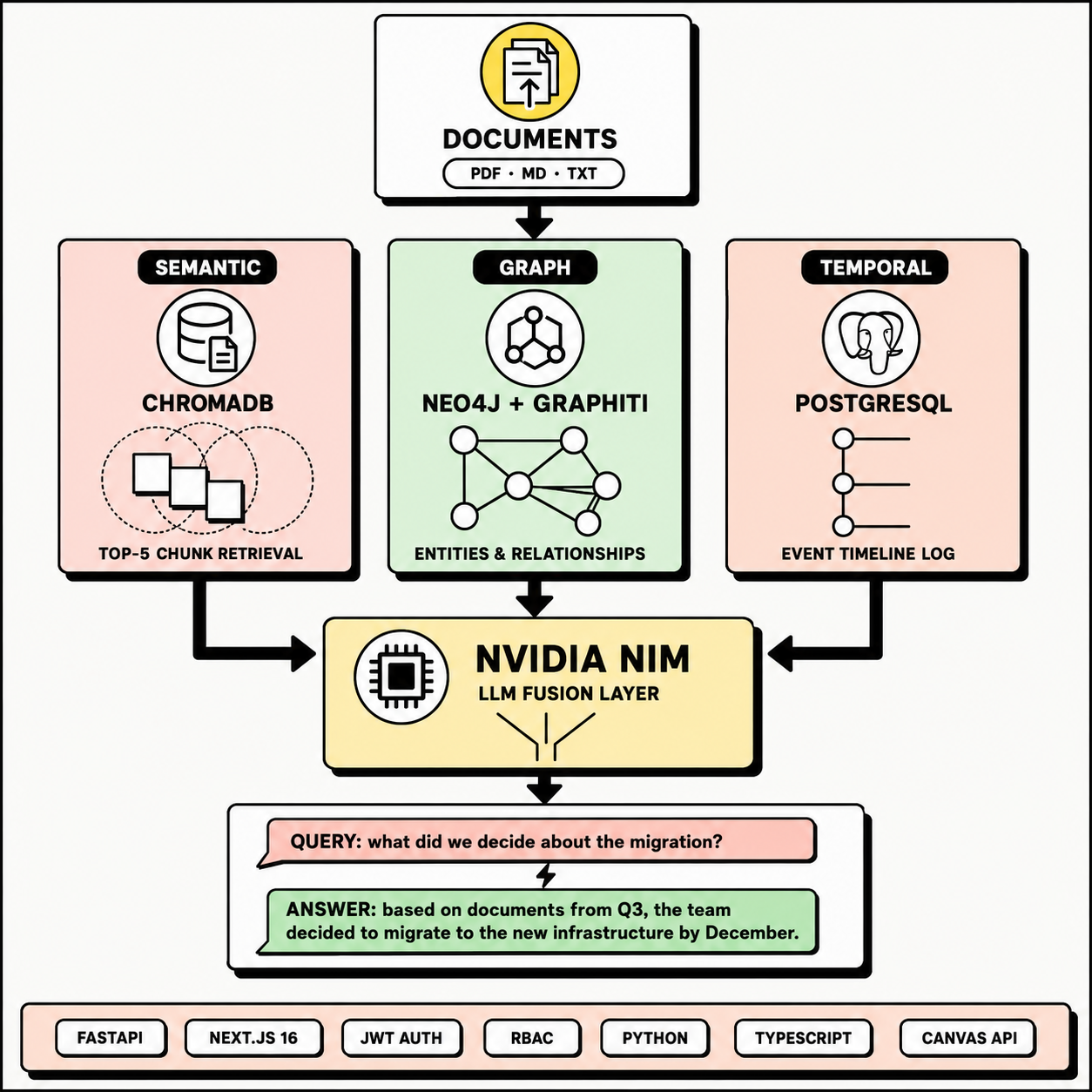
AI-powered enterprise memory — documents, knowledge graphs, timelines, and semantic search in one unified platform.
Overview
Company Brain is a centralized shared-memory system for the enterprise. It ingests documents, extracts entities and relationships into a knowledge graph, logs chronological events, and lets you query everything through an intelligent conversational interface — powered by NVIDIA NIM for LLM inference and Graphiti for graph-based knowledge extraction.
Features
| Feature | Description |
|---|---|
| ** Document Management** | Upload PDF, Markdown, or text files. Automatic OCR and text extraction. |
| ** Knowledge Graph** | Interactive force-directed canvas graph. Pan, zoom, drag nodes. Click for details. |
| ** AI Chat** | RAG-powered Q&A. Ask questions, get answers synthesized from documents + graph + timeline. |
| ** Timeline** | Chronological event log with auto-extracted date references from uploaded documents. |
| ** Semantic Search** | Vector embeddings via ONNX or hash-based fallback. Retrieval-augmented generation. |
| ** Role-Based Access** | JWT authentication with Admin, Manager, and Employee roles. |
| ** Entity Extraction** | Automatic capitalized-phrase extraction from document text into graph nodes. |
Tech Stack
| Layer | Technology |
|---|---|
| Frontend | Next.js 16 (Turbopack), React 19, TypeScript, Tailwind CSS 4, Canvas API |
| Backend | Python 3.12+, FastAPI, SQLAlchemy, Pydantic |
| LLM Provider | NVIDIA NIM (meta/llama-3.1-8b-instruct) |
| Vector Store | ChromaDB (ONNX embeddings with hash fallback) |
| Graph Database | Neo4j + Graphiti (with local in-memory fallback) |
| Relational DB | PostgreSQL 16 (with SQLite fallback) |
| Auth | JWT (python-jose, bcrypt) |
| PDF Parsing | pypdf |
Project Structure
companybrain/
├── backend/
│   ├── app/
│   │   ├── api/                    # REST endpoints
│   │   │   ├── auth.py             # JWT login/register
│   │   │   ├── documents.py        # Upload, list, delete
│   │   │   ├── graph.py            # Knowledge graph data
│   │   │   ├── search.py           # Hybrid search
│   │   │   └── timeline.py         # Timeline CRUD
│   │   ├── core/
│   │   │   ├── config.py           # Settings & env vars
│   │   │   ├── database.py         # SQLAlchemy engine
│   │   │   └── security.py         # JWT creation/validation
│   │   ├── models/models.py        # SQLAlchemy models
│   │   ├── schemas/schemas.py      # Pydantic schemas
│   │   └── services/
│   │       ├── chroma_service.py   # Vector embeddings & search
│   │       ├── graphiti_service.py # Graph extraction & storage
│   │       ├── nim_service.py      # NVIDIA NIM LLM client
│   │       └── search_service.py   # Hybrid retrieval pipeline
│   └── run.py                      # Uvicorn entrypoint
├── frontend/
│   └── src/
│       ├── app/
│       │   ├── chat/               # AI Chat interface
│       │   ├── dashboard/          # Stats & quick search
│       │   ├── documents/          # File upload & management
│       │   ├── graph/              # Canvas knowledge graph
│       │   ├── timeline/           # Event timeline
│       │   └── login/              # Authentication
│       ├── components/             # Sidebar, Header, Layout
│       └── utils/api.ts            # API client & types
└── .env                            # Configuration
Getting Started
Prerequisites
| Dependency | Version | Required |
|---|---|---|
| Python | 3.12+ | Yes |
| Node.js | 20+ | Yes |
| PostgreSQL | 16+ | Yes |
| Neo4j | 5.x | Optional (local graph fallback available) |
| NVIDIA API Key | — | Optional (local summary fallback available) |
Installation
# 1. Clone
git clone <repo-url>
cd companybrain

# 2. Backend setup
cd backend
python -m venv venv
venv\Scripts\activate    # Windows
# source venv/bin/activate  # macOS/Linux
pip install -r requirements.txt

# 3. Frontend setup
cd ../frontend
npm install

# 4. Configure environment
# Edit .env — DATABASE_URL, NEO4J_URI, NVIDIA_API_KEY
Running
Start both servers in separate terminals:
# Terminal 1 — Backend
cd backend
python run.py
# → http://localhost:8000

# Terminal 2 — Frontend
cd frontend
npm run dev
# → http://localhost:3000
Note: The frontend dev command auto-sets
NODE_OPTIONS=--max-old-space-size=8192to prevent heap OOM during Turbopack compilation.
Default Accounts
| Username | Password | Role |
|---|---|---|
admin |
admin123 |
Admin |
manager |
manager123 |
Manager |
employee |
employee123 |
Employee |
API Overview
| Method | Endpoint | Auth | Description |
|---|---|---|---|
| POST | /api/auth/register |
— | Register new user |
| POST | /api/auth/login |
— | Login, get JWT |
| GET | /api/auth/me |
JWT | Current user info |
| POST | /api/documents/upload |
Admin/Manager | Upload file |
| GET | /api/documents/ |
JWT | List documents |
| DELETE | /api/documents/{id} |
Admin/Manager | Delete document |
| POST | /api/search |
JWT | Hybrid search + AI answer |
| GET | /api/graph |
JWT | Graph visualization data |
| GET | /api/timeline/ |
JWT | Timeline events |
| POST | /api/timeline/events |
JWT | Add timeline event |
Key Design Decisions
- NVIDIA NIM Only — The sole LLM provider. No Ollama fallback. Chat completions use
integrate.api.nvidia.com/v1; embeddings are handled locally via ONNX or deterministic hash functions. - Graceful Degradation — Every data store has a fallback: Neo4j → local in-memory graph, NVIDIA → local summary, PostgreSQL → SQLite, ONNX → hash embeddings.
- Graph Entity Extraction — When Graphiti/Neo4j is unavailable, the system uses regex-based capitalized-phrase extraction seeded by a shared
_graph_node_counterfor stable IDs across restarts. - Canvas Rendering — The knowledge graph viewer uses a continuous
requestAnimationFramerender loop with mutable refs and a separate force-simulation loop for smooth interactivity without React re-render overhead. - Startup Resilience — Previously indexed documents are rebuilt into the local graph automatically on server startup via
seed_database().
Environment Variables (.env)
# JWT
SECRET_KEY=your_secret_key
ACCESS_TOKEN_EXPIRE_MINUTES=1440

# PostgreSQL
DATABASE_URL=postgresql://user:pass@localhost:5432/companybrain

# Neo4j
NEO4J_URI=neo4j://127.0.0.1:7687
NEO4J_USER=neo4j
NEO4J_PASSWORD=your_password

# NVIDIA NIM
NVIDIA_API_KEY=nvapi-...
NVIDIA_NIM_MODEL=meta/llama-3.1-8b-instruct

# ChromaDB
CHROMA_PERSIST_DIRECTORY=./data/chroma

