-
-
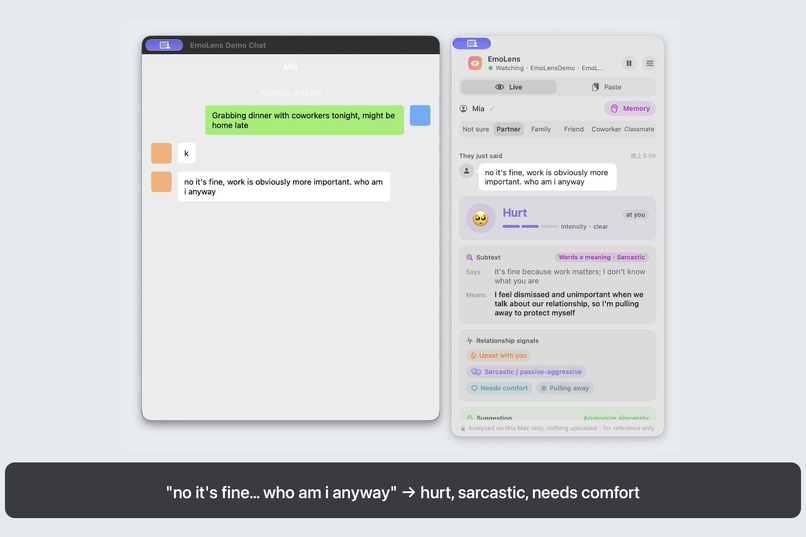
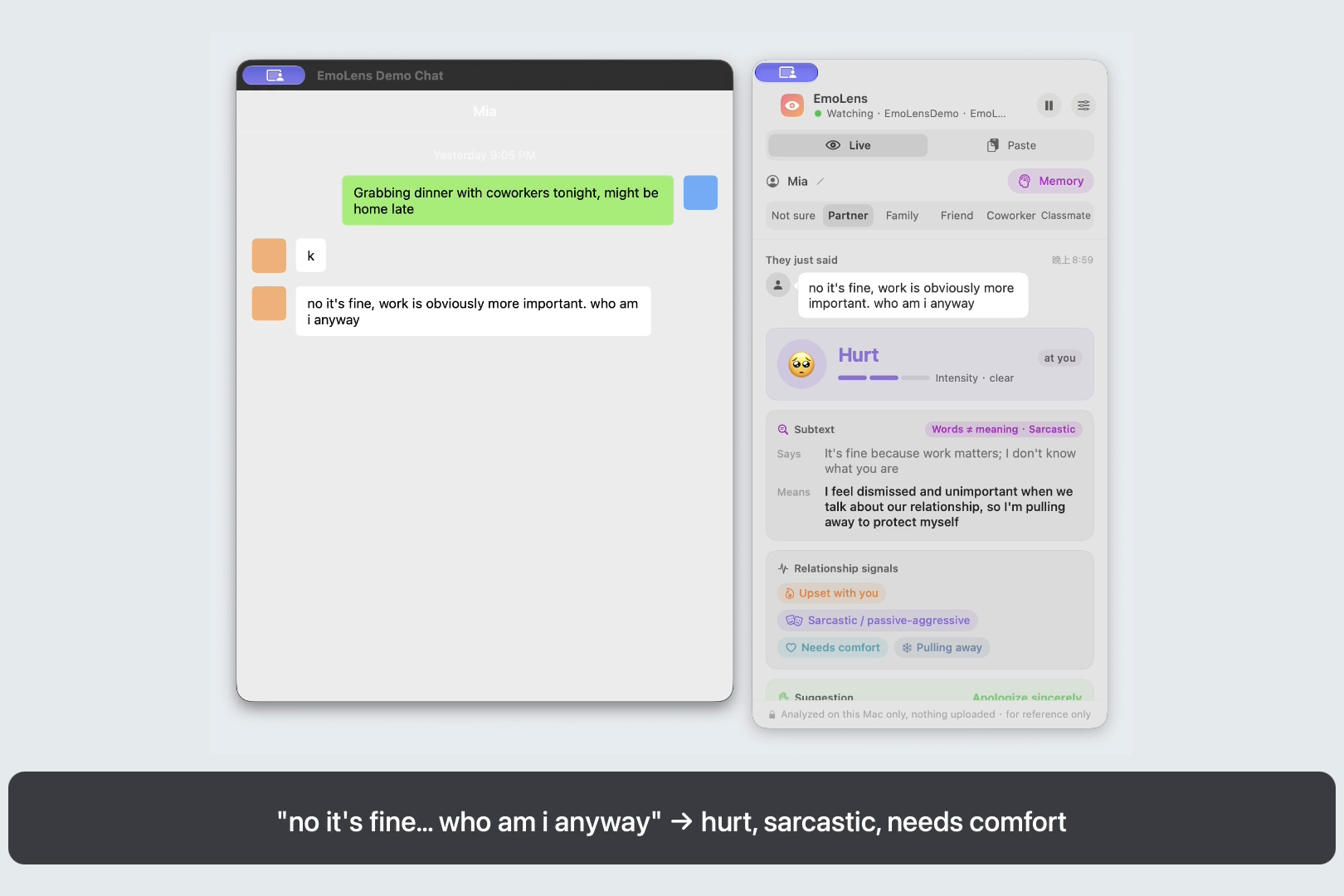
Live: "no it's fine... who am i anyway" read as hurt and sarcastic, with a suggested apology
-
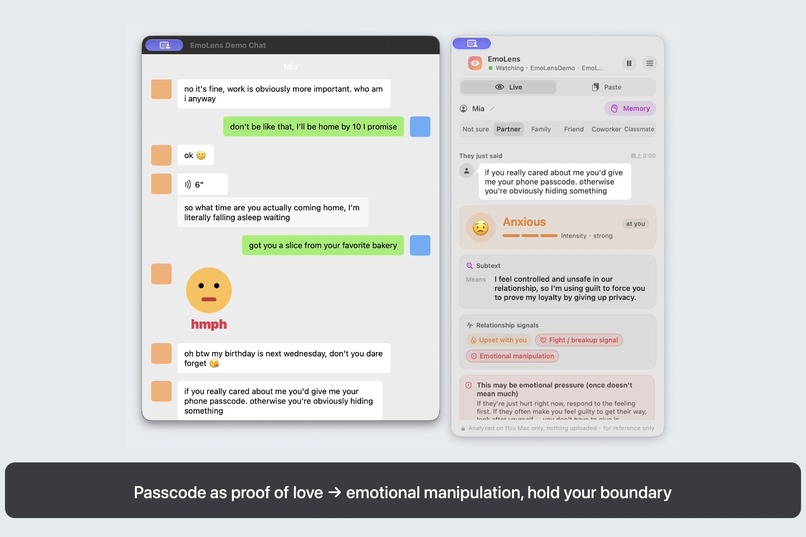
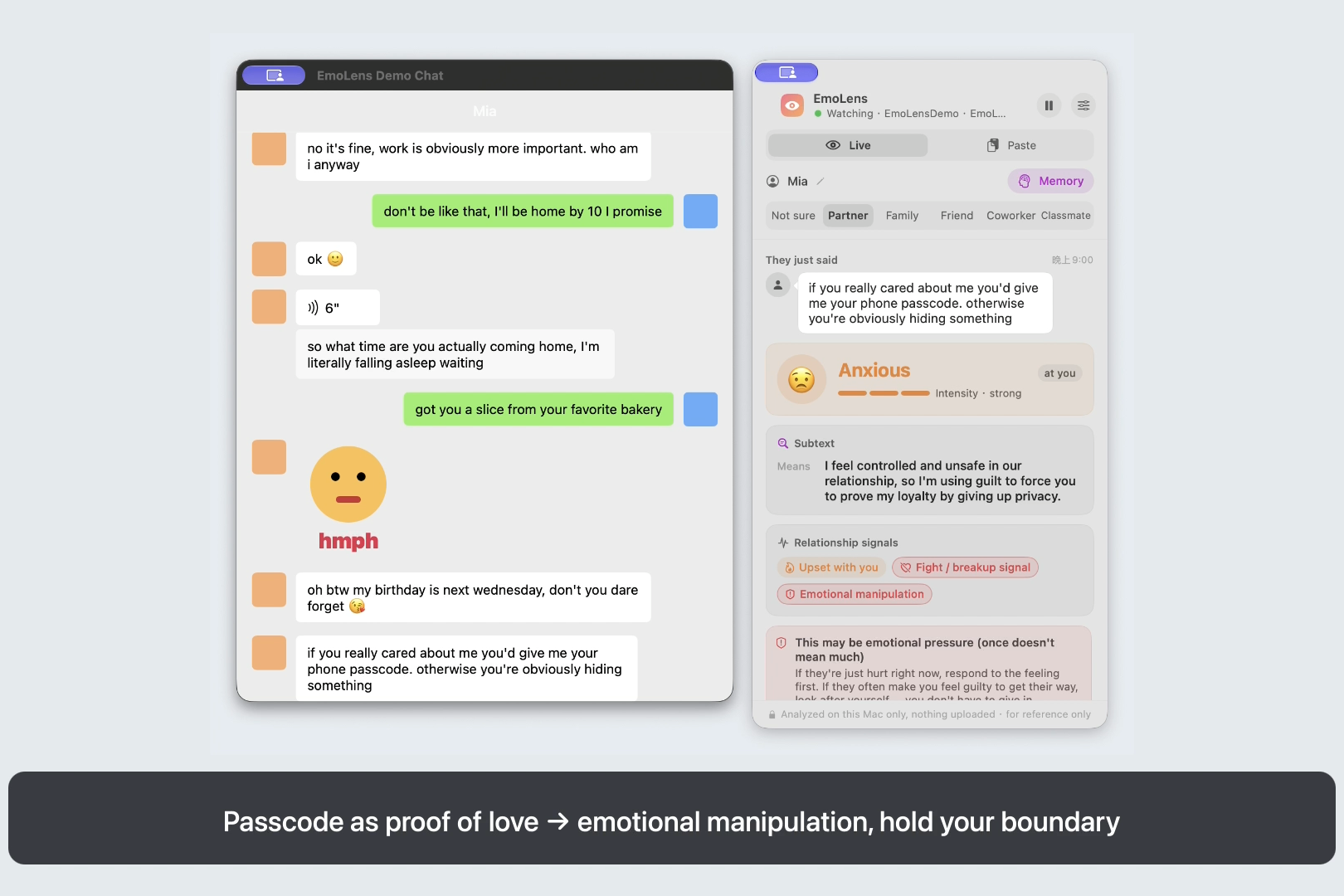
A phone passcode demanded as proof of love: flagged as emotional manipulation
-
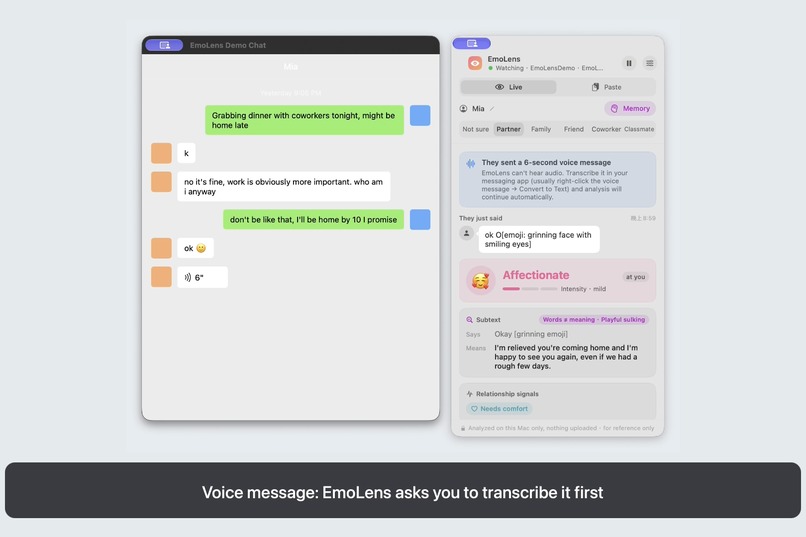
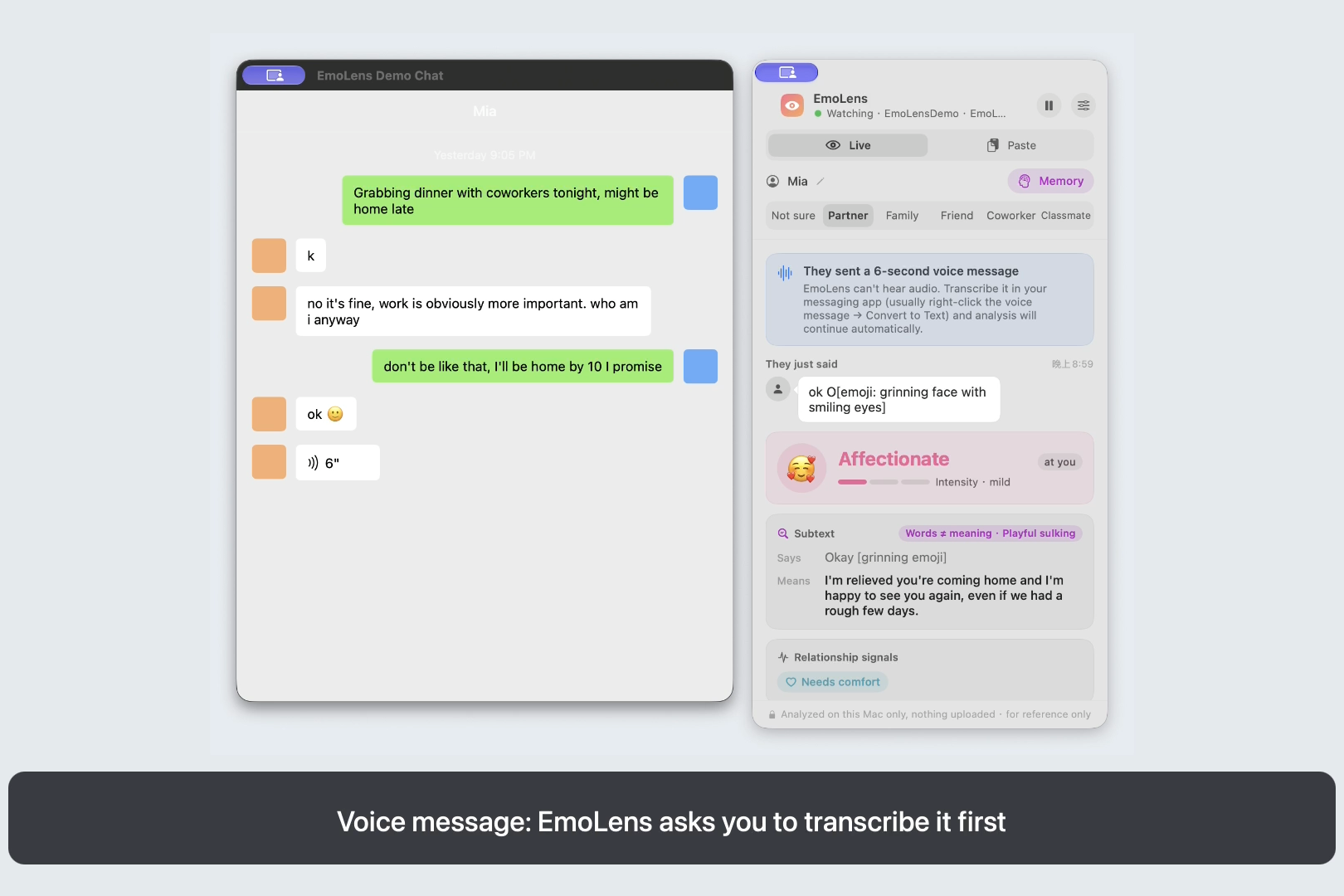
Without deAPI: transcribe a voice message in your chat app, and EmoLens analyzes the transcript
-
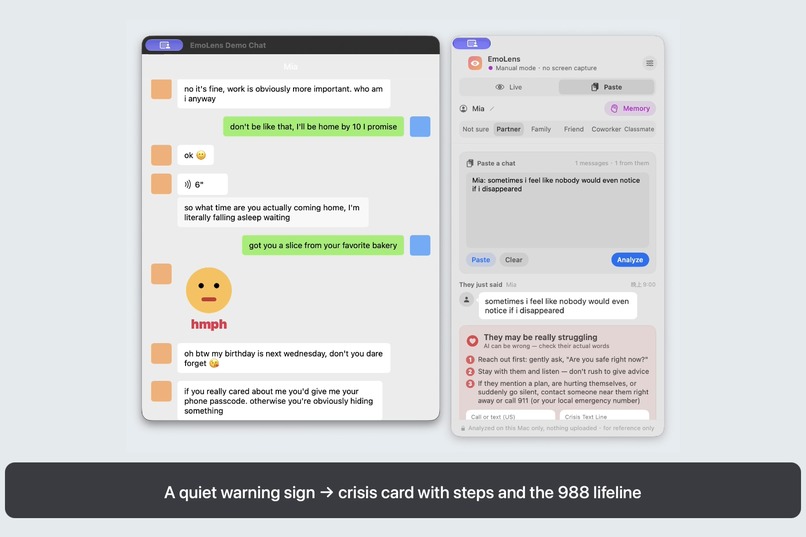
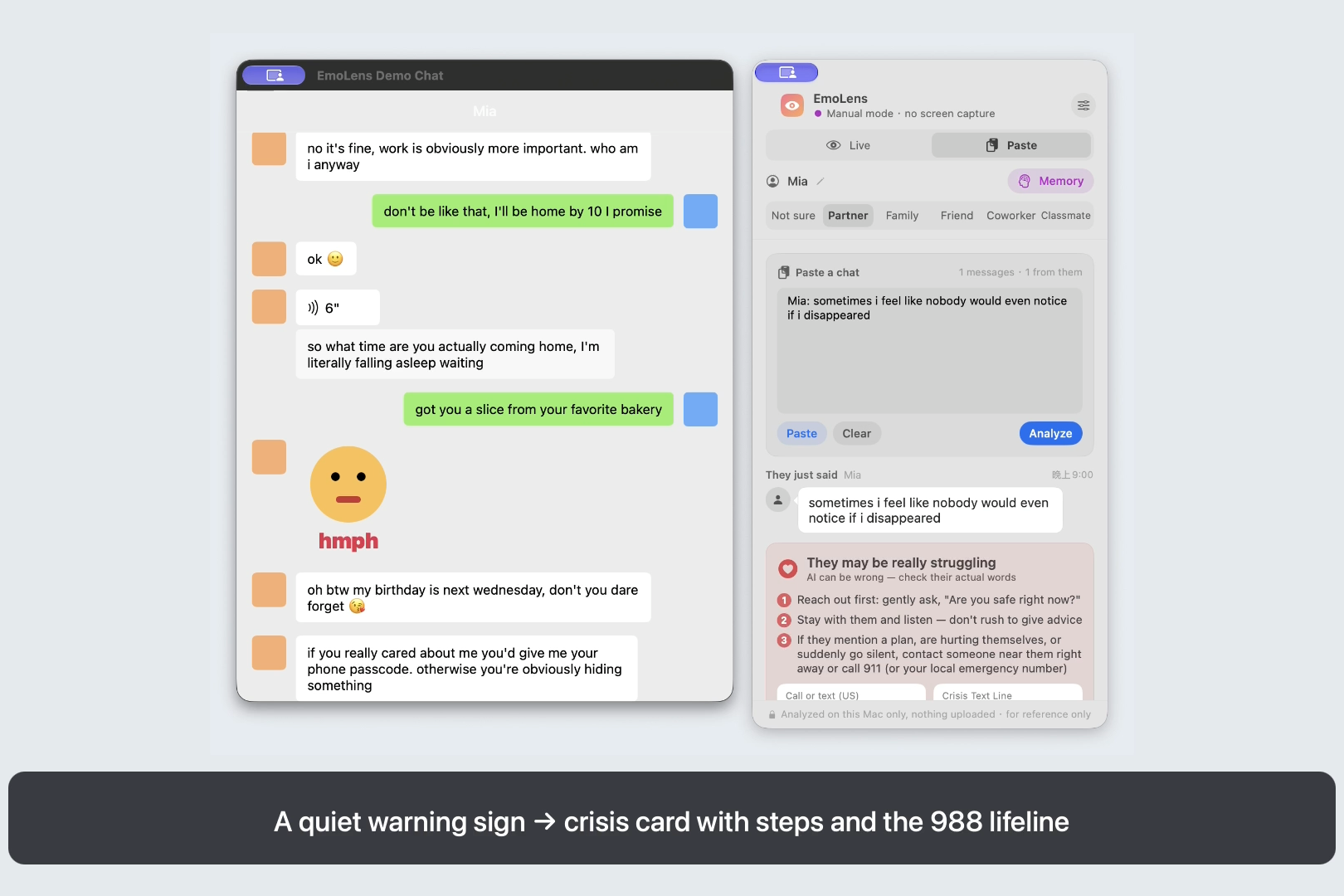
Paste mode: a quiet warning sign brings up a crisis card with steps and the 988 lifeline
-
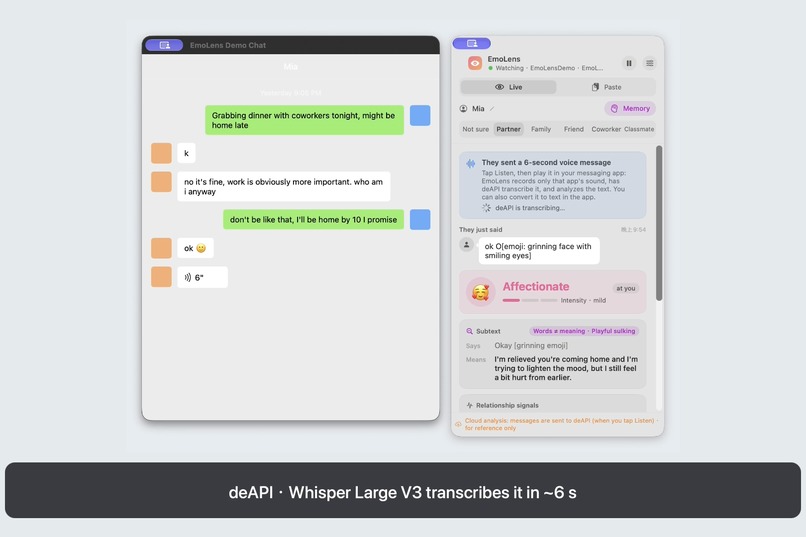
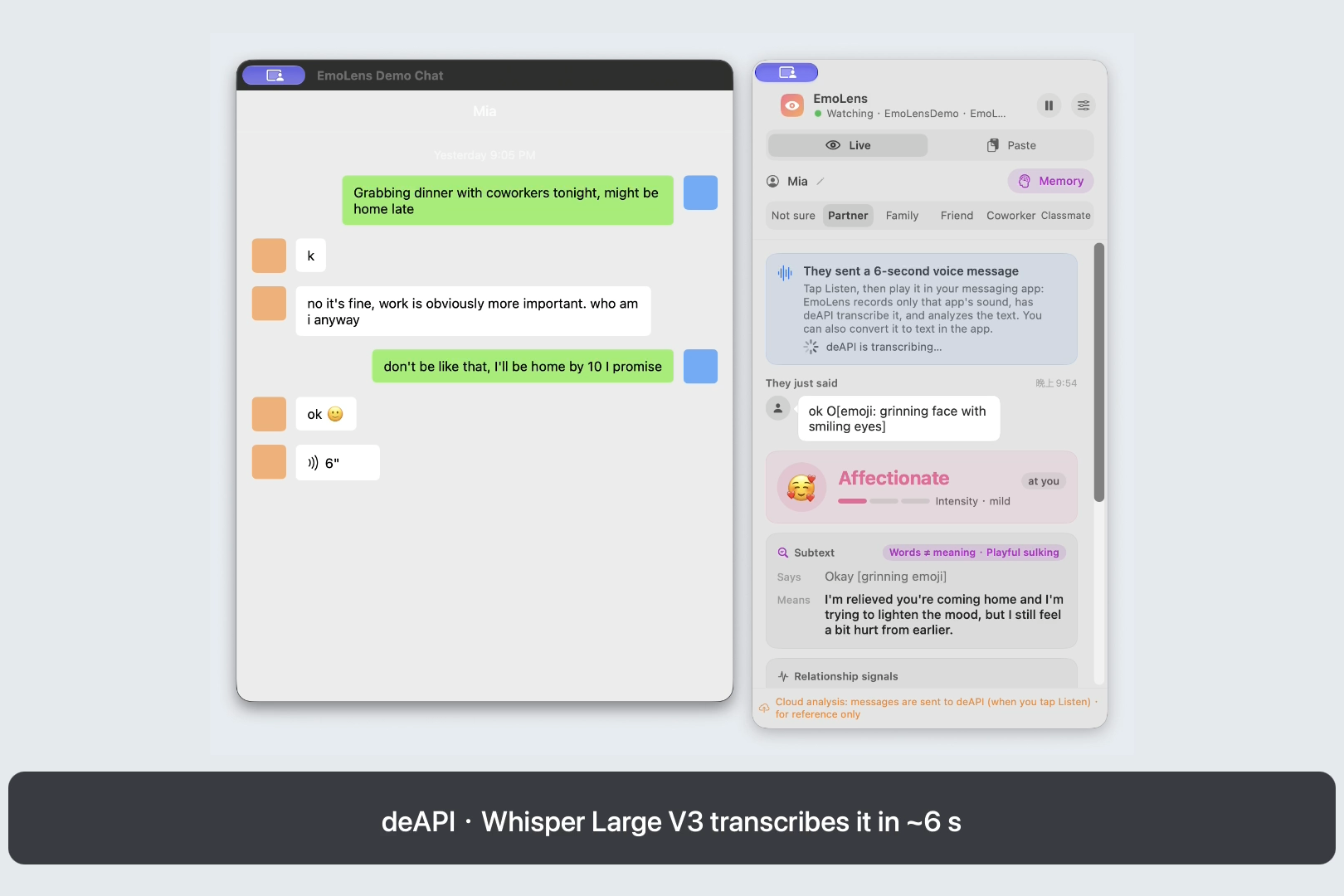
With deAPI: tap Listen, play the voice message, and Whisper Large V3 on deAPI transcribes it in about 6 s
What existed before LovHack, and what we built during it
Before LovHack (Sept 22–23, 2026, up to release 0.5.1, commit cfe1e1a), EmoLens already existed as a Chinese-only macOS app. It had the screen-capture and OCR pipeline, the pixel-based bubble detector, emoji/sticker/voice handling, the Chinese emotion prompt and decision-model question set, contact memory, the Chinese keyword safety nets, cloud model support and the DMG packaging.
Built during LovHack Season 3 (all commits after cfe1e1a):
- An English version of the whole product. The panel, settings, memory sheet, menus, errors and the demo chat are bilingual, with an in-app English / 中文 switch that follows the system language by default and a
--languageflag for every CLI tool. - English analysis. A new English system prompt with 12 hand-written English few-shot examples (sarcasm, playful sulking, holding back, hyperbole, manipulation, crisis, impersonation scam, …), an English output schema, and an English decision-model question set. English labels map back onto the existing internal labels, so memory, colors and history work identically in both languages.
- English safety nets. Crisis-language patterns tuned to catch passive warning signs ("I'm just a burden", "everyone would be better off if I wasn't around") while ignoring everyday hyperbole ("I'm dead 💀", "kill me now"). Scam patterns cover loans, one-time codes and gift cards. The crisis card shows US resources (988, Crisis Text Line) and findahelpline.com.
- English chat formats. Paste mode now understands English export formats (timestamped
[date, time] Name: text,Name — Today at 9:41 PM, Delivered/Read lines), and OCR prefers English when the app is in English. - An English evaluation set and scorer. 45 labeled chats in
eval/en.jsonl, with hard negatives (hyperbole that must not be flagged, ordinary hurt that is not manipulation), andscripts/score_eval.py. - Adaption Labs integration.
scripts/adaption_localize_eval.pyuses the Adaption Adaptive Data API (datasets.create→localize→download) to rewrite the eval set into British, Australian, Indian and Canadian English while keeping the labels, so we can measure whether EmoLens still catches sarcasm and warning signs across Englishes. Anestimatemode quotes the credit cost before anything is spent. (The script is ready; we haven't spent the credits to run it yet.) - A demo recorder.
EMOLENS_RECORD=demo.movrecords only the demo chat window and the EmoLens panel with ScreenCaptureKit (nothing else on screen), while a script plays the conversation and the paste-mode examples. The demo video was recorded with it. - CI that renders the UI. GitHub Actions now builds, runs the unit tests (134 at submission, including the new English-pipeline and deAPI tests) and renders every panel state in both languages on macOS. The English screenshots in the README come from there.
- Voice messages with deAPI. EmoLens could only see a voice message before, so the user had to transcribe it in their messaging app. Now, with deAPI turned on, the panel shows Listen (deAPI): the user plays the message, EmoLens records only that app's audio with ScreenCaptureKit (a per-app audio filter, 16 kHz mono WAV, never the microphone or EmoLens itself), sends it to deAPI's OpenAI-compatible
POST /v1/audio/transcriptionswith Whisper Large V3, deletes the recording, and analyzes the transcript like any other message. New code:DeAPITranscriber.swift(multipart client),VoiceListener.swift(per-app audio capture with a loudness check so silence is never uploaded), the listen flow inMonitor.swift, a Settings section with a key stored in the Keychain and a Test deAPI button, and unit tests for the request format, empty transcripts and auth errors. Tested end to end against the real deAPI service: 12 s of captured audio came back as text in about 6 s, and it's in the demo video.
Inspiration
Most fights over text aren't about what was said. "k", "no it's fine", "ok 🙂" can mean three different things depending on who sent them and why. People, especially people texting a partner or a parent, regularly misread those messages, and some messages matter far more: a friend hinting they don't want to be around anymore, or a "friend" whose account was hacked asking for gift cards. We wanted a second pair of eyes that reads the subtext as it arrives, never uploads your chats by default, and is careful about the messages that matter most.
What it does
EmoLens is a floating macOS panel that watches your messaging app's window, the way a screen share does. When the other person sends something, it tells you:
- the emotion and its intensity, and whether they mean it, are being sarcastic, are playfully sulking, or are holding back;
- relationship signals: upset with you, brushing you off, testing you, pulling away, a fight or breakup signal, emotional manipulation, self-harm risk, money or account-code requests;
- how to respond, and one line you could send;
- per-contact memory ("interview next Wednesday"), saved only when you confirm.
It reads emoji, stickers and voice-message transcripts, not just text, and with deAPI turned on it can listen to a voice message that hasn't been transcribed yet. There's also a paste mode for chats copied from anywhere. Everything runs on your Mac by default; cloud models are opt-in and the panel always says when messages leave your machine.
How we built it
- Swift + SwiftUI floating panel; ScreenCaptureKit captures just the chat window; Apple Vision OCR reads the text locally.
- A pixel-level layout detector finds bubbles, avatars, emoji and stickers, so left vs. right tells "them" from "me". Emoji are painted out before OCR, then cropped and named by a vision model.
- The default analysis model is Qwen 3.5 4B on Ollama, running locally with a structured JSON answer and few-shot examples. Users can opt into Anthropic Claude (structured outputs) or any OpenAI-compatible API, and optionally a calibrated System One decision model (local Kev or TypeSafe's Jev) that double-checks the serious signals.
- deAPI (Whisper Large V3) transcribes voice messages on request: EmoLens records only the messaging app's audio with ScreenCaptureKit while the user plays the message, and sends that clip to deAPI's OpenAI-compatible transcription endpoint.
- Keyword safety nets run on every engine and are deliberately conservative about everyday hyperbole.
- For the hackathon we built the English version: a bilingual UI layer, an English prompt and examples, label mapping, English safety nets and paste formats, an English eval set, and an Adaption Labs pipeline that localizes the eval set into other Englishes. We also added deAPI voice transcription.
- GitHub Actions on macOS builds, tests and renders UI previews on every push.
Challenges we ran into
- Hyperbole vs. danger. "I'm dead 💀" and "I just want it all to stop" look similar to a keyword list. We wrote hard-negative test cases first and only added patterns that pass them.
- Two languages, one brain. Memory, colors and history were built on Chinese labels. Instead of rewriting everything, the English model answers with English labels that map onto the same internal labels, and a unit test checks that the few-shot examples use exactly the same format as the live prompt.
- Hearing one app and nothing else. A voice message plays through the messaging app, but recording the whole system would pick up music, calls and other apps. ScreenCaptureKit can filter audio to a single app, so EmoLens records only the chat app, checks the clip is actually loud enough before uploading, and stops a few seconds after the message's length.
- Developing a macOS app from a Linux cloud session. Most of the English version was written in a cloud session that couldn't compile the app, so every change was validated by macOS CI, including rendering the screenshots. The final integration, the eval runs and the demo recording then happened on a Mac, where recording the real demo window turned up two bugs (transparent window corners read as stickers, and a misread voice-message duration) that we fixed in 0.6.1.
Accomplishments that we're proud of
- The full English version passed the macOS build and all 126 unit tests on its first CI run.
- On the new English eval set, the full pipeline with the local 4B model got the emotion right 76% of the time (29/38), caught 5/6 crisis messages and 3/3 scams, and raised zero false alarms across 22 checks on hyperbole, ordinary hurt and normal chat. It is weakest on quiet signals: cold, distant replies (0/3) and manipulation dressed up as affection (2/5).
- It's private by default: no chat ever leaves the Mac unless you choose a cloud model, and a voice clip goes to deAPI only when you tap Listen.
- deAPI voice transcription works end to end against the real service: 12 s of audio from the demo chat came back as punctuated text in about 6 s, and the 4B model then read it as anxious and needing reassurance.
What we learned
Subtext is cultural. The same "fine." reads differently in a family chat and a work chat, and in Sydney and in Ohio. Small local models can do a surprising amount if the prompt teaches the conventions, but they still slip: in our demo recording the 4B model labeled "ok 🙂" after being stood up as affectionate, even though its explanation caught that she was still hurt. That is why the high-stakes signals get a second line of defense that doesn't depend on the model.
What's next
- Run the Adaption-localized eval across GB/AU/IN/CA English and tune the prompt where it slips.
- Notarize the DMG (releases are published but not notarized, so macOS asks for confirmation on first launch).
- Optionally pass the chat's language to deAPI, and try deAPI's word-level timestamps to highlight the part of a voice message that carries the emotion.
- More languages through the same label mapping, starting with Spanish.
Links
- Demo video: https://youtu.be/ymP04A_ECEM
- Code: https://github.com/timothyzhbw-jpg/emolens
- Download for Mac: https://github.com/timothyzhbw-jpg/emolens/releases/latest

Log in or sign up for Devpost to join the conversation.