Inspiration
The idea for Emoji-to-Design Generator was born from the desire to make visual creativity accessible to everyone, regardless of design skills. Emojis are a universal language for expressing mood and intent—what if we could instantly turn those feelings into beautiful, shareable posters? We wanted to combine the fun of emoji selection with the power of AI-driven design, making it possible for anyone to create meaningful visuals in seconds.
What it does
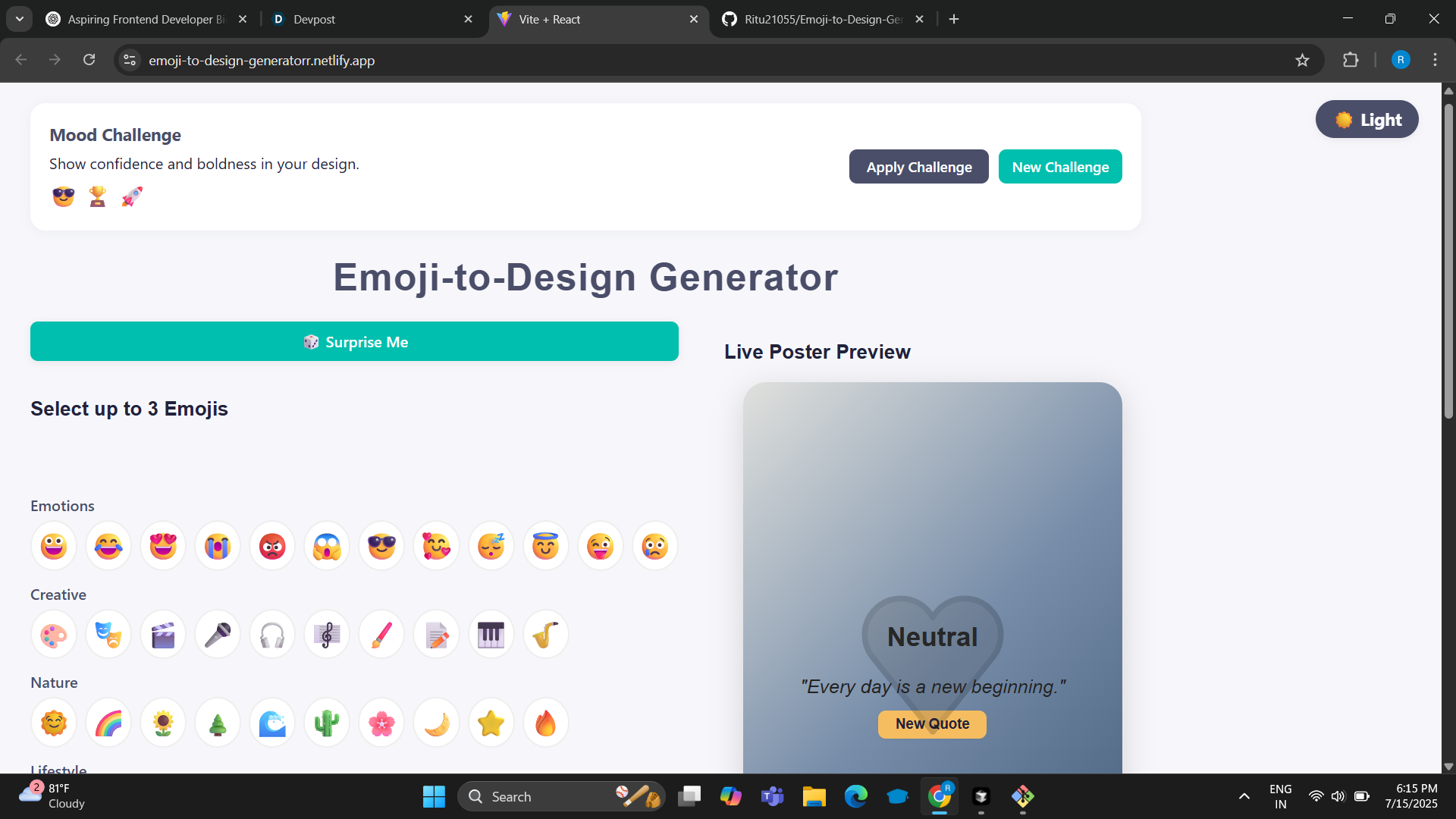
Transforms Emojis into Posters: You pick 1–3 emojis, and the app instantly generates a poster design that visually matches the mood or meaning of those emojis. AI-Powered Design Mapping: Each emoji is mapped to a mood, which determines the poster’s color palette, font style, layout, and even an inspirational quote. Live Preview: As you select or change emojis, you see your poster update in real time. Customization: You can further personalize your poster by uploading your own fonts, background images, and adding stickers or clipart. Text Effects: Add shadows, outlines, and animations to the poster’s main quote. Export: Download your poster as an image or export the design data for further editing in tools like Adobe Express. Fun Features: Includes daily/weekly mood challenges, a “Surprise Me” randomizer, and full dark/light mode support.
How we built it
Frontend: Built with React and Vite for a fast, modular, and modern development experience. Design Mapping: Emojis are mapped to moods, which in turn map to color palettes, Google Fonts, and layout styles using custom utility functions. Live Preview: The poster updates in real time as users select emojis, colors, fonts, and more, using React state and Framer Motion for smooth animations. Quote Generation: Inspirational quotes are selected based on the interpreted mood, with logic to avoid repeats and keep content fresh. Customization: Users can upload custom fonts, background images, and add stickers/clipart. Text effects (shadow, outline, animation) are applied with CSS and keyframes. Export: Posters can be exported as images using html2canvas, or as JSON for further editing in Adobe Express. Advanced Features: Dark/light mode with CSS variables Mood challenges and a “Surprise Me” randomizer Accessibility features for color contrast and keyboard navigation
Challenges we ran into
Design Mapping Complexity: Translating a combination of emojis into a coherent mood and then into a visually appealing design required careful mapping and lots of iteration. Dynamic Font Loading: Supporting both Google Fonts and custom font uploads, while ensuring fonts loaded before rendering, was tricky. Exporting Complex Layouts: Ensuring that all poster elements (backgrounds, stickers, text effects) exported correctly as an image required fine-tuning with html2canvas. Accessibility: Balancing aesthetics with accessibility (especially in dark mode) took extra effort, including color contrast checks and keyboard navigation. Performance: Keeping the app fast and responsive, even with live previews and many customization options, was a constant focus.
Accomplishments that we're proud of
Seamless Emoji-to-Design Mapping: We built a system that intelligently translates emoji combinations into mood-driven color palettes, fonts, and layouts—making design accessible to everyone. Live, Dynamic Poster Preview: The poster updates instantly as users select emojis, colors, fonts, and effects, providing a truly interactive and creative experience. Rich Customization: Users can upload their own fonts and background images, pick from Google Fonts, and add stickers/clipart, making every poster unique. Advanced Export Options: We enabled users to export their posters as images or design data, ready for further editing in Adobe Express or sharing anywhere. Fun & Engaging Features: Features like “Surprise Me,” daily mood challenges, and animated text effects make the app both fun and inspiring. Modern, Accessible UI: Full dark/light mode, keyboard navigation, and color contrast checks ensure the app is beautiful and usable for everyone. Performance & Responsiveness: Built with Vite and React, the app is fast, responsive, and works smoothly across devices. No External API Required: All design intelligence and quote generation is handled locally, ensuring privacy and instant results.
What we learned
React & Vite: We deepened our understanding of building fast, modern web apps with React and Vite, optimizing for both developer experience and performance. Design Intelligence: We explored how to map abstract concepts (like mood) to concrete design elements (color, typography, layout), and how small UI changes can have a big impact on user creativity. Accessibility: We learned the importance of color contrast, keyboard navigation, and theme support to make our app usable for everyone. Export & Integration: We discovered best practices for exporting designs as images and integrating with external tools like Adobe Express.
What's next for Emoji-to-Design Generator
AI-Powered Quote & Illustration Generation: Integrate with AI APIs (like OpenAI or Adobe Firefly) to generate unique, context-aware quotes and custom illustrations based on emoji mood. Real-Time Collaboration: Enable multiple users to co-create posters together, similar to Figma or Google Docs. User Accounts & Gallery: Allow users to save their posters, browse a public gallery, and remix or comment on others’ designs. Advanced Poster Editing: Add drag, resize, and rotate for stickers, emojis, and text. Support for layers and undo/redo. Social Sharing & Automation: One-click sharing to Instagram, Twitter, WhatsApp, and integration with Zapier/IFTTT for automated poster creation and sharing. Template Library: Offer a collection of themed poster templates (e.g., motivational, event, greeting card) for quick customization. Accessibility & Internationalization: Add multi-language support, color-blind friendly palettes, and further accessibility improvements. Mobile App: Build a mobile version for on-the-go poster creation and sharing.
Built With
- css3
- emoji-picker-react
- framermotion
- github
- googlefonts
- html2canvas
- html5
- javascript
- netlify
- openmoji
- react
- vite

