-
-
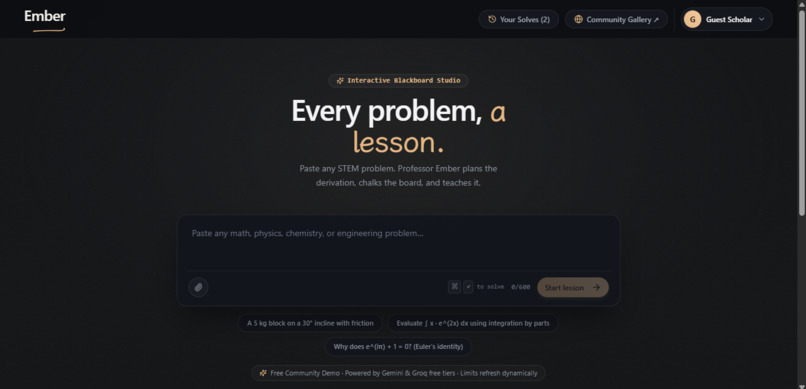
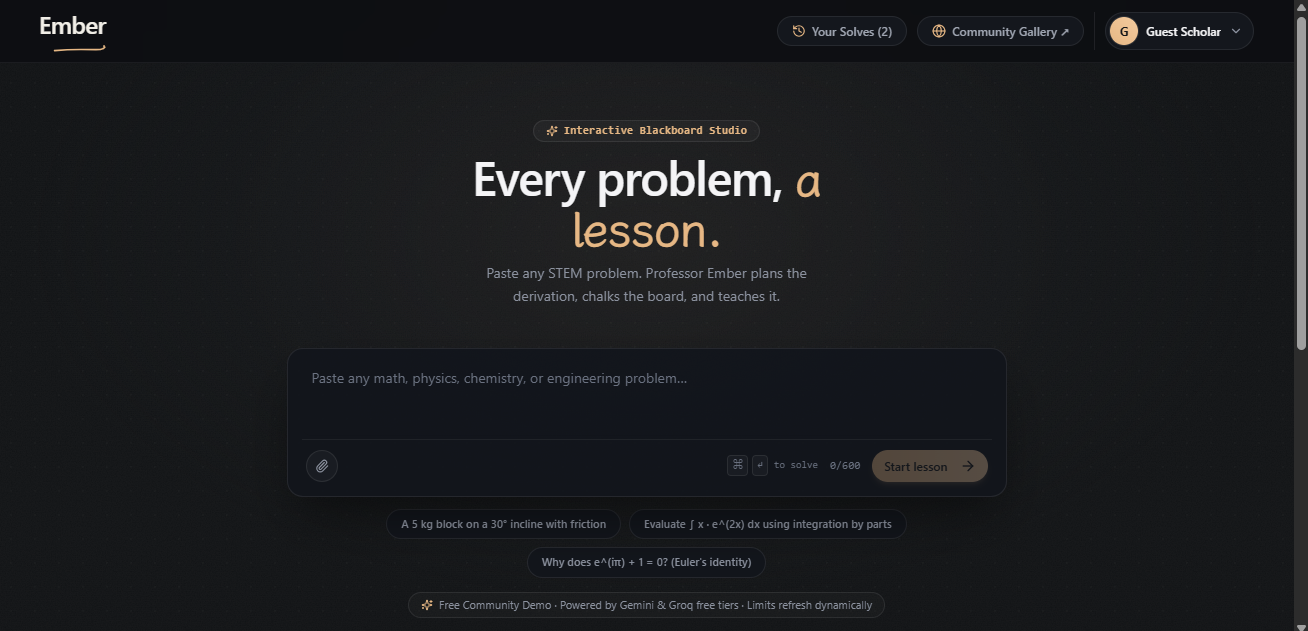
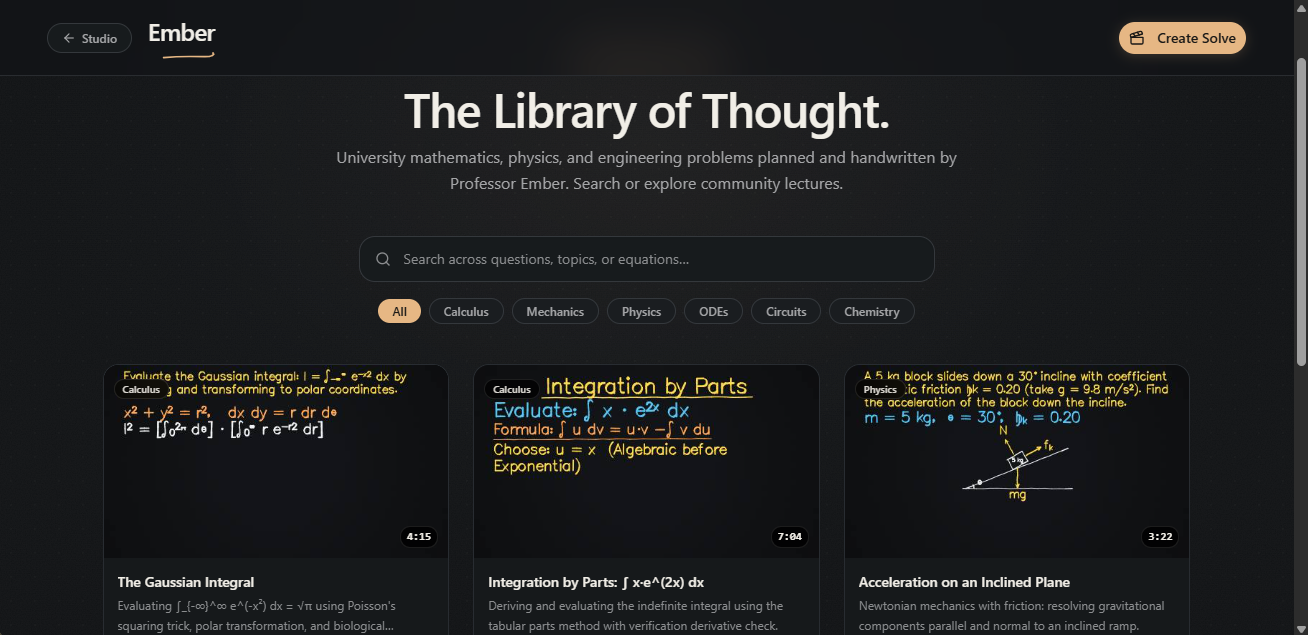
Home Screen
-
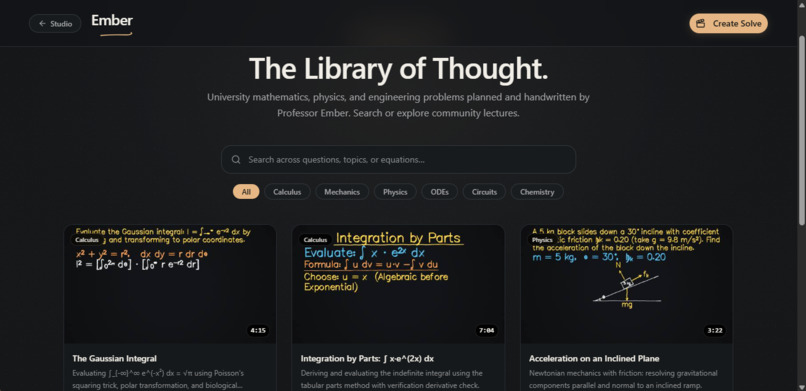
Community gallery
-
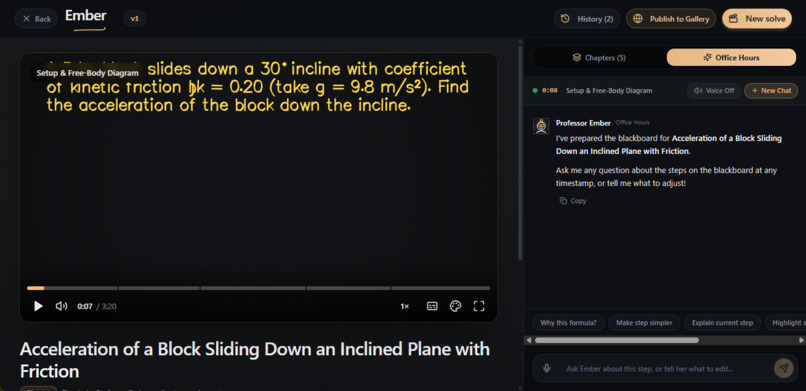
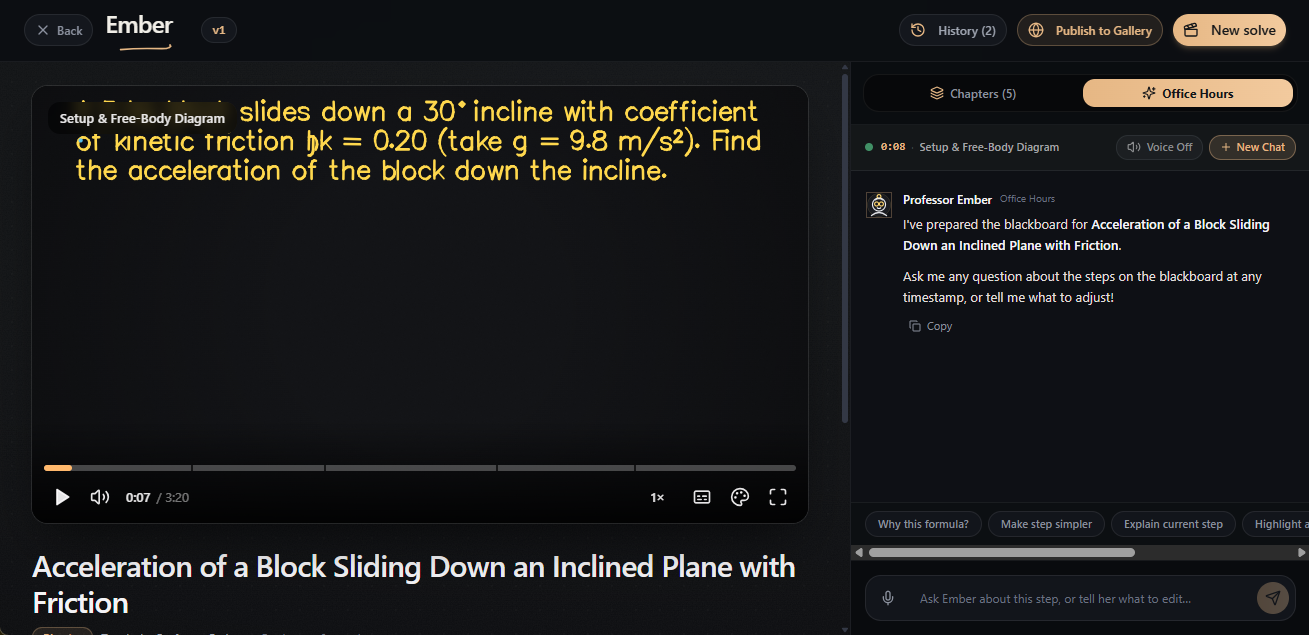
Video screen
Inspiration
It's 1 AM. The exam is Friday. You're stuck on an integration by parts with trig substitution.
You paste it into an AI chatbot. Thirty lines of solution appear instantly. You copy them down, and you still can't do the next one.
We've all been there.
Getting the answer was never the hard part. What was missing was someone to walk us through it. A great professor does that with chalk, voice, and a diagram.
Learning research agrees. In Richard Mayer's studies, students solved problems better when visuals came with narration instead of on-screen text. That held in 17 out of 17 tests.
So we built Ember. It turns any STEM problem into a narrated blackboard lesson, derived step by step.
An answer is not a lesson.
What it does
Type a problem. Watch the lesson.
Paste a university-level math, physics, chemistry, or engineering question.
Ember plans a full blackboard lecture and teaches it out loud. A calm voice explains the intuition while a pen writes every derivation, stroke by stroke.
No instant solution dump. Every lesson follows the arc of a masterclass:
- Understand: reads the problem aloud and names the beast
- Gather: puts what's given on the board, with units
- Name the ask: defines what the question really wants
- Plan: outlines the route and sketches diagrams
- Solve: writes only what the voice is explaining
- Check: sanity-checks the answer before boxing it
And the lesson doesn't end there. Watch it like a video. Scrub the timeline and jump between chapters. Stuck on a step? Ask in office hours.
How we built it
Ember doesn't render video. It writes the lecture as data, then draws it live on a vector blackboard in your browser.
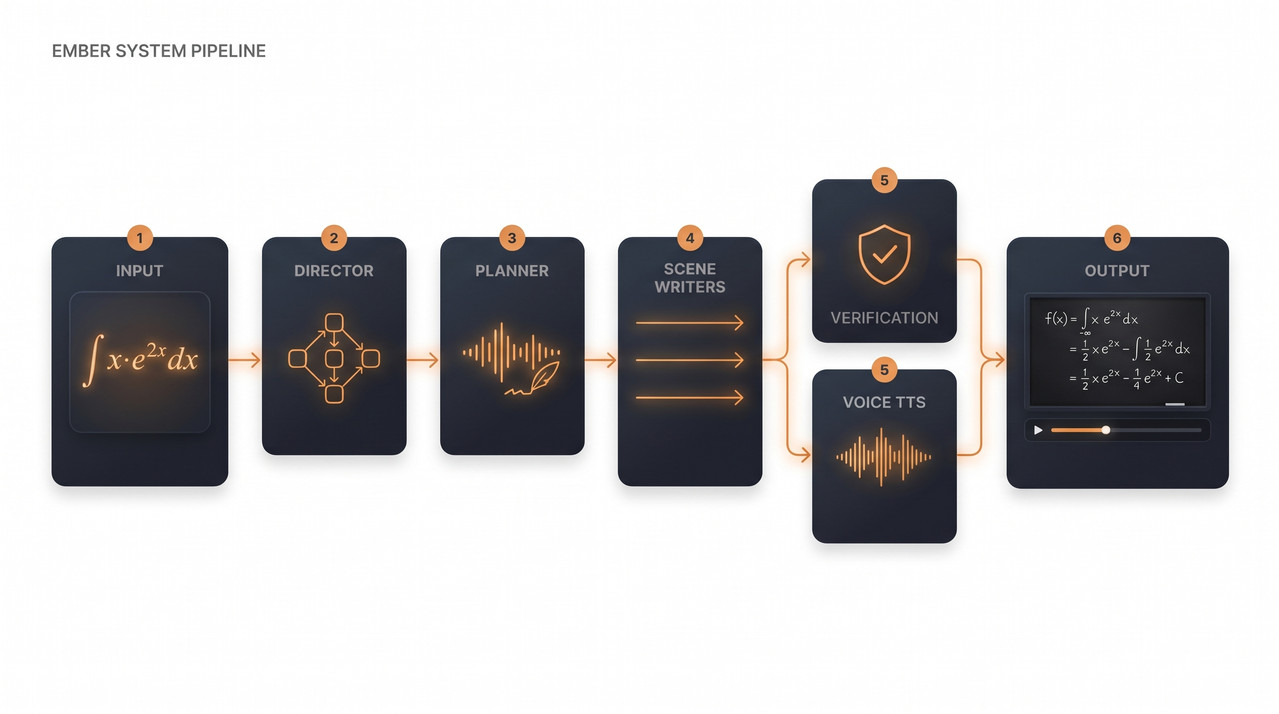
1. A crew of AI agents writes the lesson
One prompt can't teach well, so a pipeline of specialized agents build each lecture. It runs on Gemini, with failover to Groq.
- Director: plans a chaptered lesson, using the six-stage arc as a backbone and adapting the chapters to each problem
- Transcript Planner: writes the whole spoken lecture in one pass, so it flows without seams
- Scene Writers: work in parallel to choreograph the board, tagging each stroke with the words being said
- Checker: audits every equation's syntax, line by line
- Blind Solver: solves the problem independently and compares answers symbolically (Nerdamer) to flag math errors before you see them
2. A blackboard that draws itself
Lectures compile into a vector timeline, not an MP4, so there are no video files to render in the cloud.
- Single-stroke Hershey fonts: math and text are drawn as continuous pen paths, extended with custom Greek and calculus glyphs
- Human handwriting feel: speed, jitter, wobble, and pen lifts are tuned to footage of real blackboard handwriting
- Hand-built STEM beats: fractions, axes, and free-body diagrams (ramps, angles, blocks, force vectors) are drawn procedurally
3. The pen waits for the voice
- Say/write sync: every stroke carries the phrase being spoken, and the engine stretches, pauses, or speeds up the pen to match, so it writes only when the professor explains
- Instant streaming: narration is generated scene by scene in playback order, so the lesson starts as soon as Scene 1 is ready while the rest builds in the background
Challenges we ran into
Getting an AI to solve a problem is easy. Getting it to teach like an unhurried professor meant solving three genuinely hard problems.
1. Making handwriting feel human
The problem: our first pen felt robotic. It hovered almost three times too long over operators, paused at random between words, and moved at one constant speed, like a plotter instead of a person.
Why it was hard: "natural" has no ground truth, so we had to measure it ourselves.
How we solved it: we ran frame-differencing over 20,476 frames of real blackboard teaching footage through an ffmpeg pipeline. In our footage:
- Writing speed: median 6.21 cap-heights per second
- Pen-down time: only 25.8%, the rest is explaining
- Pauses: 67-150 ms within a line, ~650 ms between lines
Then we rebuilt the engine around the physics of human
movement: the Two-Thirds Power Law (v = γ · r^(1−β))
to slow the pen on tight curves, minimum-jerk velocity
profiles (Flash & Hogan) for natural acceleration, and
Fitts's Law for fast jumps between words.
2. The "karaoke defect": ink drifting off the voice
The problem: the pen kept falling out of phase with the narration, racing ahead or lagging behind.
Why it was hard: speech and handwriting don't scale
together. ∫ x·e^(2x) dx is 10 characters but takes four
seconds to say aloud ("the integral of x times e to the
two x d x"). "Let's substitute our values" is 25
characters and takes under a second. Our first version
timed strokes by character count, so it was wrong by design.
How we solved it: we split the audio into sentence-level segments and injected PCM silence buffers (400-1,800 ms), slowing speech from a rushed 165 WPM to a teacher-like 115 WPM. Every stroke is now anchored to acoustic timestamps, so handwriting speed no longer depends on speech duration, and the pen writes exactly what the voice is explaining.
3. Board discipline on a fixed 16:9 canvas
The problem: language models love to write paragraphs. On a board, that overloads working memory (Mayer's redundancy principle), because students end up reading and listening at once.
Why it was hard: a lecture board is a fixed 16:9 canvas, not an endless page, so long equations and free-body diagrams overflow or collide.
How we solved it: regex prose classifiers
(isBoardProse) and an async Reviewer agent strip
wordy text off the board and move it into the spoken
script. When space runs out, the engine erases the board
naturally between derivation chapters, with no scrolling.
Accomplishments that we're proud of
What we learned
The teaching is in the pauses, not the ink. In our 20,476 frames of real lectures, the pen was on the board only 25.8% of the time. The rest was explaining, gesturing, and silence, which leaves students time to think.
Less on the board teaches more. Repeating spoken words as on-screen text splits attention (Mayer's redundancy principle), so we keep the board to the mathematical skeleton and let the voice carry the rest.
Don't trust the model's algebra. Verify it. In our testing, models confidently dropped minus signs mid-derivation. An independent Blind Solver and a symbolic checker make the lessons trustworthy.
For teaching STEM, vector beats video. Generative video is slow, and one hallucinated symbol ruins a derivation. Compiling lectures into a vector timeline in the browser gives instant, frame-accurate seeking with no render wait.
An answer is not a lesson. Building Ember taught us what a lesson is made of: pauses, restraint, and proof.
What's next for Ember
We want Ember to go from a lesson generator to a place where students actually learn. Three things come next:
Live office hours: today you can ask questions about a lesson. Next, you'll pause mid-derivation, ask out loud, and watch Ember redraw the board and explain the tricky step on the spot.
The Ember Blackboard API: we want to package our vector engine and agent pipeline so online courses and university learning platforms can embed voiced, synchronized blackboard lessons in their own curricula.
A community lesson library: instead of regenerating every common problem, students could search, watch, and branch from lessons others have already made, each one checked by our Blind Solver, so common problems load instantly.
Our goal isn't just to help a student finish tonight's homework. It's to help them walk into tomorrow's exam able to solve it on their own.
Built With
- bun
- framer-motion
- gemini
- gemini-flash
- gemini-tts
- google-gemini
- groq
- hershey-vector-fonts
- inngest
- katex
- nerdamer
- next.js
- postgresql
- prisma
- radix-ui
- react
- remotion
- shadcn-ui
- tailwindcss
- typescript
- zustand

Log in or sign up for Devpost to join the conversation.