-
-
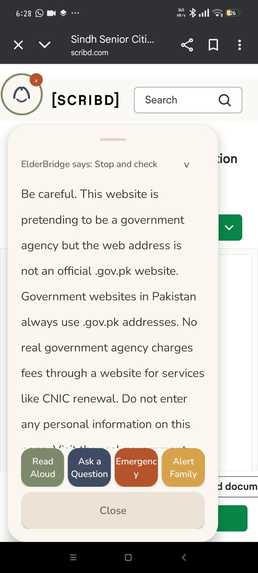
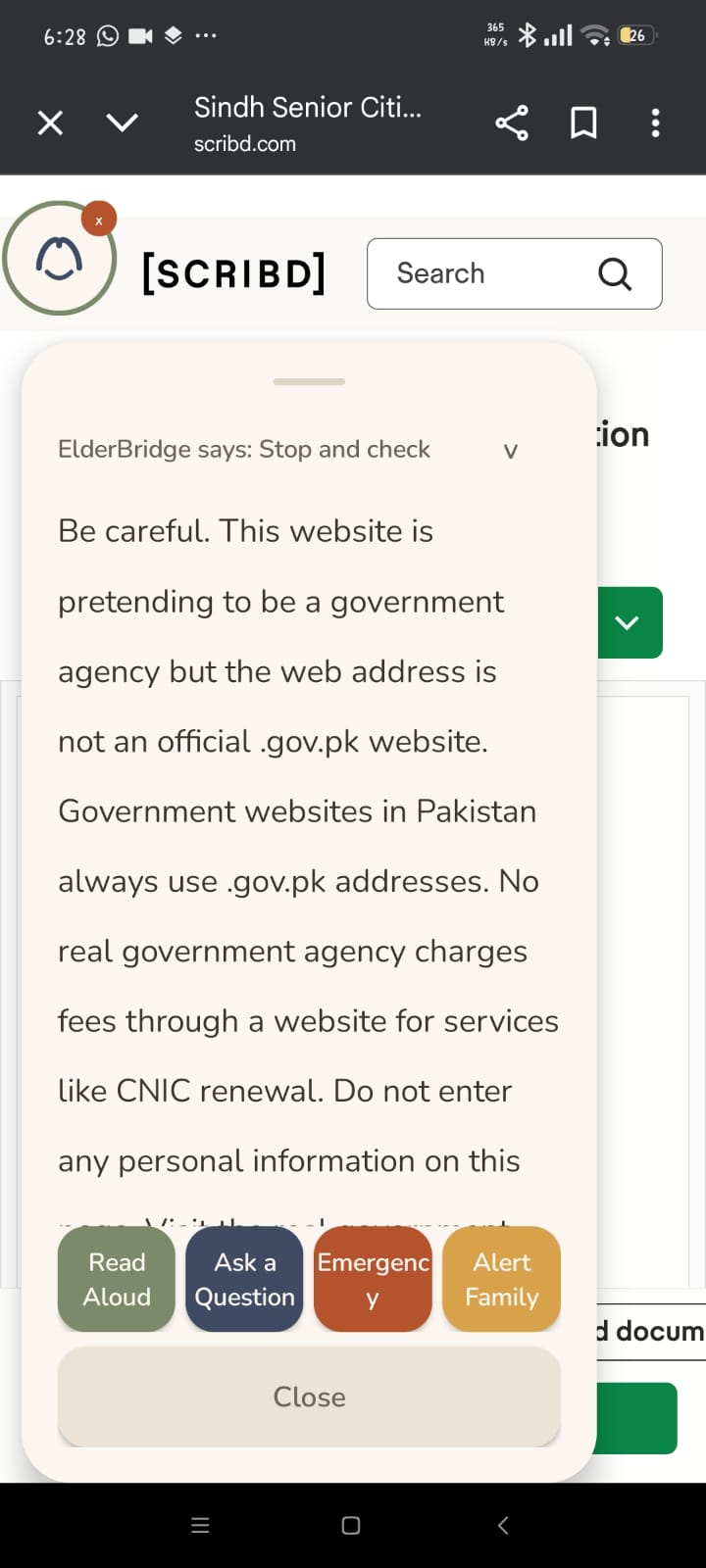
Phishing detection on Scribd. ElderBridge warns the site is not an official .gov.pk address and blocks personal information entry.
-
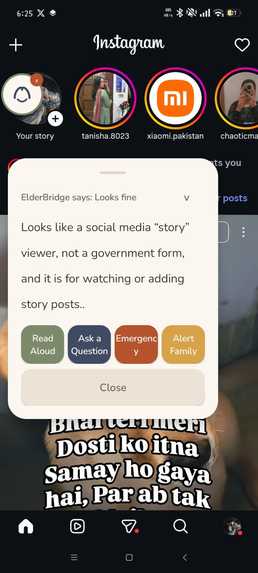
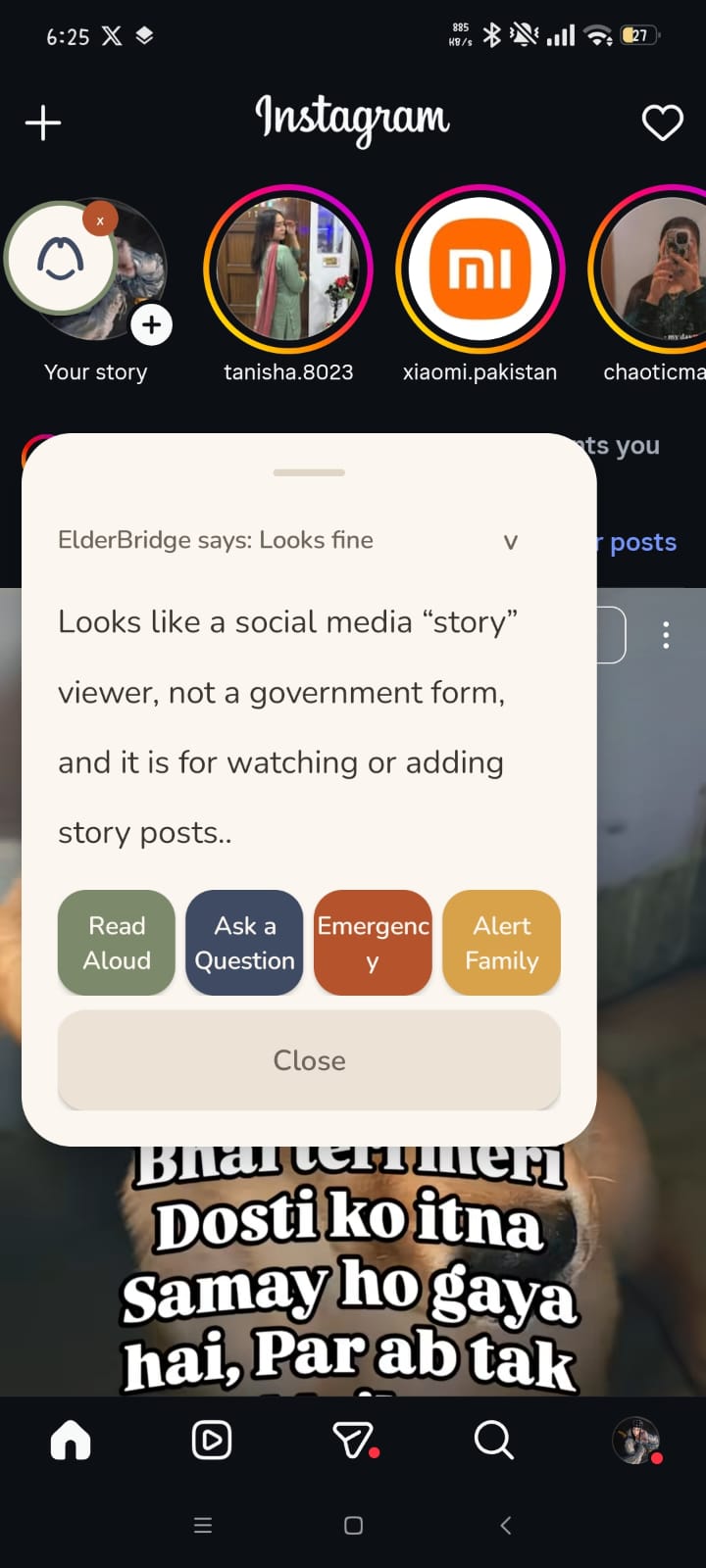
Instagram story feed correctly identified as safe social media content. No false alarm on normal app navigation.
-
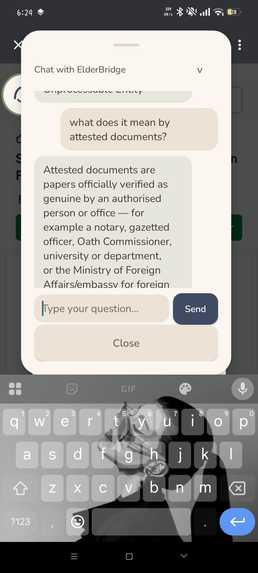
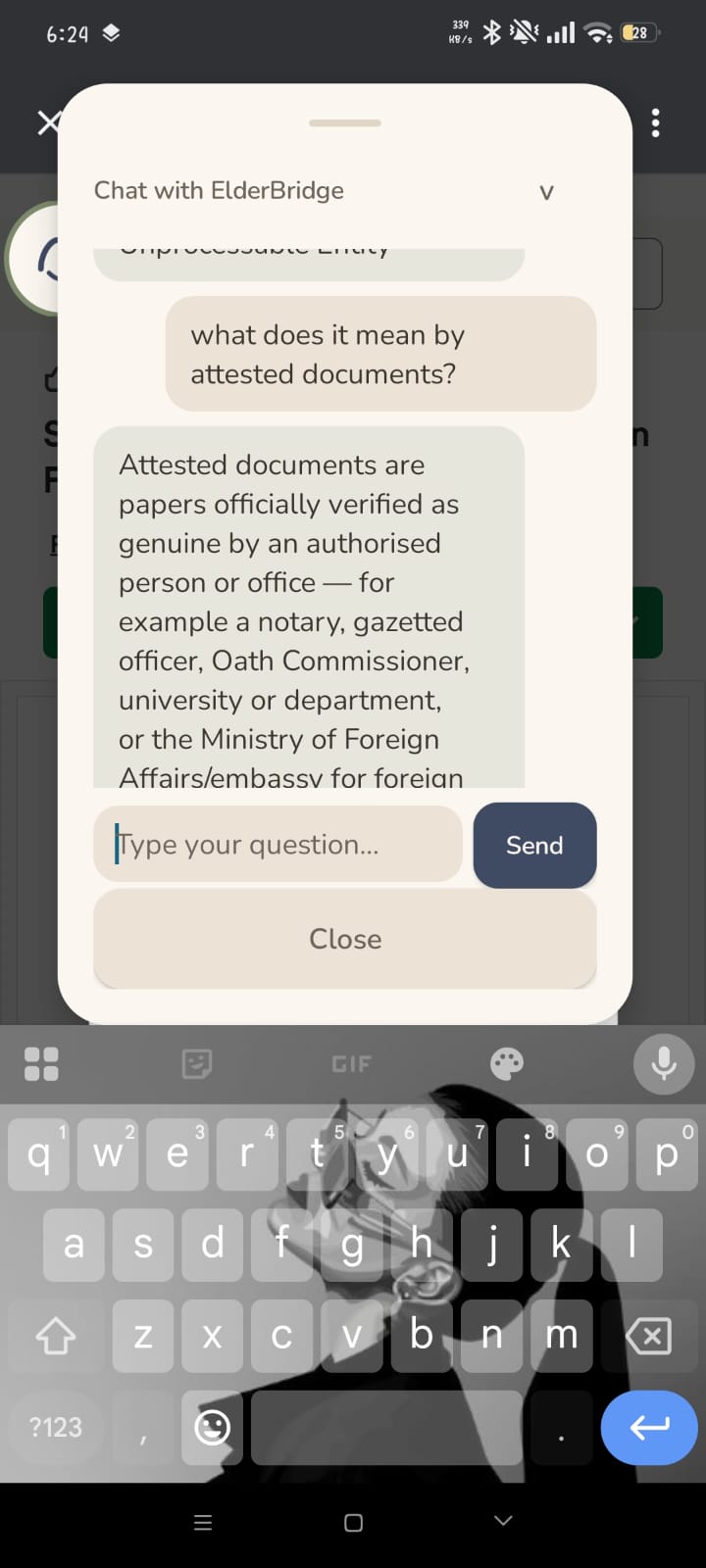
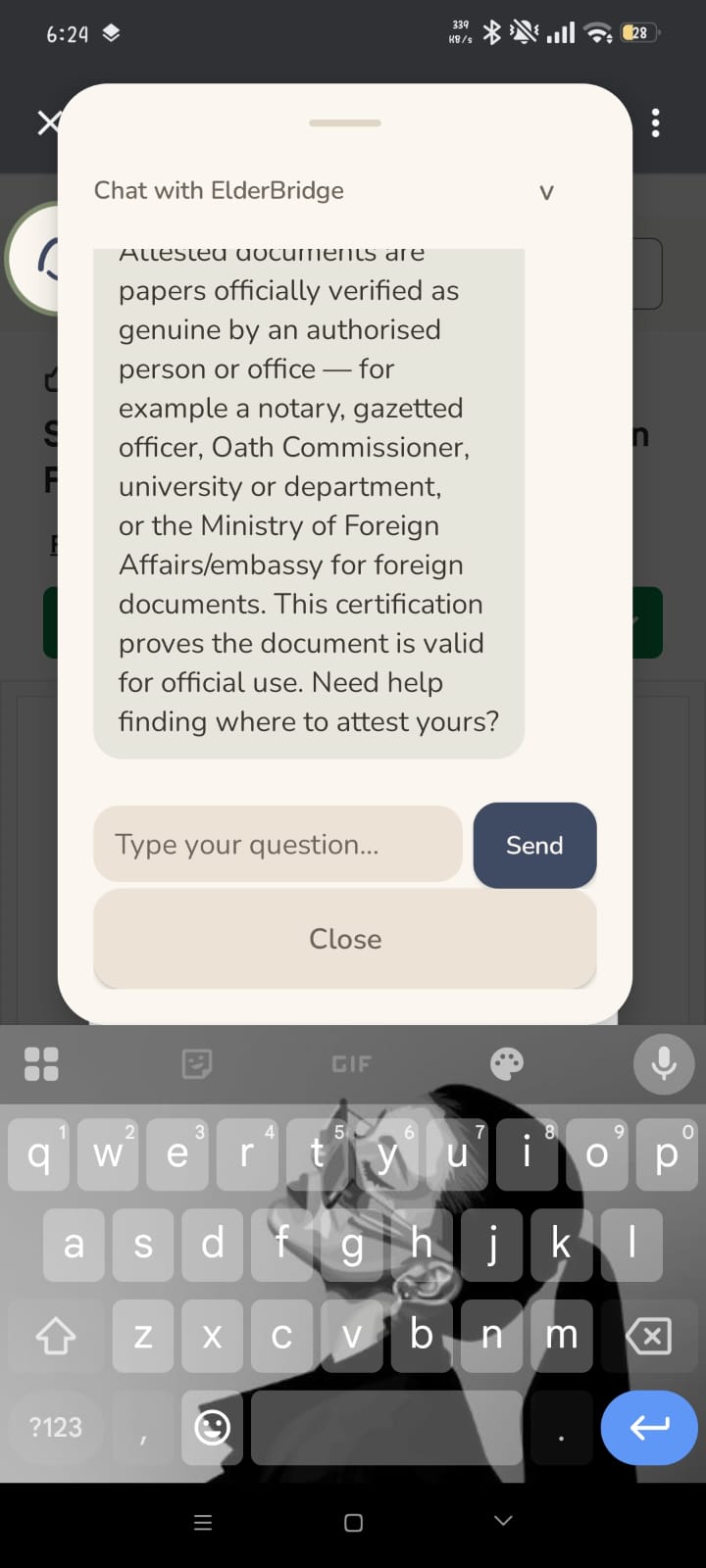
Chat explains "attested documents" in plain language while user reads a Sindh Senior Citizen Card application on Scribd.
-
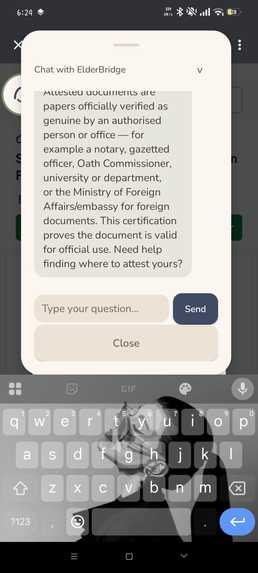
Continued attestation explanation listing specific authorities: notary, Oath Commissioner, university, Ministry of Foreign Affairs.
-
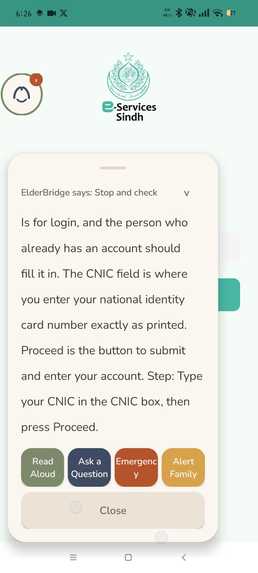
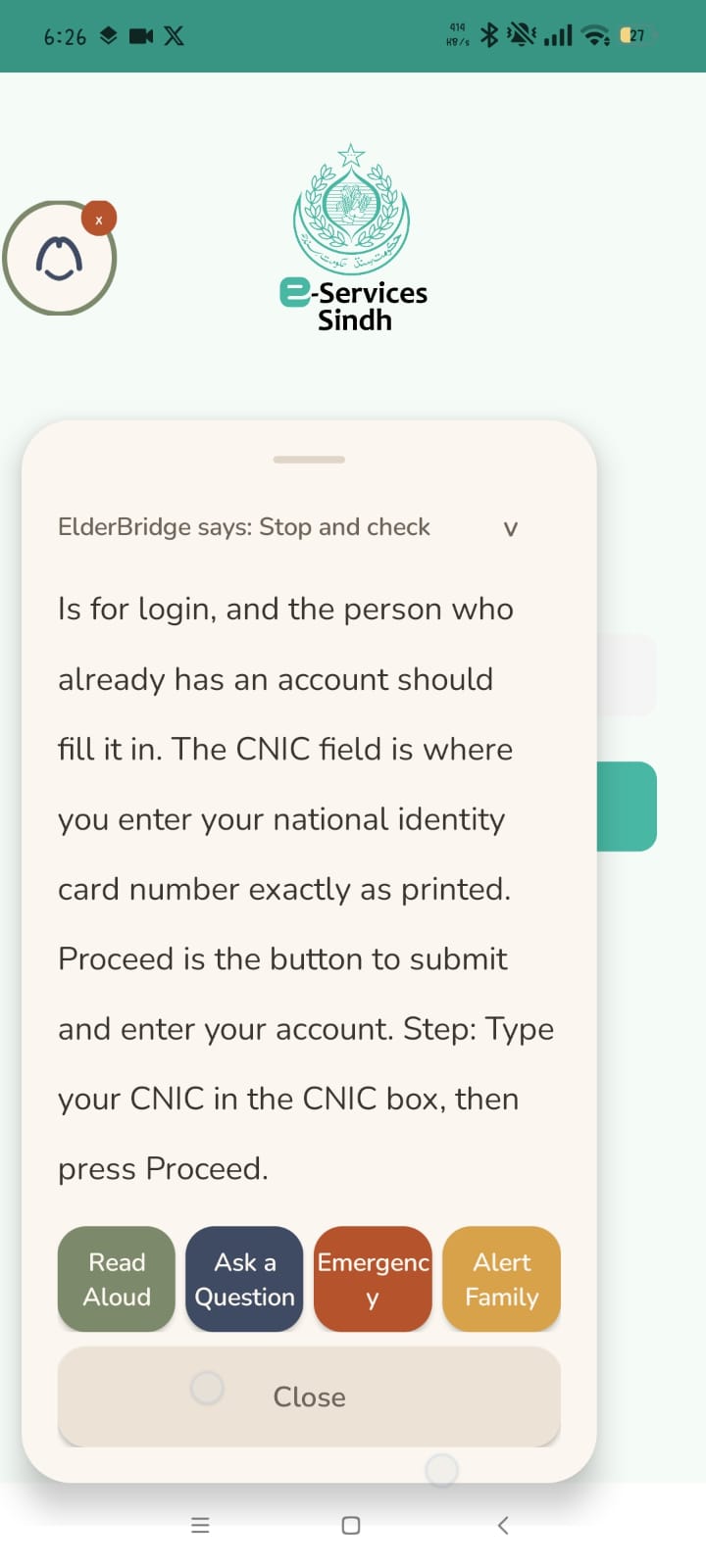
Government e-Services Sindh login screen. ElderBridge explains the CNIC field and gives step-by-step login guidance.
-
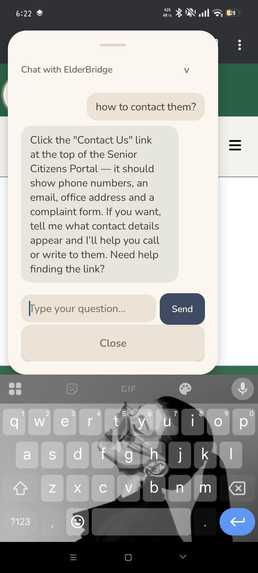
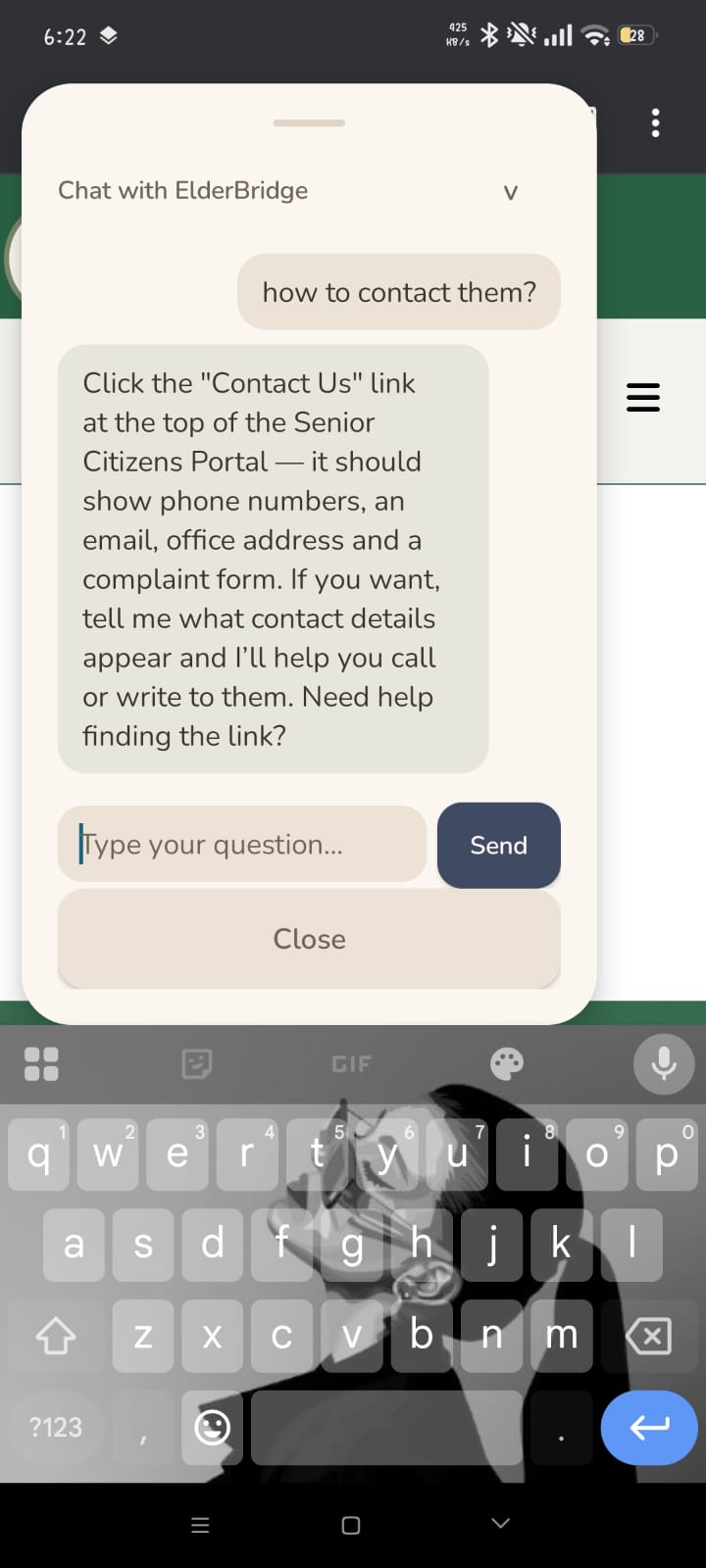
Chat answers "how to contact them?" with specific instructions to tap Contact Us on the Senior Citizens Portal.
-
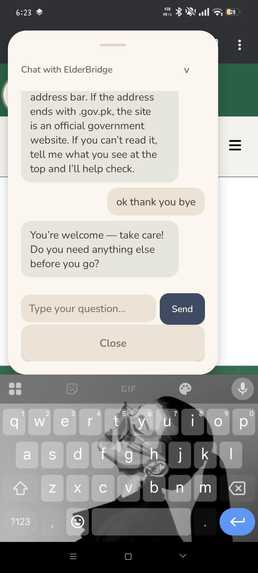
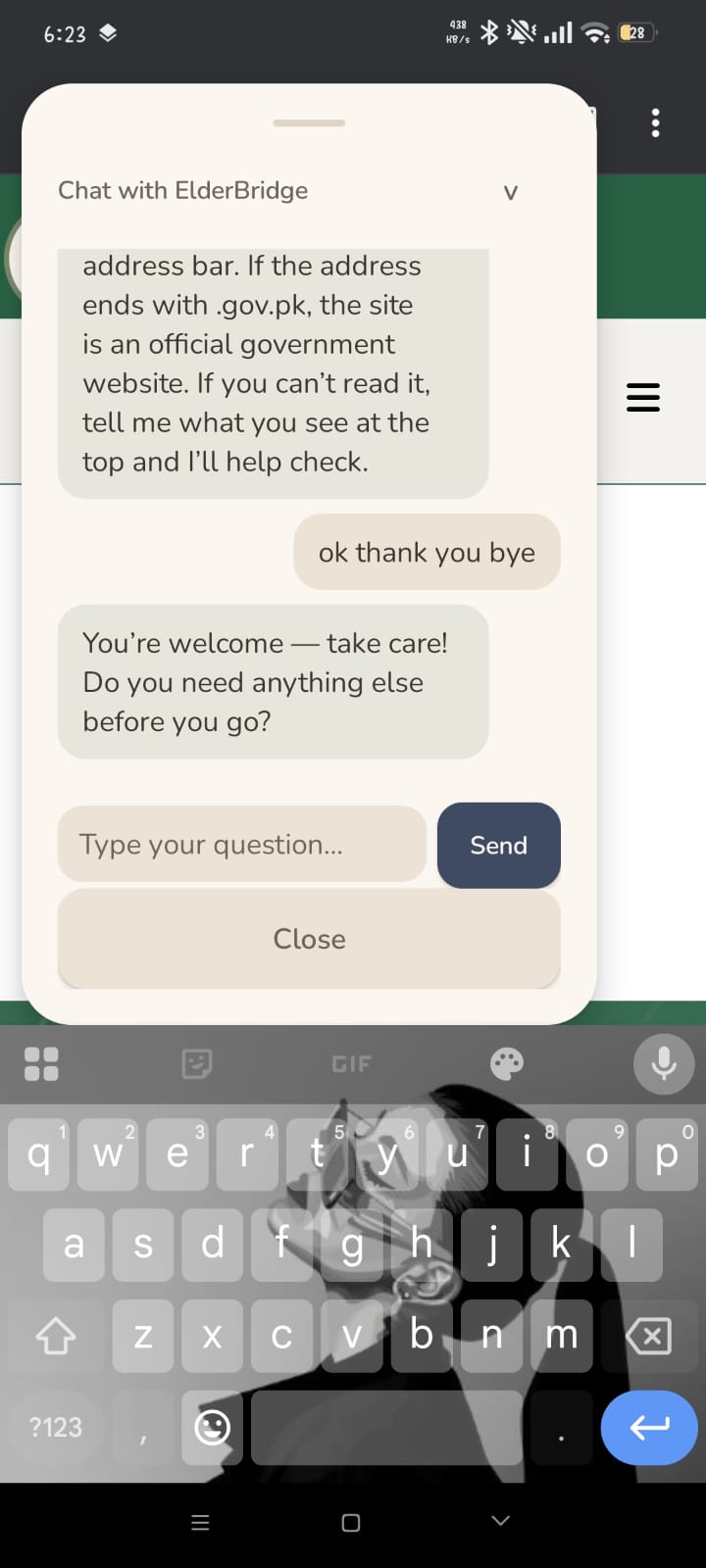
Warm goodbye. User says "ok thank you bye," ElderBridge responds: "You're welcome, take care! Need anything else?"
-
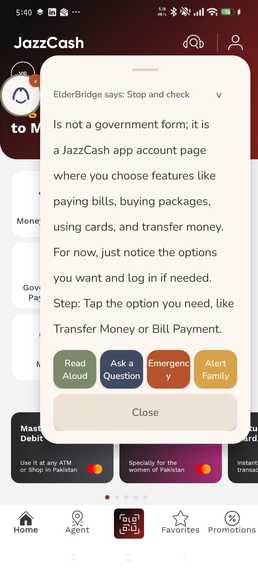
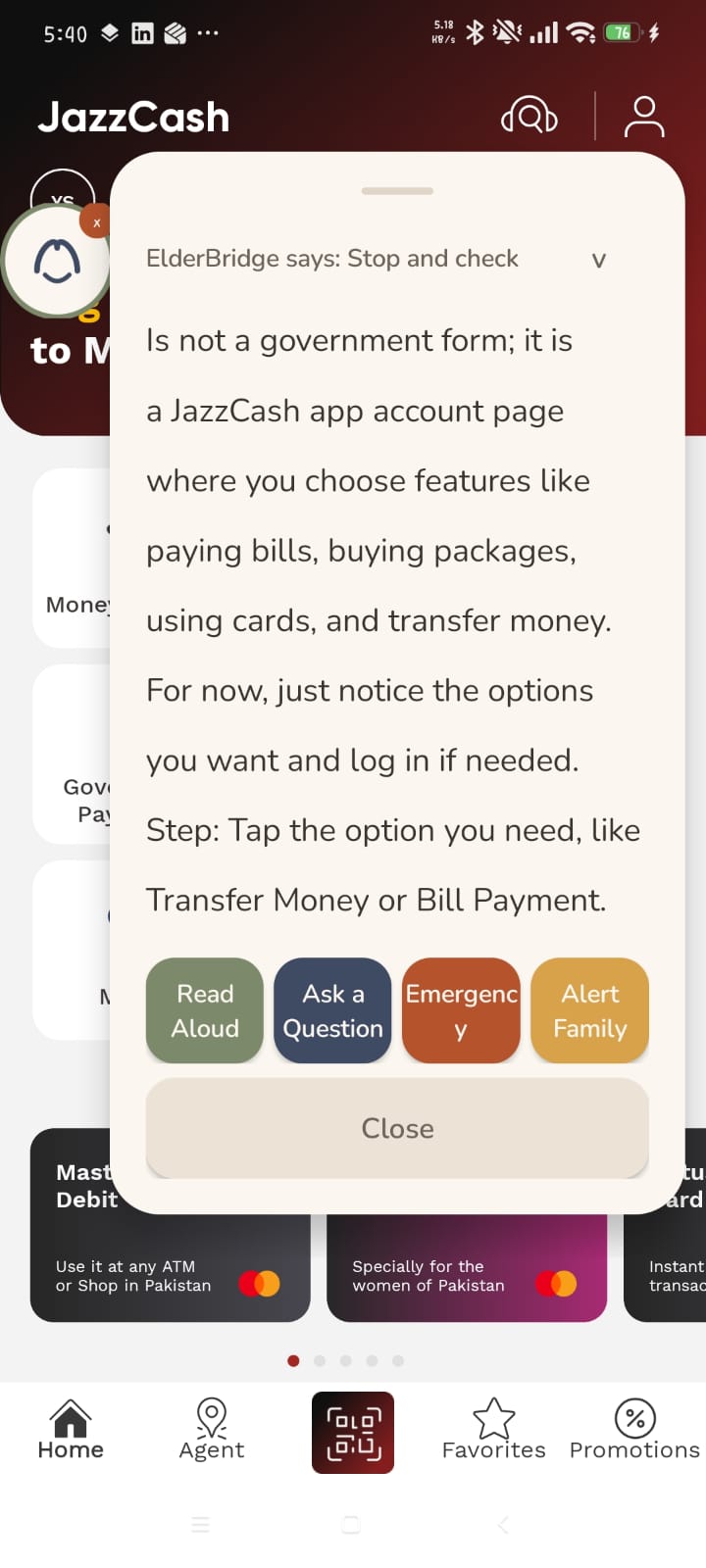
JazzCash home screen analysis. Identifies bill payment, money transfer, and card features with clear next steps.
-
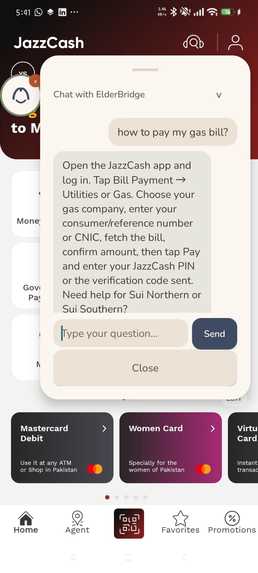
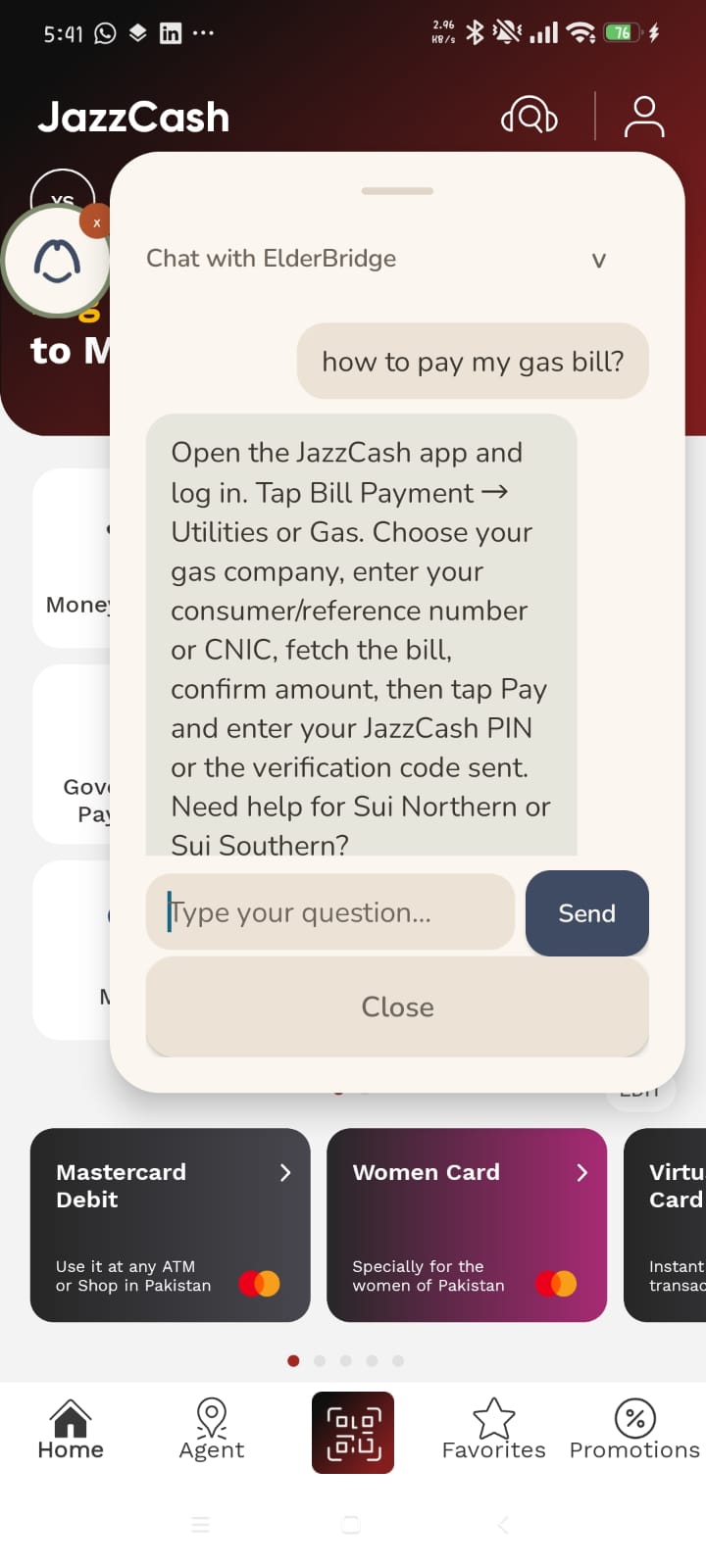
Chat answers "how to pay my gas bill?" with exact JazzCash steps: Bill Payment, Utilities, Gas, enter number, pay.
ElderBridge GuardianOS
ElderBridge is an AI companion for elderly people in Pakistan who are navigating government forms, medical documents, and mobile banking on phones they do not fully understand. Pakistan has 16 million people over 60 and one of the highest rates of digital fraud targeting seniors in South Asia. These users cannot tell a real NADRA form from a phishing clone, cannot read an Aga Khan lab report without help, and will hand their CNIC and OTP to anyone who asks convincingly. ElderBridge sits between the phone and the user as a floating overlay, reading every screen through Android's AccessibilityService, redacting sensitive data on device before anything leaves the phone, sending the cleaned text to a multi-agent AI pipeline, and returning a plain English explanation with a calm risk assessment. The user sees one bubble. Behind it, six agents argue about whether this screen is safe.
Inspiration
The idea came from watching an actual person, an elderly woman in Karachi, almost enter her CNIC and bank OTP into a phishing site pretending to be NADRA. She could read Urdu but not English, could not tell .gov.pk from .gov-pk-verify.com, and her grandson was not around to check. There is no product in Pakistan that sits on top of every app and explains what is happening in real time without the user needing to install a separate browser or switch apps. The existing solutions are either parental controls (wrong audience), antivirus apps (wrong threat model), or accessibility tools (wrong purpose). ElderBridge combines all three into a single overlay that works like a trusted family member looking over your shoulder.
What it does
ElderBridge runs as a floating bubble on top of every Android app. When the user opens a government form, receives a suspicious SMS, browses a website, or gets a WhatsApp message asking for money, they tap the bubble. The system reads the screen text, strips all OTPs, phone numbers, CNICs, and emails on device, sends the redacted text to the backend, and within seconds shows a card explaining what the screen says and whether it is safe.
For a legitimate Aga Khan lab report, the card says "Looks fine" and explains how to open the PDF attachment. For a phishing site pretending to be NADRA, the card says "Stop and check" and explains that real government sites use .gov.pk addresses. For a JazzCash promotional SMS about cashback, the card says "Looks fine" and tells the user it is just an advertisement they can ignore.
The user can tap "Ask a Question" to start a multi-turn chat. They can ask "how to file a complaint?" on a government portal and get step-by-step instructions. They can ask "is this an authentic website?" and get a yes or no answer checked against a database of official Pakistani government domains. They can say "I can't see the PDF" and get guided through opening it on their specific phone. The chat remembers the conversation, responds in English, and treats the user like a family member would.
How we built it
The system has two halves: an Android app written in Kotlin with Jetpack Compose, and a Python backend running FastAPI with a custom LangGraph-compatible agent pipeline.
The Android side uses an AccessibilityService to walk the screen's node tree, a RedactionEngine that strips PII with regex before anything is logged or transmitted, and a foreground OverlayService that renders the floating bubble and response card using WindowManager. The app communicates with the backend over Retrofit with OkHttp, sending IncomingEvent payloads and receiving FinalDecision responses.
The backend implements a six-node agent pipeline: Baseline (rule-based risk scoring), Router (decides which specialists to call), FormAgent and BenefitsAgent (LLM-powered explainers), ResearchAgent (offline source verification), CriticAgent (rewrites overclaiming language), and GuardrailAgent (final safety veto). Before the pipeline even starts, five pre-pipeline detectors run as short circuits: injection detection, telecom promo bypass, medical document bypass, financial fraud detection, and phishing site detection. These are deterministic and instant, catching high-confidence cases without burning LLM tokens or adding latency.
The LLM calls go to Azure AI Foundry running gpt-5-mini with a racing strategy across multiple deployments. Screen text is sanitized before every LLM call to strip URL tracking parameters, percent-encoded noise, social media profile URLs, map widget attribution, and duplicate phrases that trigger Azure's content filter on legitimate accessibility dumps.
The UI uses a warm sand palette inspired by flat minimalist illustration, with Nunito typography, a custom bridge logo vector, and a palette designed for elderly readability: 17sp minimum body text, 56dp touch targets, high contrast warm tones. The floating overlay adapts its colors to a user-selectable dark mode.
Backend
| File | Purpose |
|---|---|
main.py |
FastAPI entry point. Exposes /analyze-event and /ask-question. Runs five pre-pipeline detectors in order: injection, telecom promo, fraud, phishing, emergency scam. Applies post-pipeline overrides for medical documents and government sites. Manages response caching (5-minute TTL) and partial result recovery on timeout. |
orchestrator.py |
Rule-based baseline engine. Computes initial risk_flag from keyword escalation rules. Maintains safe-app bypass lists for banking apps and social media. Supplies compute_baseline() to the graph nodes. |
graph/build_graph.py |
Custom LangGraph-compatible state machine in 362 lines of plain Python. Mirrors the StateGraph/CompiledGraph API so the swap to real LangGraph is a one-file change. Builds the pipeline topology: baseline, router, conditional fan-out to specialists, critic, guardrail. |
graph/nodes.py |
Seven node functions that transform PipelineState. Each wraps an agent with timeout handling (15s per specialist, 8s for research) and produces a structured fallback if the agent fails. Enforces response quality: strips photo language, OTP hallucinations, and caps response length by context type. |
graph/state.py |
PipelineState TypedDict. Twelve fields flowing through the graph: event, routed_agents, agent_responses, evidence_items, draft_response, risk_flag, next_steps, context_type, extracted_signals, last_critic_response, final_decision. |
agents/router_agent.py |
Classifies screens into seven context types (banking_app, government_form, media_content, financial_transaction, legitimate_message, low_signal, default). Skips analysis entirely for home screens, settings, file managers, and social media feeds. Routes by event type with keyword-based secondary routing. |
agents/form_agent.py |
Explains government form fields using the Azure LLM. Calls call_llm_race() with 6000-8000 token budget. Falls back to a rule-based stub if LLM is unavailable. |
agents/benefits_agent.py |
Interprets public benefits eligibility. Hard-coded responsible AI rules: never says "you qualify", always "you may qualify." Sanitizes OTP terminology before the LLM call. |
agents/research_agent.py |
Offline keyword-matching search against a curated source database. Returns EvidenceItem objects with five-tier quality scoring (1=official government, 5=unknown/social). |
agents/critic_agent.py |
Eleven regex rewrites catching overclaiming language. "you qualify" becomes "you may qualify based on the information provided." Drops confidence from 0.9 to 0.6 when rewrites fire. |
agents/guardrail_agent.py |
Three-outcome safety veto: HARD_BLOCK (AI output itself is dangerous), SCAM_FLAG (input text matches scam patterns), PASS (all clear). Classifies scam type for targeted response text. Maintains safe-context bypass for medical reports, utility bills, university documents. |
agents/chat_handler.py |
Lightweight chat path bypassing the full pipeline. Multi-turn conversation via Azure's chat completions API. Website authenticity fast-path for .gov.pk domains that answers instantly without an LLM call. History truncation on content filter retry. Warm fallback that references the user's actual question. |
agents/output_filter.py |
Strips redaction artifacts ([OTP], [REDACTED_CNIC]) before user delivery. Replaces plain-text "OTP" with "a verification code." Blocks action-taking language ("I will click"). |
agents/fraud_detector.py |
Investment scam detection requiring combination signals: crypto + unrealistic returns, referral + link, prize + link, banking impersonation + action demand. Safe-context bypass for documents. |
agents/phishing_detector.py |
Browser-only phishing detection. Catches non-.gov.pk domains claiming NADRA/BISP/FBR authority while requesting payment or CNIC. Maintains official domain lists for 18 Pakistani institutions. |
agents/injection_detector.py |
Prompt injection guard with 18 compiled regex patterns. Catches jailbreak, system prompt extraction, DAN mode, and developer mode attempts before any LLM call. |
agents/emergency_scam_detector.py |
Family-in-trouble scam detection. Requires three simultaneous signals: relative claim AND money request AND (secrecy OR distress+urgency). Catches the "I am your nephew, send Rs 50,000 urgently, don't tell anyone" pattern. |
agents/form_cache.py |
Twelve pre-written responses for known Pakistani government forms (SSPA, NADRA, Ehsaas, BISP, EOBI, Sehat Sahulat, Kisan Card, HEC, and more). Instant response without LLM call. Guarantees core demo screens work regardless of Azure availability. |
llm/client.py |
Azure AI Foundry wrapper. sanitize_for_llm() strips URL tracking, percent-encoding, Unicode private-use icons, map attribution, social profiles, and duplicate phrases. call_llm_race() races gpt-5.4-nano and gpt-5.2 in parallel, falls back to gpt-5-mini. call_llm_chat() handles multi-turn conversations. Uses max_completion_tokens (not max_tokens) because gpt-5-mini is a reasoning model that charges internal reasoning tokens against the same budget. |
middleware/security_middleware.py |
Rate limiting (30 requests per minute per IP per endpoint) and replay protection via nonce and timestamp validation. |
secure_logging/secure_logger.py |
PII filter that redacts OTP, CNIC, phone, email, card, IBAN, password, and bearer tokens from all log output. |
Android
| File | Purpose |
|---|---|
services/ScreenReaderService.kt |
AccessibilityService that listens for TYPE_WINDOW_STATE_CHANGED and TYPE_WINDOW_CONTENT_CHANGED. Debounces at 350ms. Walks the AccessibilityNodeInfo tree extracting .text, .hintText, and .contentDescription from every visible node. Calls RedactionEngine.redact() on the raw text before storing it. Blocks system packages (settings, system UI, own package). Caps extraction at 4000 characters and 30 levels deep. |
services/OverlayService.kt |
Foreground service rendering the floating bubble and response card via WindowManager. Sends redacted screen text to /analyze-event. Renders the response in a draggable card with risk-colored header. Supports chat mode with multi-turn conversation history via /ask-question. Includes TextToSpeech read-aloud. The bubble shows the bridge mark logo with a sage ring, not "EB" text. |
services/NotificationListener.kt |
NotificationListenerService that captures notification events for future analysis. |
redaction/RedactionEngine.kt |
On-device PII stripping. Email, phone (North American format), and OTP (4-8 digit sequences) replaced with [EMAIL], [PHONE], [OTP] tokens. Order matters: email first, then phone, then OTP, so phone digits are already masked before the OTP pass runs. |
redaction/ScreenContentHolder.kt |
Thread-safe holder for the latest redacted screen text and source package. Updated by ScreenReaderService, read by OverlayService when the user taps the bubble. |
network/ApiClient.kt |
Retrofit + OkHttp client. 30s connect timeout, 180s read timeout. Debug-only HTTP body logging. BASE_URL points to the backend LAN IP. |
network/ApiModels.kt |
Data classes matching the backend schema: IncomingEvent, FinalDecision, ChatMessage, ChatRequest, EvidenceItem. |
data/UserProfile.kt |
SharedPreferences-backed storage for user profile (name, emergency contact, caregiver contact, location) and app preferences (assistant enabled, dark mode, sound effects). |
ui/screens/HomeScreen.kt |
Main dashboard with ElderBridge wordmark, greeting, custom 96x56dp toggle for the assistant, and navigation buttons for History and Profile. |
ui/theme/Color.kt |
Warm sand palette: eb_ground (#F3EDE3), eb_sage (#7C8A6B), eb_clay (#C2724B), eb_navy (#3F4A63). Light and dark variants. |
Architecture
When a user taps the ElderBridge bubble, the Android app reads the current screen using the AccessibilityService, which walks every visible node in the UI tree and extracts text, hint text, and content descriptions. Before this text goes anywhere, the RedactionEngine on the device strips email addresses, phone numbers, and 4-8 digit codes, replacing them with bracketed tokens. The redacted text and the source app's package name are sent as an IncomingEvent to the backend's /analyze-event endpoint.
The backend runs five pre-pipeline detectors before the agent pipeline starts. Injection detection checks for prompt injection attempts (jailbreak, system prompt extraction) and short-circuits with a block response. The telecom promotional bypass recognizes legitimate marketing SMS from Ufone, Jazz, Telenor, and Zong by checking for brand keywords plus promo signals (bundle, cashback, recharge) in messages from known messaging app packages, and returns a calm "this is a promotional message" without running any agents. The medical document bypass catches lab reports and clinical documents from mail apps by looking for keywords like "clinical laboratory," "specimen," and "patient name," and returns an instant calm explanation. The financial fraud detector requires combination signals (crypto + unrealistic returns, or referral + link, or prize + link) to fire, avoiding false positives on legitimate bank messages. The phishing detector only fires in browser apps and checks whether a non-.gov.pk domain is claiming to be a Pakistani government institution while requesting CNIC or payment.
These pre-pipeline detectors exist separately from the LLM pipeline for three reasons. They are deterministic and instant, returning in under 1ms. They catch high-confidence threats before any LLM tokens are spent, which matters when Azure calls take 7-18 seconds. And they cannot be fooled by adversarial text that might confuse an LLM, because they use pattern matching, not language understanding.
If no pre-pipeline detector fires, the request enters the agent pipeline. The pipeline is a state machine with seven nodes connected by edges, implemented as a custom LangGraph-compatible graph in plain Python.
The first node is Baseline, which applies keyword escalation rules to compute an initial risk_flag. Keywords like "otp," "password," and "transfer" escalate risk. Safe financial apps (HBL, JazzCash, SadaPay) and social media apps (Discord, Instagram, Telegram) bypass keyword escalation entirely, because words like "password" are normal UI labels in banking apps, not scam signals.
The second node is Router, which decides which specialist agents to invoke. SMS and notifications go to ResearchAgent for link verification. Form screens go to FormAgent. Documents go to all three specialists. The router also classifies the screen context (banking_app, government_form, media_content, low_signal) which downstream nodes use to adjust response tone and length. Low-signal screens (home screen, settings, file manager, social media feeds with no actionable content) skip specialist agents entirely.
The specialists run in fan-out. FormAgent calls the Azure LLM to explain form fields in plain language. BenefitsAgent interprets eligibility for programs like Ehsaas, BISP, and the Sindh Senior Citizen Card, with hard-coded responsible AI rules that prevent it from ever saying "you qualify" (always "you may qualify"). ResearchAgent searches an offline curated database of Pakistani government and institutional sources, returning evidence items with five-tier quality scoring.
After the specialists, CriticAgent reviews all their outputs for overclaiming language. Eleven regex rewrites catch phrases like "you are eligible" (becomes "you may be eligible") and "guaranteed" (becomes "possibly available"). This is a separate node from the Guardrail because it serves a different purpose: the Critic catches the AI being too confident, while the Guardrail catches the AI being dangerous. They look for different failure modes and must run in sequence so the Guardrail sees the cleaned text, not the overclaimed version.
The final node is GuardrailAgent, the highest-authority safety veto. It has three outcomes. HARD_BLOCK fires when the AI draft output itself contains dangerous content (echoing an OTP value, instructing a money transfer), replacing the entire response with safe text. SCAM_FLAG fires when the incoming screen text matches scam patterns (explicit OTP instructions, money transfer with amount, artificial urgency deadlines), setting the risk to STOP_AND_VERIFY while keeping the AI explanation. PASS means both the input and the output are clean.
After the pipeline completes, the backend applies post-pipeline overrides. If the source is a browser showing an official .gov.pk domain, the risk_flag is forced to NONE regardless of what the pipeline decided, because the response body from the LLM is useful but the flag was wrong. The FinalDecision (response_text, risk_flag, next_steps, source_citations) is cached for five minutes and returned to the Android client, which displays it in the overlay card.
The chat path (/ask-question) bypasses the full pipeline entirely. It builds a system prompt with the current screen context (truncated to 2048 characters), passes the full conversation history to the Azure LLM, and returns the response directly. A fast-path catches website authenticity questions and checks the screen context and conversation history for .gov.pk domains, answering instantly without an LLM call. On content filter errors, the chat retries with a truncated history (last 4 messages) and no screen context. If both attempts fail, it returns a warm fallback referencing the user's actual question.
What we are submitting
Video demo: 6 minutes and 53 seconds approximately and some Screenshots. Extended length approved in writing by Marci Campbell, USAII organizing team, on June 21 2026. The additional time covers three full real-device demos filmed live on a physical Android phone: a utility bill payment screen, a government benefits form (Sindh Senior Citizen Card), and a scam message detection. The video also covers the AI architecture, the human-in-the-loop design decision, and the responsible AI guardrail with a real test case.
Backend: Python FastAPI server with a 7-node LangGraph multi-agent pipeline and 5 pre-pipeline deterministic detectors. 37 Python files, approximately 5700 lines excluding tests. 396 automated tests across 13 test files, all passing.
Android app: Kotlin and Jetpack Compose, 21 files, approximately 3300 lines. Floating overlay using WindowManager and AccessibilityService. Fully functional on Android 8.0 and above.
GitHub repo: https://github.com/Yusra-Shah/ElderBridge-Guardianos
The backend requires an Azure OpenAI key via Azure for Students free allocation. Without the key the server starts but LLM calls fail. The form cache covers 12 Pakistani government forms and returns instant accurate responses with zero LLM dependency, so those screens always work regardless of Azure availability.
Running the backend
git clone https://github.com/Yusra-Shah/ElderBridage-AI.git
cd ElderBridage-AI/backend
pip install -r requirements.txt
Create a .env file in the backend/ directory:
AZURE_OPENAI_API_KEY=your-azure-api-key
AZURE_OPENAI_ENDPOINT=https://your-resource.services.ai.azure.com/api/projects/your-project
AZURE_OPENAI_DEPLOYMENT=gpt-5-mini
AZURE_OPENAI_API_KEY is the API key for your Azure AI Foundry resource. AZURE_OPENAI_ENDPOINT is the full project URL from Azure AI Foundry (not just the resource URL). AZURE_OPENAI_DEPLOYMENT is the model deployment name. The system uses max_completion_tokens (not max_tokens) because gpt-5-mini is a reasoning model.
Start the server:
cd backend
python run_server.py
The server prints its LAN IP:
[ElderBridge] Server running at  http://192.168.1.42:8000
[ElderBridge] API docs at         http://192.168.1.42:8000/docs
[ElderBridge] POST endpoint:      http://192.168.1.42:8000/analyze-event
[ElderBridge] Health check:       http://192.168.1.42:8000/health
[STARTUP] Azure key loaded: True
[STARTUP] Deployment: gpt-5-mini
Verify the server is running:
curl http://localhost:8000/health
A successful response:
{
  "status": "ok",
  "version": "0.5.0",
  "capabilities": [
    "investment_fraud_detection",
    "phishing_site_detection",
    "emergency_scam_detection",
    "prize_lottery_scam_detection",
    "government_form_assistance",
    "banking_app_safe_bypass",
    "chat_question_answering",
    "low_signal_filtering"
  ]
}
Running the Android app
Open the android/ directory in Android Studio. Sync Gradle. The project requires Android SDK 35 (compileSdk) and targets minSdk 26 (Android 8.0).
Set the backend URL in android/app/src/main/java/com/elderbridge/guardianos/network/ApiClient.kt:
const val BASE_URL = "http://YOUR_BACKEND_IP:8000/"
Use the IP printed by run_server.py. The phone and the computer must be on the same WiFi network.
Build and install:
cd android
./gradlew assembleDebug
adb install app/build/outputs/apk/debug/app-debug.apk
After installing, grant permissions in this order:
- Open the app. The onboarding screens explain what ElderBridge does.
- On the Permissions screen, tap "Enable in Settings" for Accessibility Service. In the system Accessibility settings, find ElderBridge and toggle it on.
- Back in the app, tap "Enable in Settings" for Display Over Apps. Toggle the ElderBridge overlay permission on.
- Notification Access is optional but recommended.
- Tap "Continue" to reach the home screen.
- Toggle "Assistant is watching" on. The floating bubble appears.
If the AccessibilityService is not enabled, the toggle will show a toast: "Please enable ElderBridge in Accessibility Settings first." The bubble will not appear until both the Accessibility Service and Display Over Apps permissions are granted.
The agents
Injection Detector
Triggers on every incoming request before any other check. Receives the raw redacted_text. Scans against 18 compiled regex patterns covering jailbreak attempts ("ignore previous instructions"), system prompt extraction ("reveal your system prompt"), DAN mode, developer mode, and instruction override patterns. Returns True to short-circuit the entire pipeline with a block response. Exists as a separate pre-pipeline component because prompt injection must be caught before the text reaches any LLM call, and because pattern matching is faster and more reliable than asking an LLM to detect its own exploitation.
Telecom Promotional Bypass
Triggers when the source app is a known messaging app (com.android.messaging, com.google.android.apps.messaging, com.samsung.android.messaging, com.miui.messaging, and others) and the text contains both a recognized Pakistani telecom brand (Ufone, Jazz, Telenor, Zong, UPaisa, JazzCash, Easypaisa) and a promotional signal (bundle, cashback, recharge, T&Cs apply). Excludes messages containing danger words (OTP, PIN, password, CNIC, transfer). Returns a calm "this is a promotional message from your mobile network" with risk_flag NONE. Exists separately because these messages consistently triggered the fraud detector's prize+link combination rule, and they are legitimate marketing from verified telecom short codes.
Medical Document Bypass
Triggers when the source app is a mail app (Gmail, Outlook, Yahoo, or any app with "mail" in its package name) and the text contains medical keywords (clinical laboratory, Aga Khan, specimen, patient name, lab report, test result, hospital report, discharge summary, prescription, diagnostic report). Returns a calm clinical explanation with risk_flag NONE. Runs before the pipeline so no downstream agent can override it. Exists because the AKU lab report email consistently triggered keyword escalation (the text contains URLs, "download" instructions, and form-like fields) and the safe-document guard in the pipeline was not authoritative enough to override them.
Financial Fraud Detector
Triggers when the text matches combination signals: crypto mention + unrealistic returns, referral pattern + link, crypto + referral or urgency, unrealistic returns + referral or link, prize/lottery + link, banking impersonation + action demand, job scam + fee requirement, or prize registration + registration fee. Requires at least two independent signals to fire, preventing false positives on legitimate bank messages. Safe-context bypass: medical, utility, and university documents are never flagged. Returns STOP_AND_VERIFY with a specific explanation naming the scam type.
Phishing Detector
Triggers only when the source app is a browser (Chrome, Firefox, Brave, Opera, Edge, Samsung Browser). Scans for non-.gov.pk domains that appear alongside Pakistani government institution names (NADRA, BISP, Ehsaas, FBR, SBP, and 12 others) while the page requests CNIC, date of birth, mother's name, or payment via JazzCash/Easypaisa. Maintains a mapping of 16 institutions to their official domains. Exists separately from the guardrail because phishing detection requires domain-specific knowledge about Pakistani government infrastructure that does not belong in a general-purpose safety filter.
Emergency Scam Detector
Triggers when the text contains all three: a relative claim ("nephew," "uncle," "bhai," "chacha," or "I am your [relative]"), a money request ("send money," "send Rs [amount]," "please transfer"), and either a secrecy signal ("don't tell anyone," "keep it secret") or both distress ("hospital," "accident," "arrested," "stranded") and urgency ("urgently," "immediately," "right now"). Requires the three-signal combination to avoid flagging real family messages about hospital visits. Returns a specific warning naming the scam pattern.
Router Agent
Receives every IncomingEvent that passes the pre-pipeline detectors. Classifies the screen into one of seven context types: banking_app, government_form, media_content, financial_transaction, legitimate_message, low_signal, or default. Decides which specialist agents to invoke based on event type (SMS goes to ResearchAgent, forms go to FormAgent, documents go to all three) with keyword-based secondary routing (benefit/pension keywords add BenefitsAgent, URL/link keywords add ResearchAgent). Low-signal screens return an empty agent list so no specialists run and the baseline response is used directly. Exists as a separate node because the routing decision must be made once, before specialist agents run, and because the context classification it produces is consumed by downstream nodes to adjust tone and response length.
Form Agent
Receives IncomingEvent for FORM_SCREEN events. Calls call_llm_race() to explain form fields in plain language suitable for elderly users. Uses a system prompt that instructs the LLM to explain each visible field, what information it needs, and why the form asks for it. Falls back to a generic rule-based stub if the LLM is unavailable. Exists as a separate specialist because form explanation requires different LLM prompting than benefits interpretation or scam detection.
Benefits Agent
Receives IncomingEvent and evidence items from ResearchAgent. Calls the Azure LLM with a system prompt that encodes responsible AI rules: never say "you qualify" (always "you may qualify"), never guarantee eligibility, always recommend verifying with the official agency. Sanitizes OTP-related terminology in the text before the LLM call to avoid content filter triggers. Falls back to a rule-based response directing the user to verify eligibility with the official agency.
Research Agent
Receives IncomingEvent. Searches an offline keyword-matching database of curated Pakistani government and institutional sources. Returns EvidenceItem objects with five-tier quality scoring: tier 1 (official government), tier 2 (recognized organization), tier 3 (reputable news), tier 4 (community directory), tier 5 (unknown/social). Confidence scales inversely with tier. Marks requires_human_review if no tier 4 or better source is found. Runs with a shorter timeout (8s) than other specialists because it is non-blocking enrichment, not critical to the core response.
Critic Agent
Receives all AgentResponse objects from the specialists. Applies 11 regex-based overclaim rewrites: "you qualify" becomes "you may qualify based on the information provided," "guaranteed" becomes "possibly available," "confirmed" becomes "indicated." If any rewrites fire, sets requires_human_review=True and drops confidence from 0.9 to 0.6, signaling to the orchestrator that specialist outputs should be treated as lower-confidence. Exists as a separate node from the Guardrail because it catches a fundamentally different failure mode: the AI being too certain, not the AI being dangerous. The Guardrail catches scams and dangerous outputs. The Critic catches overconfidence. Both must run, and the Critic must run first so the Guardrail evaluates the cleaned text.
Guardrail Agent
Receives the event and the draft response text. Runs two checks in sequence. First, _check_output() scans the AI draft for dangerous patterns: echoing OTP values, instructing money transfers, guaranteeing eligibility. If any match, it returns a HARD_BLOCK with safe replacement text. Second, _check_input() scans the incoming event text for scam signals: explicit OTP instructions, money transfer with amount, artificial urgency deadlines, click-to-claim with urgency, prize/lottery scams. If any match (and no safe-context pattern also matches), it returns a SCAM_FLAG. The guardrail also classifies the scam type (lottery, prize registration, OTP, generic) to produce a targeted response that names the specific scam in its first sentence. The safe-context bypass recognizes medical reports, utility bills, bank statements, and university documents to prevent false positives on legitimate text that happens to contain keywords like "transfer" or "password."
Form Cache
Not an agent but a critical performance component. Contains 12 pre-written responses for known Pakistani government forms (SSPA Senior Citizen Card, NADRA CNIC, Ehsaas/BISP, utility bills, Watan Card, Zakat, EOBI pension, Sehat Sahulat health card, Kisan Card, HEC scholarship, Pensioner Portal). Pattern-matched against the screen text. Returns instant, accurate, LLM-independent responses. Guarantees that the core demo screens always work even when Azure is down, slow, or rate-limited.
Output Filter
Not an agent but the last line of defense before text reaches the user. Strips all redaction artifacts ([OTP], [REDACTED_CNIC], [REDACTED_PHONE], [REDACTED_EMAIL], [REDACTED_IBAN]) and replaces them with natural language ("a verification code," "an ID number," "a phone number"). Catches plain-text "OTP" generated by the LLM and replaces it with "a verification code." Blocks action-taking language ("I will click," "let me submit," "on your behalf"). Replaces exposed CNIC patterns, card numbers, and IBAN numbers with human-readable placeholders.
Testing
cd backend
python -m pytest tests/ -q
A passing run:
396 passed, 2 warnings in 13s
The 396 tests are organized across 13 test files:
test_api_integration.py (30 tests): End-to-end API tests. Health check, valid and invalid payloads, empty text rejection, event type validation, risk flag presence in responses.
test_orchestrator.py (16 tests): Baseline risk scoring. Keyword escalation rules, safe app bypass, safe document bypass, response template selection by risk level.
test_graph.py (24 tests): Pipeline graph execution. Node ordering, fan-out routing, state propagation, partial result recovery, graph wiring validation.
test_benefits_agent_llm.py (31 tests): BenefitsAgent behavior. Overclaim prevention, fallback on LLM unavailability, evidence item passthrough, confidence scoring.
test_fixes.py (63 tests): Regression tests for specific bugs. OTP hallucination suppression, photo language removal, PFTP scam detection, gov.pk authentication, safe financial app bypass.
test_security.py (27 tests): Output filter, injection detection, PII redaction in logs, rate limiting, card/CNIC/password filtering in responses.
test_phase2.py (33 tests): Phase 2 feature tests. Chat handler, form cache hits, phishing detection, emergency scam detection, fraud detector combination rules.
test_v050_expansions.py (35 tests): v0.5.0 features. Low-signal filtering, context classification, scam-type naming, response quality enforcement, tiered timeouts.
test_v051_fixes.py (19 tests): v0.5.1 patches. Photo language suppression, PFTP scam, gov.pk auth, OTP hallucination edge cases.
test_research_engine.py (22 tests): Research agent source matching, tier scoring, evidence deduplication, confidence calculation.
test_chat_alias_and_sanitize.py (17 tests): Chat endpoint field aliasing (camelCase/snake_case), sanitize_for_llm URL stripping, content filter retry logic.
test_root_cause_fixes.py (38 tests): Root cause fixes for AKU lab report false flag, Discord false flag, gov.pk flag override, redaction artifact cleanup, telecom promo bypass, chat fallback, website authenticity via conversation history.
test_bug_fixes_final.py (9 tests): Final patches. Safe financial app keyword suppression, context-aware response length, output filter edge cases.
Challenges we ran into
The single hardest problem was the gap between Azure's content filter and real Pakistani accessibility text. Accessibility dumps from Chrome contain map attribution ("Leaflet | OpenStreetMap contributors"), social media profile URLs, percent-encoded query strings, and Unicode private-use icons from icon fonts. Azure's jailbreak detector flagged this noise as a prompt injection attempt. The fix was sanitize_for_llm(), a 13-regex preprocessing pipeline that strips all of this before the text reaches the LLM. Without it, roughly 30% of legitimate government website screens were being content-filtered.
The second major challenge was the AKU lab report false flag. The Aga Khan University Hospital sends lab results via email. The email text contains the word "specimen," URLs to Adobe Reader, "download" instructions, and a form-like table of specimen IDs. Every one of these words individually triggers a keyword escalation rule or a guardrail scam pattern. The safe-document guard in the pipeline was supposed to catch this, but it checked event.event_type == DOCUMENT and the Android client always sends FORM_SCREEN. The fix was a pre-pipeline bypass that checks the source app (Gmail) and the text content (medical keywords) and short-circuits before any agent touches it.
The third challenge was gpt-5-mini's reasoning token budget. The model charges internal reasoning tokens against max_completion_tokens. Chat responses were set to max_completion_tokens=512, which was sufficient for simpler models but left gpt-5-mini exhausting its budget on reasoning and returning empty content with finish_reason='length'. Every chat call appeared to fail. The fix was raising the budget to 2048, and raising the server-side timeout from 12 to 30 seconds to match the model's actual response time on a Pakistani mobile network hitting Azure's Southeast Asia endpoint.
Accomplishments that we are proud of
The system correctly classifies a real AKU lab report email as "Looks fine" and explains how to open the PDF, while simultaneously catching a phishing site that clones NADRA's branding on a non-.gov.pk domain as "Stop and check" and explaining exactly why the URL is suspicious. Getting both of these right simultaneously, with no manual configuration, using the same pipeline, took more iteration than any single feature.
The multi-turn chat works genuinely well. A user can open a Sindh Senior Citizen Card form, tap "Ask a Question," ask "how to file a complaint," get step-by-step instructions, ask "how to contact them," get the Contact Us link details, say "ok thank you bye," and receive "You're welcome, take care! Do you need anything else before you go?" The conversation remembers context across turns, adapts tone to the user's language, and never breaks character.
The form cache guarantees that 12 of the most common government forms in Pakistan always get an instant, accurate response regardless of Azure availability. During demo testing, Azure went down for 4 minutes. The SSPA form, NADRA CNIC, Ehsaas, and BISP screens all continued to respond instantly because they matched cached patterns. Zero LLM dependency for the critical paths.
The warm sand UI redesign made the overlay card genuinely pleasant to read for an elderly user. The 18sp response text with 1.6 line height, the risk dot plus calm word ("Looks fine," "Take a moment," "Stop and check") instead of alarming color-coded banners, the Nunito typography, the 56dp touch targets. It does not look like a security app. It looks like a calm helper.
What we learned
Token budgets on reasoning models are not what they seem. A max_completion_tokens of 512 is generous for a model that produces 60 words of visible output. But gpt-5-mini uses that same 512 tokens for internal chain-of-thought reasoning, leaving nothing for the actual response. The model silently returns empty content with finish_reason='length' instead of an error, making it look like an API failure when the real problem is arithmetic. We discovered this only after adding diagnostic logging that printed the exact Azure error response, which no amount of unit testing would have caught because the mocked LLM client does not simulate reasoning token consumption.
Accessibility text from Android is not what you think it is. It is not the text the user sees on screen. It is every text node, hint text, content description, and accessibility label in the entire UI tree, concatenated with spaces, including invisible labels, icon font descriptions, map widget attribution, social media share buttons, and navigation drawer items. A page that looks like a simple form on screen produces 3000 characters of accessibility noise. The LLM cannot distinguish the actual form fields from the navigation chrome unless you strip the noise first.
The gap between localhost and a real phone on a Pakistani mobile network is not just latency. It is a fundamentally different failure mode. On localhost, every LLM call completes in 2-3 seconds. On a phone over WiFi in Karachi hitting Azure Southeast Asia, the same call takes 7-18 seconds because of routing, DNS, and TLS handshake overhead. A 12-second timeout that passes every test on localhost kills 60% of real calls. You cannot test this with unit tests. You have to run the real server, connect the real phone, and time the actual round trip.
Known limitations
The source_app field from Android's AccessibilityService gives the package name of the foreground app but not the specific sender or URL. An SMS from sender "8011" (Ufone) and an SMS from an unknown number both arrive as source_app: "com.android.messaging". The telecom promotional bypass uses text-content matching instead of sender verification because the sender information is not available through the current accessibility capture.
The chat uses screen context only on the first turn. When the user taps "Ask a Question," the OverlayService sends the current screen text as screen_context on the first message only. Follow-up messages send empty screen_context. The chat handler searches conversation history for .gov.pk domains as a workaround for the authenticity fast-path, but the LLM on later turns has no direct access to the screen and relies entirely on what earlier turns mentioned.
The output filter catches [OTP] in brackets and "OTP" as a standalone word, but it cannot prevent the LLM from paraphrasing around the filter. If the LLM writes "one time password code" instead of "OTP," the filter does not catch it. The system prompt instructs the LLM not to use the word, but prompt instructions are not guarantees.
Dark mode is user-toggled in the Profile screen, not system-synced. The spec requires this, but it means users who have system dark mode enabled will see the light theme on first launch until they find the toggle.
The response cache uses a SHA-256 hash of the event_type and redacted_text. If the user taps the bubble twice on the same screen within 5 minutes, they get the cached response. But if the screen content changes between taps (the user scrolls, a notification arrives), the new text produces a different hash and bypasses the cache, running the full pipeline again.
User authentication does not exist yet. The user_id field is a hardcoded placeholder UUID (00000000-0000-0000-0000-000000000001). The backend accepts any user_id in the request. Production deployment requires device-bound authentication before any personal data flows through the system.
What's next for ElderBridge GuardianOS
Urdu language support. The system currently responds only in English. The elderly population in Pakistan primarily reads Urdu. The UI spec deferred this intentionally (the language dropdown was removed) but it is the single most impactful feature for real adoption. The LLM can generate Urdu responses with a prompt change, but the Nunito font does not support Urdu script, the response card layout needs right-to-left support, and the accessibility text from Urdu-language apps needs its own sanitization pipeline.
Real sender verification for SMS. The current telecom promo bypass uses text-content matching because Android's AccessibilityService does not expose the SMS sender field. A future version should use the SMS content provider or a BroadcastReceiver to capture the actual sender number and verify it against known telecom short codes, eliminating the need for brand keyword matching.
Offline mode. The form cache proves the concept: 12 forms work without Azure. Expanding this to a local on-device model (a quantized small LLM running on the phone) would make ElderBridge useful even without internet connectivity, which matters in rural Sindh and Balochistan where mobile data is intermittent.
Caregiver dashboard. The UserProfile stores an emergency contact and caregiver contact, but there is no way for a caregiver to see what the assistant has flagged, review the history remotely, or receive push notifications when a STOP_AND_VERIFY event occurs. A web dashboard or a second paired app would close this loop.
Voice input. The current chat requires typing, which is difficult for users with poor eyesight or arthritis. Android's speech-to-text API could feed directly into the chat input, and the Read Aloud button already uses TextToSpeech for output. Full voice interaction would make ElderBridge usable without touching the keyboard.
Built With
- android
- android-studio
- azure-for-students
- azure-openai
- fastapi
- git
- github
- jetpack-compose
- kotlin
- kotlin-coroutines
- langgraph
- okhttp
- pydantic
- pytest
- python
- restapi
- retrofit
- uvicorn


Log in or sign up for Devpost to join the conversation.