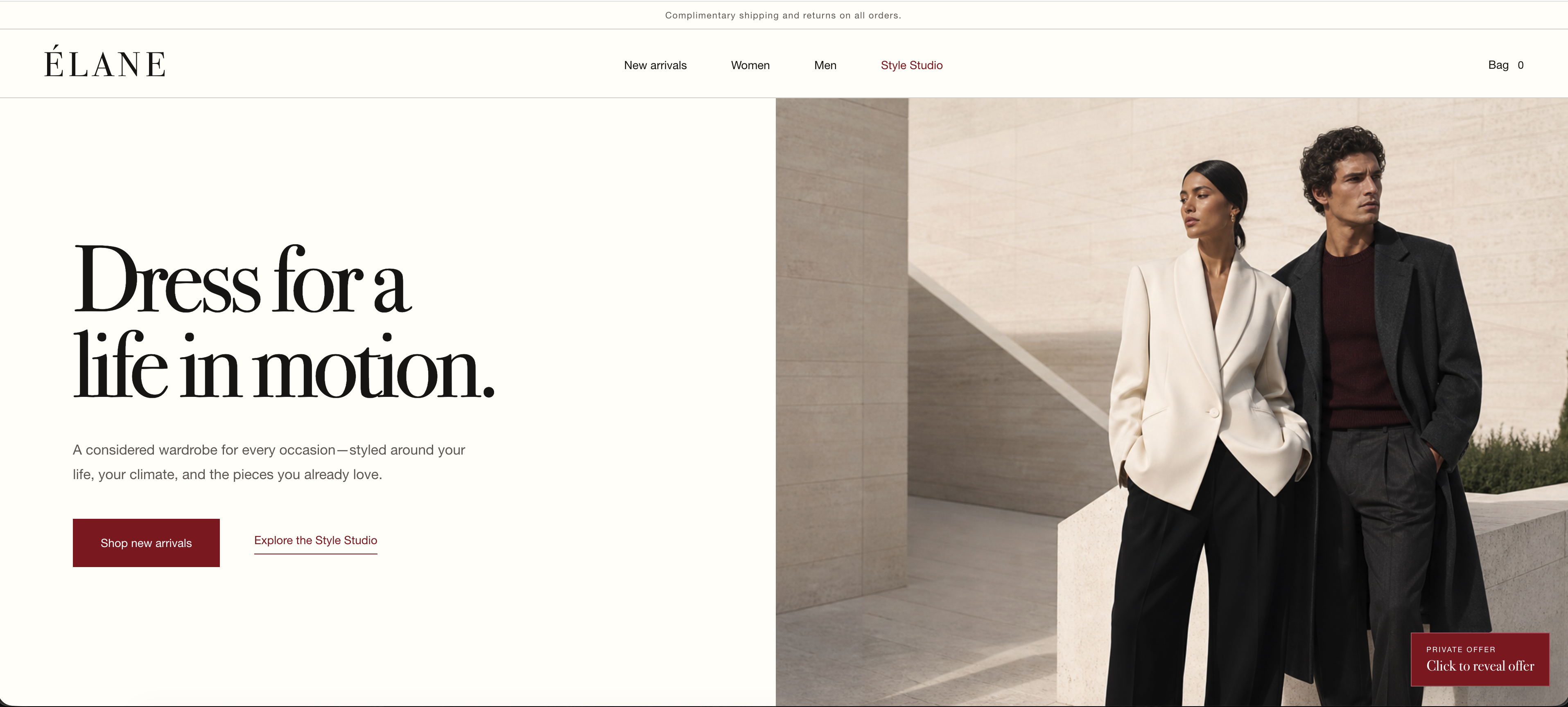
What inspired me
Online fashion shopping involves many small decisions. A customer may know the occasion, budget, size, colour, and style they want, yet still need to move between product pages, filters, the shopping bag, promotional details, and policy pages.
An AI agent can help, but relying on screen navigation alone is not always reliable. The agent may have to infer product details, selected sizes, garment images, prices, and the current bag state from different parts of the interface.
I wanted to create a shopping experience in which the customer and agent work with the same visible state. I was especially interested in personal outfit previews. This led to a simple idea: bring your own agent to preview your personal look.
The customer can keep a full-body photo inside their own agent conversation. ÉLANE provides the agent with references to the exact garments staged on the website. A compatible image-generating agent can then create a personal outfit concept before the customer decides what to buy.
Why this is a strong fit for WebMCP
ÉLANE uses WebMCP to give an agent structured access to the same catalog, Style Studio, shopping bag, promotions, and store policies that the customer can see.
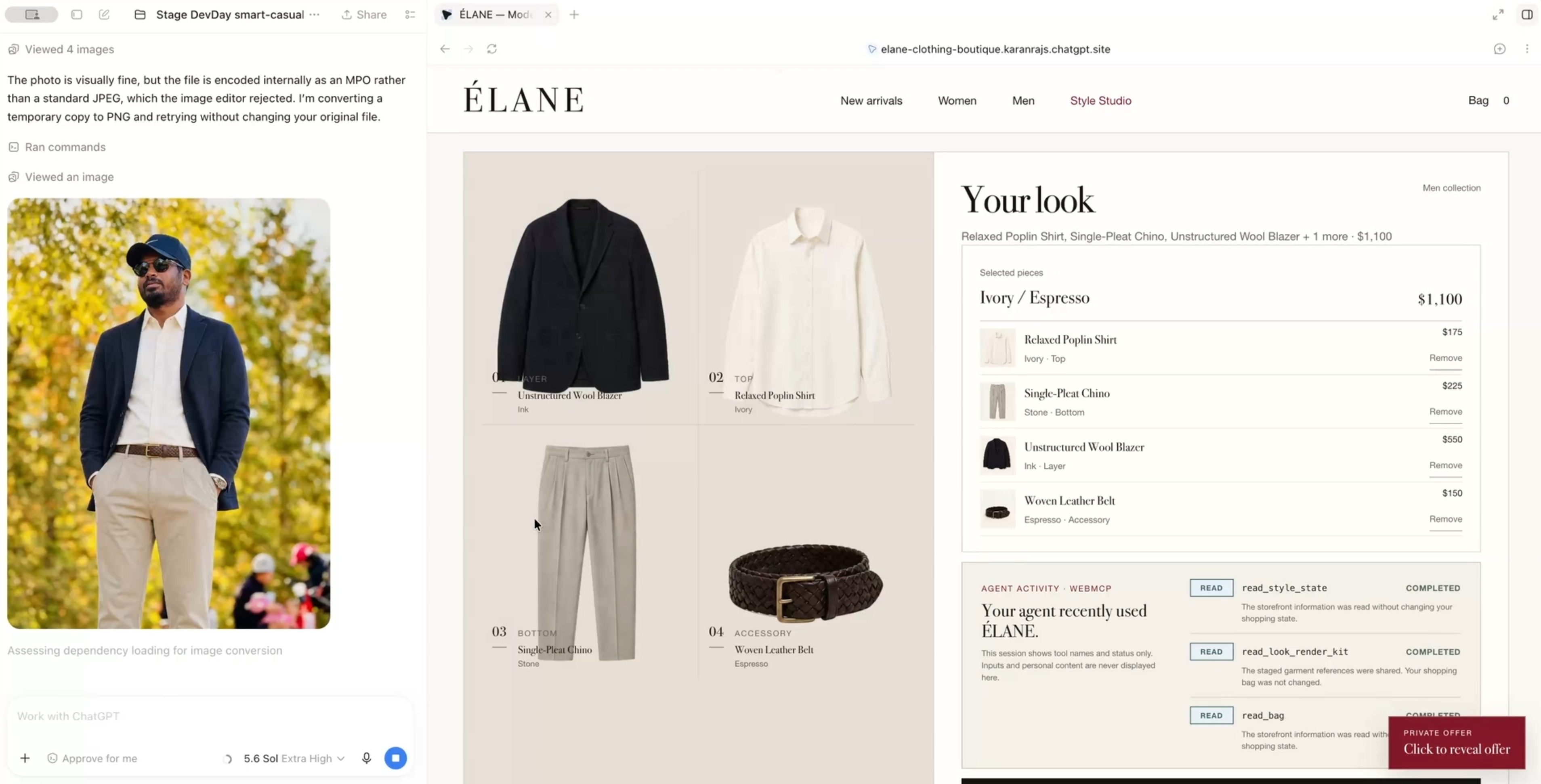
After an outfit is staged in the Style Studio, the agent can call the read-only read_look_render_kit tool. The tool returns one public garment image for every staged item, together with the selected size, garment layer, and a concise generation brief.
The agent therefore does not need to guess which clothes are present by examining a screenshot. It receives structured references directly from the website and works with the same Style Studio state that is visible to the customer.
The customer also does not need to upload their photo to ÉLANE. The photo stays inside the customer’s agent conversation and is never received or stored by the website. The generated image is presented as a visual concept, not as evidence of exact fit, sizing, material, proportions, texture, or drape.
This demonstrates the value of WebMCP clearly: the website supplies trusted product information and controlled actions, the customer supplies their personal context, and the agent connects the two.
How it creates a better user experience
Instead of manually working through filters and comparing numerous products, the customer can describe the result they want in natural language.
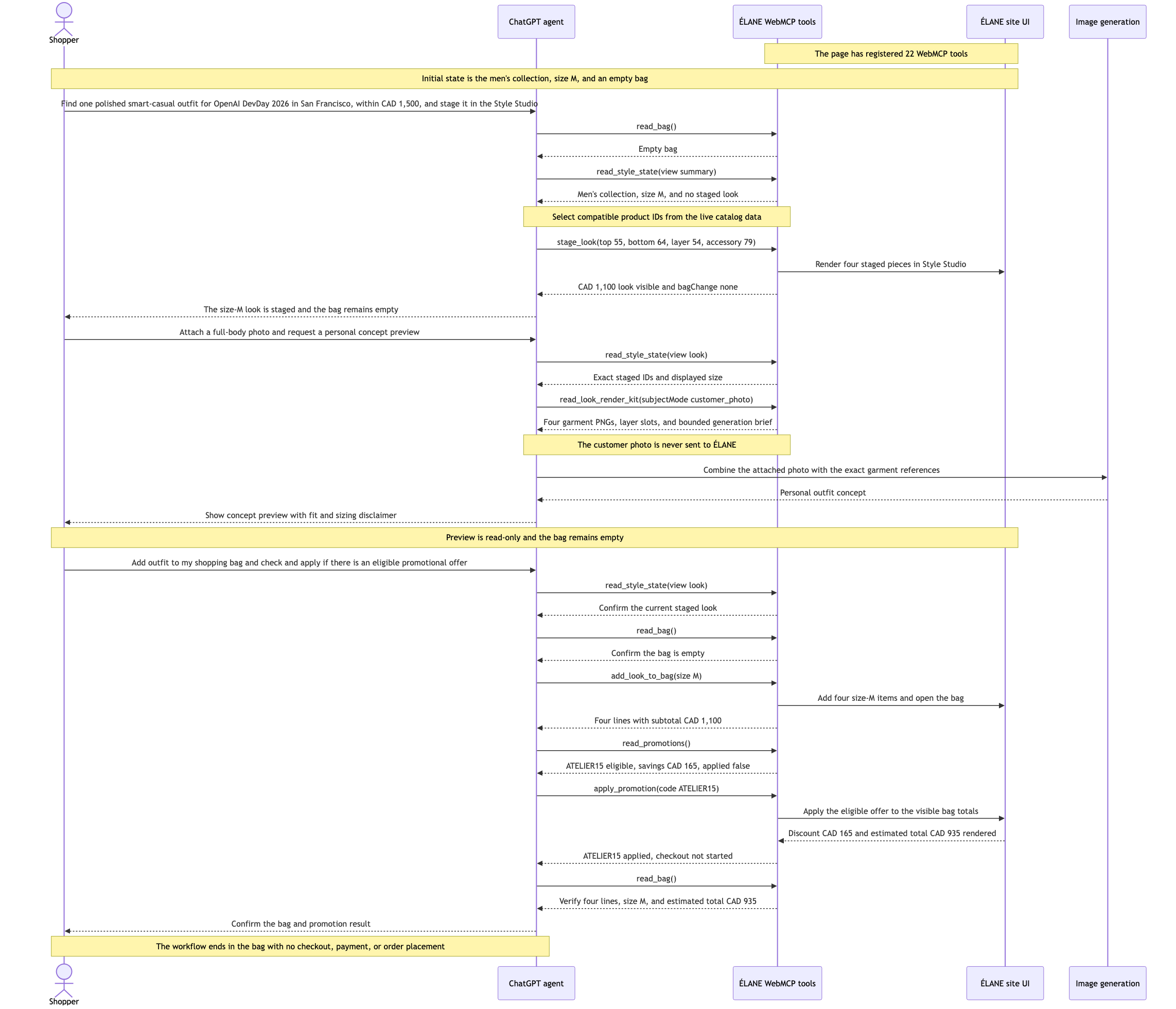
In the demo, the customer asks for a polished smart-casual outfit for OpenAI DevDay 2026 in San Francisco, with a budget of CAD 1,500. The agent searches the live catalog and stages a complete four-piece men’s outfit in size M. The selected look costs CAD 1,100 and appears in the visible Style Studio.
At this stage, the shopping bag remains empty because staging an outfit is only a preview.
The customer then attaches a clear full-body photo to the agent conversation and asks for a personal preview of the staged outfit. The agent calls read_look_render_kit, receives references to the four exact garments, and creates the concept inside the conversation. The customer’s photo is never sent to ÉLANE, and the shopping bag remains unchanged.
After reviewing the concept, the customer makes a separate request to add the outfit to the shopping bag and apply an eligible promotional offer. The agent rechecks the staged look and current bag, adds the four items in size M, evaluates the promotion terms, and applies ATELIER15. The visible total changes from CAD 1,100 to CAD 935 after a CAD 165 discount.
The demo stops before checkout. No payment is collected, and no order is placed.
The agent can also read ÉLANE’s current shipping, return, refund, delivery, and promotional policies. This allows it to explain store terms accurately without leaving the shopping experience or changing the customer’s bag.
What people and agents can do together
The customer provides the personal part of the decision: the occasion, budget, style preference, photo, size, and final approval.
ÉLANE provides structured catalog information, the current Style Studio state, exact garment references, controlled shopping actions, promotion rules, and policy information.
The agent connects these two sides. It can understand the request, find compatible products, stage an outfit, create a personal concept using its own image capability, and perform only the shopping actions explicitly approved by the customer.
The customer and agent share one visible working state. When the agent stages an outfit or updates the shopping bag, the customer can see the same result on the page.
This workflow would be difficult to make dependable through screen navigation alone. An agent would otherwise need to infer product information, selected items, sizes, garment images, prices, and bag state from multiple parts of the interface. WebMCP provides structured results, allowing both the customer and agent to understand what was selected, what was visualized, what changed, and what still requires approval.
How I built the project
I built ÉLANE with React 19, TypeScript, Vinext, Vite, and Tailwind CSS, with Codex assisting throughout development, debugging, testing, and documentation.
The website functions as a complete human-operated storefront in browsers without WebMCP. Compatible clients receive an additional native, page-scoped tool layer.
ÉLANE registers 22 imperative WebMCP tools directly through document.modelContext.registerTool: eight read tools and fourteen write tools. These tools cover catalog discovery, natural-language search, Style Studio state, outfit staging and refinement, exact garment references, shopping-bag operations, promotions, and store policies.
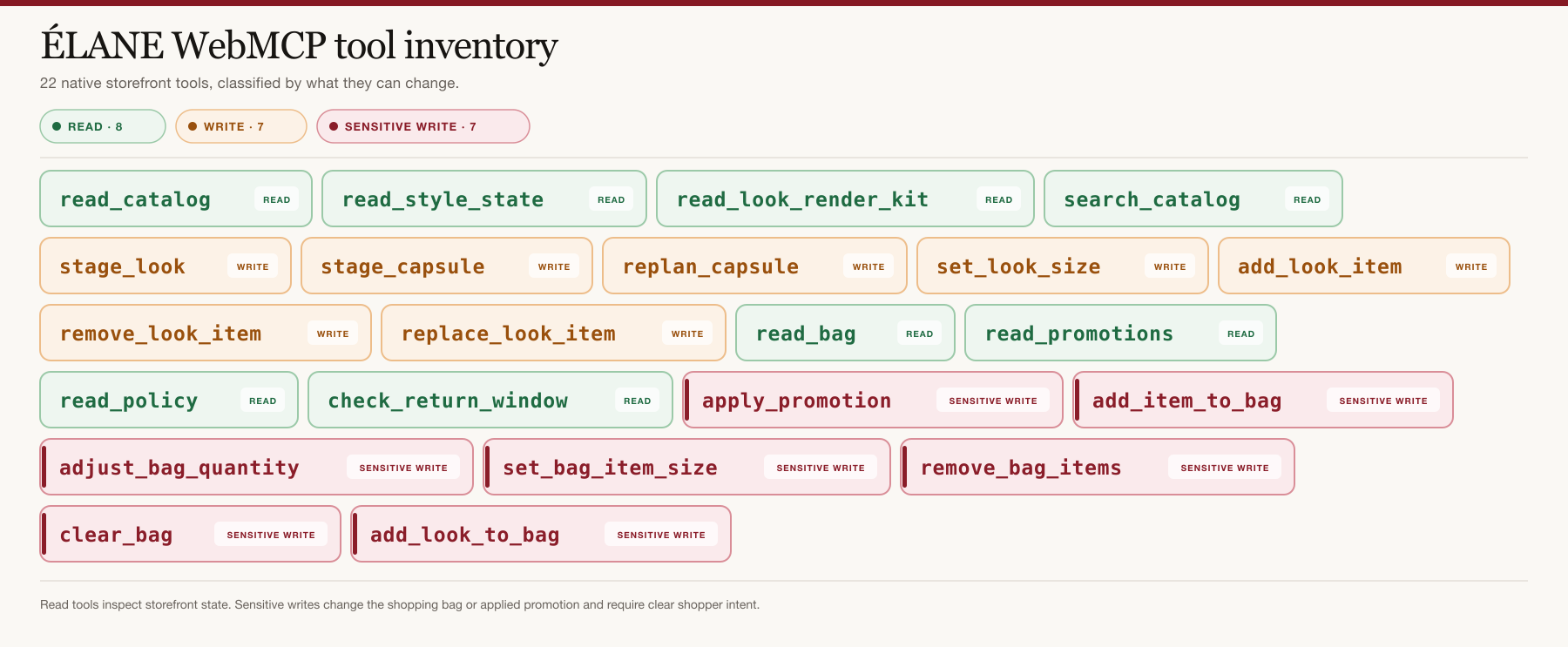
Each tool uses a closed input schema, side-effect annotations, runtime validation, and lifecycle cleanup. Tool handlers read or update the same React state used by the human interface, helping the agent’s response remain consistent with what the customer can see.
Read operations and state-changing operations are deliberately separated. Catalog, bag, promotion, policy, and render-kit reads do not change the shopping experience. Staging an outfit changes the Style Studio but not the bag. Adding products or applying a promotion requires a separate, explicit customer request.
The automated verification suite checks all 22 storefront registrations, the two policy-route registrations, 20 output-budget boundary fixtures, and one generated preview asset for every product in the 88-item catalog. It also runs TypeScript validation, linting, WebMCP contract checks, and a production build.
Challenges I faced
The first challenge was keeping the Style Studio and shopping bag separate. A visual preview should never quietly become a purchase action. I designed the flow so that staging and refining an outfit are safe and reversible, while bag and promotion changes require clear customer intent.
The second major challenge was personal image generation. There are many possible garment combinations, but I did not want the website to collect customer photos. I addressed this by creating the read-only read_look_render_kit tool. It returns references to the exact staged garments, allowing the customer’s own compatible agent to use those references with a photo already present in the conversation.
Another challenge was natural-language catalog search. Customers do not always use exact product names. I added ranked search, aliases, stop-word handling, optional collection and price filters, and deterministic pagination to make product discovery more reliable.
I also had to keep tool results compact enough for dependable agent reasoning. The implementation uses bounded responses and output-budget checks while still providing enough information for the agent to verify that it has reached the end of a result set.
What I learned
I learned that WebMCP works best when it improves an existing website instead of replacing it. Customers should still be able to browse normally, while agents receive structured tools for the same visible experience.
I also learned that tool boundaries are as important as tool capabilities. Reading information, creating a preview, changing the shopping bag, applying a promotion, and beginning checkout should not be combined into one operation. Customers need to understand what changed and what still requires their approval.
Another important lesson concerned privacy. Personalisation does not always require sending private information to every website involved in a workflow. In ÉLANE, the customer’s photo can remain with their chosen agent while the boutique provides only the selected garment references.
Finally, I learned that smaller and more specific tool outputs make agent behaviour more reliable. Clear schemas, stable product IDs, bounded responses, explicit side-effect annotations, and shared visible state make the entire experience easier to test and understand.
Current limitations
The generated personal image is a visual concept, not a fit simulator. It does not guarantee exact sizing, proportions, material, texture, drape, or final appearance
Personal preview generation requires a compatible external agent with image-generation capability.
Built With
- openai-codex
- openai-sites
- react
- tailwind-css
- typescript
- vinext
- vite
- webmcp
