Inspiration
Plenty of households have one smartphone for the whole family, often an older Android with a small or empty data bundle, and three to five children who need to study on it. Most study apps assume each child has their own device, an account and a steady connection. Ek Phone ("one phone" in Urdu) starts from the opposite assumption: several learners, one shared phone, no data.
What it does
Ek Phone is an offline-first study app (a PWA) for siblings or classmates who share one phone. The first screen asks "Who is studying?", not "Log in".
- Several kids, one phone. Up to 8 local learner profiles, each a name tag with an optional 4-digit PIN (salted SHA-256, 30-second lockout after 5 wrong tries). Each child's reading, quiz scores and progress are kept separately on the same phone.
- Read with a highlighter. Lessons are split into sentences. A yellow band moves sentence by sentence with arrow keys or taps, and read-aloud highlights the sentence being spoken.
- Check what you learned. A 5-question quiz with feedback on every answer. Each child's best score is kept separately.
- English or اردو. One tap switches the whole UI and lesson to Urdu, with right-to-left layout and Nastaliq script (the font loads only when needed).
- Teachers make lessons. A lesson writer (title, text split into sentences, 5 questions, preview with size), plus import from .txt, .md or .pdf with 5 fill-in-the-blank questions suggested for the teacher to check and edit.
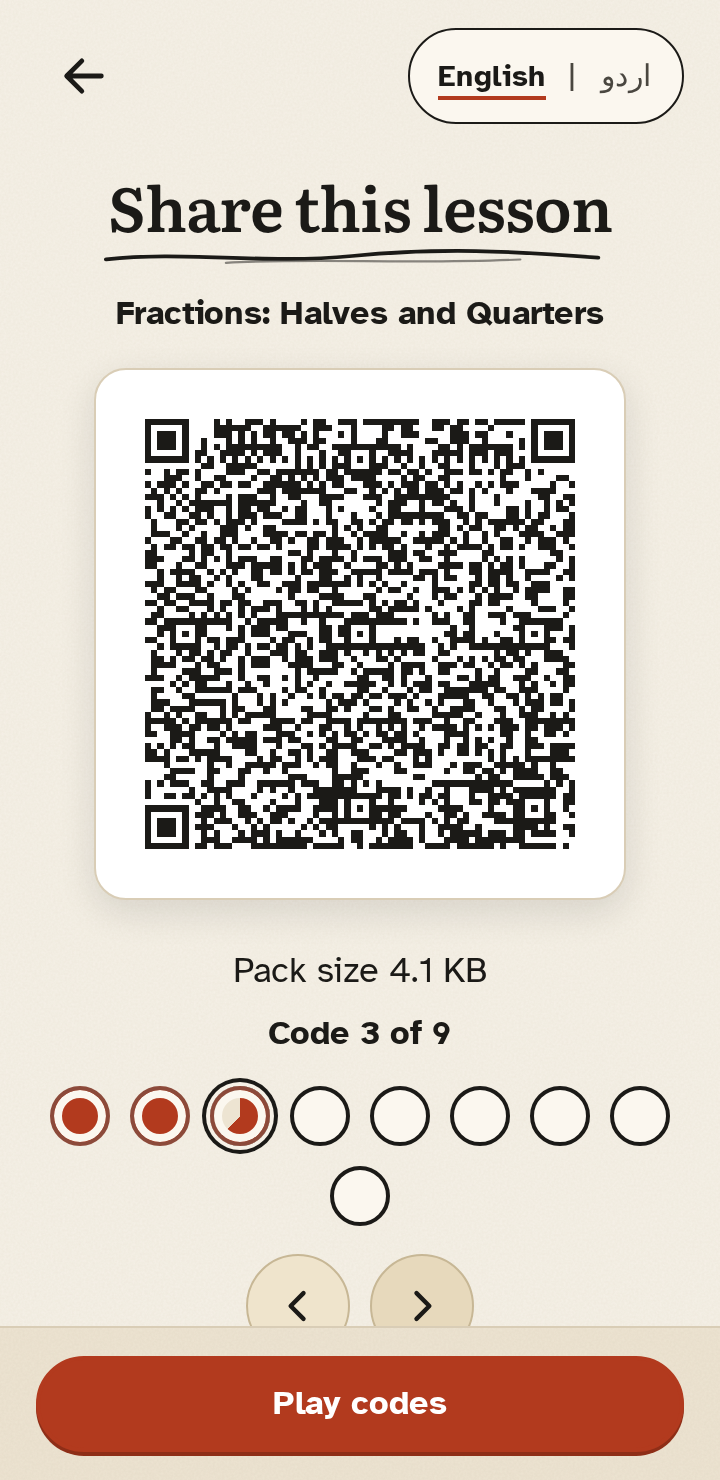
- Share lessons with 0 MB. One phone shows a lesson as a sequence of QR codes. Each code is a link into the app, so any phone camera can open it. A file (offline send-as-file, with a download fallback) or pasted text works too. The pack size is always shown before loading.
- One-tap demo. "Try the demo" loads 4 made-up learners; the demo PIN 1234 is shown on screen.
- Works offline. After one visit, a service worker keeps everything on the phone.
Before → After: four siblings, one phone, no data bundle. Before: every child needs an account and data to log in, the app won't open offline, a new lesson costs data, and progress mixes together. After: each child taps their name, reads, takes the quiz and keeps their own score; a teacher turns a text file into a lesson; it arrives on another phone by QR, using 0 MB.
How I built it
- Plain HTML, CSS and JavaScript with no framework. The first-screen code is 127.3 KB (37.5 KB gzip), within a 150 KB budget. Everything, including fonts, icons and lazy parts, is 1895.6 KB, of which pdf.js is 1374.2 KB and loads only when a PDF is imported.
localStoragefor profiles and progress. Web Crypto for PIN hashing. A service worker with a content-hashed precache for offline use.- A small chunking layer (
qrchunk.js):deflate-rawcompression where available, numbered chunks with a checksum, reassembly in any order, and each chunk written as an app link of at most 300 characters. qrcode-generator draws the codes. The nativeBarcodeDetectorreads them in the app, with jsQR as a fallback. - A lazy-loaded lesson writer and importer (
author.js), with pdf.js for PDF text. - Lesson packs are small bilingual JSON files written for this project (Grade 5 fractions, Grade 5 water cycle, Grade 4 English sentences, plus a Grade 3 plant-parts sample), licensed CC BY 4.0.
- "Kaghaz" (paper) design: paper
#F6F1E7, ink#1B1A17, rust#B23A1E, highlighter#F2D27A. Atkinson Hyperlegible for body text, Literata for headings, Noto Nastaliq Urdu for Urdu. - Testing with Playwright, axe-core and Lighthouse. Every test writes its own result file to
evidence/. - AI assistance: Hark AI assistant helped design, code, test and document this project, and made the demo video; reviewed by the entrant, Muhammad Faizan.
Challenges I ran into
- QR codes hold very little. A lesson does not fit in one code, so the chunking has to survive codes arriving out of order, duplicates, and codes from a different pack.
- A phone camera read the codes as a random string. The first codes were plain text that only Ek Phone's scanner understood. They are now links into the app, so any camera app opens them and the app keeps the pieces.
- Urdu is heavy. Even a subset of the Nastaliq font is 98.2 KB. It loads only when someone turns Urdu on, and is then cached for offline use.
- Testing read-aloud and the camera without real hardware. Automated tests used a fake speech engine and a fake camera feed, so real voices, TalkBack and two physical cameras are still untested.
Real-device testing
On 2026-11-11 the entrant installed the PWA on his own Android phone, and the offline core worked. He found 4 bugs: send-as-file did not work offline, the phone camera read the QR codes as a random string, there was no import from a file, and there was no responsive layout. All four are fixed in commit fc45750 and covered by automated tests: the phone-bug fixes 23/23, import 17/17, and 0 sideways scroll in 121 English + 121 Urdu responsive checks. Read-aloud with real voices, TalkBack and QR transfer between two physical cameras are still untested.
Accomplishments that I'm proud of
- Automated evidence: unit 16/16, end-to-end flow 33/33, demo + lesson writer 30/30, offline 14/14 with 0 app requests to the network, QR transfer 13/13 (7 codes in 3.9 s with a fake camera), phone-bug fixes 23/23, import 17/17, keyboard-only 73/73, live site 14/14.
- 0 axe violations on 20 English and 20 Urdu screens. 0 sideways scroll in 121 + 121 checks from 320 to 1920 px, landscape, and 200% / 400% zoom.
- Lighthouse (mobile, simulated 3G, 4× slower CPU): Performance 91 (median of 3, up from 85 on the same test server), Accessibility 100, Best practices 100, PWA 100, LCP 3.2 s.
- No server, no accounts, no analytics. Nothing leaves the phone.
What I learned
- Designing for a shared device changes the basics: "who is using this?" has to be the first screen, not a login.
- Offline-first means budgeting every kilobyte and lazy-loading anything that isn't needed on the first screen.
- RTL is more than mirroring text. Layout, arrow keys and focus order all need checking in both directions.
- One check on a real phone found 4 bugs that the automated tests had missed.
What's next
- Test read-aloud with real phone voices (especially Urdu), TalkBack, and QR transfer between two physical phones.
- Testing with real learners.
- More lessons and subjects, and more regional languages.
- An optional export/backup of progress to a file, still with no server.
Try it: https://ekphone-app.vercel.app · Code (public, MIT): https://github.com/MuhammadFaizan-prog/ekphone · Demo video (2 min 38 s, captioned): https://github.com/MuhammadFaizan-prog/ekphone/blob/main/docs/demo.mp4 · Built during: AccessED Hacks 2026 (Oct 17 to Nov 20, 2026; all work on Nov 11, 2026)
Built With
- accessibility
- axe-core
- css3
- html5
- i18n
- javascript
- jsqr
- lighthouse
- localstorage
- offline-first
- pdf.js
- playwright
- pwa
- qr-code
- rtl
- service-worker
- urdu
- vercel
- web-crypto

