Inspiration
What if your whiteboard could write back?
Only 27% of U.S. eighth graders are proficient in math, and nearly 40% are below the basic level (2024 Nation's Report Card). We've known for decades what works: in Bloom's "2 sigma" study, students with a one-on-one tutor outperformed classroom students by two standard deviations. But there's one teacher per room, tutoring is expensive, and AI tutors live on a screen, while real practice happens with a marker in your hand.
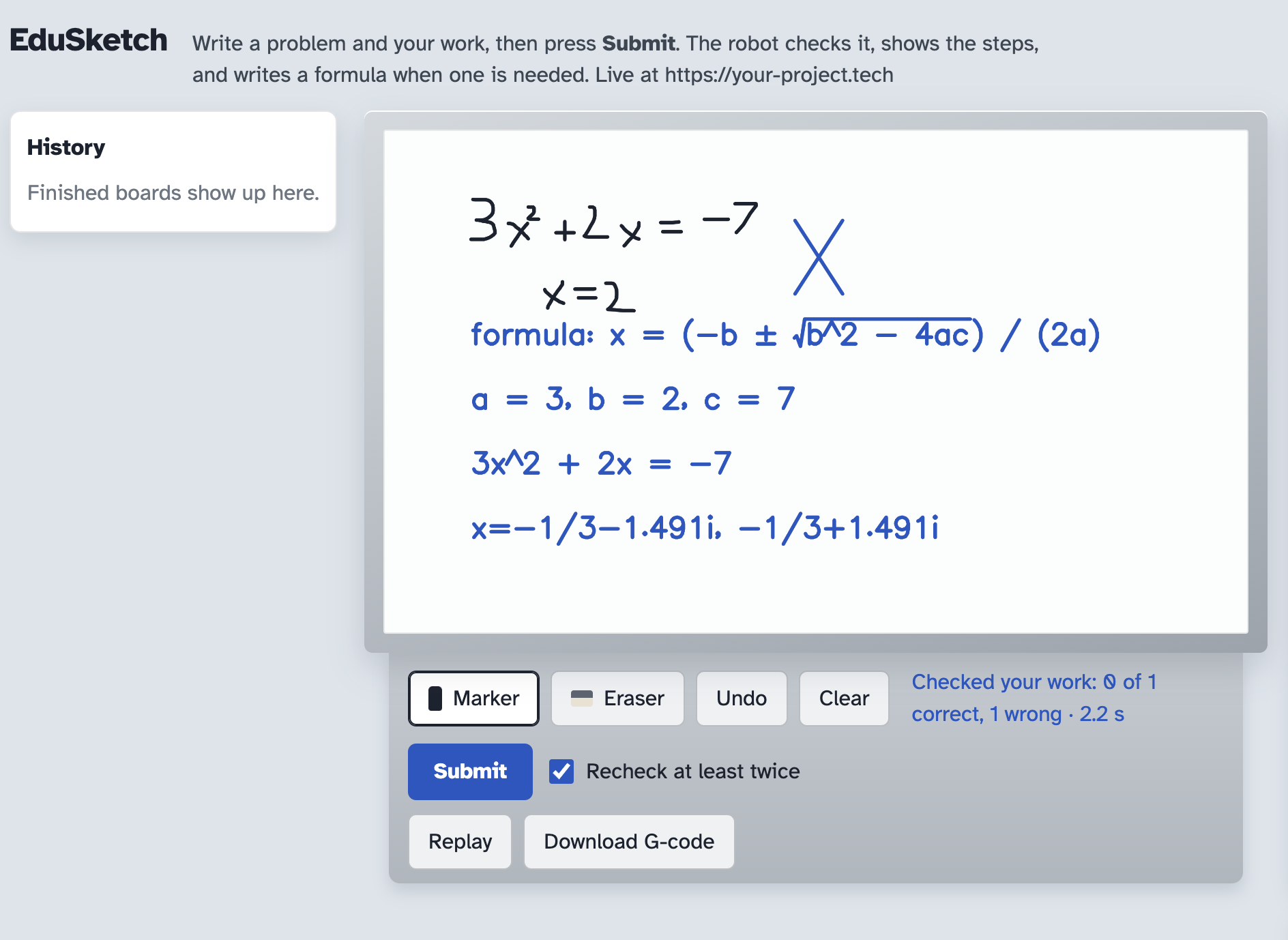
So we built EduSketch: an AI tutor that writes on a real whiteboard. Write 7 + 2 = and a robot picks up the marker and writes 9. Stuck? It writes a hint, not the answer. Done? It marks your work ✓ or ✗ in real ink.
What it does
- Answer: arithmetic, algebra, fill-in-the-blanks, number patterns, and written questions.
- Hint: one short nudge toward the next step, informed by your past mistakes.
- Check my work: grades what you actually wrote and shows which step went wrong.
- Finish drawing: completes a half-drawn sketch, like a house missing its roof or half a face.
- Ask, Talk, and Image upload: type a prompt, say it out loud, or snap a worksheet photo, and the robot answers in place.
A thought process panel shows every step: what the model read, what SymPy computed, where the ink goes, and how long the plotter will take.
How we built it
The core rule: the AI only reads the board. Python decides everything that has to be exact.
- Reading: Vision models (OpenAI, Gemini, or Claude, chosen on the board) return only JSON transcriptions, plus a second "math reading" of every board so
1+1is never mistaken for a letter. - Math: SymPy evaluates, solves, fills blanks, and grades, including complex roots (x² + 2x + 2 = 0 gives x = −1 ± i). The model is never the calculator.
- Handwriting: Hershey single-stroke fonts turn answers into letters a pen can draw with one line, in print or cursive.
- Drawings: The model can't be trusted with pixels, so we name every corner of your sketch (
K0,S2.end) for it to build from, snap loose ends onto existing lines, and mirror symmetric halves in code. A second pass reviews and corrects the result, and an OpenCV fallback finishes circles and gaps with no AI at all. - Photos: OpenCV chooses Zhang–Suen centerline thinning for line art or Canny edges for photos, traces the question onto the board, and writes the answer on the same line.
- Memory: MongoDB Atlas saves finished boards, and Backboard remembers each student's last mistake for smarter hints.
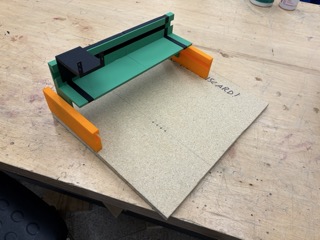
- The robot: Strokes are sorted nearest-first, converted from a 1200 × 700 px board to 800 × 500 mm, and streamed as G-code over pyserial to an Arduino Nano running GRBL, one acknowledged line at a time so the planner never overflows.
How we used Cursor
We're a small team, and half of us spent the weekend with screwdrivers and 3D prints, not keyboards. Cursor is why the software kept up anyway.
We designed the system, including the rule that the AI only reads and Python decides everything exact. Then we used Cursor's agent to build it, and it ended up writing over 90% of our code in under 48 hours while we steered, reviewed, and tested every piece. It wrote our G-code converter, the streamer that feeds GRBL one line at a time, and the simulator that let us watch the robot draw before the motors were even wired.
Our favorite moment came around 3 AM, when our drawings kept floating next to the sketch instead of connecting to it. Cursor traced the bug from the vision output all the way through our coordinate math, and the fix became one of our best ideas: naming every corner of the sketch so the AI builds from exact points instead of guessing.
Without Cursor, we would have built a robot. With it, we built a robot that teaches. Our on-screen robot uses the exact same numbers as the hardware (50 mm/s drawing, 0.15 s pen lifts), and a GRBL simulator let us debug the whole pipeline before the motors existed.
How we used ElevenLabs
Voice turns EduSketch from a whiteboard tool into a tutor you can talk to, which matters most for students who struggle to write things down: younger kids, students with dyslexia, and students with motor difficulties.
- Speech-to-text (Scribe v2): Press Talk and say a problem ("what's twelve times eight?") or an instruction ("draw a triangle"). The recording is sent to ElevenLabs, and the transcript becomes a prompt the robot answers on the board. Captions update live while you're still speaking, so students can see they were heard correctly.
- Text-to-speech (Flash v2.5): When the robot finishes, it reads its answer or hint aloud, so students hear the explanation while watching the marker write it.
Together, a student can go from a spoken question to a written, spoken answer without typing anything.
How we used Gemini
EduSketch can run its entire vision pipeline on Gemini, selected with one click on the board. Gemini reads handwriting, classifies each problem (math, question, pattern, or drawing), and returns structured JSON transcriptions that SymPy then solves exactly. To keep a live demo reliable, we built a fallback chain across Gemini Flash models: if one is busy, the request automatically moves to the next, so the tutor never stalls mid-lesson.
Challenges we ran into
- AI knows "what," not "where." Early drawings floated near the sketch but never touched it. Named anchors, snapping, and a review pass fixed it.
1 + 1looks like the letter H. The model tried to "finish" it as a drawing, so every board now gets a second math reading.- The AI kept "helping." It corrected students' mistakes before grading them. Now it transcribes exactly, and SymPy grades.
- Pixels aren't millimeters. The browser, simulator, and plotter only agree because they share four calibrated numbers: board size, physical size, feed rate, and pen dwell.
Accomplishments that we're proud of
- A full loop from a handwritten problem to real ink on a real whiteboard, with every step explained.
- Answers that are mathematically exact, every time the handwriting is read correctly.
- A simulator that exactly matches the G-code the robot receives.
- Three ways to ask without writing anything: typing, talking, or snapping a photo.
What we learned
The model reads; Python decides. SymPy owns the math, Hershey owns the letters, anchors own the geometry, and GRBL owns the motion. Designing around the AI's weaknesses, instead of trusting it with everything, is what made it reliable.
What's next for EduSketch
- Handwritten step-by-step work, not just final answers.
- Graphing: write y = 2x + 1, and the robot draws the axes and line.
- A camera mount to read a physical whiteboard live.
- Classroom mode: one robot rotating between students, remembering each one's mistakes.

Log in or sign up for Devpost to join the conversation.