-
-
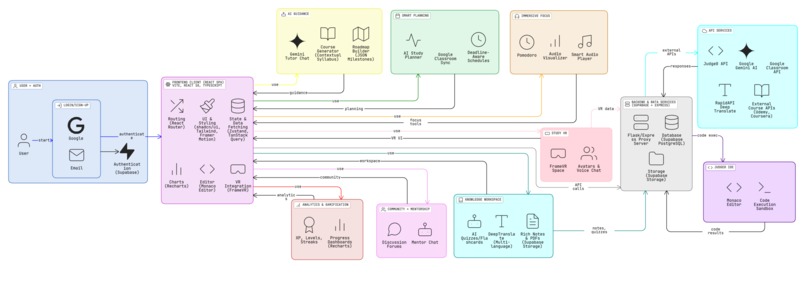
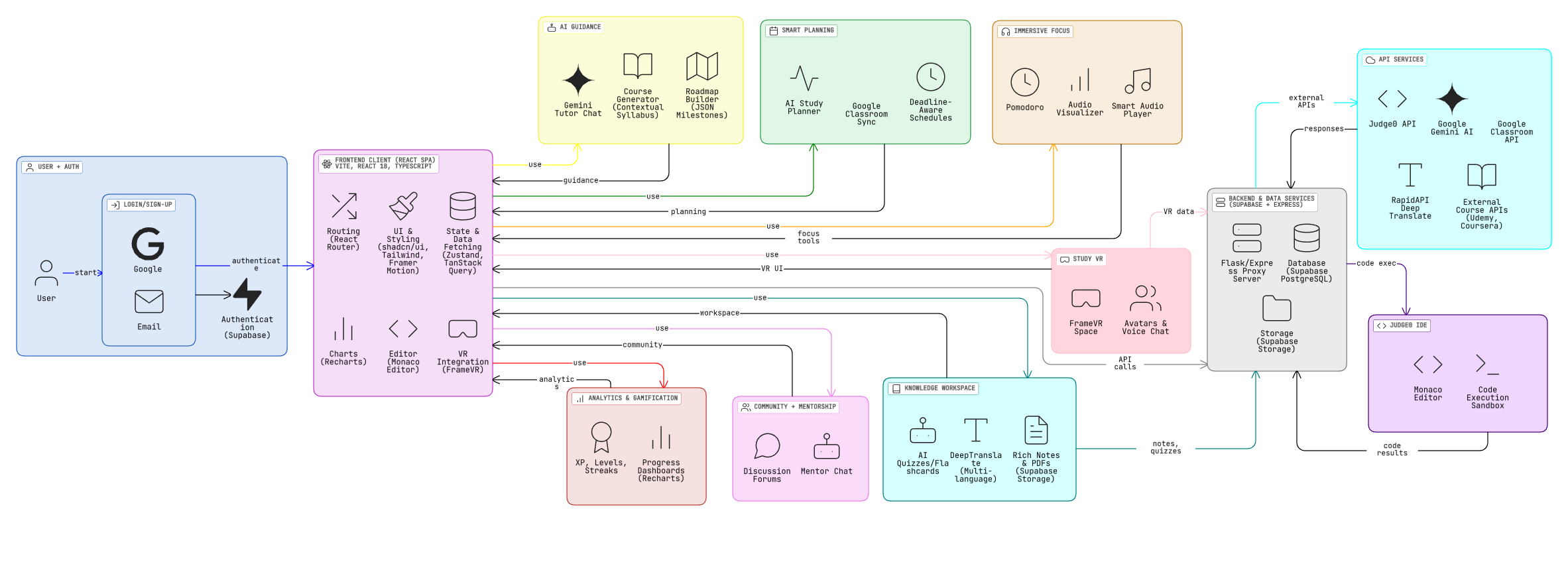
System Architecture (Click on the image to view neatly)
Edura – AI Powered Study & Learning Companion
Inspiration
As students, we often aren’t overwhelmed by the subjects, we’re overwhelmed by the system around studying. Notes spread across devices, PDFs lost in downloads, AI chats scattered in tabs, deadlines in different apps, and the constant pressure to keep up.
I used to feel buried under disorganized material, messy planning, and the frustration of trying to learn efficiently in a chaotic environment.
What I wanted was simple:
- a place to upload and organize everything
- an AI tutor who explains clearly and patiently
- quizzes and flashcards generated automatically
- a study planner that adapts to my deadlines
- a focus space that keeps me grounded
- accessibility options for dyslexia, ADHD, and colorblindness
- something that understands my pace and learns with me
Edura was born out of this need, not just a tool, but a study companion that brings peace, clarity, structure, and personalization to the learning journey.
What it does
Edura is an AI-powered, all-in-one learning companion that simplifies studying through intelligent automation and personalized support.
1. Explain Anything with the AI Tutor
Students can ask questions and receive simple, friendly, step-by-step explanations.
2. Upload Notes/PDFs → Get Quizzes, Flashcards & Summaries
Edura extracts concepts and automatically generates:
- MCQs
- Flashcards
- Summaries
- Revision sets
3. Smart Study Planner
Using deadlines (or Google Classroom import), Edura creates:
- daily study plans
- task prioritization
- personalized schedules
- long-term learning roadmaps
4. Organized Knowledge Workspace
Store PDFs, notes, AI summaries, metadata, and multi-language content in one unified space.
5. Immersive Focus Mode
Pomodoro + ambient audio + visualizers + streaks → helps students stay focused and consistent.
6. Study VR Rooms
FrameVR-powered collaborative study spaces with avatars & voice chat.
7. Learning Analytics & Gamification
Track XP, streaks, study sessions, module completion, and mastery progress.
8. Accessibility & Inclusion
Edura includes:
- Dyslexia mode (OpenDyslexic fonts, spacing adjustments)
- Colorblind-friendly themes (Protanopia, Deuteranopia, Tritanopia modes)
- Clean, distraction-free layouts
- Language translation (30+ languages)
Edura is built to support all learners including neurodiverse students.
How we built it
System Architecture

Frontend
- React 18 + TypeScript
- Vite
- Tailwind CSS + shadcn/ui
- Zust and for global state
- TanStack Query for server state
- React Router
- Monaco Editor
- Recharts
- Framer Motion
Backend & Storage
- Supabase Auth, Database, and Storage
- Custom RLS policies
- Express.js proxy server
- Real-time listeners for progress, streaks, XP
AI Stack
- Google Gemini: tutoring, summaries, quizzes, flashcards, roadmaps
- DeepTranslate API for multilingual notes
- Judge0 for code execution
Integrations
- Google Classroom API
- FrameVR for immersive study rooms
Challenges we ran into
1. Building a fully unified flow
Integrating tutoring, planning, quizzes, VR, notes, analytics, and translations required extreme UX clarity.
2. Handling large PDF uploads
Optimizing extraction → chunking → summaries → quiz generation without lag.
3. Making schedules deadline-aware
Balancing urgency, study time, assignment load, and user patterns was complex.
4. Ensuring precise XP and streak tracking
Real-time events needed consistency across sessions and timelines.
5. Accessibility modes
Designing dyslexia-friendly typography and colorblind themes without breaking UI contrast.
6. VR integration
Embedding FrameVR inside React without performance loss required careful isolation.
Accomplishments we're proud of
- Built a complete AI-powered study companion, not just a chatbot
- Created instant PDF → quiz/flashcard/summary pipelines
- Integrated VR study rooms for collaborative learning
- Added dyslexia mode + colorblind themes for accessibility
- Achieved real-time analytics for mastery, streaks, and study progress
- Designed a clean, modern, aesthetic UI
- Unified planning, learning, and focus in one seamless ecosystem
What we learned
- AI becomes meaningful when structured into real workflows
- Accessibility features aren’t optional, they change lives
- Students don’t need more tools; they need fewer tools that do more
- State management + real-time updates require careful planning
- VR surprisingly increases motivation and accountability
- Good UX is the difference between “powerful” and “usable”
What’s next for Edura
- Mobile app (React Native)
- Offline mode for notes & flashcards
- AI-generated mind maps
- Voice-based AI mentor
- More VR tools (shared whiteboard, Pomodoro rooms, group quizzes)
- Weekly planner with time distribution
- Notion/PDF export
- Smart reminders & habit formation
- Dashboards for teachers, schools & study groups
Built With
- deeptranslate
- express.js
- framermotion
- framevr
- gemini
- judge0
- monacoeditor
- rapidapi
- react18
- shadcn/ui
- supabase
- talwindcss
- typescript
- vite
- zust


Log in or sign up for Devpost to join the conversation.