Problem we solve
Most study resources are static: same syllabus, same pacing, one-size-fits-all.
Students struggle to (a) choose what to study next, (b) bridge knowledge gaps, (c) keep consistent daily progress, and (d) translate goals (e.g., “learn web security”) into concrete actions.
Educators and platforms lack an automated way to provide individualized micro-plans that adapt as the student learns.
- Target users
High-school and university students in CS, Cybersecurity, and related STEM fields.
Self-learners preparing for internships, certifications (e.g., entry-level cybersecurity certs), or interviews.
Educators who want a personalized companion for students.
Small online course providers seeking personalized study pathways.
- Core value proposition
Turn vague learning goals into bite-sized, actionable daily learning items that adapt as the user improves.
Identify weak topics and schedule targeted remediation so students close gaps efficiently.
Provide accountability with progress tracking, micro-deadlines, and optional gamified rewards.
- What it does — feature-level detail 5.1. Intake & profiling
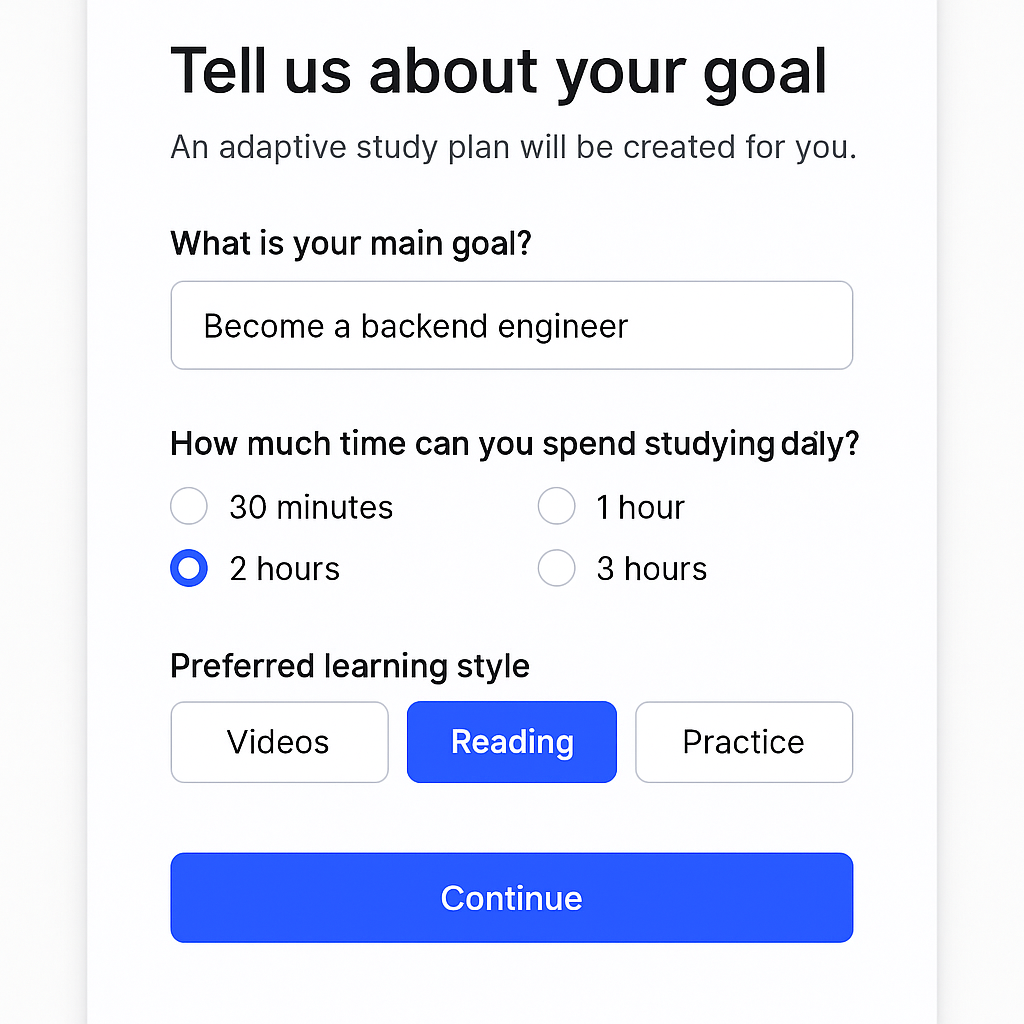
Goal capture: student states long-term goal(s) (e.g., “become a backend engineer”, “pass Intro to Cybersecurity”).
Baseline assessment: short adaptive quiz (10–20 questions) to measure initial knowledge and place the learner.
Preferences: daily available time, preferred learning style (videos / reading / hands-on), exam dates or milestones.
Syllabus ingestion: user can enter/upload a course syllabus, or select from built-in curricula (e.g., CS fundamentals, Networks, Web Security).
5.2. Personalized curriculum generation
Curriculum generator uses the syllabus + baseline assessment to produce a prioritized topic list with dependencies, learning objectives, and recommended resources.
Output: a day-by-day schedule (micro-plan) with lessons, practice problems, short readings, and active recall exercises.
5.3. Adaptive scheduling & re-planning
Each day, EduGuide adjusts the next tasks based on:
quiz results,
time spent,
user feedback (too hard / too easy),
missed sessions.
Rebalancing: pushes forward unfinished items, introduces remediation sessions for weak subtopics, and reorders topics if prerequisites aren’t mastered.
5.4. Explanations & scaffolding
For each concept, the assistant generates: a concise definition, step-by-step worked example, 2 practice problems (with solutions), and a one-paragraph “memory hook” for retention.
5.5. Micro-assessments & spaced repetition
Interleaved quizzes and flashcards generated automatically.
Spaced repetition scheduler adapts to retention performance (e.g., move content to later intervals when remembered).
5.6. Progress tracking & analytics
Learning dashboard: completion %, weak topics heatmap, time-on-task, streaks, mastery scores per topic.
Exports for teachers or integration APIs so LMSes can ingest progress.
5.7. Motivation/Gamification (future / configurable)
Badges, points, leaderboards (classroom mode), streaks, and redeemable small rewards.
Social features: study groups, shared plans, and peer challenges.
5.8. Integrations
Third-party course providers (Coursera, Udemy) and code labs (Replit, GitHub Classroom).
Calendar sync to block focus sessions.
Export/import syllabus via CSV, PDF (parsed), or LTI for LMS.
- How we built it — technical architecture (high level) 6.1. Components
Frontend: React (web), optionally mobile wrappers (React Native / Flutter).
API & Backend: Node.js/Express server (or serverless functions) managing user accounts, progress tracking, business logic.
ML/LLM Layer: Gemini API (or equivalent) for curriculum generation, question generation, explanations, and planning.
Database: Firebase (Firestore) for user profiles, progress, and content metadata (you currently use Firebase).
Resource store: metadata for curated resources (videos, articles, practice problems) and their alignments to topics.
Scheduler: service that computes daily plans for users and handles push notifications.
Auth: Firebase Auth (email, Google), plus OAuth for integrations.
Analytics / Telemetry: BigQuery / Firebase Analytics.
6.2. Data flow (simplified)
User signs up & inputs goals.
Backend creates a profile and calls Gemini with a structured prompt + syllabus + assessment results.
Gemini returns a prioritized curriculum + day-by-day plan.
Backend persists plan in Firestore and schedules daily tasks.
User completes tasks; results and time spent are recorded.
Background re-planning triggers: backend sends updated context to Gemini to re-generate next plan chunk.
- How Gemini is used (detailed)
Prompting pattern: structured prompt templates with sections: user profile, syllabus, known weaknesses, resource constraints, desired granularity (e.g., daily/weekly).
Capabilities used:
Reasoning & planning (break down goals into milestones).
Few-shot template responses (generate learning block = {objective, duration, resources, exercises}).
Chain-of-thought-free outputs (prepare final plan without exposing internal chain-of-thought).
Chunking strategy: generate plans in chunks (e.g., 2-week windows) to keep context size manageable and allow dynamic replanning.
Safety / correctness checks:
Post-process LLM outputs through rule-based validators (e.g., verify prerequisite ordering, scope fits time budget).
Optionally, lightweight retrieval from curated curriculum DB to ground resource suggestions.
Question & Assessment Generation:
LLM generates multi-level questions (conceptual, applied) & step solutions.
Use deterministic seeds or prompts to keep question formats consistent across users (easier grading).
Example prompt skeleton (abbreviated):
Task: Create a 14-day adaptive learning plan for user. User profile: {goal, daily_time, baseline_scores, preferred_style} Syllabus topics: [{id, name, prerequisites, importance}] Constraints: {no more than 60 mins/day, include 2 practice problems/day} Return format: JSON array [{day, topics, objective, duration, resource_links, exercises:[...]}]
- Personalization algorithm (concrete)
Inputs: baseline assessment scores per topic; user availability; syllabus topology; engagement history.
Scoring model:
For each topic compute priority_score = importance * (1 - mastery) * dependency_factor * deadline_urgency.
mastery is between 0–1 (from assessments).
dependency_factor increases priority if topic is prerequisite of many high-importance topics.
Scheduling:
Greedy bin-packing of daily time using sorted priority_score; ensure variety (avoid same heavy topic for multiple days).
Insert remediation sessions when mastery drops after assessment.
Online adaptation:
After each micro-quiz, update mastery via Bayesian update / exponential decay and recompute the plan for next N days.
Exploration vs exploitation:
Occasionally (configurable) introduce new optional topics to broaden learning (serendipity feature).
- Data model (Firestore sketch)
users/{userId}: profile, prefs.
users/{userId}/plans/{planId}: plan metadata (goal, start_date, chunk_size).
users/{userId}/plans/{planId}/days/{date}: tasks, status, timestamps.
questions/{topic}/{questionId}: generated/curated questions & solutions.
resources/{resourceId}: metadata (type, link, duration, license).
analytics/{userId}: time_on_task, quiz_scores.
- UX / user journey (example)
Onboarding: set goal, preferred study time, upload syllabus or pick course.
Baseline Quiz (10–15 min) -> immediate “starting level” and suggested plan preview.
Day 1: morning push -> “Today’s Plan — 40 minutes” with 3 micro-tasks (learn, practice, quick quiz).
After tasks: user marks done or provides feedback (“too hard”).
Evening: quick 5-question quiz and progress update. System updates mastery and adjusts Day 2.
Weekly summary: weak topics, suggested adjustments, badges if milestone achieved.
Include undo/skip options and “snooze” without penalizing long-term adaptation.
- Evaluation & metrics (what to measure)
Engagement: daily active users (DAU), sessions/day, average time-on-task per session.
Learning effectiveness: pre/post test gains on baseline topics (normalized gain).
Retention: % users continuing after 7/14/30 days.
Mastery acceleration: time to reach mastery threshold per topic vs. control group.
Plan accuracy: % of suggested tasks completed on schedule.
Satisfaction: NPS, in-app feedback (“this plan was helpful”).
Suggested experiments: A/B test adaptive re-planning strategies and different remediation intensities.
- Challenges & mitigations (expanded) 12.1. Balancing personalization with academic accuracy
Risk: LLM might produce incorrect or misleading educational content.
Mitigation:
Use curated knowledge base for fact-checking important content.
Apply rule-based validators for dependency ordering and common-sense checks.
Have a “trusted resource” flag: only recommend vetted resources for critical learning milestones.
12.2. Long-term context handling
Risk: LLM context limits may cause drift.
Mitigation:
Summarize long-term progress state into compact prompts (e.g., mastery vector + last 10 assessments).
Store canonical representations (topic mastery scores) rather than raw logs for each call.
12.3. Overfitting to user-reported data
Risk: Users may over- or underreport difficulty.
Mitigation:
Combine self-report with objective short quizzes.
Use engagement signals (time spent, quiz correctness) to adjust automatically.
12.4. Privacy & sensitive data
Risk: storing learning behavior or performance may be sensitive.
Mitigation:
Follow data minimization: store only what's necessary.
Allow export/delete of user data; strong encryption at rest & in transit.
Transparent privacy policy & parental-consent flows for minors.
- Safety & content policy considerations
Prevent generation of harmful or exam-leak content: block prompts that request to generate answered copyrighted exam question banks or facilitate cheating.
Filter any content for profanity or disallowed content.
Provide citations/links when recommending external resources and flag paid content.
- Monetization & business model ideas
Freemium: core adaptive plan for free; premium for deep analytics, 1:1 mentor sessions, advanced practice banks.
B2B licensing to schools or tutoring centers (LMS integrations).
White-label for education platforms.
Affiliate / referral fees for recommended paid courses (clearly disclosed).

Log in or sign up for Devpost to join the conversation.