-
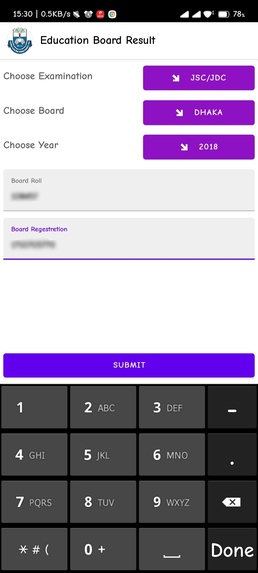
All Exam Boards, Exam Year and Exam name selections and Board Roll Reg input with classic UI.
-
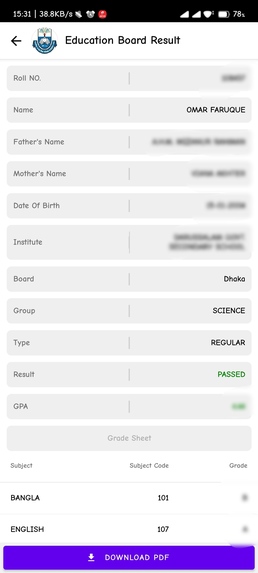
Results are beautifully organized with GPAs and PDF generation
-
-


 ## **Education Board Result (EBR)**
EBR is a android app that help to get Board Exam's Result
easily and generate a printable PDF file.


<a href="https://github.com/OmarFaruk-0x01/Education-Board-Results/issues">Report Bug</a>
·
<a href="https://github.com/OmarFaruk-0x01/Education-Board-Results/issues">Request Feature</a>
About The Project

EBR is a mobile version of educationboardresults.gov.bd with some extra features e.g. Generating PDF, and clean UI. The app was made with React Native as a Frontend Technology and Python Flask as a Backend Technology. The app will help those people who can't use websites. People can easily get their results and also generate PDF in one click. ## Features with Snapshots 1. All Exam Boards, Exam Year and Exam name selections and Board Roll Reg input with classic UI. snapshot
 2. Results are beautifully organized with GPAs and PDF generation
snapshot
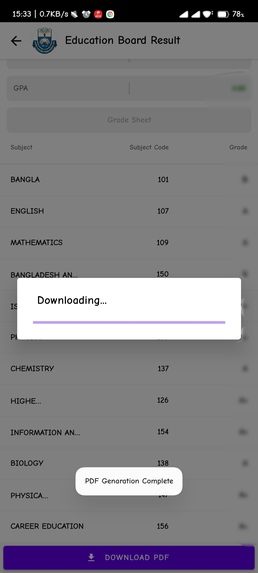
 3. Server side printable PDF generation. In one click.
snapshot
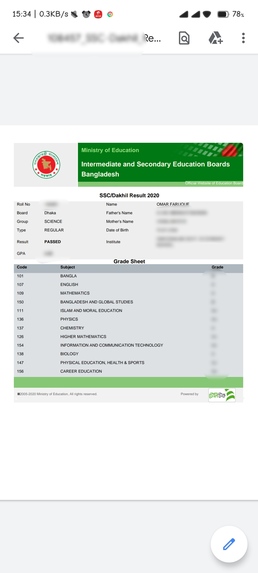
 4. Save Your Result's PDF in your storage
snapshot
 ## Built With
#### Frontend Technology
* [React Native](https://reactnative.dev/)
* [React Native Paper](https://reactjs.org/)
#### Backend Technology
* [Python Flask](https://svelte.dev/)
* [BeautifulSoup4](https://pypi.org/project/beautifulsoup4/)
* [HTML to PDF]()
## Prerequisites
There are some prerequisites to run this app and server
* **NPM**
Follow the instruction to install [node-js & npm](https://nodejs.org/de/download/package-manager/)
######
* **Python3**
Linux
```sh
sudo apt-get install python3
sudo apt-get instsll python3-pip
```
MacOS
```sh
brew instsll python3 python3-pip
```
Windows
Download Python Binary by clicking here
#####
* **React Native**
React native has a greate [documentation](https://reactnative.dev/docs/environment-setup) for enviroment setup
## Installation
### Frontend
1. Clone the repo
```sh
git clone https://github.com/OmarFaruk-0x01/Education-Board-Results
```
2. Goto to the Frontend Folder
```sh
cd Frontend
```
4. Install NPM packages
```sh
npm install
```
4. Run the command to start application.
```sh
npx react-native run-android
npx react-native start
```
### Backend
1. Goto to the Backend Folder
```sh
cd Backend
```
2. Install dependencies
```sh
pip3 install -r requirements.txt
```
3. Run the server
```sh
python3 main.py
```
Setup & Run
Now you have to run some commands to start the app.
Frontend
- To run the application
sh cd Frontend npx react-native run-android # 'run-ios' if you are in macOS - To start the developement server
sh npx react-native start - To make a Release Build follow [the article][release_build_article].
Backend
Use those commands to run the backend server.
   cd Backend
   python3 main.py
Any Issue?
If there are any connection issue with localhost server then use [Ngrok][ngrok_url] or any other porxy.
You can change server host url from Frontend/src/Constants/index.js this file.
const BASEURL = "<Your ngrok/proxy url>";
Roadmap
Frontend
- [x] Create two screens.
- [x] 1st screen for taking informations and
- [x] 2nd screen for showing the results in a organized way.
- [x] Create Static Constant Data of Exam Boards, Exams and Years.
- [x] Create DropDown Button Component take Datas and title with Props
- [x] Link Constant Data with dropdown components
- [x] Take Informations and send it to the server when Submit button will be pressed.
- [x] When get the results, move it to the 2nd screen and organized them.
- [x] When
Download PDFbutton pressed. results send to the server and Generate A PDF. after generating download and save it to the storage.
Backend
- [x] Create a Request Session.
- [x] Send a
GETrequest to the [Education Board Result][eduresultgov] and parse the HTML with BeautifulSoup4. - [x] Findout the all input fields
- [x] Calculate the Captcha and send a
POSTrequest to theresult's routewith all input fields and captcha. - [x] After getting the results parse the HTML and get all information.
- [x] Make a JSON object with all result information and send to client.
- [x] After getting a
POSTrequest to the/genPDFroute with Result Data. Create a PDF and save it to the server storage and generate a link and send it to the client. - [x] After getting a
GETrequest to the/getPDFroute with PDF id. Send the PDF to the client.
[linkedin-url]: https://linkedin.com/in/linkedin_username [ps1]: Screenshots/EBR1.jpg [ps2]: Screenshots/EBR2.jpg [ps3]: Screenshots/EBR3.jpg [ps4]: Screenshots/EBR4.jpg [release_build_article]: https://instamobile.io/android-development/generate-react-native-release-build-android/ [ngrok_url]: https://ngrok.com/ [eduresultgov]: http://www.educationboardresults.gov.bd/
