Inspiration
Let's face it. Staying up to date and organized with school during covid is hard. It's a new environment and many students have moved to discord to stay in touch with classmates. Locating the meeting links, knowing when assignments are due, and keeping up with class can get difficult when you have to do it all by yourself. Surprisingly, there's no discord bot on the market to help with that. This is why we decided to tackle this issue.
There has been too many times where a friend has asked us "Do you know the link to the zoom meeting for this course?" or "What do we have to get done this week?" because they are still adjusting to the online learning environment.
According to a Survey Study on the Effects of COVID-19 on College Students’ Mental Health in the United States, Of the 195 students, 138 (71%) became more stressed and showed an increase in anxiety due to the COVID-19 outbreak.
As students ourselves, we would like to solve at least one issue COVID has caused and our solution was EduBot.
What it does
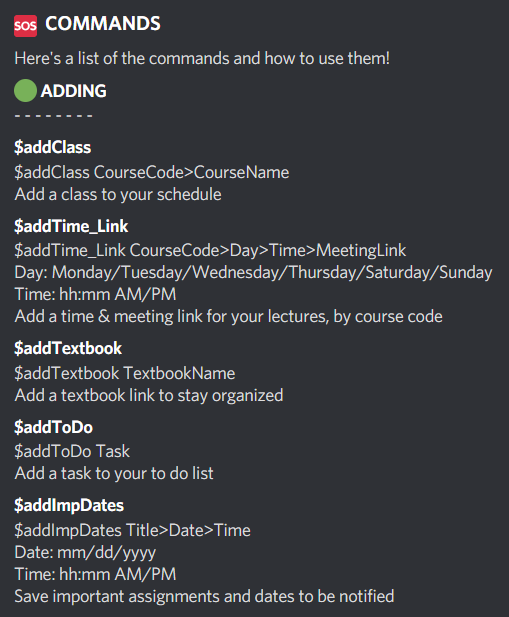
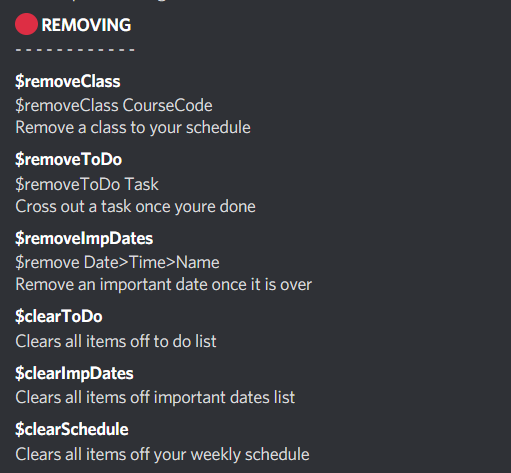
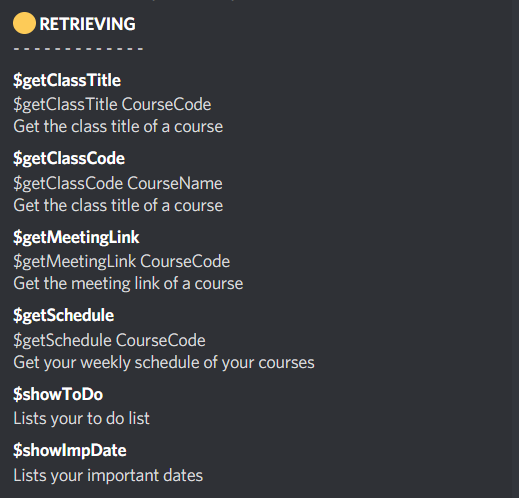
Edubot is a discord bot that is made to help students stay organized while learning online. You are able to store class information, meetinglinks, important events and even keep a todo list. All class information is stored in a database. When a class or important event is about to take place, you are notified in a discord channel of your choice.
How we built it
Edubot was built using Python, CockroachDB and SQL.
How to run
- EduBot is currently not hosted on a server domain
- In Command prompt, a packages need to be installed
In Command prompt, run:
pip install -U discord.py
pip install -U python-dotenv
pip install -U os-win
pip install asyncio
pip install psycopg2-binary
pip install APScheduler
pip install cron-schedule-triggers
To authorize the bot into discord: ` https://discord.com/api/oauth2/authorize?client_id=837782902066511902&permissions=0&scope=bot
`
Challenges we ran into and Accomplishments that we're proud of
We had an issue of making the discord bot post a message without calling any commands. After doing some research we were able to implement CronTrigger (CronTrigger uses “cron expressions”, which are able to create firing schedules) and Asyncio (library to write concurrent code using the async/await syntax) into our code.
What we learned
Our team members learned how to built a python bot, implementing various different commands. As well, All members learned how to connected the SQL database, and dynamically send and retrieve information from the database. Furthermore, we learned how to work with various python libraries, such as the apscheduler library to schedule timed alerts.
What's next for EduBot
The next steps for EduBot would be to deploy and host it so that it doesn't have to be hosted locally. As well, Edubot would have to be extended to work for multiple different unique users. Currently, Edubot is restricted to only work one user as there is only one database and table storing all the informations
Built With
- cockroachdb
- python


Log in or sign up for Devpost to join the conversation.