-
-
-
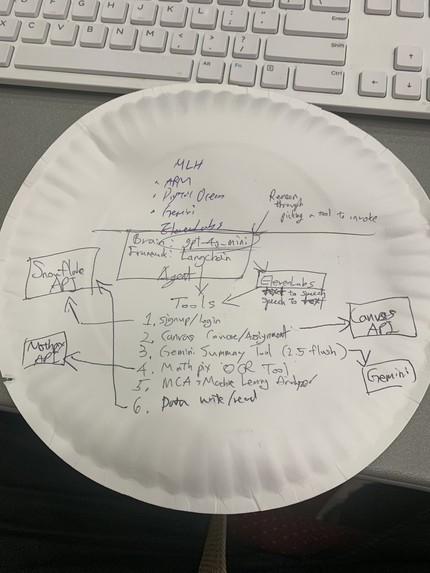
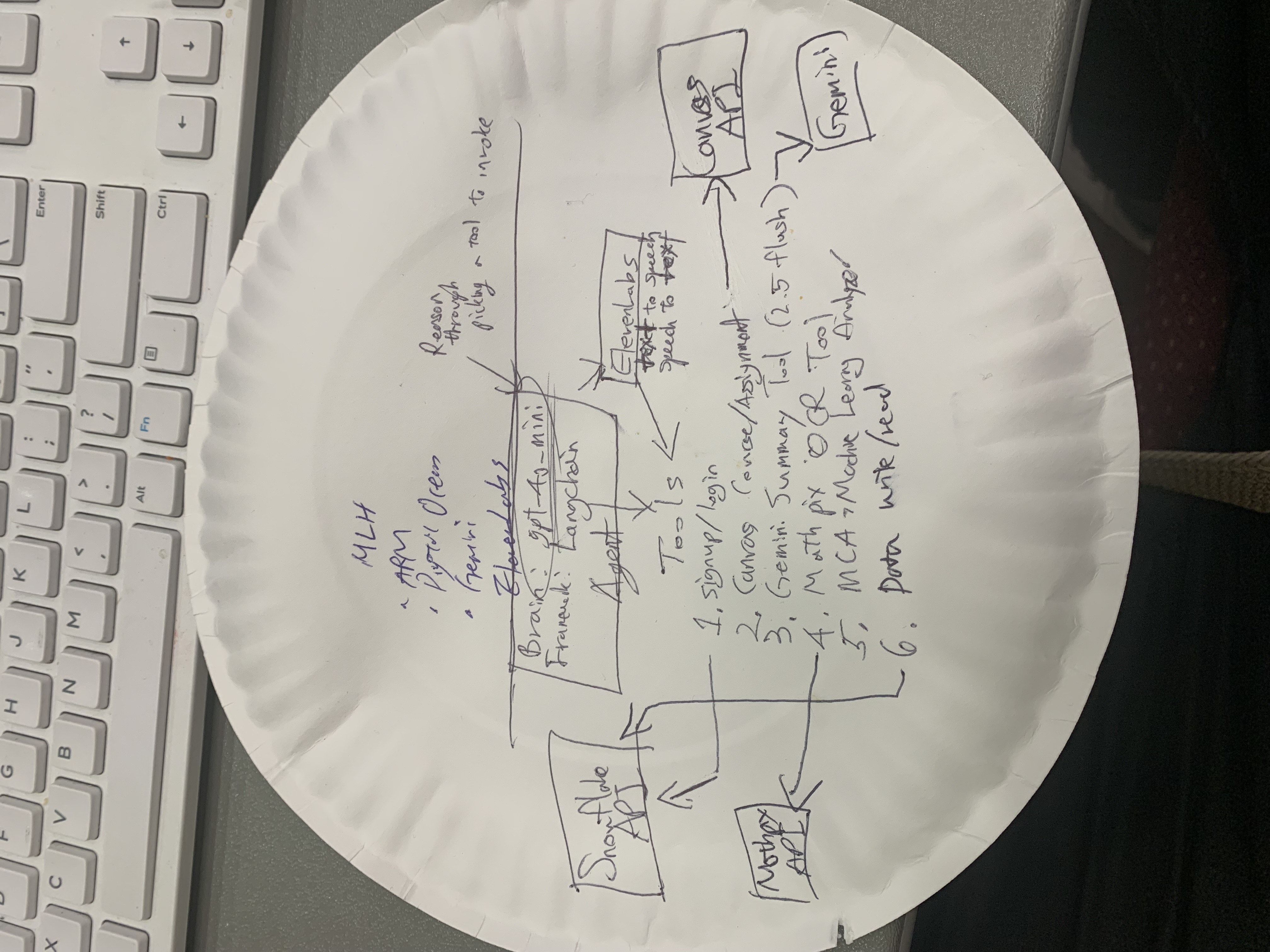
Tech Stack on paper plate
🧠 Inspiration
Blind and low-vision students often struggle to access digital course materials independently. EduAgent was built to make course information, research, and OCR-based summaries instantly available through voice or text — no screen navigation required.
🧠 Architecture Overview
EduAgent is a LangChain-powered multimodal assistant designed to help blind and low-vision students access academic content using voice or text. The core agent uses GPT-4o-mini via the OpenAI API, orchestrated through LangChain’s create_openai_tools_agent() to call specialized tools dynamically.
💡 High-Level Flow 1. Frontend (Voice & Text UI) • Built in Flask + Bootstrap 5, with voice and typing modes. • Voice input is recorded via MediaRecorder, sent to /transcribe_and_run. • The backend transcribes speech using ElevenLabs STT and returns both transcript and GPT-4o response (optionally with ElevenLabs TTS playback).
2.  Backend (Flask + LangChain Agent)
• The core model: gpt-4o-mini (via openai API).
• The agent runs through langchain.agents.create_openai_tools_agent() using your custom tools below.
• Each user input is structured as a ReAct-style message (input → reasoning → tool calls → final answer).


3.  LangChain Tools Integrated

4.  Data Persistence Layer

• Snowflake acts as EduAgent’s memory:

5.  Voice Accessibility Layer


• ElevenLabs Speech-to-Text (STT) converts spoken input into text.
• ElevenLabs Text-to-Speech (TTS) generates natural speech output.
• Combined, blind users can “talk” to EduAgent hands-free.

6.  File Handling & OCR


• When the user says “OCR tools/test1.png and summarize”, the agent automatically:
1.  Calls mathpix_ocr() → extracts LaTeX + plain text.
2.  Summarizes the result via GPT-4o-mini.
3.  Logs both raw text & summary to Snowflake.
Each time a user sends a voice or text request, EduAgent: 1. Converts speech → text (if applicable). 2. Sends the text input to the LangChain agent. 3. The model chooses the right tool (OCR, Canvas, or Snowflake). 4. The agent executes the tool call and returns the structured result. 5. The output (and optional audio) is returned to the front end.
⸻
⚙️ How We Built It (Technical Details)
🔧 Core Stack • Language model: GPT-4o-mini (OpenAI API) • Orchestration: LangChain tools + agent executor • Backend: Flask (Python 3.12, venv) • Frontend: Bootstrap 5 (voice + type UI) • Persistence: Snowflake (warehouse + connector) • OCR: Mathpix API • Voice I/O: ElevenLabs STT + TTS • Course data: Canvas LMS API (Georgia Tech) • Research data: Semantic Scholar Graph API
⸻
🚀 What it does
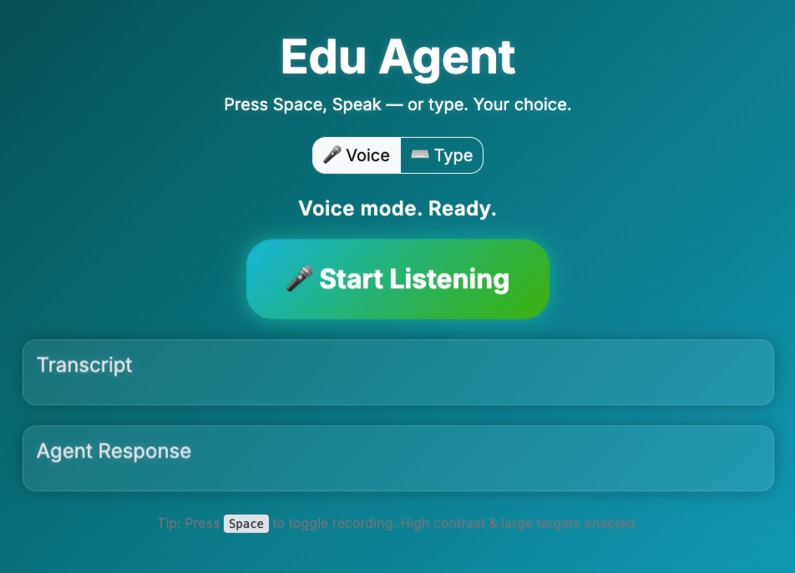
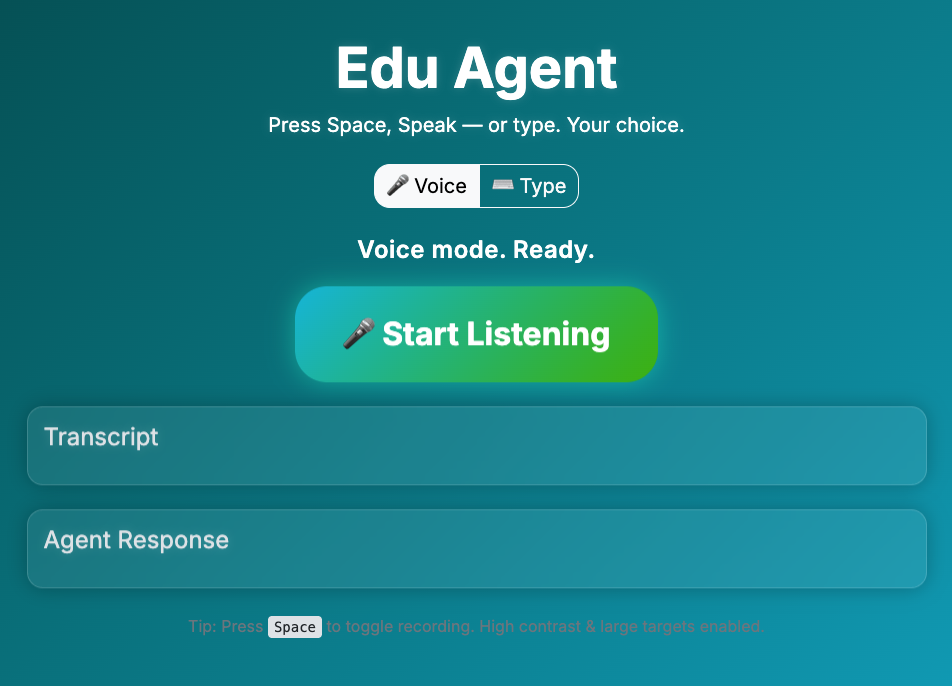
EduAgent is an accessibility-first education assistant that listens, reads, and speaks. • 🎙️ Voice Mode: Students press the space bar, speak a question, and EduAgent replies aloud using ElevenLabs TTS.
• 📚 Canvas Integration: Fetches course lists and assignments directly from Canvas LMS.

• 🔬 Semantic Scholar Search: Finds and summarizes related academic papers.

• 🧮 OCR + MathPix: Reads equations or text from uploaded screenshots.

• 💡 Agentic Reasoning: Uses OpenAI/Gemini/ASI models to decide which tool to invoke automatically.
Everything is presented in large fonts, high-contrast UI, and voice feedback for screen-reader compatibility.
⸻
🛠️ How we built it
• Frontend: Bootstrap 5 UI (emerald-blue theme) for voice / type toggle interaction.
• Backend: Flask + LangChain OpenAI Tools Agent orchestrating calls to Canvas, Mathpix, and Semantic Scholar APIs.
• Voice I/O: ElevenLabs Speech-to-Text (scribe_v1) + Text-to-Speech (eleven_multilingual_v2).
• Reasoning Core: GPT-4o-mini or local llama.cpp fallback via OpenAI-compatible endpoint.
• Persistence: .env-based secrets and dynamic tool loading through the TOOLS registry.
⸻
Use of ARM
We did a learning path on running local LLM using docker, the hard truth was ai/smolLM2 by hugging face was not enough to reason through invocating a tool as a brain for tool calling agent. Heavier model was not able to be run on my machine, it ran but took enormous amount of time to reason through picking a tool.


🧩 The snippet
In your test_mca.py, you provided:
add x0, x1, x2 ret
That’s a simple ARM64 function that:
Adds registers x1 + x2 → x0
Returns (ret)
llvm-mca simulates this looped hundreds of times through the pipeline to estimate performance characteristics for that CPU.
📊 The report results
The fields shown in your terminal correspond to the following:
Field Meaning Iterations How many loop iterations llvm-mca used to collect statistics (default 100). Instructions Total number of instructions executed (often iterations × 2 here since you have two). Total Cycles Total simulated cycles required. uOps Per Cycle Average micro-operations retired per cycle. IPC “Instructions Per Cycle,” a key throughput metric (here ≈ 1.94 → very efficient). 🧠 In plain terms
Your test measured how efficiently your CPU’s backend can process a two-instruction function (add + ret) in a steady-state loop. It’s a microarchitectural performance simulation—no actual execution, just LLVM’s pipeline model.
✅ Confirms llvm-mca is working.

🧩 In Short
Defines a short AArch64 assembly snippet.
Sends it to LLVM-MCA for microarchitectural simulation.
Parses & prints the JSON performance summary.
Generates detailed text/markdown/timeline output files for deeper analysis.
It’s basically an automated CPU performance micro-benchmarking harness for small assembly routines — useful for ARM optimization or compiler performance studies.
We made this Assembly code analyzer into a tool for agent.
✅ Shows your Apple M2 has roughly ~2 instructions per cycle for this tiny workload.
🧾 Generated full text, timeline, and markdown reports under reports/.
🌤️ Use of Gemini
Gemini 2.5 Flash API powers summarization and context-aware Q&A for OCR output and Semantic Scholar abstracts.
The model rewrites dense research text into concise, screen-reader-friendly explanations.
⸻
🔊 Use of ElevenLabs
• Speech-to-Text: scribe_v1 converts spoken questions into text commands.

• Text-to-Speech: eleven_multilingual_v2 with Rachel voice reads responses aloud.
Together, they create a frictionless, eyes-free conversation loop.
⸻
Use of Digital Ocean
🖥️ Signup Page Deployed to Digital Ocean

https://eduagent-signup-yjsxw.ondigitalocean.app/
Image file to be used with OCR by Mathpicks

⸻
⚔️ Challenges we ran into
• Managing context size limits (128 k tokens) when chaining multiple tool calls.

• Sending image as base64 data increase the number of tokens and it got blocked by openAI. We just used path to handle image.

• After learning the ARM learning path about running LLM locally using docker, we were able to run local model by huggingface smolLM2. However, after figuring out for several hours, the langchain tool calling process and the ability to reason through picking a tool was not possible with such lightweight model smolLM2. We tried different heavier LLM locally on docker, it took several minutes for processing of reasoing to pick a tool, since my machine is not a supercomputer.

• Keeping responses concise enough for auditory consumption.

• Synchronizing real-time audio capture and playback across browsers.

• Handling Canvas API pagination and inconsistent course metadata.
⸻
🏆 Accomplishments we’re proud of
• Functional multimodal agent accessible to blind/low-vision users.

• Integrated four APIs (Canvas, Mathpix, Semantic Scholar, ElevenLabs) under one reasoning loop.

• Verified ARM performance efficiency via llvm-mca.

• Successfully, running local LLMs using docker.

• Created a clean, accessible emerald-blue Bootstrap interface.
⸻
📚 What we learned
• Fine-tuning prompts drastically improves tool-selection accuracy.

• Accessibility testing should be done early — contrast ratios, focus order, and audio cues matter.

• ARM profiling is invaluable for ensuring smooth on-device inference.
⸻
🔮 What’s next for EduAgent
• Add offline mode using local llama.cpp models on Apple Silicon.

• Extend to Blackboard / Moodle LMS integrations.

• Deploy a Progressive Web App for mobile voice-first access.

• Incorporate Gemini Computer Use for real-time document navigation.


Log in or sign up for Devpost to join the conversation.