Inspiration
It is inspired by the lack of learning management systems in many educational institutions. Without the means to centralize their materials, classes end up with slides in one place, past papers in another and notes in a group chat. Building and maintaining an LMS is expensive, so many schools simply don't have one.
At the same time, a lot of learning apps have bolted an AI chat box on. It knows nothing about your class, drifts off topic, and hands over the answer if you ask. We wanted the opposite: a tutor that is the app, teaches from the teacher's own material, and makes the student do the thinking.
The tutor is called Sophie, after Sophie Germain, who taught herself mathematics when no school would take her.
What it does
EdKernel is an education engine with a Socratic AI tutor at its core.
- Sophie guides instead of answering. She asks one question at a time, never gives the answer before the student submits one, and when the student is right, she smiles.
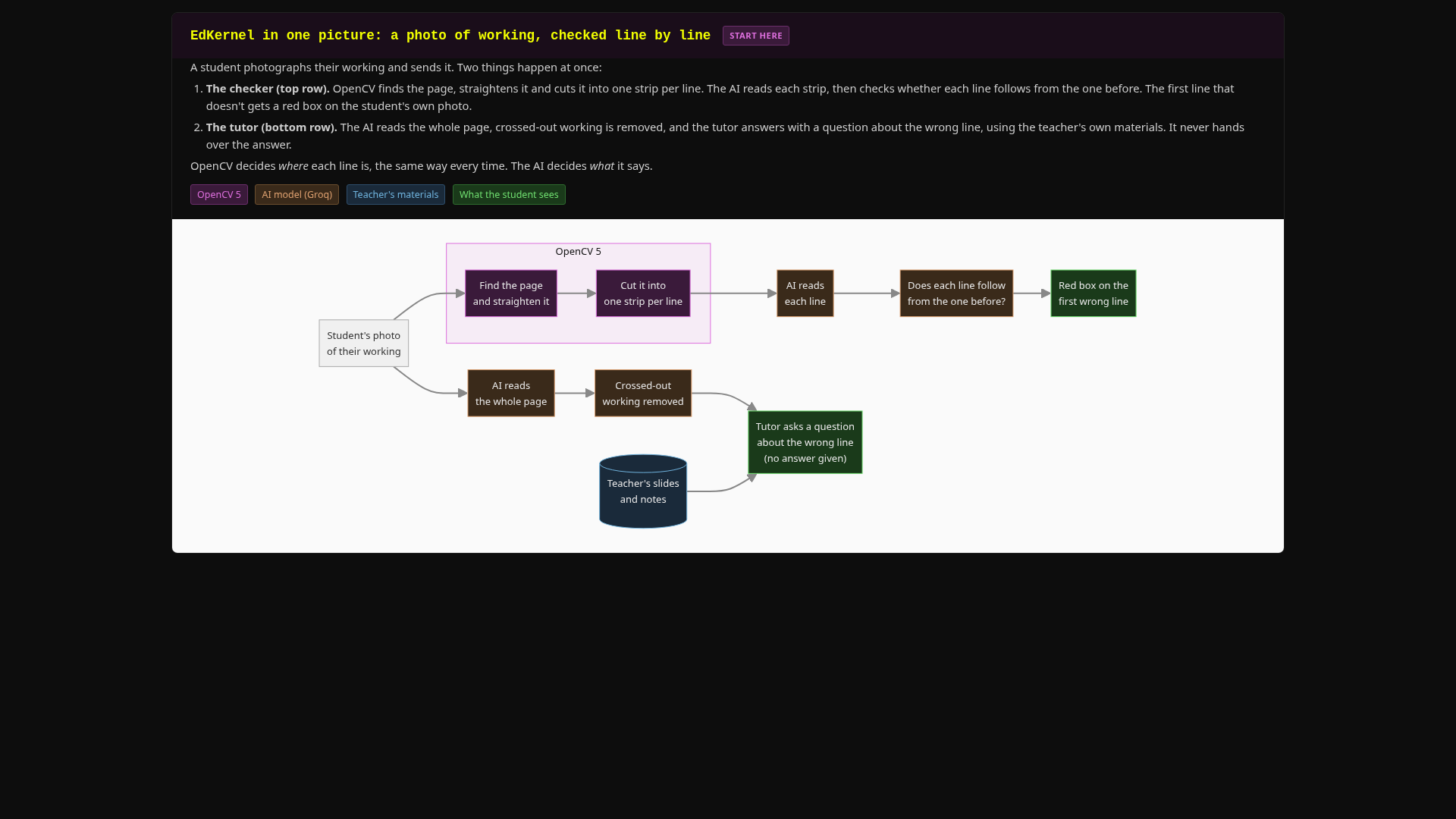
- She reads handwriting. Students photograph their working on paper (up to 10 photos at once). Sophie finds the first wrong line, quotes it, and asks about it, without giving the fix. Crossed-out working is recognised and ignored, because real students don't have unlimited paper.
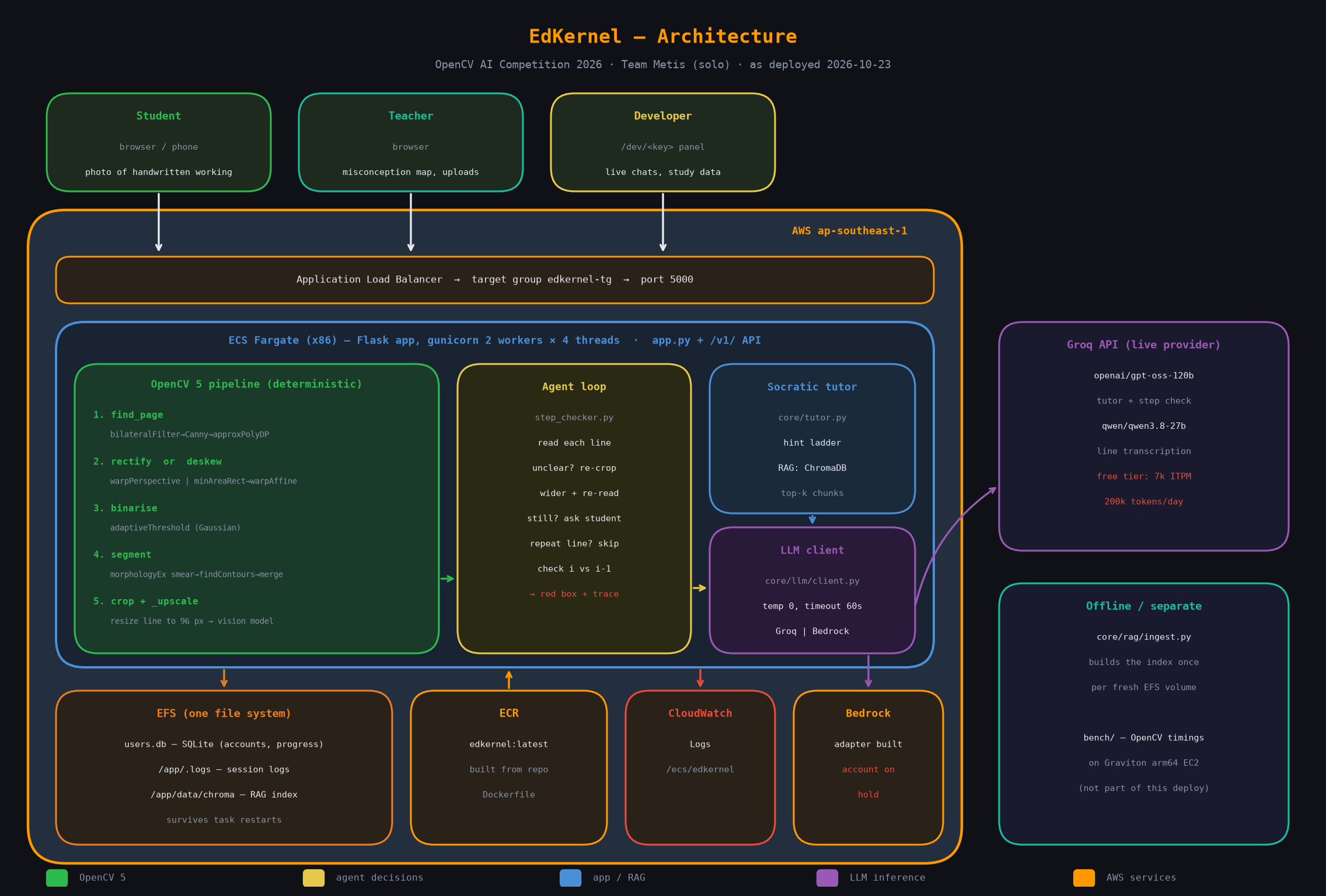
- OpenCV 5 finds the exact wrong line. The step checker finds the page, straightens it, cuts it into one strip per line, and checks whether each line follows from the one before. The first line that doesn't gets a red box on the student's own photo. OpenCV decides where each line is, the same way every time; the AI decides what to say.
- Teachers bring their own material. A teacher uploads slides (PDF, PowerPoint or text), and EdKernel indexes them so Sophie teaches from them.
- Practice and progress: real past-paper search, quizzes marked on the server (the answer key never reaches the browser), mastery per topic, a class map of common mistakes for the teacher, and XP, streaks and quests to keep students coming back.
- An engine, not just an app: everything runs through a stateless
/v1/API, so any front end (web, mobile, LMS plugin) can use the same tutor.
How we built it
- Python 3.12 throughout. Flask serves the web app and the
/v1/API; the engine (core/) has no web code in it, so the command-line tutor and the test suite use it directly. - OpenCV 5 for the vision pipeline:
findContours+approxPolyDPto find the page,getPerspectiveTransform/warpPerspectiveto flatten it, a contour-based deskew when no page is found,adaptiveThresholdto binarise, and morphology plus contour boxes to split it into lines. - Open models through Groq:
openai/gpt-oss-120bfor the tutor andqwen3.8-27bfor reading handwriting. - ChromaDB for retrieval: teacher uploads are chunked and embedded, and the three most relevant chunks go into Sophie's prompt on every turn.
- SQLite for accounts, progress, quiz attempts and misconceptions.
- Plain HTML and JavaScript on the front end, with KaTeX for maths.
- Deployed with Docker on AWS ECS Fargate behind a load balancer, with EFS keeping the database and the search index safe between deploys.
Challenges we ran into
- Line segmentation on real handwriting. A threshold tuned on synthetic text silently dropped real pen strokes, which are much lighter. The order of the filters also turned out to matter: filtering before merging the pieces of a line cut
4x = 20down to=20. We now validate every vision change on real photos. - Small crops are unreadable. A line cut from a phone photo is only about 30 to 40 pixels tall, so each crop is upscaled before the model reads it.
- A repeated line is not an error. Students copy a line out before working on it, and the checker first flagged that as a mistake. We now detect repeated lines without a model call.
- Free-tier limits. Reading every line separately costs about ten times more than reading the whole page, and it used up the free daily vision budget in a handful of photos during our demo. We now read the whole page in the chat and keep the line-by-line check for when it's asked for.
- Prompt rules aren't enough. Telling the tutor to ignore crossed-out working didn't work reliably, so we strip it in code before the tutor ever sees it.
Limitations, honestly:
- Our classroom test was small: three students, one session, and no pre-test, so we can't yet claim that students improved.
- The vision pipeline was tested on photos from one student and one pen. Cluttered or angled photos where the page edges can't be found are handled less reliably.
- On Groq's free tier, photo reading is capped per minute and per day, so heavy use needs a paid tier or a cheaper reader.
- Teacher uploads are not yet kept across redeploys (the search index is).
Accomplishments that we're proud of
- A real classroom test: three students used EdKernel in a school lab. One told us: "it is useful and helpful, it is fun to use, and I can see many use cases for it."
- The OpenCV step checker finds the wrong line on real handwritten photos, not just clean test images.
- Sophie catches slips without giving the answer away. In our demo she caught a 3π/6 that should have been 3π/2 and asked about it instead of correcting it.
- Quiz answers never leave the server before submission, so students can't read them from the browser.
- One engine runs any subject: the same code serves A-level Maths and Chemistry.
What we learned
- OpenCV is best used for what it is good at: deterministic, repeatable geometry. The model reads the handwriting; OpenCV decides where each line is.
- Always test against real model output and real photos. Two changes that looked right on paper failed with the real model.
- Watching real students use it taught us more than any test. One student was locked out by the on-screen keyboard on a tablet, a bug we never would have found ourselves.
What's next for EdKernel Education Engine
- Turn the line-by-line red box back on everywhere with a cheaper or paid vision tier.
- Keep teacher uploads on persistent storage, and a teacher dashboard for the class mistake map.
- A proper pre-test and post-test study, so we can measure whether students actually improve.
- An LMS plugin and a mobile app on top of the
/v1/API.
Built With
- amazon-ecs
- amazon-web-services
- aws-fargate
- chromadb
- css3
- docker
- flask
- groq
- html5
- javascript
- katex
- opencv
- python
- sqlite


Log in or sign up for Devpost to join the conversation.