-
-
Icon
-
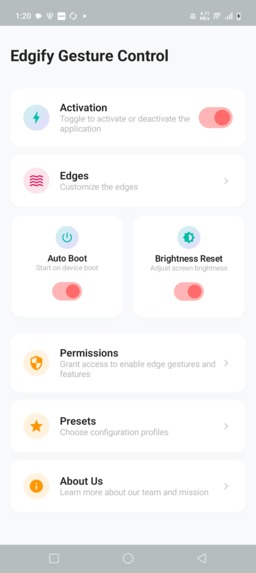
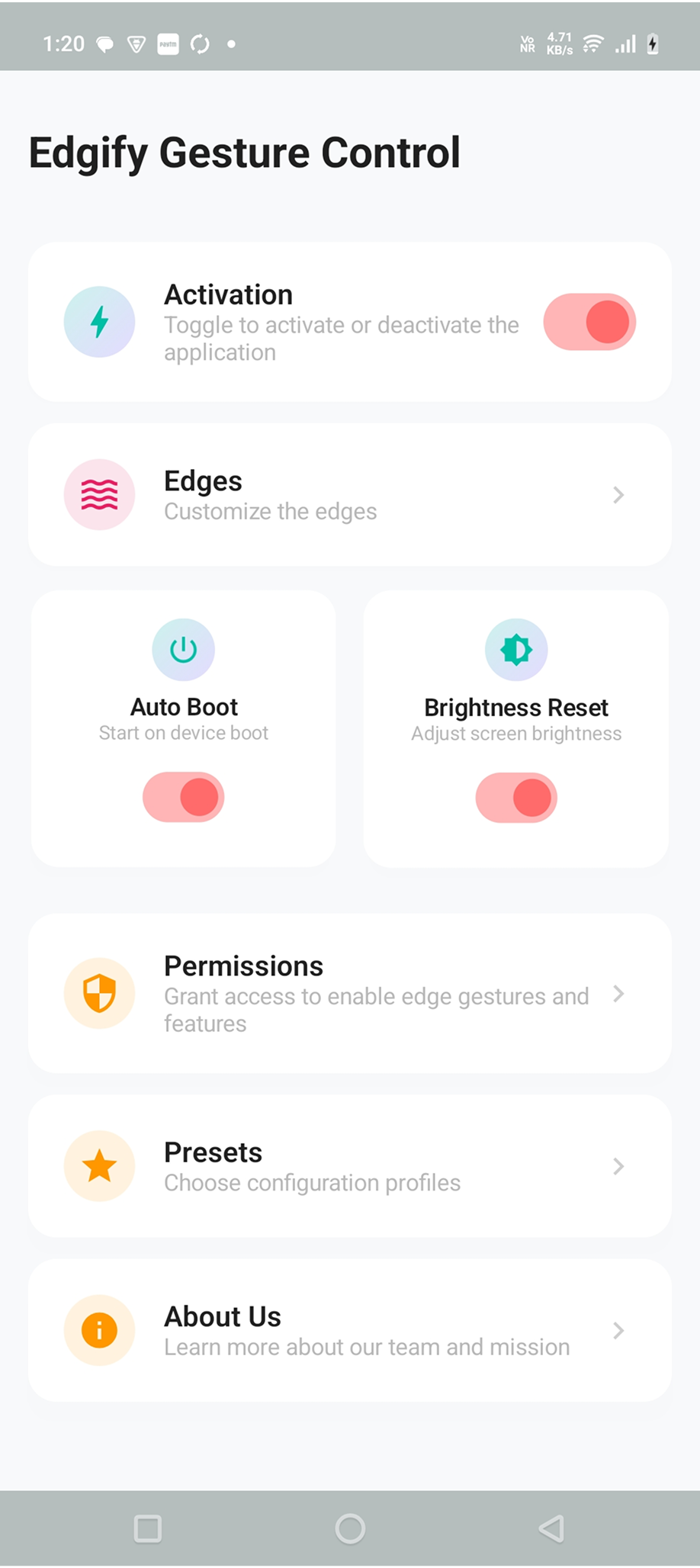
Homescreen
Inspiration
Most Android devices rely on traditional buttons and on-screen controls for basic functions like adjusting volume or brightness. We wanted to revolutionize device interaction by bringing powerful edge gestures to any Android phone.
After experiencing how cumbersome it can be to unlock your phone, pull down the notification shade, or dig through settings just to change brightness or volume, we set out to make device control instant and effortless.
We were inspired by how edge gestures could transform the entire user experience—making common actions accessible with simple swipes from the screen edges, without interrupting what you're doing.
What it does
Edgify - Gesture Control reimagines how users interact with their Android devices through customizable edge gestures. Users can:
- Activate edge zones on all four sides of the screen (left, right, top, bottom).
- Assign multiple actions to each edge: Control Brightness, Media Volume, Ring Volume, Alarm Volume, Call Volume, Notification Volume, System Volume, and Expand Status Bar.
- Customize gesture types: Swipe Up, Swipe Down, Swipe Left, Swipe Right, Long Press, and Double Tap.
- Adjust edge appearance: Thickness (size of transparent edge indicator), Sensitivity (touch responsiveness), and Color customization.
- Configure feedback and behavior: Haptic vibration strength, Visual feedback effects, Toast notifications showing current levels, and System panel display.
- Enable Auto Brightness Reset that automatically restores brightness settings when the screen turns off.
- Activate Auto Boot to launch Edgify automatically when the device starts.
- Use Presets with predefined edge configurations for common tasks—ready-made setups for brightness control, volume management, media control, and more.
- Unlock premium features via RevenueCat lifetime upgrades.
- Test premium features through rewarded ads.
- Enjoy an ad-free experience after the upgrade.
- Receive OneSignal smart notifications for feature updates and tips.
How we built it
Frontend & Architecture
- Frontend: Android (Kotlin + Jetpack Compose) for a modern, responsive UI with smooth edge gesture detection.
- Architecture: MVVM with Hilt DI, Navigation Compose, Kotlin Coroutines/Flows for reactive state management.
Core Systems
- Overlay System: Custom WindowManager implementation to draw edge zones on top of all apps, with TYPE_APPLICATION_OVERLAY for Android 8.0+ compatibility and proper lifecycle management.
- Gesture Detection: Advanced touch listener system combining GestureDetector with custom edge detection logic for accurate swipe recognition and seek control.
Monetization & Growth
- Monetization: RevenueCat SDK for lifetime unlocks and Google AdMob for ads revenue stream with rewarded ads.
- Growth: AdMob for free tier monetization + rewarded ads; OneSignal for targeted notifications and feature discovery.
- Analytics: Firebase + in-app metrics to track gesture usage, edge zone popularity, and feature engagement patterns.
AI Assistance
AI Assistance: Google Gemini as development companion for implementation approaches and troubleshooting; Perplexity AI for research and marketing content. Below is the edge gesture system prompt we used with Gemini:
Create an edge gesture control system for Android that:
- Implements WindowManager overlay views positioned at screen edges
- Uses GestureDetector for swipe, long-press, and double-tap recognition
- Handles edge position calculation accounting for screen rotation and notch cutouts
- Implements seek control for continuous adjustment (brightness/volume)
- Includes sensitivity and acceleration factors for smooth control
- Provides haptic feedback and toast notifications
- Manages multiple edge zones independently with separate configurations
- Handles permission flows for SYSTEM_ALERT_WINDOW and WRITE_SETTINGS
- Minimizes battery impact by efficient touch event processing
Provide the touch listener class, edge view job launcher, and control feature implementations.
This prompt helped establish the foundation for our gesture detection system.
We used Perplexity AI for comprehensive research on Android gesture best practices, edge detection algorithms, and competitor analysis. We provided Perplexity with our core concept, target features, and several Google Play Store links to similar apps in this niche. Perplexity excelled at extracting successful patterns and user preferences from these sources.
Design & Visual Assets
Design: Every edge zone and gesture type required unique implementation with custom touch handling, not just template duplication. The seek control feature (for brightness and volume adjustment) demanded precise sensitivity calibration and acceleration algorithms.
App icon and App Screenshot: App screenshots were created using a combination of Figma for layouts and Gemini for generating realistic device mockups with visible edge indicators. For the app icon, we found this prompt works very well for us, so we used it for all of our apps.
Challenges we ran into
We assumed gesture detection would be straightforward, but implementing accurate edge touch recognition across different screen sizes, resolutions, and devices with various notch configurations proved complex.
Each Android version handles overlay permissions differently, requiring extensive testing and fallback strategies.
The biggest challenge was developing the seek control feature—translating vertical/horizontal swipes into smooth brightness or volume adjustments required sophisticated algorithms balancing sensitivity, acceleration, and step-based control.
Preventing false gesture triggers when users accidentally touched screen edges during normal app usage demanded careful threshold tuning.
Managing multiple independent edge zones simultaneously without performance degradation required optimized rendering and touch event processing.
Ensuring gestures worked reliably on lock screens while respecting security constraints added another layer of complexity.
RevenueCat integration with rewarded ads also required extensive testing to ensure smooth trial-to-purchase flows.
Accomplishments that we're proud of
Successfully implemented a robust edge gesture system that works across different Android versions, screen sizes, and device configurations.
Achieved incredibly smooth and responsive seek control for brightness and volume adjustment with natural acceleration curves that feel intuitive.
Created independent edge zone management where users can configure each screen edge differently without conflicts or performance issues.
Built smart gesture recognition that accurately distinguishes between intentional gestures and accidental touches, dramatically reducing false positives.
Implemented proper permission handling flows that educate users without frustrating them, explaining why each permission is necessary.
Delivered extensive customization options—thickness, sensitivity, colors, feedback types—giving users complete control over their experience.
Integrated preset configurations that let new users get started immediately with proven edge setups for common tasks.
Built as a 2-person indie team within a tight timeline while maintaining code quality and thorough testing.
We're particularly proud of making advanced gesture control accessible to everyone, not just power users. The preset system and intuitive configuration UI democratize what could have been an intimidating feature set.
What we learned
Edge gesture detection is deceptively complex: Accounting for screen rotation, notch variations, navigation bar heights, and different display densities required more abstraction than initially anticipated.
Sensitivity calibration is critical: The difference between "responsive" and "too sensitive" is extremely narrow—extensive real-world testing across devices was essential.
User education matters: Features like edge gestures require clear onboarding and visual feedback. Users who understood the concept during first launch had dramatically better retention.
Performance optimization is non-negotiable: Edge overlays run continuously, so even minor inefficiencies compound into noticeable battery drain. We learned to be ruthless about optimization.
Presets reduce friction: Giving users ready-made configurations significantly increased activation rates compared to starting from blank configurations.
Gesture conflicts are real: Users needed clear guidance about which gestures worked in which contexts to avoid frustration when system gestures took precedence.
Combining ads + lifetime premium is sustainable for both casual and power users, providing dual revenue streams without alienating either segment.
Most importantly, we created reusable templates for RevenueCat, OneSignal, and AdMob integration, allowing us to focus on innovative core features. Gemini served as a development companion for discussing implementation approaches and troubleshooting Android API issues, while Perplexity excelled at research and marketing content creation.
What's next for Edgify: Edge Gesture & Control
App-specific edge profiles that automatically switch edge configurations based on which app is active (e.g., different gestures for gaming vs. reading).
Advanced action types: Flashlight toggle, Screenshot capture, Recent apps switcher, Split-screen activation, and Custom shortcuts to any installed app.
Gesture chains allowing multiple actions triggered by sequential gestures (swipe up, then swipe right = specific action combo).
Edge zones shaped customization beyond rectangles—curved edges, corner-only zones, and custom paths.
Smart gesture suggestions based on usage patterns and time of day using machine learning.
Gesture recording mode where users can draw custom gesture patterns for unique actions.
Floating gesture indicator that shows active edge zones temporarily when screen turns on.
Accessibility enhancements including voice feedback and larger touch targets for users with motor difficulties.
Themed edge styles (neon glow, minimal lines, animated particles) to match user preferences.
Scaling monetization: premium gesture packs, bundled preset collections, advanced action subscriptions.
We sincerely thank all the judges for taking the time to review our application. In addition, we’ve built three more Android apps for this hackathon—please take a moment to explore them as well.
We crunched day and night to build four Android apps during this hackathon, and we learned a lot about how to use coding agents to our advantage. Winning would help us finally expand into marketing, where we’ve been lacking. Thank you, judges.
Our Google Play Developer Page - First, second
Here is the Promo code to access our app's premium UI, do checkout
- Nico Wittenborn : G6FJRAWDJT7QJBCZHVFZYCG
- Evan Bacon : MA4YK1M4JKAU11NVZRJPFQ9
- Evelin Herrera : Z7Z74S1ZFXWLXVBFG43D60F
- Andrew Davies : 8TYUQYJACQLK6JDXPBQHC5R
- Eric Crowley : 7JQ0XQ53MQFT7AJJPQH05P3
- Adam Lyttle : PKUZ1CJZBFQMSQNC69BRZF6
- Pamela Hill : 5YN0FPS60LBWVXYFFKGZXPD
- George Deglin : U98YWGWQG3PKF8365ET3HW2
- Thor Schaeff : VUGLN4DLLTT62EB4GKGG00N
- Rajiv Ayyangar : 94KY1UDA4G91U3P2XAVKRZ2
- Steve P. Young : V3VXGESRW9L0SFMNC5KBDDT
- Sam Eckert : XY0RB4E19S21RLZLVB6U0U5
- Mustafa Yusuf : ELKN88MXUE5CC9FV6DE6823
- Jacob Eiting : 29M64FM3UTLDEZVVXAHVBRN
- David Barnard : PFAFXRCH2GTG0EG0AXUV75S
- Charlie Chapman : H3PXCPS92QPMYE52XES7BPN
Built With
- compse
- jetpack
- kotlin
- onsignal
- revenuecat


Log in or sign up for Devpost to join the conversation.