EcoSync - AI-Powered Waste Sorting & Carbon Tracking Platform
A full-stack web application designed for the Technology for Planet hackathon track. EcoSync combines multimodal artificial intelligence, environmental data analytics, and community impact tracking to help individuals sort waste correctly and measure their daily carbon footprint.
Problem Statement
Proper waste management and personal carbon management remain difficult for the average individual due to several factors:
- Recycling Confusion: Different municipalities have conflicting rules regarding what can be recycled, composted, or discarded. Incorrectly sorted waste often leads to entire batches of recyclables ending up in landfills due to contamination.
- Abstract Carbon Metrics: Daily human choices (transportation, food choices, shower times) are rarely quantified in a way that makes sense to people. Knowing an action emits "2.5 kg of CO2" carries little meaning without contextual comparison.
- Lack of Immediate Feedback: Most sustainability efforts lack tangible feedback loops or tracking systems to encourage long-term behavioral change.
Solution
EcoSync addresses these issues through a central web interface powered by Google's Gemini 3.5 Flash model:
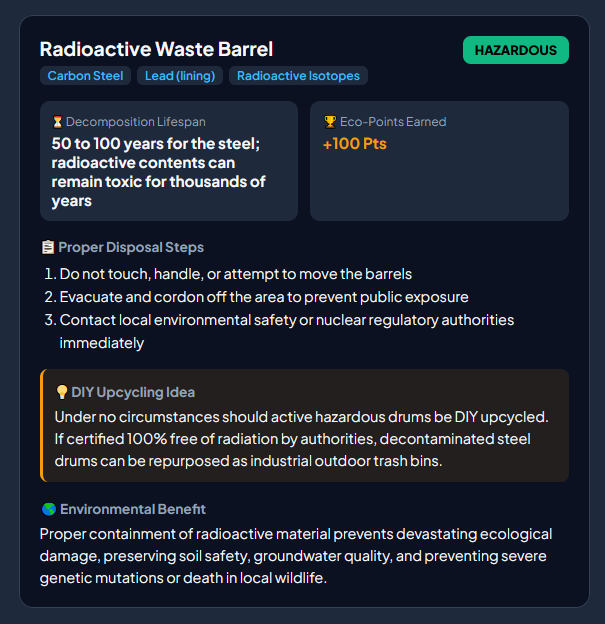
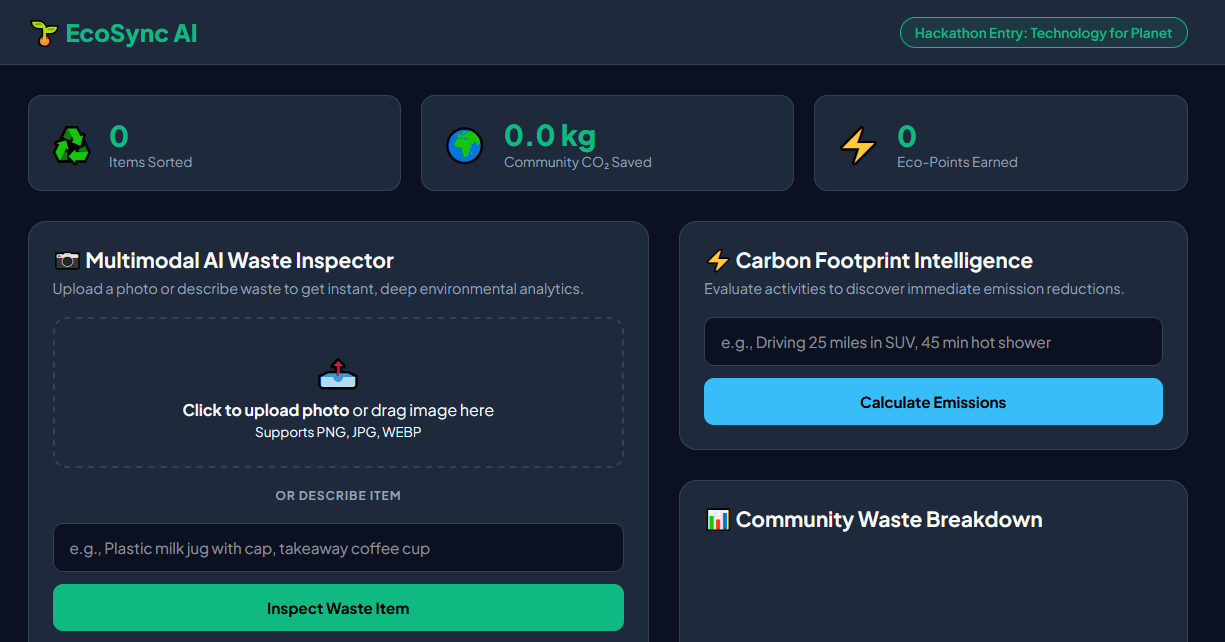
- Multimodal Waste Inspector: Users can either upload a photo or type a description of an item. The AI identifies the materials, determines its exact disposal category, provides step-by-step preparation instructions, estimates decomposition time, and offers creative DIY upcycling ideas.
- Carbon Footprint Intelligence: Users describe daily activities in plain text. The AI calculates the CO2 impact and translates raw emissions into relatable equivalents, such as gas car miles driven, trees needed for absorption, and phone battery charges.
- Aggregated Community Analytics: Every analyzed item and logged carbon reduction is stored in a local database. Real-time statistics display total items sorted, total CO2 mitigated, total community Eco-Points earned, and a breakdown chart by category.
Target Users
- Households and Individuals: Anyone looking to eliminate guesswork at the recycling bin and establish sustainable daily habits.
- Students and Educators: Educational institutions seeking a tool to teach waste sorting, material decomposition, and personal footprint analysis.
- Community Groups and Environmental Organizations: Local green initiatives wanting to track collective waste diversion metrics and community engagement.
Tech Stack
Backend
- Python 3.10+: Core backend runtime.
- Flask & Flask-CORS: Lightweight REST API framework and cross-origin resource sharing handler.
- SQLite3: Relational database for persistent storage of community stats and impact records.
- Google Generative AI SDK (
google-generativeai): Interface for querying thegemini-3.5-flashmodel. - Pillow (PIL): Image processing library for converting user-uploaded images for model consumption.
- python-dotenv: Environment variable management.
Frontend
- HTML5 & CSS3: Custom modern layout utilizing CSS Grid, Flexbox, and dark mode themes.
- Vanilla JavaScript (ES6+): Handles async API requests, file drag-and-drop operations, and dynamic UI updates.
- Chart.js: Interactive JavaScript library for rendering doughnut charts of community waste breakdown.
Key Innovation
- Multimodal Inference Engine: Integrates vision and text capabilities into a single backend API call. It accepts raw binary image data alongside custom prompt engineering to return structured JSON.
- Strict Schema Formatting: Standardized JSON responses enforce reliable schema parsing, guaranteeing material tag extraction, step-by-step preparation lists, and creative upcycling suggestions.
- Relatable Environmental Equivalents: Rather than showing raw numbers alone, the platform converts emissions into understandable real-world benchmarks (trees required, car miles, smartphone charges).
- Zero Heavy Dependencies: Built without heavy external frontend framework dependencies, ensuring fast page load times and minimal system resource requirements.
Results & Impact Metrics
- Landfill Diversion: Eliminates recycling contamination by providing clear instructions (such as rinsing containers or separating caps) before disposal.
- Resource Awareness: educates users on the true lifecycle of materials by displaying decomposition timelines ranging from weeks to hundreds of years.
- Actionable Reductions: Replaces abstract eco-guilt with immediate daily actions and long-term lifestyle recommendations.
- Quantifiable Community Impact: Aggregates individual actions into a shared metric of mitigated CO2 kilograms and earned Eco-Points.
Project Structure
ecosync_project/
├── backend/
│   ├── app.py              # Main Flask application, API routes, and DB logic
│   ├── .env                # API keys and environment configuration
│   ├── requirements.txt    # Python dependencies
│   └── ecosync.db          # SQLite database (auto-generated)
└── frontend/
    ├── index.html          # Main application dashboard
    ├── css/
    │   └── styles.css      # Custom UI styles and layout rules
    └── js/
        └── script.js       # Frontend API integration and Chart.js setup
Local Installation & Setup
Follow these steps to run EcoSync locally on your machine.
Prerequisites
- Python 3.9 or higher installed.
- A valid Google Gemini API key.
Step 1: Clone or Download the Project
Navigate to your desired workspace directory and enter the project folder:
cd ecosync_project
Step 2: Set Up a Virtual Environment
It is recommended to use a virtual environment to manage dependencies.
On macOS/Linux:
python3 -m venv venv
source venv/bin/activate
On Windows (Command Prompt):
python -m venv venv
venv\Scripts\activate
On Windows (PowerShell):
python -m venv venv
.\venv\Scripts\Activate.ps1
Step 3: Install Backend Dependencies
Navigate to the backend folder and install required Python packages:
cd backend
pip install -r requirements.txt
Step 4: Configure Environment Variables
Inside the backend directory, create a file named .env:
touch .env
Open the .env file in your text editor and add your API key and server port:
AI_MODEL_API_KEY=your_actual_gemini_api_key_here
PORT=5000
Step 5: Start the Flask Backend Server
Run the application script:
python app.py
Upon starting, you should see output similar to:
✅ Gemini AI Model initialized successfully.
🚀 EcoSync Backend starting at http://127.0.0.1:5000
Step 6: Access the Application
Open your web browser and navigate to:
http://127.0.0.1:5000
How to Use the Application
- Waste Sorting Inspection:
- Drag and drop an image of an item into the upload dropzone, OR type a description (e.g., "plastic takeaway coffee container").
- Click Inspect Waste Item.
Review the detected category, material composition, decomposition timeline, preparation steps, upcycling ideas, and earned Eco-Points.
Carbon Footprint Tracking:
Enter a daily activity in the text field (e.g., "Drove 30 miles in a gasoline truck" or "Left air conditioner running for 8 hours").
Click Calculate Emissions.
View total calculated CO2 in kilograms, real-world equivalents, an immediate tip, and a long-term habit replacement.
Monitoring Community Impact:
View top metric cards updating live as actions are recorded.
Review the Community Waste Breakdown chart at the bottom to see distribution across Recyclable, Compostable, E-Waste, Hazardous, and Trash categories.

Log in or sign up for Devpost to join the conversation.