Inspiration
EcoSpotMapGoogle emerged from a growing concern for environmental sustainability and the need to make eco-conscious choices more accessible to the public. Finding sustainable businesses, recycling centers, and green spaces can be difficult in today's world, often requiring numerous searches across multiple platforms.
The inspiration stemmed from personal experience. I frequently searched for farmers markets, thrift stores, and recycling centers in my area, only to find the information scattered across various websites and apps. I realized a centralized, user-friendly platform was needed to help people discover and navigate to eco-friendly locations within their communities.
The project aims to connect environmental awareness with practical action by making sustainable choices more discoverable and rewarding through gamification elements.
What I Learned
Throughout EcoSpotMapGoogle's development, I gained extensive knowledge in several key areas:
- Android Development & Kotlin
- Kotlin coroutines for asynchronous operations
- Material Design 3 principles for modern UI/UX
- Android lifecycle management and permission handling
- RecyclerView adapters and custom layouts
- Google Maps Platform Integration
- Google Maps SDK for Android for interactive map display
- Places API for location search and details
- Directions API for turn-by-turn navigation
- Proper API key management and security practices
- Gamification Design
- Point systems and level progression
- Badge achievement mechanics
- User engagement strategies
- Progress tracking and analytics
- Software Architecture
- Separation of concerns with dedicated services
- Data models and type safety
- Error handling and user feedback
- Local data persistence with SharedPreferences
How I Built It
The project was built using a structured development approach:
Phase 1: Core Infrastructure Set up an Android project using Kotlin and Material Design 3. Integrated the Google Maps SDK and configured API keys. Implemented basic location services and permissions.
Phase 2: Map Functionality Built an interactive map interface with custom markers. Integrated the Places API for location search. Added real-time location tracking and camera controls. Implemented a 3D view mode for enhanced user experience.
Phase 3: Navigation Features Integrated the Google Directions API using Retrofit. Built turn-by-turn navigation with route visualization. Added haptic feedback for improved user interaction. Implemented route optimization and traffic considerations.
Phase 4: Gamification System Designed a comprehensive user profile system. Built a badge achievement system with multiple categories. Implemented point-based progression and leveling. Added check-in functionality and activity tracking.
Phase 5: User Experience Created an intuitive bottom sheet for location details. Built a profile management interface. Added recent activity tracking. Implemented a spot suggestion system for community contribution.
Challenges Faced
API Integration Complexity Integrating multiple Google APIs (Maps, Places, Directions) required careful coordination and error handling. The biggest challenge was managing API rate limits and handling network failures gracefully.
Location Permission Management Android's location permission system is complex, especially with runtime permissions. I had to implement proper permission request flows and handle cases where users deny location access.
Performance Optimization Loading and displaying a large number of map markers while maintaining smooth performance required careful optimization of marker clustering and lazy loading techniques.
Gamification Balance Designing a point system that encourages sustainable behavior without feeling like a chore was challenging. I had to balance reward frequency with meaningful progression.
UI/UX Design Creating an intuitive interface that works well on different screen sizes and orientations required extensive testing and iteration. The bottom sheet design for location details went through multiple iterations to achieve the right balance of information density and usability.
Data Persistence Managing user progress, badges, and check-in history required careful consideration of data structure and storage efficiency using SharedPreferences and JSON serialization.
Built With
- Languages & Frameworks
- Kotlin - Primary development language
- Android SDK - Native Android development
- Material Design 3 - Modern UI components and design system
- Google Platform Services
- Google Maps SDK for Android (
18.2.0) - Interactive map display - Google Places API (
3.4.0) - Location search and details - Google Directions API - Turn-by-turn navigation
- Google Play Services Location (
21.3.0) - Real-time location tracking
- Google Maps SDK for Android (
- Networking & Data
- Retrofit
2.9.0- HTTP client for API calls - Gson
2.10.1- JSON serialization/deserialization - Glide
4.16.0- Image loading and caching
- Retrofit
- Maps & Utilities
- Google Maps Android Utils (
2.3.0) - Route decoding and map utilities - Maps Utils KTX (
3.4.0) - Kotlin extensions for map utilities
- Google Maps Android Utils (
- Development Tools
- Android Studio - IDE and development environment
- Gradle - Build system and dependency management
- Git - Version control
Mathematical Models & Algorithms
Gamification Point System
The app implements a point calculation system that rewards sustainable behavior: $$ \text{Total Points} = \sum_{i=1}^{n} (P_{\text{check-in}} + P_{\text{first-visit}} + P_{\text{streak}} + P_{\text{bonus}}) $$ Where:
- \(P_{\text{check-in}} = 10\) points for each check-in
- \(P_{\text{first-visit}} = 25\) points for first-time visits
- \(P_{\text{streak}} = 5 \times \text{daily_streak}\) points for consecutive days
- \(P_{\text{bonus}} = \text{category_bonus} + \text{time_bonus}\)
Level Progression Formula
User levels are calculated using a logarithmic progression: $$ \text{Level} = \left\lfloor \log_{1.5}\left(\frac{\text{Total Points}}{100} + 1\right) \right\rfloor + 1 $$
Sustainability Score Algorithm
The app calculates a sustainability score based on user behavior: $$ \text{Sustainability Score} = \frac{\sum_{i=1}^{n} w_i \times f_i}{\sum_{i=1}^{n} w_i} \times 100 $$ Where \(w_i\) represents the weight of each eco-action type and \(f_i\) represents the frequency of that action.
Route Optimization
For navigation, the app considers multiple factors in route calculation: $$ \text{Route Score} = \alpha \times \text{Distance} + \beta \times \text{Time} + \gamma \times \text{Eco\Factor} $$ Where \(\alpha\), \(\beta\), and \(\gamma\) are weighting factors that prioritize different aspects of the journey.
Project Media
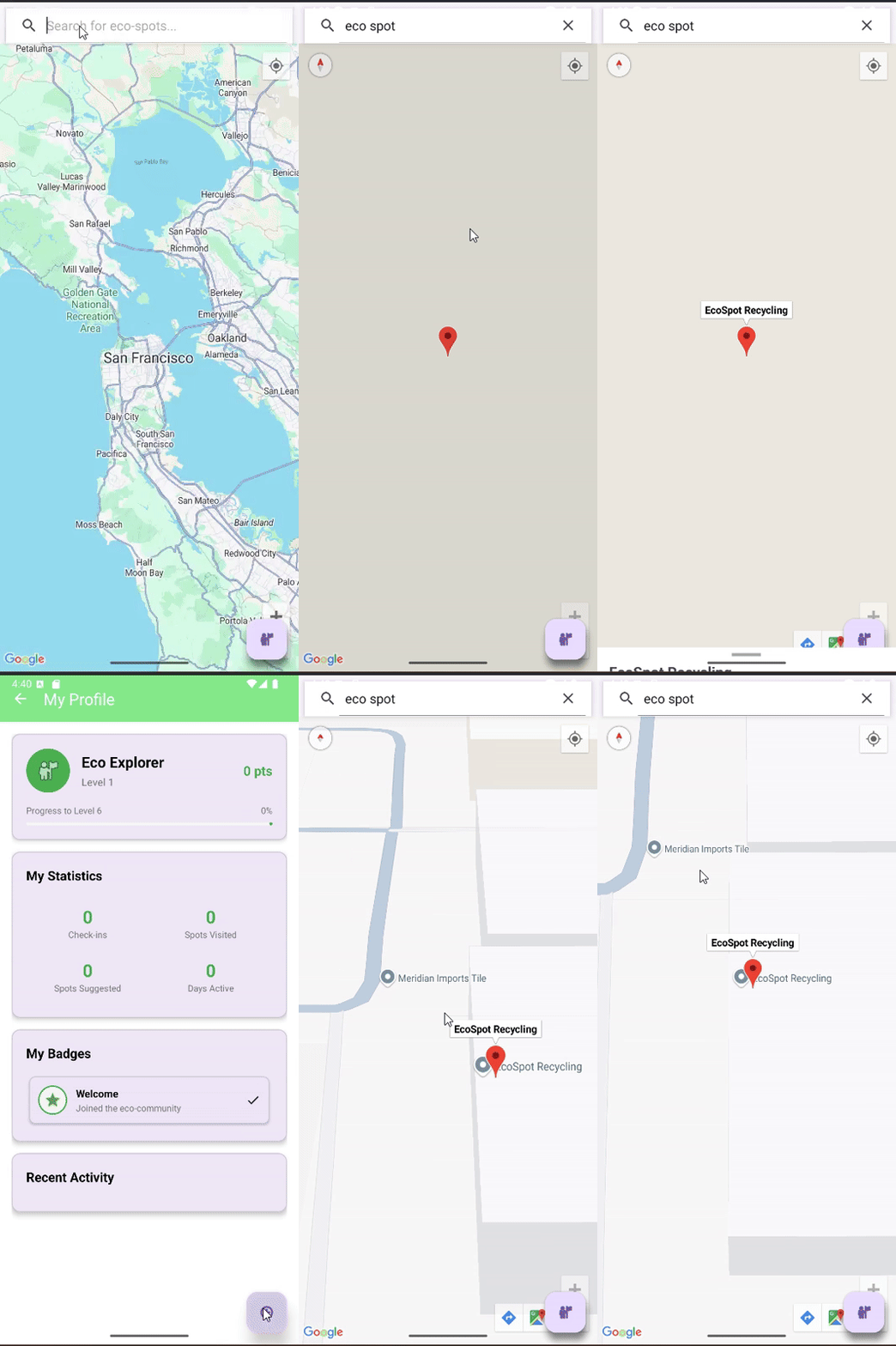
EcoSpotMapGoogle Demo
Interactive demo showing the app's core features including map navigation, location search, and gamification elements.
The app demonstrates seamless integration of Google Maps services with a gamified approach to environmental sustainability, making it easier for users to discover and engage with eco-friendly locations in their communities.
Key Features Summary
- [x] Interactive Map Interface - Real-time Google Maps integration
- [x] Location Discovery - Search and filter eco-friendly spots
- [x] Navigation Support - Turn-by-turn directions
- [x] User Profiles - Personalized experience with activity tracking
- [x] Gamification System - Badge system and progress tracking
- [x] Recent Activity - History of visited locations
- [x] 3D View Mode - Enhanced map visualization
- [x] Haptic Feedback - Improved user interaction
- [x] Community Features - Spot suggestions and voting system


Log in or sign up for Devpost to join the conversation.