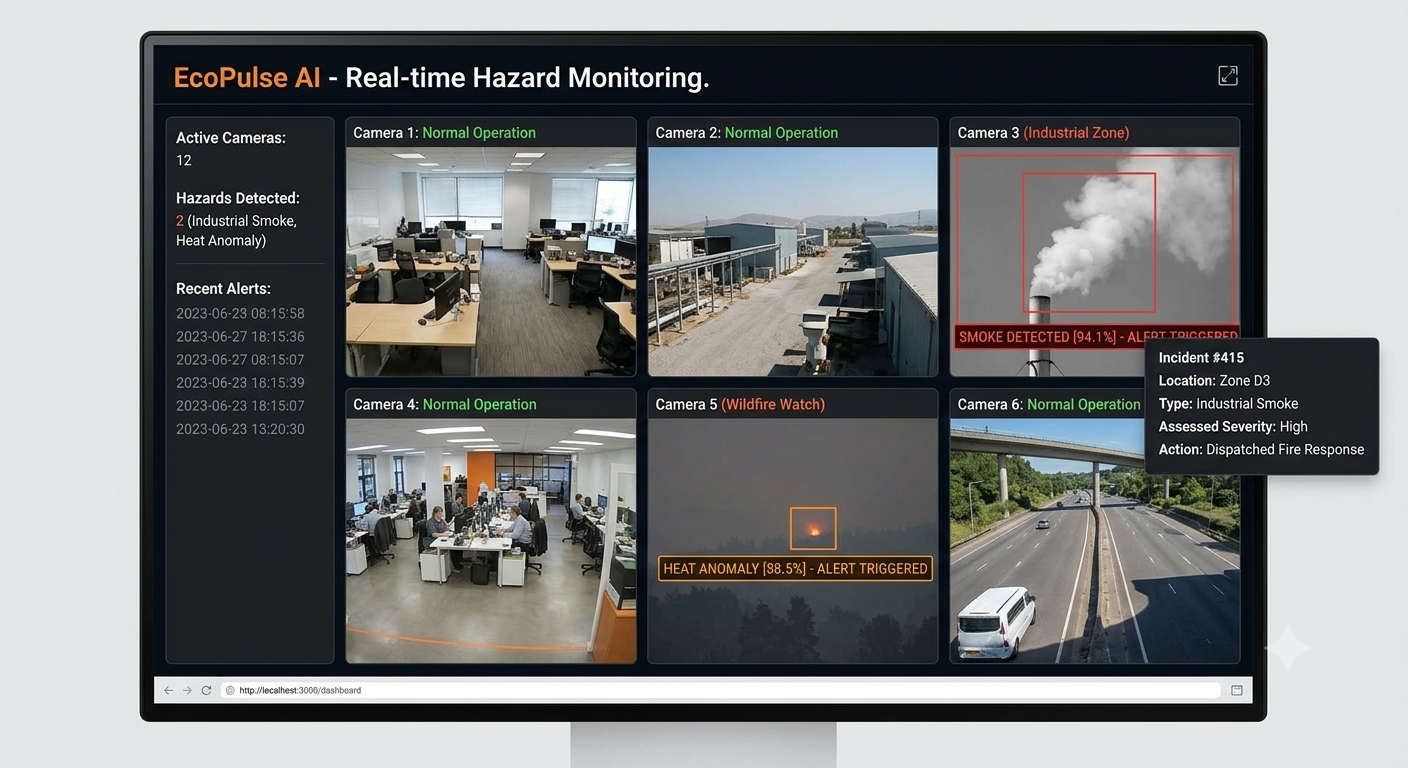
Inspiration Industrial facilities, chemical plants, and manufacturing hubs handle dangerous airborne toxins daily. Traditional safety measures rely heavily on fixed hardware sensors mounted on walls or ceilings, which only trigger when a gas or chemical physically reaches the sensor. This delay creates dangerous blind spots. Seeing how critical time is lost during chemical leaks inspired us to build EcoPulse AI—a software solution that turns existing CCTV and visual camera infrastructure into proactive, real-time safety sentinels capable of detecting toxic plumes visually before they reach personnel or hardware boundaries.
What it does EcoPulse AI is an industrial safety desktop application that monitors visual camera streams in real time to spot airborne hazards like smoke, toxic mist, and chemical fumes.
Multi-Stream Camera Support: Seamlessly connects to built-in webcams, external USB inspection cameras, or industrial IP network feeds via RTSP.
Visual Hazard Detection & Tracking: Uses background motion segmentation and HSV color filtering to detect airborne plumes and draw real-time hazard bounding boxes over the video feed.
Dynamic Threat Density Scoring: Computes the surface area and density of detected plumes to assign a live hazard score (0% to 99.9%).
Asynchronous Emergency Alerts: Automatically triggers synthesized voice evacuation warnings ("Toxicity detected. Evacuate immediately.") and loud audio alarms without stuttering or freezing the live video stream.
Actionable Health Advisories: Displays immediate emergency response guidelines, symptom warnings, and safety actions directly on the monitoring display during critical alerts.
How we built it EcoPulse AI was engineered as a standalone Windows desktop software:
GUI Framework: Built using Python's Tkinter to construct a dark-themed user interface that manages live canvas rendering, stream selection, and hotkey support (F for Fullscreen, Q for Quit).
Computer Vision Pipeline: Powered by OpenCV (cv2) using Gaussian Mixture-based MOG2 background subtraction combined with HSV color thresholding to isolate moving airborne plumes from static background elements.
Audio Synthesis: Integrated pyttsx3 for text-to-speech audio guidance alongside winsound for system alert tones.
Multithreading: Utilized Python’s threading module to execute audio alarm loops on secondary daemon threads, ensuring the main GUI and video capture loop remain at a smooth 30 FPS.
Packaging & Deployment: Compiled into a single standalone executable using PyInstaller with full OpenCV binary collection (--collect-all cv2), then wrapped into an automated Windows wizard installer using Inno Setup.
Challenges we ran into PyInstaller Binary Dependencies: Standalone builds initially crashed because PyInstaller omitted OpenCV’s native C++ background DLLs. We solved this by explicitly forcing PyInstaller to collect all internal OpenCV assets during compilation.
Thread Blocking & Video Stutter: Speech synthesis (pyttsx3) initially froze the main UI window during hazard alerts. Moving speech and sound calls to isolated daemon threads resolved the latency.
UI Type Strictness: Debugging unexpected interface crashes caused by float values passed into Tkinter font settings taught us to strictly sanitize UI input parameters into whole integers.
Build Process Lockups: Overwriting executables during testing threw permission errors (WinError 5) due to active background processes, requiring process termination scripts during iterative builds.
Accomplishments that we're proud of Zero-Latency Monitoring: Achieved real-time motion and color segmentation while maintaining a stable 30 FPS video feed.
Pure Standalone Distribution: Successfully packaged a complex Python codebase into a single, clean .exe installer that runs on Windows machines without requiring Python or external libraries to be pre-installed.
Integrated Safety UX: Designed a dark, high-visibility UI with real-time hazard callouts, health advisories, and instant hotkey navigation suitable for industrial control rooms.
What we learned Advanced techniques in motion segmentation, contour tracking, and HSV color space filtering using OpenCV.
Thread lifecycle management for maintaining fluid UI frame rates during continuous background audio execution.
Best practices for compiling, debugging, and packaging Python desktop applications for end-user distribution.
What's next for EcoPulse AI Deep Learning Classification: Train a custom YOLO / Convolutional Neural Network (CNN) model to distinguish between non-hazardous water steam/fog and dangerous chemical smoke.
IoT Hardware Integration: Implement MQTT / Modbus triggers to automatically activate facility exhaust fans and ventilation systems upon high toxicity detection.
Multi-Camera Grid Dashboard: Expand the user interface to display an array grid of 4 to 16 camera feeds simultaneously for facility-wide coverage.
Cloud Logging & Analytics: Store historical hazard event timestamps and density metrics to generate compliance reports for occupational safety standards (OSHA).

