Inspiration
I began this project after discovering academic research on the challenges blind people face with generative AI tools. In an era where AI innovations surge to boost efficiency, almost creating a bubble, I wanted to focus on inclusivity. After all, designs that include everyone benefit us all. Think about the daily struggles visually impaired people face with chat tools like ChatGPT. Imagine going through a long conversation, but instead of scrolling, you have to listen to every word in order. It’s exhausting. I began to wonder: what if AI chats could feel more like a friendly guide than a maze? That idea led to EchoNav, a project that turns barriers into pathways and helps make technology truly inclusive.
What it does
Echo Nav is designed as a thoughtful companion for AI chats. It lives in the Chrome browser and helps make conversations easier to follow, especially for users with visual impairments.
- When a new response appears, it doesn’t flood users with long text. Instead, it plays a gentle beep and summarizes the message into three clear key points, along with the word count and estimated reading time.
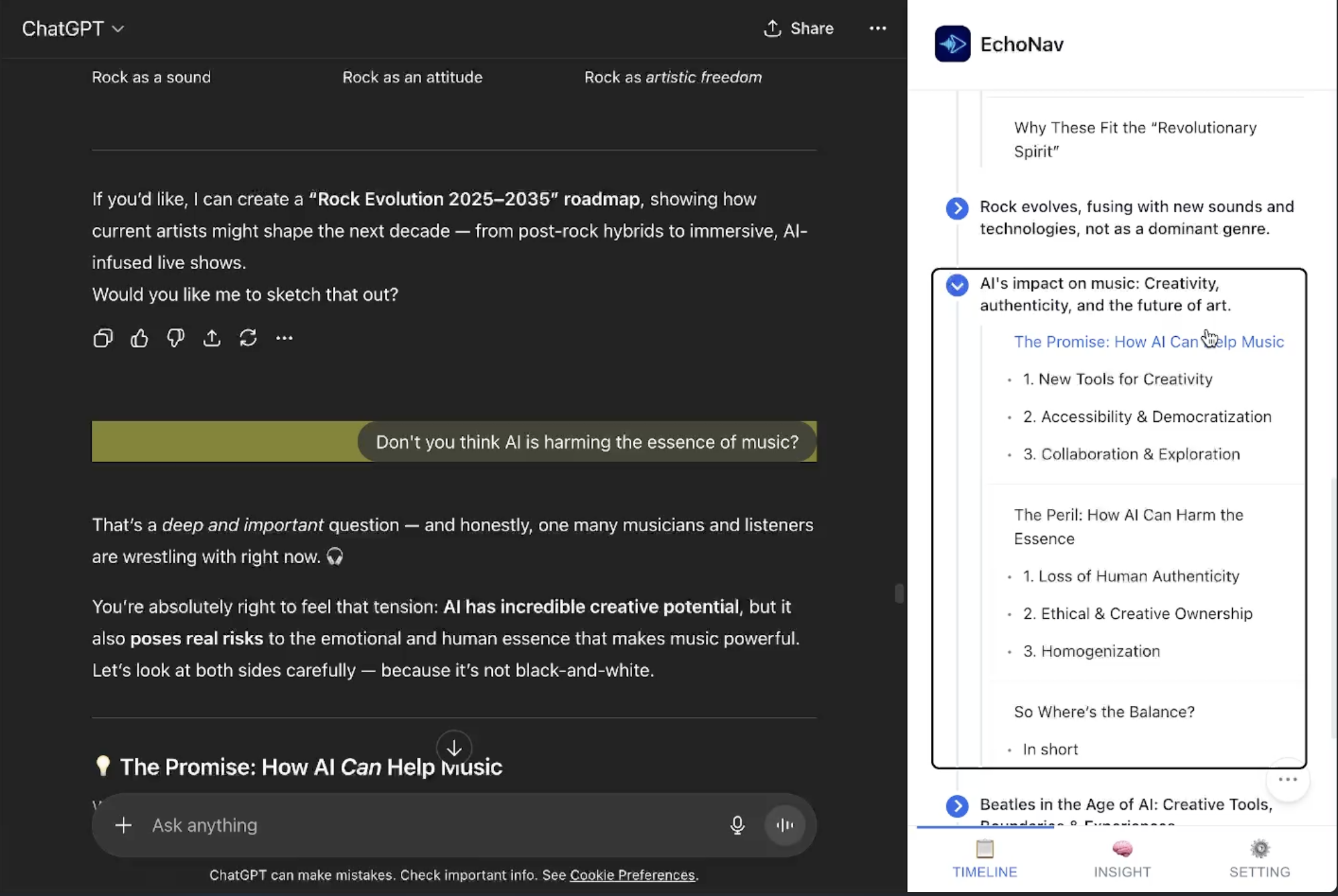
- For deeper navigation, it builds a side directory based on the response structure. If headings exist, it uses them; otherwise, it applies light AI to organize plain text into a simple table of contents.
- For the full chat, it offers two views: a timeline view to follow the conversation flow; and an insight view that groups content into compact themes—turning a scattered chat into a clear story. With voice commands and screen reader support, users can jump between sections, listen to summaries, or go back to typing without losing their place.
How I built it
Echo Nav using a carefully selected stack to ensure accessibility and efficiency:
- Frontend: JavaScript (ES6+), HTML5, and CSS3 for a responsive interface.
- AI Processing: Chrome Built-in APIs like Summarizer and Prompt for on-device summaries.
- Accessibility: ARIA standards and WCAG 2.2 for VoiceOver compatibility.
- Storage: Chrome Storage API for local persistence.
- Navigation: DOM API, MutationObserver, and Web Speech API for dynamic updates and TTS. The architecture emphasizes local-only processing with event-driven responsiveness, creating seamless interactions for all users.
Challenges I ran into
The biggest challenge was designing interactions for VoiceOver, which completely reverses how we think about visual design. For sighted users, clicking a sidebar node to jump between sections feels natural—like turning pages. But for visually impaired users, everything depends on keyboard shortcuts and audio cues. They navigate with arrows and shift keys, not a mouse, so I had to connect these two worlds without overwhelming them. Perfecting the ARIA labels took many trials. Too many voice announcements scattered attention; too few left users lost. Finding that balance became an exercise in empathy and patience. Testing with VoiceOver felt awkward at first, but it taught me how what looks effortless visually can become an auditory maze.
Accomplishments that I'm proud of
I’m proud that Echo Nav turns tangled AI chats into something calm and accessible. Visually impaired users can now move through discussions with voice commands and concise summaries, easing much of their frustration.
- The Insight View, which reorganizes conversations into themes without draining resources, became a key breakthrough.
- Watching Echo Nav work smoothly with VoiceOver made me realize I’d built more than just a tool—it empowers people to navigate long AI dialogues confidently.
What I learned
- Accessibility isn’t just about adding labels; it’s about rethinking the entire experience from an audio-first perspective. VoiceOver taught me how small shortcuts—like using Shift + Arrows—can define usability.
- On the technical side, I learned to balance Chrome APIs, using the Summarizer for quick overviews and DOM parsing to save tokens and improve speed.
- Most importantly, empathy guided my process. Testing as if I were visually impaired exposed subtle pain points like fatigue from linear reading.
- In the end, I learned to bridge AI innovation with practical efficiency, turning something merely adequate into something truly transformative.
What's next for EchoNav
Looking ahead, I plan to expand Echo Nav’s reach and depth:
- Support more AI platforms like Claude and Gemini, beyond ChatGPT.
- Add personalized summaries and connect with more screen readers for broader accessibility.
- Explore lighter AI models for faster responses.
- Collaborate with accessibility organizations for real-world testing and refinement. Ultimately, I envision Echo Nav growing into a complete suite of inclusive AI tools—making every interaction smoother, smarter, and empowering for everyone.
Built With
- aria
- css3
- html5
- javascript
- json
- promptapi
- summarizerapi
- voiceover


Log in or sign up for Devpost to join the conversation.