-
-
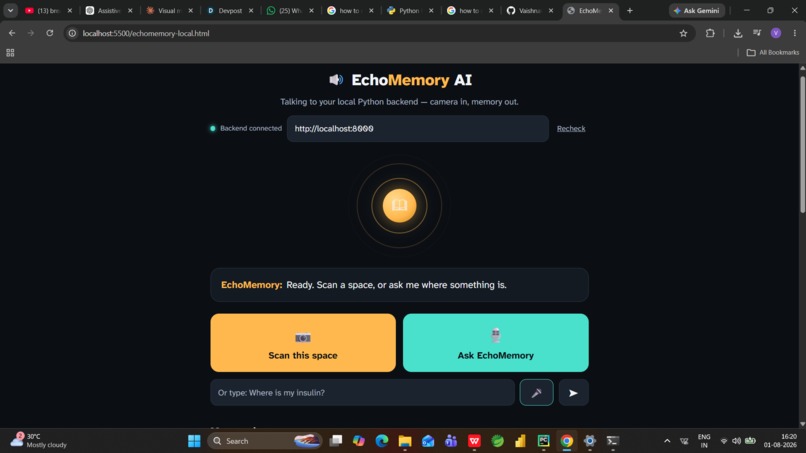
this is the front page of my project EchoMemory AI
-
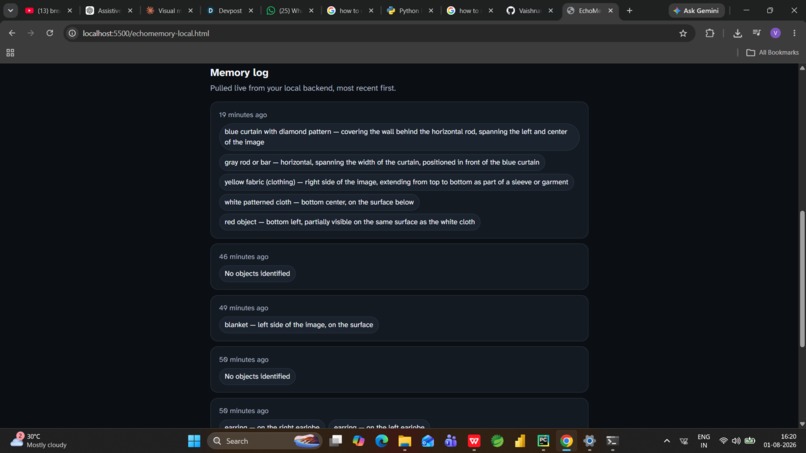
here are the memory logs
Inspiration
It's 7 AM. Someone is running late, patting down a kitchen counter they can't see, trying to remember where they set down their insulin the night before. A minute passes. Then two. They finally call out to whoever's home — "Have you seen my medicine?" — and wait.
That small, everyday scene repeats itself constantly in the lives of blind and low-vision people: keys, wallets, a phone, a cane. Not because anything is lost, exactly — just misplaced, the way things are for everyone. The difference is that a sighted person solves it with a two-second glance around the room. A blind person can't take that shortcut. The search takes longer, sometimes needs another person, and happens over and over, every single day.
Meanwhile, the AI world has spent years teaching cameras to see — Google Lens, Seeing AI, Be My AI can all tell you what's in front of them right now, instantly and impressively. But ask any of them what they saw five minutes ago, and they've got nothing. They have eyes, but no memory.
So I asked a simpler question: what if it just remembered? Not "what is this," but "where did I put that" — the way a sighted roommate does when you ask, "hey, did you see where I put my phone?" They don't need to stare at it right now. They just remember, because they were paying attention earlier.
That question became EchoMemory AI — a memory for the things you can't see.
What it does
- Scans a space — point a camera at a counter, shelf, or bag and tap "Scan this space" to analyze what's there.
- Identifies objects and exact locations — not just "there's a bottle," but "medicine bottle, second shelf from the top, left side."
- Remembers over time — every scan is logged with a timestamp and optional room label, and persists across sessions rather than resetting.
- Answers natural-language questions — ask "Where's my insulin?" by voice or text, and it searches the memory log and matches loosely by meaning (insulin → medicine bottle).
- Responds out loud — answers are spoken back in one natural sentence, including roughly how long ago the object was last seen.
- Works entirely by voice — every core action (scan, ask, hear the answer) is designed to work without ever reading a screen. ##How I built:
- Started with a self-contained web app (HTML/CSS/JS) that used the camera and microphone directly in the browser, talking straight to an AI model for both image analysis and question-answering.
- Moved to a proper Python backend: built with FastAPI, so the browser could send photos and questions to a local server instead of calling the AI model directly.
- Used SQLite to store the memory log — every scan saved as a timestamped entry (object, location, room, time), so memories persist across sessions.
- Wrote a vision module that sends each photo to a vision-capable model with a prompt tuned to extract specific object names and spatial locations, not generic captions.
- Wrote a query module that reasons over the full memory log to answer natural-language questions, matching loosely by meaning rather than exact keywords.
- Built a CLI (using Typer) to scan, ask, and review the memory log from the terminal, with optional webcam capture and spoken output.
- Exposed the same functionality as FastAPI endpoints (/scan, /ask, /log), so the browser frontend could reuse the exact same backend logic as the CLI.
- Routed all model calls through OpenRouter's OpenAI-compatible API, so the pipeline could run entirely on free, open-weight vision models — no paid API key required.
Added defensive parsing and an automatic model fallback chain, so the app stays reliable even when a free model produces malformed output or misses objects.
Challenges I ran into
Early prompts gave vague locations ("on a shelf") — had to rewrite the prompt to demand precise, actionable spatial language (which shelf, which side, relative to what).
Free vision models produced malformed JSON in different ways — missing closing braces, extra stray ones — so I built a balanced-bracket parser to extract clean JSON regardless of how it broke.
Free models sometimes missed objects entirely, especially small or held items — fixed with a more exhaustive prompt plus an automatic fallback chain across multiple free vision models.
Camera framing was trickier than expected — one scan identified my earrings and a blanket instead of the objects I was holding, because the camera wasn't pointed where I assumed. A reminder that "aim the camera correctly" is part of the accessibility problem itself.
Getting a fully free ($0) AI stack to work reliably — correct OpenRouter routing, picking a vision-capable free model, handling shared-pool rate limits — took real engineering, not just one API call.
Accomplishments I'm proud of
- A complete, working loop — scan → remember → ask → hear the answer — running end to end on a completely free stack (OpenRouter's free tier).
- Location descriptions specific enough to actually be useful ("second shelf, left side" rather than "on a shelf").
- A resilient parsing and fallback layer that keeps the app working even when the underlying free model is unreliable — the kind of defensive engineering that matters far more once you're not on a guaranteed frontier model.
- A voice-first design that doesn't treat speech as an accessibility bolt-on, but as the primary way the app is meant to be used.
What I learned
- Asking the right question matters more than raw AI power.
- Free models need retries and fallbacks to stay reliable.
- Small details — like camera framing — are part of the real accessibility problem, not just a bug.
- Precise wording ("which shelf" vs "just a shelf") is what makes an answer usable.
- Designing voice-first from day one leads to simpler design overall.
- Worth double-checking what already exists before assuming an idea is new. ## What's next for EchoMemory AI
- Passive, always-on scanning — right now the user has to remember to scan, which is a real limitation for the exact audience this tool serves. The next step is background scanning through smart glasses or a always-worn camera, so memory builds automatically instead of requiring a deliberate action every time.
- Priority-item mode — rather than trying to remember everything, let users flag a small set of high-stakes objects (medication, keys, wallet, cane) for more frequent, higher-confidence tracking.
- Continuous room sweeps — pan across a whole kitchen or room in one scan instead of one photo at a time.
- Smarter model routing — escalate to a stronger model only when a free model repeatedly fails on a scan, keeping cost low without sacrificing reliability.
- Offline resilience so a dropped connection doesn't mean a dropped memory.
Built With
- accessibility
- claude
- computer-vision
- css3
- fastapi
- html5
- javascript
- llm
- openrouter
- python
- rest-api
- speech-recognition
- sqlite
- uvicorn
- web-speech-api
