Inspiration
Fast Twitch chat is a firehose. A joke, a genuine question, a strategy call, and a raid welcome all arrive at the same speed, and the one message you cared about is gone before you finish reading it. Most viewer tools give you either the entire room or nothing; creator-side filters are built for the streamer, not for the person watching.
I wanted a personal, read-only second screen: the stream stays visible, the original chat stays intact, and when the room gets loud I can choose one broad conversation to follow without losing access to everything else. EchoLane is that view.
What it does
EchoLane embeds a Twitch stream and receives real chat through Twitch EventSub with a single read-only scope, user:read:chat. It keeps the most recent 300 messages, preserving Twitch's original message text, author and message ID. The timestamp shown is Twitch's EventSub notification time, labelled as such.
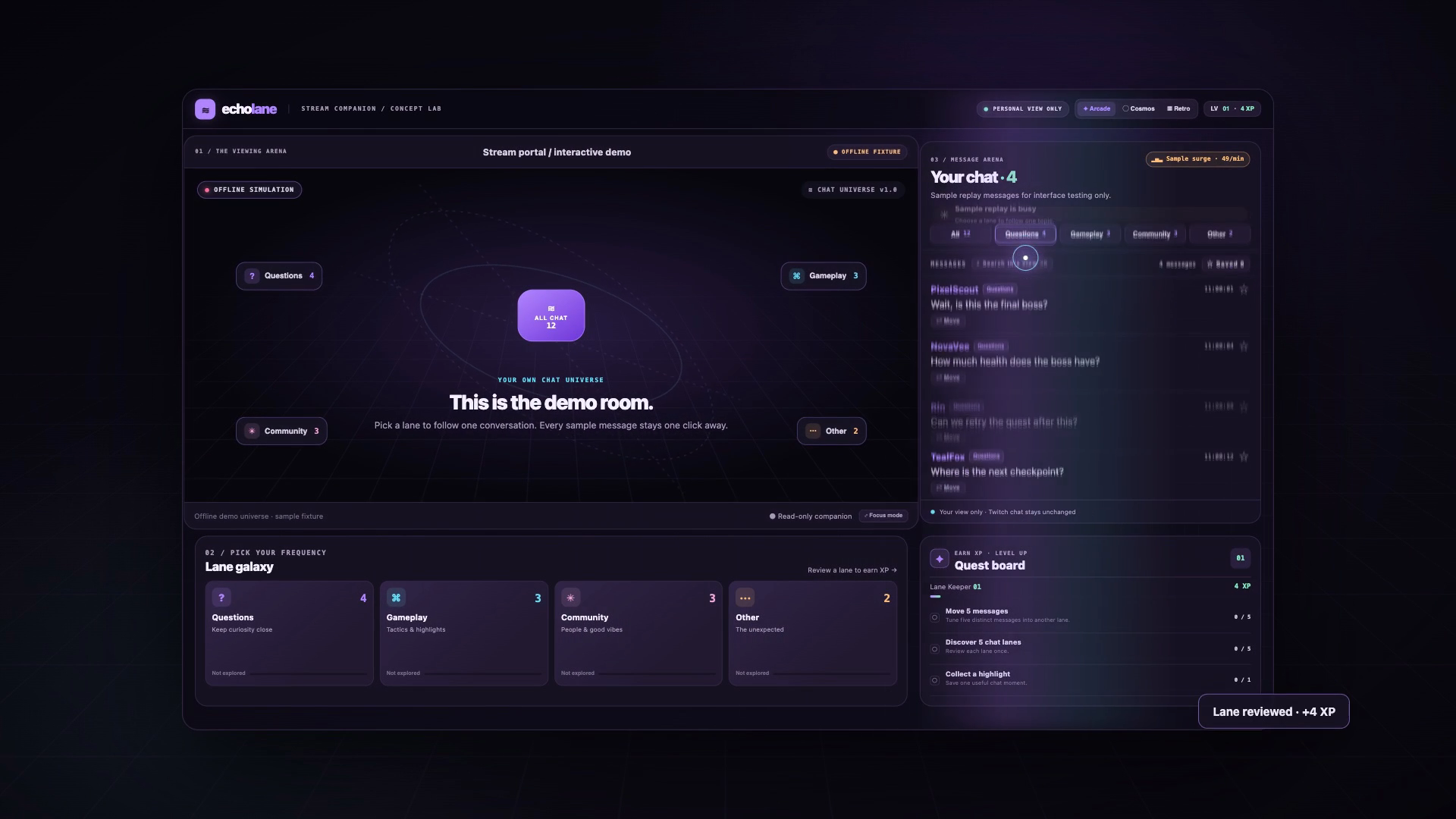
When the rolling 15-second message rate reaches 10, a surge badge appears and invites the viewer to pick a lane: Questions, Gameplay, Community & raids, or Other. Grouping runs on the viewer's device with transparent keyword rules — no model, no embedding service, no chat sent to a third party. Unclear or non-English messages fall back to Other.
The viewer can switch lanes, return to All chat at any time, move a mis-grouped message locally, search the current view, and save a highlight. Optional local XP and quests reward useful actions — reviewing a lane, correcting a message, saving a highlight — not incoming message volume. There are three visual themes, motion and sound settings, and a focus mode for a quieter second screen.
EchoLane does not post, moderate, ban, or control a channel. Disconnect closes the socket, clears the local view, and asks Twitch to revoke the token.
How we built it
The server is Node.js with no runtime dependencies. It performs the OAuth authorization-code exchange, keeps access and refresh tokens only in memory, looks up the channel through Helix, and creates a channel.chat.message EventSub subscription for the browser's WebSocket session. The browser receives EventSub notifications directly and never sends to the socket.
The frontend is vanilla HTML, CSS and JavaScript: a responsive stream-plus-chat workspace, a local lane model, search, highlights, progress stored in localStorage, three themes and reduced-motion support. The server uses an HttpOnly session cookie, OAuth state validation, same-origin checks on subscription/disconnect calls, a restrictive Content Security Policy, and never sends a Twitch secret to the browser.
The build started in a fresh repository with Codex as the development assistant. After the first working version, I ran a clarity pass on the interface: one lane vocabulary across the radar, tabs and cards; visible XP and quest progress; lane mastery; a compact Move menu instead of a dropdown under every message; a clearer offline All-chat control; and a mobile layout that no longer squeezed the level card. The product itself runs no model.
There are 12 automated tests covering deterministic grouping, original-field preservation, duplicate and malformed events, non-English fallback, lane switching and correction, surge detection, missing or expired authorization, reconnect behavior, and checks that the frontend contains no secrets or chat-send/moderation calls. A headless browser pass against the labelled offline fixture showed 12 messages, four in Questions, all 12 returning with Show all chat, the surge badge activating, and no page errors.
I also built a 1:21 narrated explainer film from real UI captures and a code rebuild of the app. Its 18 kinetic words each use a different transition, and the film marks the app as a demo room with sample messages.
Challenges we ran into
Twitch's authorization model. EventSub over WebSocket requires a user access token, so the OAuth exchange, token refresh, subscription creation and reconnect path all had to be correct before a single message appeared. Twitch does not replay messages missed during a socket gap, so the UI has to say that rather than pretend the view is complete.
Keeping the read-only promise real. The app requests only user:read:chat. There is no chat-send, moderation or channel-action endpoint. Tokens stay in memory, the secret never reaches the browser, and disconnect revokes access. Failure states are explicit: missing credentials, expired authorization, revoked access, unavailable channels and rate limits all produce visible guidance instead of a fabricated result.
Grouping is a guess. Questions, Gameplay, Community and Other are broad keyword rules, not a semantic model. Non-English text without a matched keyword goes to Other. The product makes that limitation visible and gives the viewer a one-click correction, because a local, inspectable guess is more trustworthy than a black box.
Gamification versus clarity. XP, quests and lane mastery made the interface more playful, but the first version repeated the same lane choices in three different vocabularies and buried the core loop. The clarity pass unified the lane names, made XP visible, turned per-message dropdowns into a compact Move menu, and fixed the offline centre control so it reads ALL CHAT instead of looking like a play button.
Honest demoing. Live verification needs a registered Twitch application and credentials. The offline fixture is clearly labelled and is used only for interface review and automated checks. The film says DEMO ROOM · SAMPLE MESSAGES and does not claim live Twitch delivery.
Accomplishments that we're proud of
- A complete read-only viewer companion: OAuth, EventSub, lane switching, correction, search, highlights, progress, themes and disconnect.
- All chat is always one click away; original messages are never rewritten.
- Transparent on-device grouping with a visible fallback and a local correction path.
- No chat-send or moderation endpoints, no secret in the browser, and explicit failure states.
- 12 tests plus a headless browser pass over the labelled fixture.
- A gamified interface that still explains itself: one lane vocabulary, visible XP, lane mastery and a compact Move menu.
- A narrated 81-second demo film with 18 distinct word transitions and a real-UI rebuild, labelled as a sample room.
What we learned
- Transparency beats sophistication for trust. A simple rule the viewer can inspect and correct is easier to rely on than a model that hides its reasoning.
- Every filter needs an escape hatch. "Show all chat" is not a fallback; it is the feature that makes the lanes safe to use.
- Security and failure states are product features. Showing "authorization expired" or "AI unavailable" honestly is better than inventing a result.
- Gamification must explain, not decorate. XP should reward useful actions, not message volume. If the game layer hides the read-only promise, it has failed.
- Honest labels shape design. "Sample data", "read-only" and "not a replacement for Twitch chat" are not footnotes; they determine what the UI can say.
What's next for EchoLane
The immediate next step is live verification: register the Twitch application, configure a channel, and exercise the real OAuth and EventSub path end to end. After that, a small consented pilot with viewers and streamers to measure whether lane switching actually helps people follow a conversation — without claiming participation or retention improvements until there is evidence.
On the product side: user-defined lanes and keyword tuning, better multilingual fallback, a stronger mobile/PWA experience, a full keyboard and screen-reader pass, and performance work for very high message rates. Grouping stays deterministic by default; if we ever explore assistive suggestions, they must run on-device, remain clearly labelled, and never replace the original chat or the viewer's correction.
EchoLane is a prototype, not a settlement or moderation tool. It is read-only by design, and the whole room stays one click away.

Log in or sign up for Devpost to join the conversation.