Echo Journal - AI-Powered Voice Thoughts
Inspiration
In our fast-paced digital world, we're constantly consuming information—reading articles, watching videos, listening to podcasts. But capturing our thoughts in the moment often means breaking our flow, switching contexts, and fumbling with keyboards.
I wanted to create something that felt as natural as thinking out loud. What if you could just speak your thoughts and have them automatically organized, tagged, and actionable? With Chrome's groundbreaking built-in AI capabilities, this vision became possible—and it could all happen privately, on-device, without sending data to any server.
The inspiration came from a simple realization: our best ideas often come when we're actively engaged—browsing, reading, learning. But by the time we open a notes app and start typing, the thought has often evaporated. Echo Journal solves this by letting you speak your mind instantly while AI handles the organization.
What it does
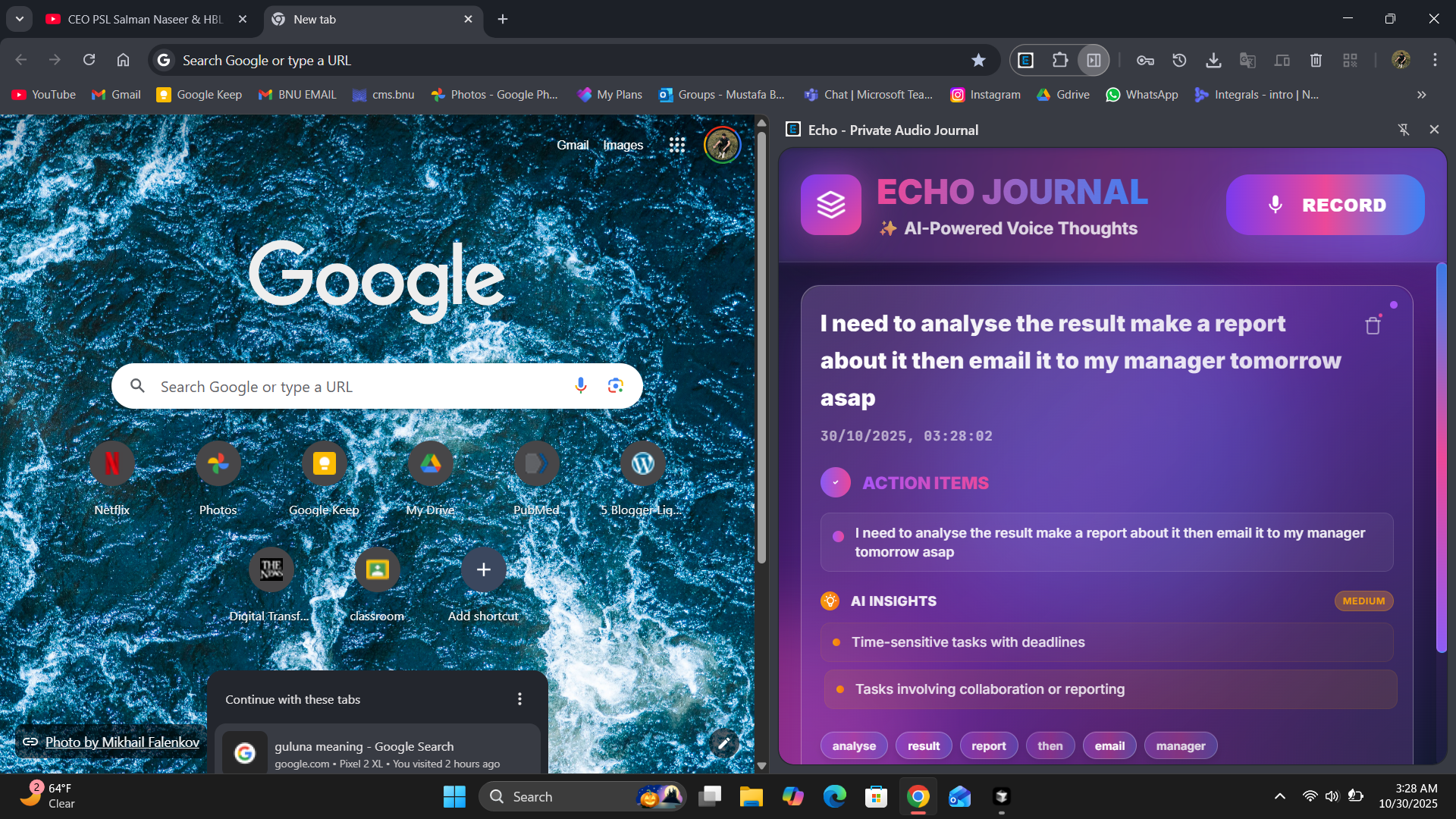
Echo Journal is a Chrome extension that transforms your voice into organized, actionable notes using on-device AI. Here's what makes it special:
Core Features
🎤 One-Click Voice Recording
- Click the RECORD button and start speaking
- Live transcript appears as you talk
- Instant results—no waiting for processing
- Works completely offline after initial load
🧠 AI-Powered Analysis
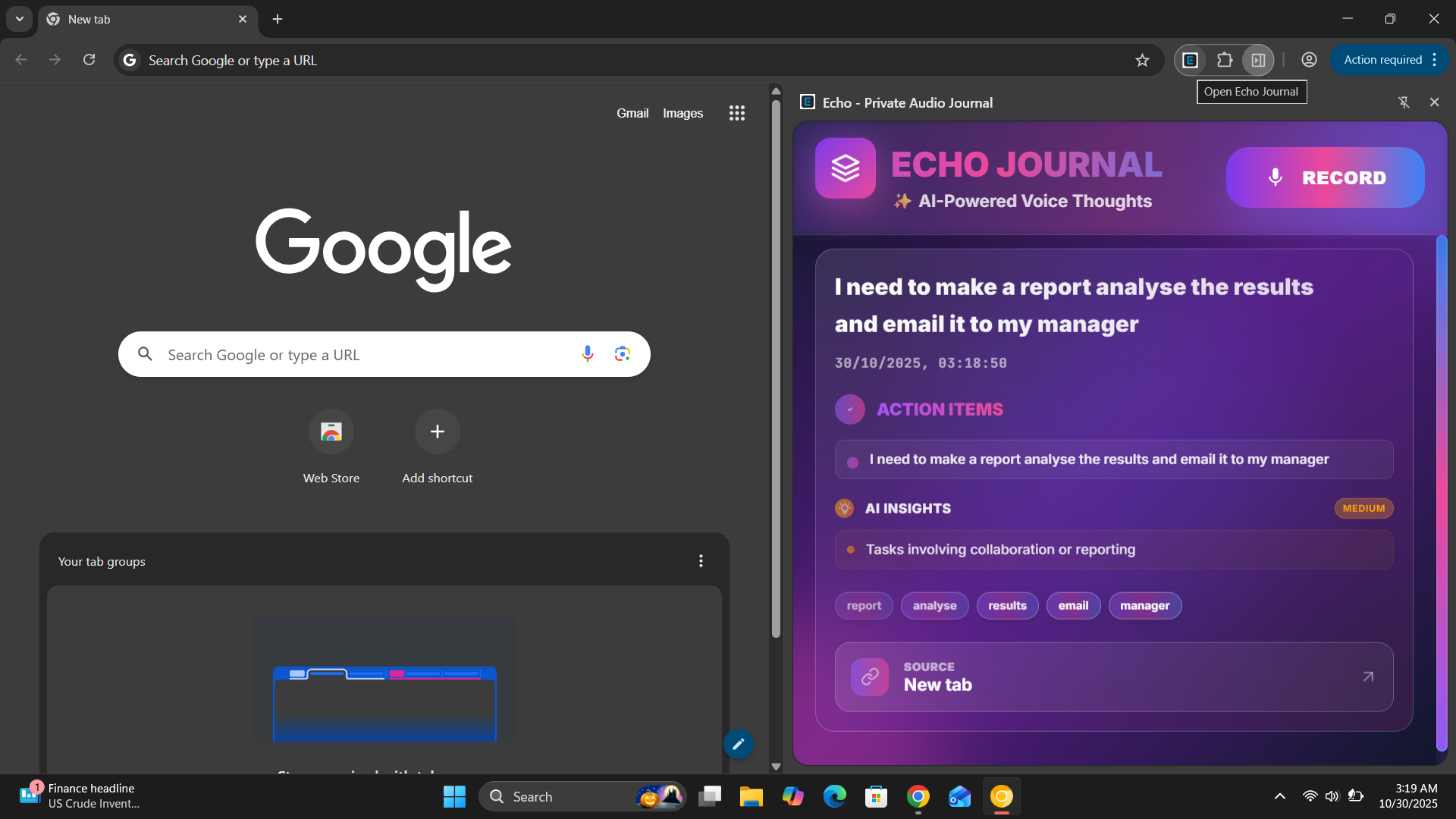
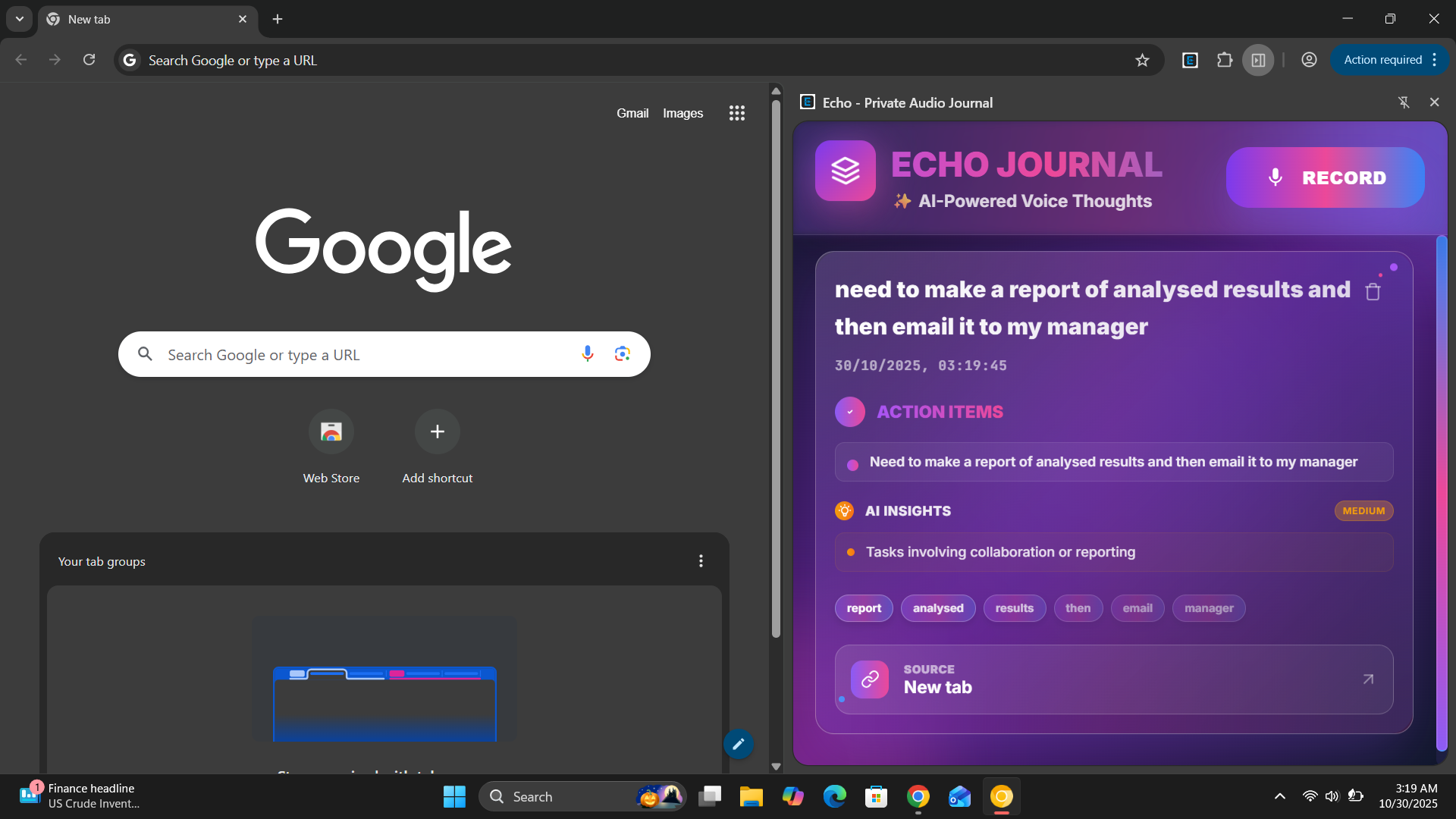
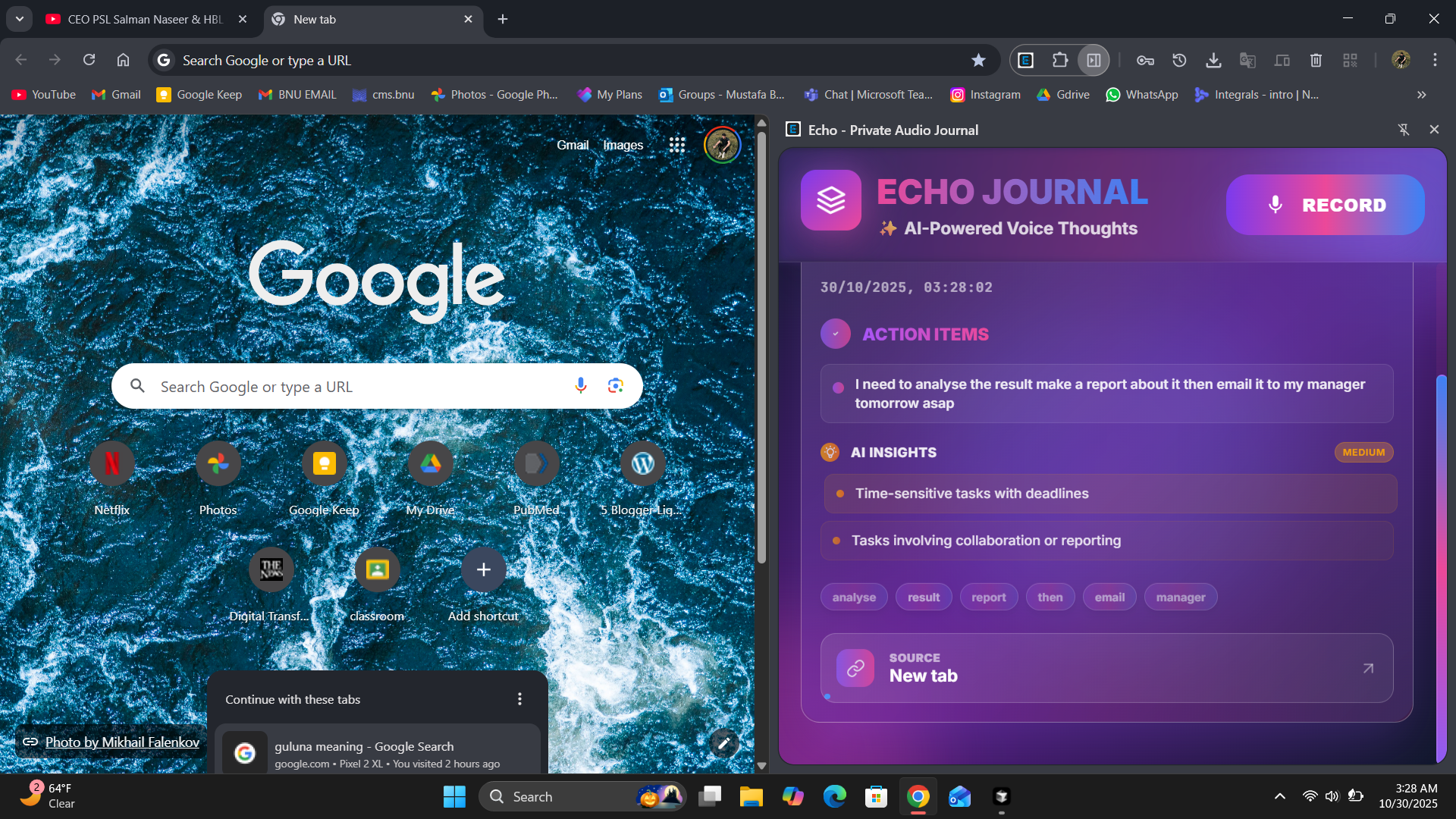
- Smart Summaries: Converts your thoughts into concise, professional summaries
- Automatic Tagging: Extracts 5-7 relevant keywords for easy organization
- Action Item Extraction: Identifies and breaks down tasks automatically
- AI Insights: Provides contextual analysis and key points
- Confidence Scoring: Shows how reliable the AI processing was
📅 Smart Reminders
- Understands natural language dates ("tomorrow at 3pm", "next Tuesday")
- Detects owners/assignments ("@John should review this")
- Schedules Chrome notifications automatically
- Priority detection (urgent, high priority, low priority)
✏️ Seamless Editing
- Click any summary or action to edit inline
- Auto-saves on blur or Enter key
- No forms, no save buttons—just natural editing
- Changes persist immediately to local storage
🎨 Beautiful Modern UI
- Stunning glassmorphism effects with backdrop blur
- Animated gradients and floating particles
- Smooth transitions and micro-interactions
- Dark theme that's easy on the eyes
- Responsive design perfect for Chrome's side panel
🔒 100% Private
- All processing happens on your device
- Data stored locally in Chrome storage
- No external API calls (except Chrome's built-in AI)
- No tracking, analytics, or telemetry
- Your thoughts stay yours, always
The User Experience
- Click the extension icon → Side panel opens
- Click RECORD → Speak your thoughts
- See live transcript as you speak
- Note appears instantly with local processing
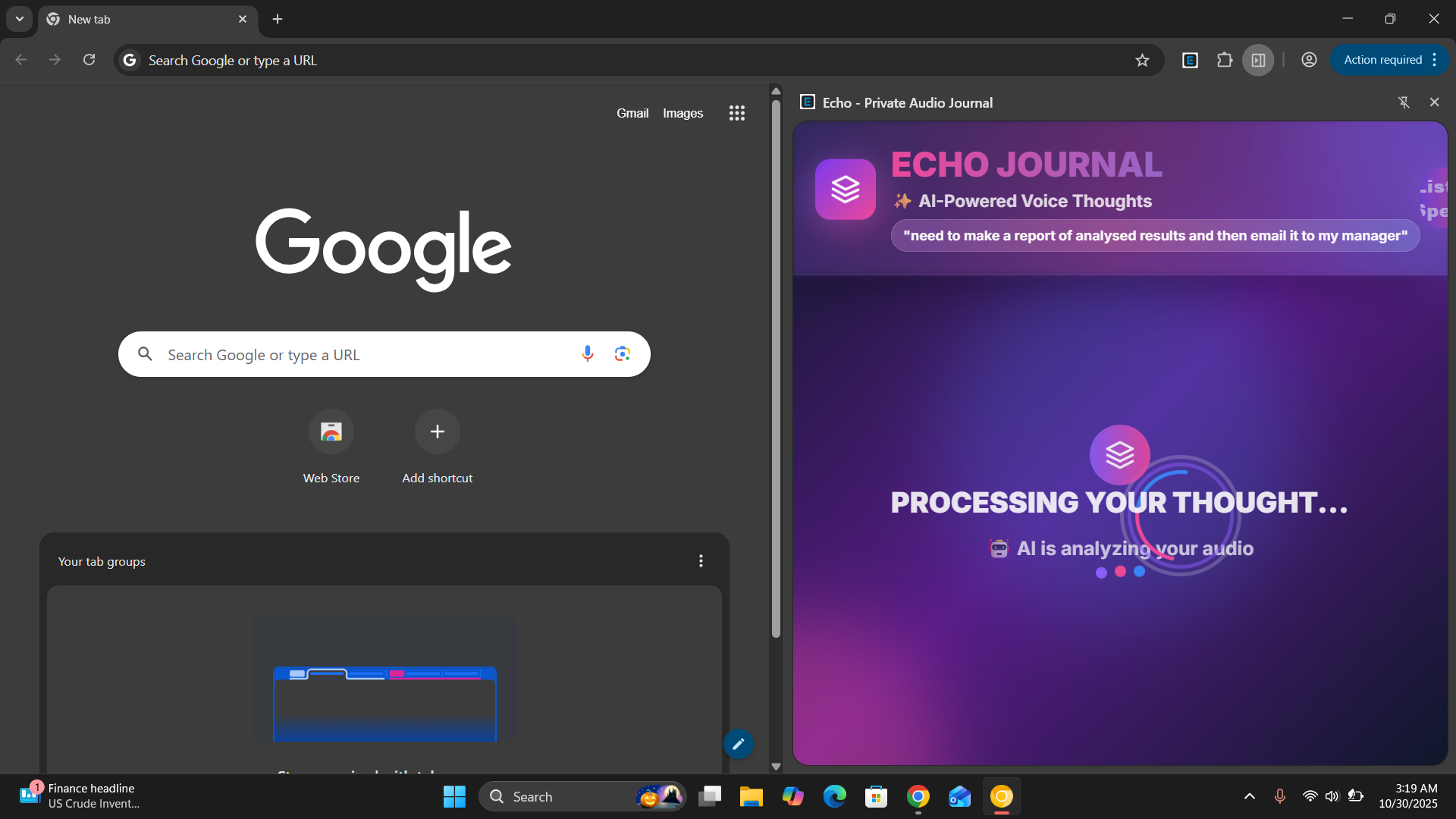
- AI enhances it in the background (2-5 seconds)
- Edit anything inline—it saves automatically
- Get notified when reminders are due
How we built it
Architecture & Tech Stack
Frontend Technologies
- HTML5: Semantic, accessible markup
- CSS3: Custom glassmorphism, gradients, animations (no frameworks)
- Vanilla JavaScript ES6+: Modern async/await patterns, no libraries
Browser APIs
- Web Speech API: Real-time speech-to-text conversion
- Chrome Extension API: Side panel, local storage, tabs, alarms
- Chrome Built-in AI: Prompt API and Summarization API
- Notifications API: Smart reminder delivery
Design System
- Color palette: Purple (#8b5cf6), Pink (#ec4899), Blue (#3b82f6)
- Typography: Inter (UI), JetBrains Mono (code/dates)
- Effects: Glassmorphism, backdrop filters, gradient animations
- Animations: Float, pulse, shimmer, bounce, gradient-x
Dual-Phase Processing Architecture
One of our key innovations is the dual-phase processing system:
Phase 1: Instant Local Processing (< 100ms)
Speech → Text → Local Analysis
         ↓
    Extract keywords
    Identify action patterns
    Parse date/time
    Create basic summary
         ↓
    Display note IMMEDIATELY
Phase 2: AI Enhancement (2-5 seconds, background)
Transcript → Chrome AI APIs
         ↓
    Better summaries (Summarization API)
    Smarter tags (Prompt API)
    Deeper insights (Prompt API)
    Action breakdown (Prompt API)
         ↓
    Update note seamlessly
This means users see results instantly while AI improves them in the background—best of both worlds!
Key Technical Implementations
Speech Recognition Pipeline
- Initialize Web Speech API with interim results
- Display live transcript in header pill
- Handle errors gracefully (no-speech, permissions, network)
- 30-second timeout with user feedback
- Process final transcript through dual-phase system
AI Integration Strategy
- Try multiple API paths:
chrome.ai,window.ai,window.ai.assistant - Structured JSON output with explicit schema
- Regex extraction of JSON from responses
- Comprehensive validation and cleanup
- Always fallback to local processing on failure
Action Item Extraction
- Pattern matching for 50+ action verbs and obligation phrases
- Sentence breaking algorithm for complex speech
- Fragment repair using original transcript context
- Normalization: capitalization, bullet points, minimum length
- Deduplication using substring detection
Date/Time Parsing
- Relative dates: tomorrow, next week, Monday-Sunday
- Time formats: 12-hour (3pm), 24-hour (14:30)
- Date + time combination from different parts of speech
- Chrome alarms scheduling with computed timestamps
- Native browser notifications
Inline Editing System
contenteditablefields for summaries and actions- Save on blur or Enter key
- Throttled auto-save to prevent race conditions
- Re-compute reminders when actions change
- Optimistic UI updates
Development Process
Week 1: Foundation
- Researched Chrome AI APIs and Web Speech API
- Built basic speech recognition prototype
- Designed dual-phase processing architecture
Week 2: Core Features
- Implemented instant local processing
- Created NLP algorithms for action extraction
- Built date/time parsing system
Week 3: AI Integration
- Integrated Chrome's Prompt and Summarization APIs
- Built fallback systems and error handling
- Implemented confidence scoring
Week 4: Polish
- Created stunning visual design
- Added inline editing
- Implemented reminders system
- Built comprehensive error notifications
Week 5: Testing & Refinement
- Fixed edge cases across all features
- Optimized animations and performance
- Enhanced AI prompt engineering
- Added delete functionality and empty states
Challenges we ran into
1. Navigating Experimental AI APIs
Chrome's built-in AI is cutting-edge but experimental. Documentation was sparse, with unclear API surfaces (chrome.ai vs window.ai) and cryptic errors.
Solution: We built wrapper functions that try multiple API paths, implemented extensive logging, and created comprehensive fallback systems. Our local processing acts as both fallback and instant-result provider.
2. Speech Recognition Unpredictability
Web Speech API can be temperamental—background noise, silent pauses, premature endings, and microphone permissions all cause issues.
Solution: We added robust error handling for every error type, implemented a 30-second timeout, built live transcript feedback, and created clear user-facing error messages. The UI guides users through permission issues.
3. Balancing Speed and Quality
Users expect instant feedback, but AI processing takes 2-5 seconds. We couldn't make users wait.
Solution: Our dual-phase architecture displays notes immediately using local processing (< 100ms), then seamlessly enhances them when AI completes. Users never wait, but still get AI-quality results.
4. Natural Language Action Extraction
Extracting actionable tasks from natural, conversational speech is incredibly difficult. People speak in run-on sentences with multiple nested tasks.
Solution: We built a sophisticated pattern recognition system with 50+ patterns, a sentence-breaking algorithm, fragment repair using context, and normalization. After 50+ hours of testing and refinement, it now reliably extracts discrete, actionable tasks.
5. Date/Time Parsing
"Tomorrow at 3pm" or "next Tuesday" needs to become an actual timestamp for reminders.
Solution: We implemented custom date arithmetic with day-of-week mapping, 12/24-hour time detection, AM/PM handling, and intelligent date + time combination. The system correctly schedules Chrome alarms for notifications.
6. Complex Animations Without Performance Loss
We wanted stunning visuals—floating particles, gradient animations, glassmorphism—but animations can kill performance.
Solution: We used GPU-accelerated CSS transforms, strategic will-change properties, optimized blur radii, and tested on various devices. All animations run at 60fps even on low-end hardware.
7. Consistent AI Responses
AI sometimes returns prose instead of JSON, has missing fields, or includes extra text around the JSON.
Solution: We use explicit JSON format instructions in prompts, regex extraction of JSON blocks, field-by-field validation, and always preserve good local data when AI fails or returns partial results.
8. State Management Without Frameworks
Managing state across multiple notes without React/Vue was challenging—finding notes by ID, updating after AI enhancement, handling deletions.
Solution: We added data-note-id attributes for DOM lookup, created dedicated helper functions (updateNoteInUI(), updateNote()), separated storage from UI logic, and used async/await patterns throughout.
Accomplishments that we're proud of
✅ Zero External Dependencies - No frameworks, no NPM packages, no build tools—pure web platform APIs
✅ Privacy-First Architecture - 100% local processing with no external servers, tracking, or analytics
✅ Instant Feedback Loop - Notes appear in < 100ms, AI enhancement happens invisibly in background
✅ Bulletproof Fallbacks - Works perfectly even when Chrome AI is completely unavailable
✅ Production-Grade Design - Stunning UI that rivals commercial apps, with smooth 60fps animations
✅ Smart Date Parsing - Natural language understanding for "tomorrow at 3pm", "next Tuesday", etc.
✅ Seamless Editing - Inline editing with auto-save, no forms or buttons needed
✅ Comprehensive Error Handling - Every edge case covered with user-friendly messages
✅ Advanced NLP - Sophisticated action extraction from natural conversational speech
✅ Dual-Phase Innovation - Unique architecture that combines instant results with AI quality
Key Metrics
- 0 external dependencies (just web platform APIs)
- < 100ms instant results
- 2-5 seconds for AI enhancement (background)
- 100% privacy score (no external calls)
- ~2,700 lines of clean, maintainable code
- 60fps animations throughout
- 10+ major features in a side panel extension
What we learned
Technical Insights
Chrome's Built-in AI is Powerful But Requires Care
- Multiple API surfaces exist and behave differently
- Always build fallback systems
- Structured output with JSON schemas is the way to go
- Validation and cleanup are essential
Progressive Enhancement is the Right Pattern
- Start with local processing for instant feedback
- Enhance with AI in the background
- Users never wait, quality improves automatically
- Graceful degradation keeps app working
Vanilla JavaScript is Incredibly Viable
- Modern web APIs are powerful enough for complex apps
- No framework needed for excellent UX
- Less code, faster load times, simpler debugging
- Direct control over every aspect
CSS Can Create Stunning UIs
- Glassmorphism with backdrop-filter is magical
- GPU-accelerated transforms enable smooth animations
- Gradient animations create premium feel
- No UI framework needed for modern design
Design & UX Lessons
Instant Feedback is Non-Negotiable
- Users won't wait 5 seconds for results
- Show something immediately, improve it later
- Loading states should be brief and beautiful
- Always provide visual feedback
Inline Editing Beats Forms
- Click-to-edit feels more natural
- No save buttons reduces cognitive load
- Auto-save on blur is intuitive
- Makes the UI feel more direct and responsive
Error Messages Need Personality
- Technical errors should be friendly
- Always explain what went wrong and how to fix it
- Beautiful error notifications reduce frustration
- Guide users to success, don't just say "error"
AI & NLP Insights
Prompt Engineering is Critical
- Explicit format instructions are essential
- Schema definitions improve consistency
- Fallbacks for when AI returns unexpected formats
- Less is often more—concise prompts work better
Natural Language is Hard
- People speak in run-on sentences
- Context matters for understanding
- Pattern matching needs dozens of patterns
- Testing with real speech reveals edge cases
Confidence Scoring Builds Trust
- Show users how reliable the AI processing was
- High/medium/low gives useful signal
- Users appreciate transparency about AI limitations
Privacy & Architecture
Local-First is Powerful
- Users genuinely appreciate privacy
- No servers means no maintenance, no costs
- Offline-first improves reliability
- Local processing is faster anyway
Fallbacks Enable Innovation
- You can use experimental APIs if you have fallbacks
- Always work, enhance when possible
- Users get progressively better experience
- Future-proof architecture
What's next for Echo Journal
Short Term (v1.1 - Next Month)
Search & Filter
- Full-text search across all notes
- Filter by tags, date range, confidence level
- Quick filters for today, this week, this month
Export & Backup
- Export notes as JSON or Markdown
- Bulk export for backup purposes
- Import previously exported notes
Note Organization
- Custom categories/folders
- Pin important notes to top
- Archive completed notes
Bulk Actions
- Select multiple notes
- Mass delete, export, or categorize
- Quick cleanup tools
Medium Term (v2.0 - 3 Months)
Voice Playback
- Store original audio recordings
- Replay your voice notes
- Optional feature (privacy-focused)
Multi-Language Support
- Spanish, French, German, Mandarin
- Auto-detect language
- Mixed-language notes
Custom Tags & Categories
- Manual tag editing
- Custom tag colors
- Tag-based organization
Calendar Integration
- Export tasks to Google Calendar
- iCal format support
- Two-way sync for reminders
Enhanced Reminders
- Recurring reminders
- Snooze functionality
- Location-based reminders (optional)
Long Term (v3.0 - 6 Months)
Weekly AI Insights
- Automatic weekly summaries
- Trend analysis across your notes
- Productivity patterns
- Goal tracking suggestions
Collaboration Features
- Share specific notes (while maintaining privacy)
- Team journals with permissions
- Shared action items
Mobile Apps
- Native iOS and Android apps
- Cross-device sync (encrypted, optional)
- Offline-first mobile experience
Advanced AI Features
- Custom AI models for better accuracy
- Context-aware processing using page content
- Emotion detection in voice
- Speaker diarization for meetings
Voice Commands
- "Hey Echo, show me tasks from yesterday"
- "Echo, mark this as done"
- "Echo, remind me about this tomorrow"
- Natural conversation with your notes
Research & Experiments
Emotion & Sentiment Analysis
- Detect mood in voice notes
- Track emotional patterns over time
- Well-being insights
Meeting Mode
- Multi-speaker conversation tracking
- Automatic speaker identification
- Meeting summaries and action items
Smart Suggestions
- Proactive task recommendations
- Related notes suggestion
- Follow-up reminders based on context
Browser Integration
- Automatically capture page context
- Link notes to specific paragraphs
- Web annotation with voice notes
AI Model Fine-Tuning
- Learn from your corrections
- Personalized keyword extraction
- Custom action patterns
Vision
Echo Journal started as a simple idea: make capturing thoughts as natural as thinking them. We're building toward a future where:
- AI augments thinking without getting in the way
- Privacy is fundamental, not optional
- Tools disappear into seamless experiences
- Your thoughts remain yours, always
We believe the best productivity tools are the ones you barely notice using. They just work, instantly, privately, and beautifully.
Echo Journal isn't just a note-taking app—it's a glimpse into the future where AI augments our thinking in real-time, privately, and effortlessly.
Built with ❤️ for productivity and thought organization
Built With
- chromebuiltinai
- css3
- gemininano
- html5
- javascript
- json

Log in or sign up for Devpost to join the conversation.