Inspiration
I'm a pretty serious home cook (if I may say so), and I have hundreds of saved recipe posts on Instagram. Every time I see a recipe I like, I bookmark it - and then never cook it. It just gets lost in the bookmarks. Who's going to scroll through hundreds of saved reels looking for that one pasta dish you saw three weeks ago?
Then there's my mum. She's an incredible home cook with a large, old book full of handwritten recipes - stained pages, faded ink, years of cooking history. I wanted somewhere those recipes could live forever, not just in a book that's falling apart.
When I watched Eitan's brief, it clicked immediately. He described exactly what I was experiencing: people are inundated with recipes from social media, cookbooks, and the internet, but the gap between "I want to make this" and actually cooking it is massive. The grocery shopping, the planning, the organisation - it all gets in the way. I knew I had to build something that solved this, because I live this problem every single day.
What it does
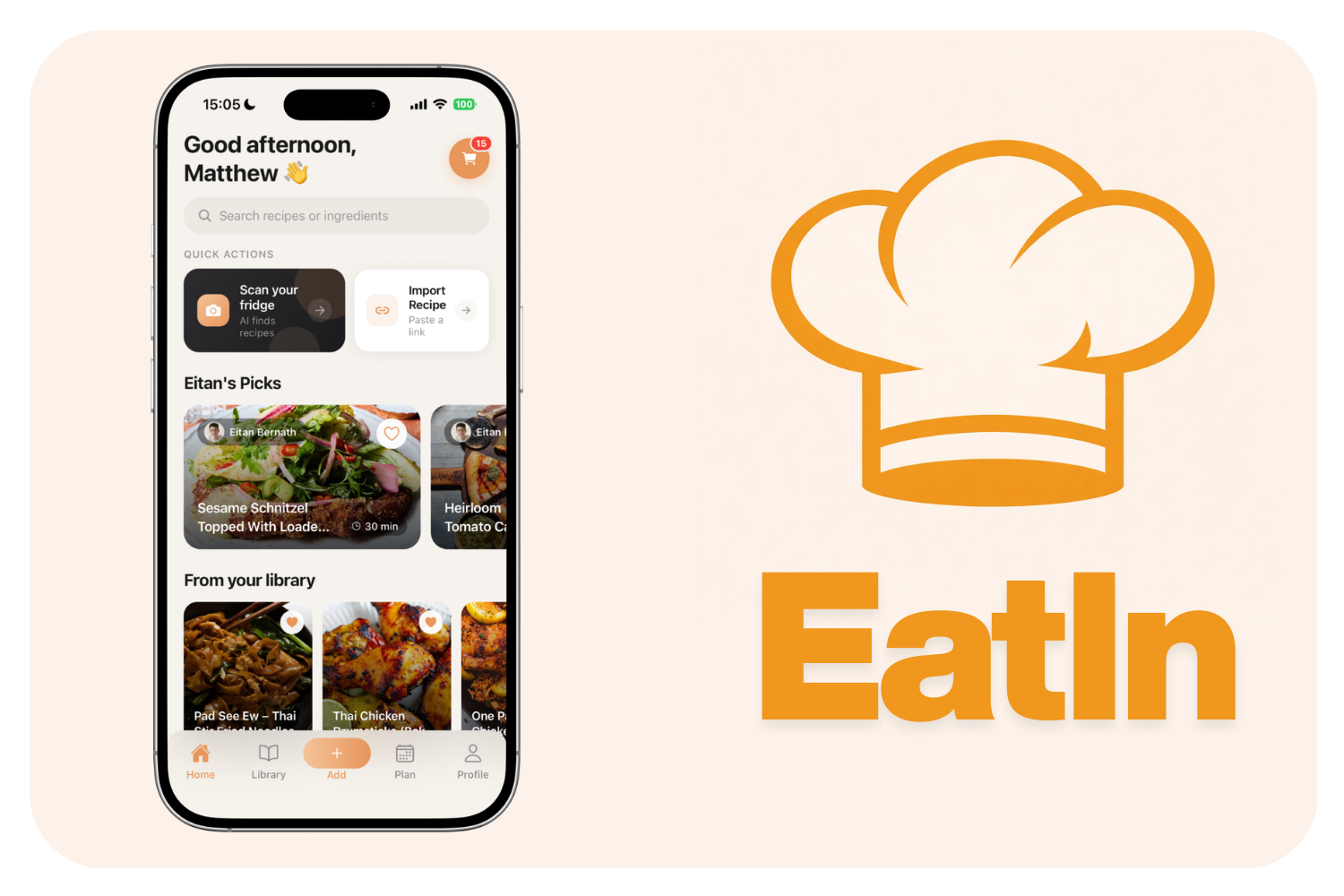
EatIn bridges the gap between recipe inspiration and real meals.
Import recipes from anywhere - Paste a TikTok, Instagram, or any recipe URL and EatIn extracts a fully structured recipe with ingredients, instructions, servings, and prep time. You can also photograph a cookbook page, a handwritten recipe, or even a stained, decades-old recipe card, and our AI will read it perfectly. Need to cook for more people? Adjust the serving size and EatIn will recalculate the ingredients for you.
Scan your fridge - Take a photo of what's in your fridge. EatIn uses AI to detect your ingredients, then matches them against your entire recipe library to show what you can cook right now, or generates a brand new recipe from what you have.
Plan your meals - A full week and month meal planner with auto-plan that fills your week intelligently from your saved recipes.
Shop smarter - One tap generates a smart grocery list from your meal plan or any recipe. Ingredients are auto-categorised by aisle, duplicates are merged, and quantities scale with servings.
Instacart integration - Go from recipe or shopping list to a real grocery order in one tap. EatIn connects directly to Instacart, giving users access to over 100,000 grocery stores. From any recipe page, tap through to an Instacart recipe page with your ingredients pre-filled. From your shopping list, send the entire list to Instacart in one click. The full journey - from seeing a recipe on TikTok to groceries at your door - happens without ever leaving the EatIn ecosystem.
The app comes pre-loaded with 50 recipes from Eitan's website, so there's a rich library of content from the moment you open it.
How we built it
Built solo, from scratch.
Frontend: React Native with Expo, TypeScript, Expo Router. A lot of thought went into the UI to ensure it met the brief, and gave the app a 'fun' feel.
Backend: Node.js/Express with MongoDB. Firebase for authentication (Google, Apple, and anonymous sign-in).
AI Pipeline: OpenAI for recipe extraction, image recognition, and recipe generation. ElevenLabs for audio transcription from recipe videos. Apify for social media scraping.
Monetization: RevenueCat SDK powering subscriptions with a hard paywall, annual and monthly plans, and a 7-day free trial.
Grocery Integration: Instacart API for recipe-to-cart and shopping list-to-cart across 100,000+ stores.
The process was intensely iterative (as building apps always is) - build, test, break, fix, ship, repeat. Luckily I'm in the middle of Eitan's target audience age-wise, so a lot of friends volunteered as beta testers, along with family who caught bugs I had no idea about! Having testers in their 20s all the way to 60s, alongside my own perspective, was invaluable for making sure the app is intuitive for everyone.
Challenges we ran into
Instacart approval the night before submission. I'd applied for Instacart developer access last week, expecting it to come through with time to spare. It was approved the night before the deadline (yesterday). I integrated the full Instacart API, tested it, and then had to re-edit the entire demo video to include it - all in one night. Worth it though, because it closes the loop on the entire user journey.
Fitting everything into a 3-minute demo video. EatIn does a lot - recipe import from four different sources, fridge scanning, meal planning, shopping lists, Instacart integration, folder organisation, recipe editing, sharing. Condensing all of that into a coherent video around three minutes was genuinely one of the hardest parts. And then having to re-do it after adding Instacart at the last minute made it even harder.
Shipping a polished app in under two weeks. Every day was about prioritising the most import aspects - what moves the needle most for the user right now?
Keeping AI processing times down. Features like TikTok extraction involve scraping, audio download, transcription, and AI extraction. I optimised the pipeline by trying caption-based extraction first and only falling back to audio transcription when needed, compressing images before upload, and parallelising where possible.
Building for every age group. Eitan's audience skews 18-34, but I didn't want to limit it to that, so that every age group can use it without friction. Every interaction had to be intuitive whether you're 22 or 62 - clear labels, obvious navigation, generous tap targets, and a UI that doesn't sacrifice beauty for usability.
Accomplishments that i'm proud of
Building an app that genuinely feels as polished as competitors doing seven figures a month in revenue - solo, on a zero budget, in under two weeks.
The moment I photographed one of my mom's old, stained, handwritten recipe cards and EatIn read it perfectly - extracting every ingredient and instruction from decades-old handwriting - that was the moment I knew this app was something special.
And also pulling off the Instacart integration the night before the deadline. The full journey now works end-to-end: see a recipe on TikTok → import it → plan it → generate a grocery list → order from Instacart → cook it. That's the complete vision, and it's live.
What I learned
The hardest part of building a great app isn't the code, it's the decisions. Every feature you add is a feature you have to design, test, and support. The discipline of saying "not yet" to good ideas so you can ship great ones on time was the biggest lesson.
I also learned that your best beta tester is someone who isn't afraid to tell you the truth.
What's next for EatIn
Pantry support - Extending the fridge scan feature to also track what's in your pantry. The app will know both your fresh ingredients and your staples, making recipe matching and generation even more accurate.
Beyond that: A/B testing paywall and pricing with RevenueCat Experiments, Instacart affiliate program for commission on grocery orders, Android support, step-by-step cooking mode, and continued optimisation of the AI pipeline for speed and accuracy.
Facebook Integration: Currently EatIn works with Instagram Reels + TikToks, but not Facebook. That's something that will be implemented over the next few days.
Built With
- apify
- firebase
- mongodb
- node.js
- openai
- react-native
- render
- revenuecat
- typescript


Log in or sign up for Devpost to join the conversation.