Inspiration
I used to work as a software engineer at a startup building a cooking robot for the kitchen. Every day, I watched us try to solve the hardest problem in cooking — not the automation, but understanding recipes themselves. Videos don't come with structured data. Blog posts bury instructions under walls of text. And once you're actually cooking, your hands are covered in flour and your phone screen has timed out. When I left, that problem stuck with me.
When I heard Eitan's brief for this hackathon — a tool where you give it a video link and it writes a grocery list, something that bridges the gap between seeing a recipe and actually cooking it — it clicked instantly. That was the exact problem I'd been staring at for months, just framed from the other side. He wasn't thinking about robots. He was thinking about real people scrolling past recipes they'll never make because the friction between "that looks good" and "I have everything I need" is too high.
I knew how hard the underlying problem was. But I also knew AI had gotten good enough to crack it. I didn't need a robot — I just needed to build the bridge Eitan was describing. That's how Eaten was born.
What it does
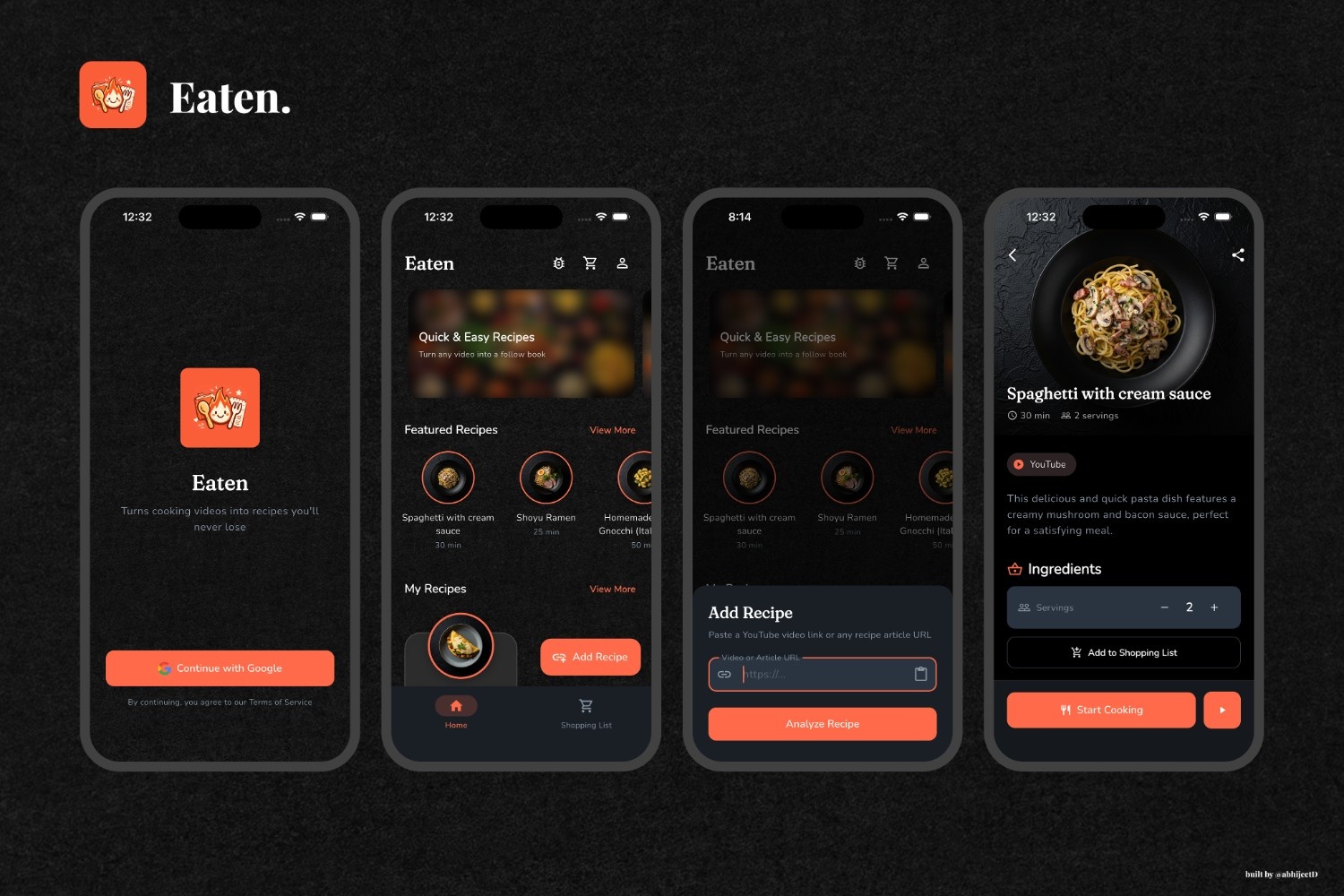
Eaten turns any recipe — from a YouTube video or a food blog — into a smart, interactive cooking experience.
Paste a link, and the AI extracts everything: ingredients with precise quantities, step-by-step instructions with video timestamps, nutritional data, and even generates a custom illustration for the dish. Every instruction gets narrated with AI-generated voice, so you can cook hands-free.
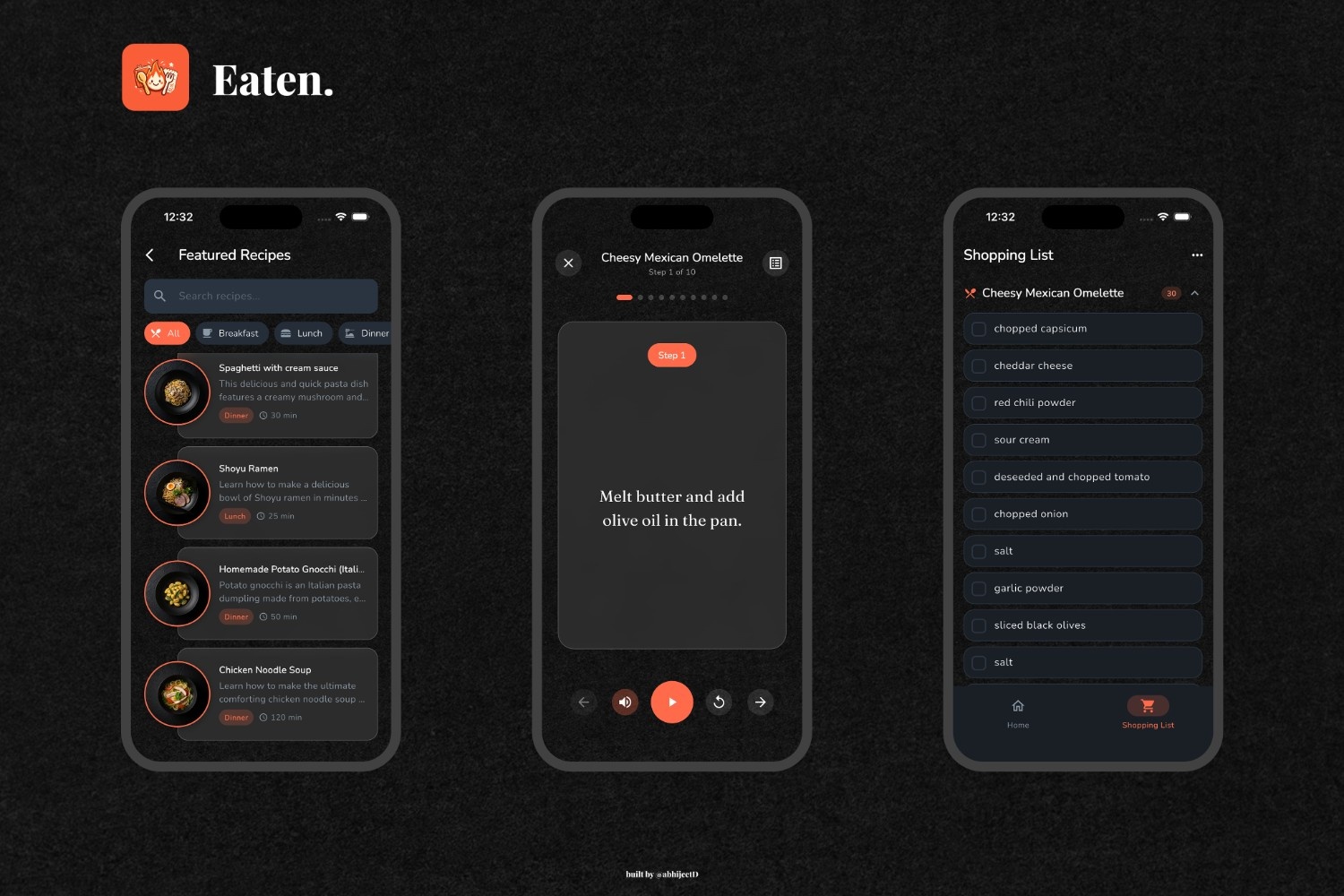
Cook Mode takes over the screen — no distractions, no screen timeout, just the current step, a play button, and a timer. When you're done cooking, send your ingredients to a smart shopping list that scales quantities and deduplicates items across recipes.
Found something great? Share it with a link. Your friend opens it, sees the full recipe, and saves it to their own collection in one tap.
How we built it
Flutter for the cross-platform app, Firebase for the backend, and a pipeline of AI services stitched together with Cloud Functions.
The core is a Cloud Function that takes a URL and hands it to Gemini 2.0 Flash with video understanding. For YouTube links, Gemini watches the video natively — no downloading, no transcription hacks — and extracts structured recipe data including the exact timestamps in the video where each cooking step happens. For articles, it parses the page and pulls out the same structured format.
Once the recipe is extracted, Imagen 4.0 generates a custom food illustration, and OpenAI's TTS API narrates every instruction step. The audio files get uploaded to Firebase Storage so they're available offline after first load.
On the frontend, Riverpod handles state management, with real-time Firestore streams keeping everything in sync. Cook Mode uses WakelockPlus and SystemChrome to create a true immersive experience. Deep linking is built with Universal Links and App Links so shared recipes open directly in the app — handling both cold starts and warm starts.
Monetization runs through RevenueCat with a Firebase Functions webhook that syncs subscription status to Firestore in real time, so the app never has to guess whether someone is premium.
Challenges we ran into
Getting structured data out of videos was harder than expected. Gemini is powerful, but prompt engineering for consistent JSON output — with accurate timestamps, properly separated ingredients, and logically ordered steps — took serious iteration. A recipe video where someone says "add a pinch of salt" while simultaneously listing five other ingredients doesn't map cleanly to structured data.
The TTS pipeline added real complexity. Generating audio for every instruction step means parallel API calls to OpenAI, uploading each file to Cloud Storage, making them public, and stitching the URLs back into the recipe document — all within a single Cloud Function invocation. The function needed a 5-minute timeout and 512MB of memory just to handle longer recipes.
Deep linking across cold and warm app states was surprisingly tricky. When a user taps a shared recipe link and the app isn't running, the link has to survive the entire boot sequence and land the user on the right screen. Handling that alongside the normal in-app link stream without duplicate navigations required careful state management.
Ingredient scaling with readable fractions. Displaying "1/3 cup" instead of "0.333 cup" when someone halves a recipe sounds simple — until you're handling edge cases across every possible quantity and unit combination. Getting the formatting right for common fractions like ¼, ⅓, ½, and ¾ while keeping the math accurate took more effort than anticipated.
Accomplishments that we're proud of
The end-to-end pipeline — from pasting a raw YouTube URL to standing in the kitchen with hands-free audio narration — works seamlessly. There's no manual entry anywhere.
Cook Mode genuinely feels like a different app. The screen stays on, the system UI disappears, and you navigate steps by swiping. Tap play, and the step reads itself to you. It's the feature I built because I actually needed it.
The smart shopping list deduplicates ingredients across multiple recipes using batch Firestore operations, so adding dinner for Monday and Wednesday gives you one combined list — not two separate ones with duplicate onions.
Recipe sharing with deep links works end to end on both platforms. A shared link opens the recipe in-app, shows who shared it, and lets you save it to your collection in one tap.
What I learned
AI output needs a rigid contract. Gemini can understand a cooking video brilliantly, but getting it to return data in a consistent, parseable schema every single time required treating the prompt like an API specification — not a conversation.
Pre-generating assets beats runtime generation. Early prototypes tried to generate TTS on the fly during Cook Mode. Moving that to the analysis Cloud Function — so audio is ready before the user ever opens the recipe — made the experience dramatically better.
Serverless has real constraints. Firebase Functions v2 configuration has its own patterns — mixing syntax from different versions or adding unsupported options silently breaks deployments. I learned to study the existing working functions in my codebase before writing new ones.
Subscription infrastructure is an iceberg. RevenueCat handles the purchase flow, but verifying subscription status on the backend, syncing it to Firestore via webhooks, and gating features correctly on the client — that's a whole system, not just a paywall screen.
What's next for Eaten
Meal planning that lets you drag recipes onto a weekly calendar and auto-generates a consolidated shopping list. Multi-language support for recipe extraction — Gemini already understands videos in other languages, the structured output pipeline just needs to handle it. And a social feed where you can follow friends and see what they're cooking, built on the sharing infrastructure that's already in place.


Log in or sign up for Devpost to join the conversation.