Inspiration
I'm an international student at Calvin University, and honestly, eating out stresses me out sometimes. Not because I don't want to — I do — but because I never know what a meal is gonna cost until I'm already sitting at the table with a menu in my hand. My first question whenever my friends suggest a place is never "is it good?" It's "how much is it gonna be?" And I couldn't find a single app that answered that.
Yelp just shows dollar signs. What does that even mean? Google Maps shows star ratings UberEats / DoorDash technically show prices, but with delivery fees and service charges adds on which is hard to calculate
I was thinking — why doesn't this app exist yet? I'll just build it.
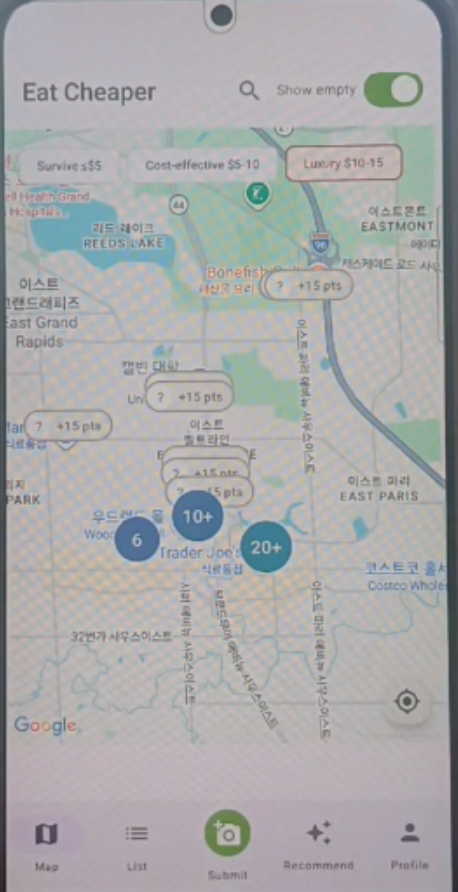
What it does Eat Cheaper is a map-based Android app that shows every restaurant near you with actual menu prices Items are sorted into three simple tiers:
Survive — $0–5 Cost-effective — $5–10 Luxury — $10–15
Core features: Map view — color-coded pins show every restaurant, pin colors match the cheapest tier available List view — scrollable list sorted by price or distance, with AI-parsed vs verified badges so you know what you're trusting Search — find any restaurant by name Submit — if no data, users can upload image and the data will be parsed Recommend — type something and Gemini picks the best match from nearby menus Profile + Points — earn points and level up by submitting and verifying prices. Higher levels count more when they verify, which keeps data honest as the community grows.
Launch data: I wanted whole US, but that was too big. So I started with my region Grand Rapids, MI. 500 restaurants, 17,000+ menu items.
How we built it Stack
- Backend: FastAPI + PostgreSQL with PostGIS (for geospatial queries)
- Android: Kotlin + Jetpack Compose + Hilt + Retrofit
- Maps: Google Maps Android SDK + Maps Compose + Marker Clustering utility
- Places data: Google Places API (restaurant discovery + photos)
- AI: Gemini API (used in 4 distinct ways)
- Data collection: BeautifulSoup, Playwright, Google Places API
4 Distinct Uses of Gemini This was genuinely my favorite part of the project. I wanted to use it wherever it actually helped.
- Web Parsing (text menus) Scrape restaurant website HTML with BeautifulSoup >> send raw text to Gemini with a structured prompt >> get clean JSON menu items back.
- Screenshot Vision (image-only menus) Some restaurants don't have text menus, they're images, or JavaScript-rendered. Playwright screenshots the page >> Gemini Vision extracts items from the image.
- Photo Submission (user uploads) Take a photo of the menu board or pick from your gallery >> Gemini Vision reads it >> all items appear in the app.
- Natural Language Recommendation The Recommend tab. You type "cheap ramen" or "something spicy under ten bucks" >> Gemini picks the best matches. 4 Parallel Data Pipelines I built 4 pipelines running in parallel: PipelineTechTargetABeautifulSoup + Gemini (text)Text-based websites Playwright + Gemini VisionImage-only menus Google Places Photos + Gemini VisionMenus uploaded to GoogleDDirect Gemini PDF extractionPDF menus
Backend
PostGIS for "restaurants within 5km" queries 6 database triggers for auto-verification, point accounting, and streak tracking Anonymous device-ID auth (no signup friction)
Android
5 screens: Map, List, Submit, Recommend, Profile Custom 3-state map pins (verified / AI-parsed / empty) Marker clustering with tap-to-zoom Material 3 design system throughout
If We Had DigitalOcean Credits I applied for the DigitalOcean credit sponsorship but unfortunately got declined, so everything currently runs on my local machine. If I'd gotten it, here's exactly how I would've used it:
Droplet>> host the FastAPI backend with gunicorn + uvicorn workers, running 24/7 for real user testing Managed PostgreSQL with PostGIS extension >> move off my local database to a production-grade instance with automatic backups and point-in-time recovery Spaces >> store user-submitted menu photos with CDN delivery instead of letting them sit on the server's disk
Challenges we ran into Gemini accuracy isn't always 100%. A clean restaurant website gives near-perfect extraction. A blurry photo of a handwritten specials board? Not so much. That's why I labeled everything clearly as AI-parsed vs human-verified — I didn't want to pretend AI was always right. Different data sources, different quirks. Some sites lazy-load menus with JavaScript (BeautifulSoup misses them >> need Playwright). Some restaurants only post menus as Facebook photos. Some PDFs are scanned images instead of text. Having 4 pipelines meant I could still recover data even when one approach failed. A weird bug that almost got me. The app worked fine for most restaurants, but for some, it showed "Can't reach server" — except the server logs showed 200 OK responses. I was so confused. Turns out the backend added a new hours field in a nested format, and the Android JSON parser expected a simple Map. The parser threw an exception, which got caught and turned into a generic network error. Classic. Emulator vs real device. The app ran perfectly in the Android emulator but couldn't connect to the backend on my actual phone. A real phone needs the LAN IP. Took me a minute to figure out, plus some firewall rules. The AI recommendation chat still has two rough edges: Unstable server connection — sometimes fails to respond under back-to-back queries. Likely a mix of Gemini API latency and my async timeout handling. Repetitive picks — Gemini tends to cluster recommendations from the same restaurant. I added a two-pass dedup layer and a variety prompt hint, which helps but doesn't fully fix it.
Accomplishments that we're proud of A real working app. 500 restaurants. 17,000+ menu items. Running on a real phone. You can open the app right now and search menus. 4 distinct Gemini use cases. Not one feature with AI bolted on — four completely different pipelines, each solving a real data problem. This alone took most of the build time and I think it's what makes the project stand out. Legally clean from day one. I didn't scrape anything I wasn't supposed to. I respected every robots.txt. This might sound boring for a hackathon but for me it was important — I want this app to actually survive as a real product, not just be a demo. Solo full-stack build. Backend (10 endpoints, 68 tests), Android app (5 screens, real-device compatible), 4 data pipelines, 6 design documents — done alone in a weekend. Designed for growth. Points + verification + AI-parsed labels create a system where the app gets better as more people use it.
What we learned Gemini is really an extraction engine. I came in thinking of Gemini as a smarter ChatGPT. Building this, I realized it's actually an extraction engine — turning messy stuff (HTML, screenshots, photos, PDFs, natural language) into clean JSON. Once I saw that, I kept finding new places to use it.
Design first, code later. I spent 6 hours on design docs (MASTER_DESIGN.md, SCHEMA.sql, API.md, GEMINI_PROMPTS.md) before writing any real code. Felt slow at first, but every line after went way faster. Doing this again 100%.
Going solo with AI is doable now. Full-stack app in 48 hours alone used to sound impossible. But I ran multiple Claude Code sessions in parallel — Android, backend tests, data pipelines — while I focused on direction. The new skill isn't typing fast.
Community-driven apps need thoughtful systems. Just letting users submit data isn't enough. You need trust weights, verification chains, and clear labels so people know what to trust.
What's next for Eat Cheaper
Move to DigitalOcean (or similar cloud hosting) for production deployment Private Beta with Calvin student Open Beta across Grand Rapids Expand to more college towns in the Midwest Long-term vision: make "Eat Cheaper" the default answer when anyone types "cheap food near me" in their app store
I'm launching with 500 restaurants and 17,000 menu items — but this is just the start. Every user who takes a photo or verifies a price helps complete the map. I started it, and the community finishes it.
Built With
- android
- beautiful-soup
- fastapi
- gemini
- google-maps
- google-places
- jetpack-compose
- kotlin
- playwright
- postgis
- postgresql
- pypdfium2
- python
- sqlalchemy


Log in or sign up for Devpost to join the conversation.