-
-
WebMCP powered flow chart builder
Inspiration
I was thinking about a practical useful tool that makes someones life a little better with WebMCP and that is when I decided to build this flowchart builder app (EasyFloww). It demonstrate WebMCP capabilities in a practical and visually engaging way so more people can understand it and explore.
What it does
EasyFloww is a drag and drop flowchart builder, it lets users create diagrams easily and share and editable as well as non editable version with anyone easily. With built in WebMCP support and no vendor lock in, any ai model with tool calling capabilities will be able to create flowchart seamlessly.
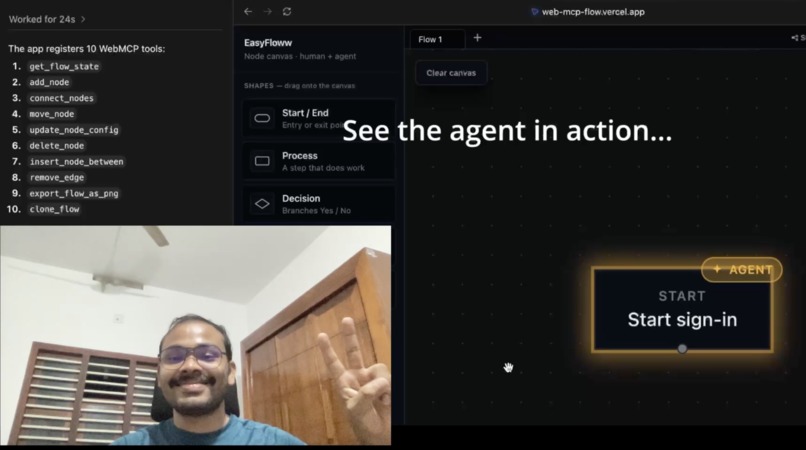
What makes this app special is that an AI agent and a user can work on the canvas together to create diagrams and collaborate in real time.
The data is stored in localstorage and never leaves your system, which tighten the security.
How we built it
I used AI as a companion to plan and develop the application. React and TypeScript is the technologies along with the npm package xyflow which power this application.
The app exposes actions as tools using webmcp. We have built and registered 10 tools. get_flow_state: returns the current nodes and edges (with type, label, config, position, and connected handles) for the active flow add_node: adds a new node of a given type, label, and optional position connect_nodes: connects two nodes by ID, with an optional sourceHandle for decision branches. move_node: repositions an existing node by ID update_node_config: updates a node's label/condition/description/borderColor delete_node: removes a node (and its connected edges) insert_node_between: splits an existing edge to insert a new node directly between two connected nodes remove_edge: disconnects two nodes by removing a specific edge clone_flow: duplicates a flow (active or specified) into a new independent tab import_flow: creates an entire new flow in one call from a complete node/edge JSON graph, with validation
Every tool calls the exact same Zustand store functions that the UI itself uses, addNode, moveNode, addEdge, updateNodeConfig etc. There's no separate path for the AI agent through the code, a tool call and a mouse drag both end up mutating the same store the same way.
Challenges we ran into
The main challenge was to design the architecture of the project in a way that makes the agent-human collaboration foolproof - meaning a human and an agent editing the same live canvas should never produce corruption, silently divergent data, lost work, or ambiguity about who changed what.
The design decisions that highlight the actions an agent is performing in the canvas was another challenge.
Accomplishments that we're proud of
The end product came out really well and useful, anyone who is looking for an AI support flowchart builder can use this product.
I am proud about the fact that I got a deeper understanding about the latest features of the web and got hands on experience in it. I am really proud of it.
What we learned
I got a pretty solid understanding about the WebMCP protocol and got really confident in implementing it in my future projects.
What's next for EasyFloww
Most diagram tools lock you into their own built in AI assistant. If you want AI help, you use their model, in their chat box, on their terms. EasyFlow is here to change that, to provide a better experience for the end user to use the AI models they are comfortable with and to create complex diagrams seamlessly.
We want to provide the user at most security and privacy possible so that their data belongs to them and not any servers.
Built With
- react
- xyflow

Log in or sign up for Devpost to join the conversation.