-
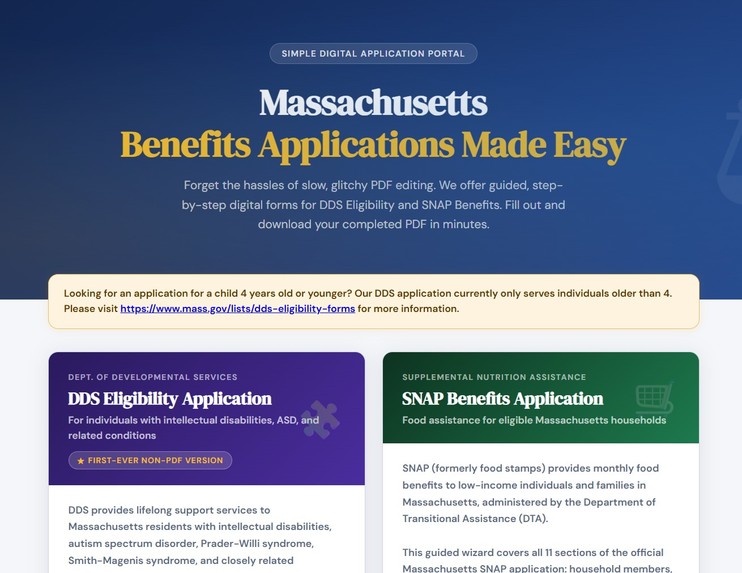
Landing Page
-
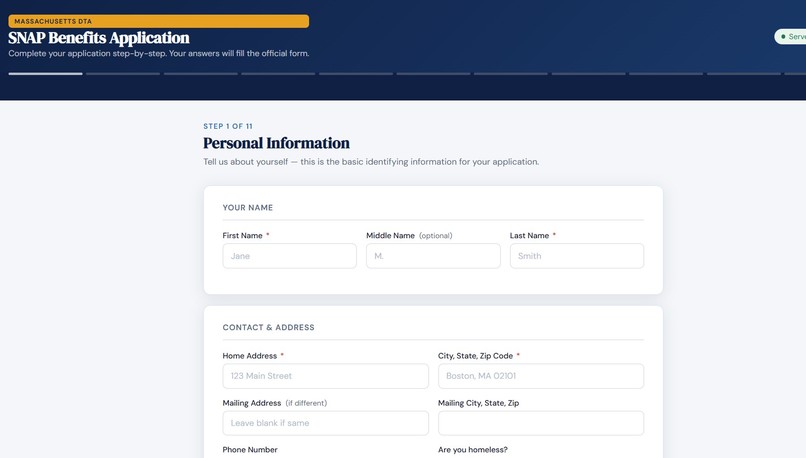
SNAP application first page
Inspiration
Applying for government benefits in Massachusetts means one thing: a PDF. PDF editing tends to be inaccessible, slow, and PDF editors have a tendency to crash. If you do not have or cannot afford tools such as Adobe Acrobat, or even a computer, you print the application, handwrite it, and mail or fax it back. For families already navigating food insecurity or a disability diagnosis, filling out inaccessible PDFs that's an extra barrier they shouldn't have to face. And for the social workers, case managers, and teachers who help these families every day, filling out the same dense forms over and over for client after client is slow, error-prone, and exhausting. We built EasyFill because people in urgent need shouldn't need a $20/month subscription just to apply for help they're entitled to. Social workers, who fill out forms for clients who may not have access to a computer, shouldn't spend their time wrestling with paperwork when they could be spending it with clients.
What it does
EasyFill is a free, guided web wizard for two official Massachusetts government applications:
SNAP Benefits: monthly food assistance administered by the Department of Transitional Assistance (DTA)
DDS Eligibility: services for people with intellectual disabilities, autism, Prader-Willi syndrome, Smith-Magenis syndrome, and related conditions
Instead of staring at a blank PDF, applicants, or the social workers helping them, are walked through every question in plain language across clean, step-by-step screens. The form is smart:
Say you don't have household members? Those fields disappear entirely Not applying for a disability category? That section is skipped Social Security numbers are masked while typing Upload a photo of your signature and it fills every signature field across the entire document automatically
At the end: one button, one downloaded PDF. The official government form, completely filled out and ready to submit to DTA or your regional DDS office. No account needed, no data stored, no subscription.
How we built it
Frontend: Vanilla HTML, CSS, and JavaScript: a multi-step wizard with conditional section logic, yes/no toggle buttons, repeating dynamic rows, and drag-and-drop signature upload. Hosted free on GitHub Pages Backend: Python using PyPDFForm to programmatically fill the official PDF form fields, wrapped in a lightweight HTTP server. Two separate services hosted on Railway: one for SNAP, one for DDS PDF layer: We mapped every field in both official Massachusetts PDFs, over 200 fields across the two forms, to the form inputs, including radio buttons, checkboxes, text fields, and image signature fields
Challenges we ran into
The official DDS form initially did not have any fields created by a PDF editor. We had to go through this PDF and make each entry field and a corresponding name by hand. In general, the PDFs are complex. The SNAP application alone has over 150 named fields with inconsistent naming conventions, radio button groups, and signature image fields. Mapping all of them took careful work. CORS and cross-origin requests. Hosting the frontend on GitHub Pages and the backend on Railway meant carefully handling cross-origin headers so the browser would allow the requests.
Accomplishments that we're proud of
Built the first-ever digital guided application for Massachusetts DDS eligibility: a form that has only ever existed as a static PDF We were able to deploy: this is a huge win as the public will be able to use our app immediately. Covered both forms end-to-end, including complex sections like household members, income sources, medical costs, authorized representatives, and multi-page release of information forms Deployed a fully working live product at zero recurring cost for low to moderate traffic
What we learned
How to programmatically fill complex government PDFs with Python How to architect a clean separation between a static frontend and a lightweight Python backend across two different hosting platforms The idea that our software must be better for those in need
What's next for EasyFill for Benefits Applications
Add more Massachusetts benefit applications: MassHealth, PFMLA, Housing assistance such as Section 8 Auto-detect the applicant's region and pre-fill the correct DDS regional office address Multilingual support, since both forms serve non-English-speaking populations A social worker mode: save a partially filled session and return to it later
Built With
- acrobat
- css
- html
- javascript
- pypdfform
- python
- railway
- server


Log in or sign up for Devpost to join the conversation.