Inspiration
Creating a multilingual website sounds exciting, but in real life, it’s often confusing, costly, and time-consuming. Many people use paid translation services or complicated plugins that need setup, subscriptions, and send website content to third-party servers.
This becomes a big problem for small business owners, bloggers, and creators who just want to reach more people in different countries without spending money or dealing with technical steps.
This idea began with a simple question: “Why is not website translation easy and free for everyone?”
As we explored existing tools, we noticed that most website owners face similar problems with translation plugins:
- Require monthly subscriptions for translation APIs
- Send website content to external servers, raising privacy concerns
- And even then, AI API responses are often slow, taking time to translate content
- Are difficult to set up and manage
When Chrome introduced on-device AI, we saw the perfect opportunity to fix all of this. With translation running directly inside the browser, it’s now super fast, fully private, and completely free.
It helped us build a tool that:
- Translates content instantly without server delays
- Keeps all data private on the user’s device
- Costs nothing to use
- Works smoothly for everyone — no technical knowledge required
What This Plugin Does
Easy WP Translator helps you translate your WordPress content into different languages directly from your dashboard. You can translate:
- Posts, Pages, Menus, Categories, and Media details (alt text)
- No Monthly Cost
- No External API
- No Coding Needed
This plugin uses Chrome’s free On-Device AI (Translator API) — so translations happen inside the user’s browser. Your data never leaves the device.
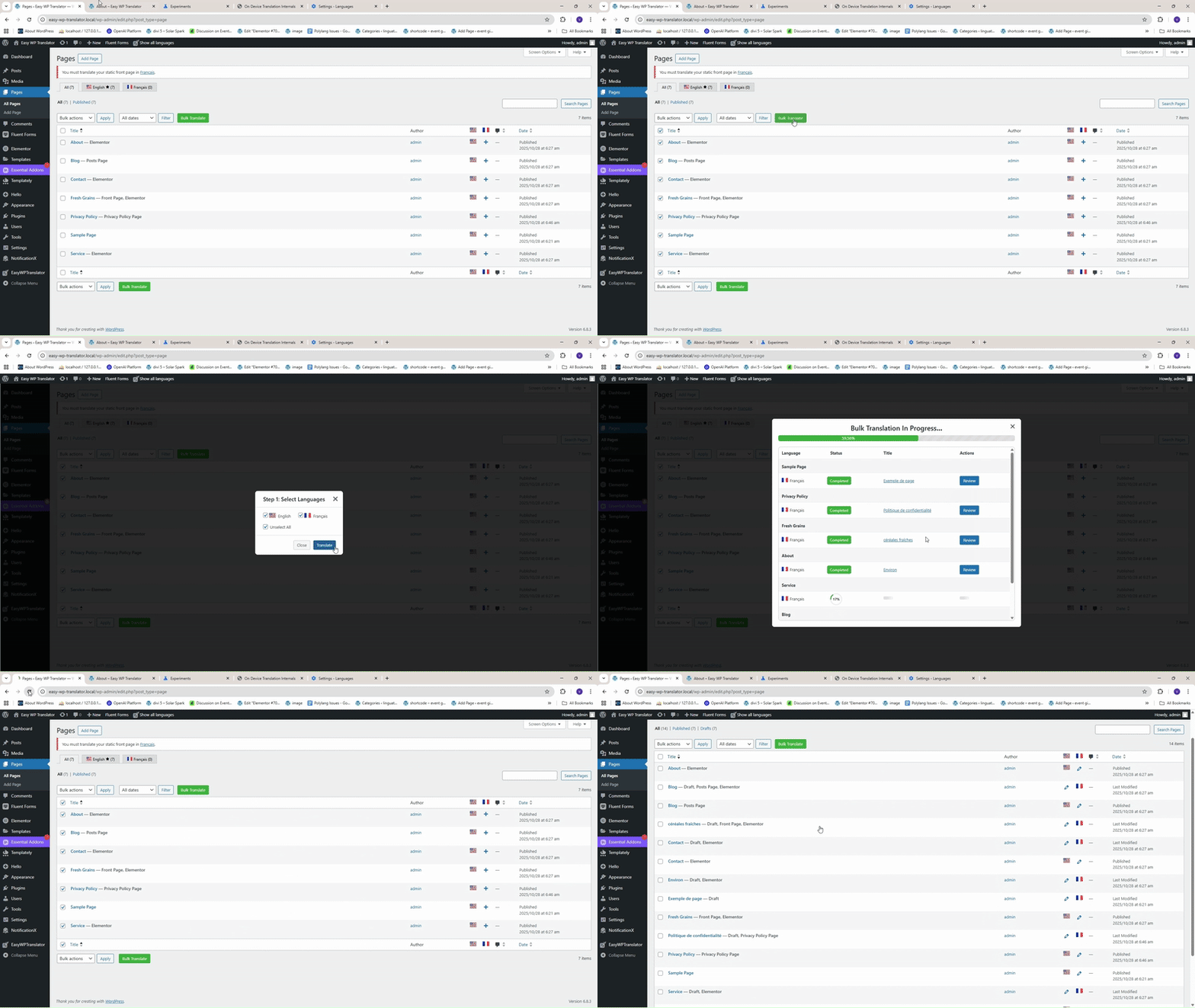
Simple Workflow
- Open pages or posts
- Click Bulk Translate
- Choose languages
- Your website becomes multilingual instantly
Why Use Easy WP Translator?
- Free AI Translations – Uses Chrome AI for free; no paid credits needed
- Familiar WordPress UI – Easy to use for beginners
- Works with Elementor & Gutenberg – Fully compatible with popular page builders
- Fast, Secure & Private – No data is sent to external servers
- No SaaS Lock-In – Once installed, it’s fully yours
How We Built It
We started by creating a simple plugin structure that integrates smoothly with the WordPress editor (Gutenberg and Elementor). We used JavaScript and PHP to build the plugin interface and manage translation inside the browser.
Instead of sending text to external servers, the plugin uses Chrome’s built-in Translator API to process translations locally on the user’s device.
We focused heavily on user experience — designing a clean and easy dashboard where users can translate entire pages or multiple posts with one click. For visual builders like Elementor, we added special handling to preserve layout structure and keep HTML tags intact during translation.
We tested the plugin on different WordPress setups to ensure smooth performance, stable layouts, and accurate translations — all without needing API keys or paid subscriptions.
Challenges We Faced
1. AI Could Not Understand Context
Chrome’s Translator API does not support extra instructions or context, so sometimes the translation was not accurate for brand terms or technical words.
2. HTML Formatting Got Mixed Up
When translating text with HTML tags, some tags got removed or changed. We added extra logic to protect the tags so that the translated content stays clean and properly formatted.
3. Language Settings Were Hard for New Users
Many users found it difficult to change or set language preferences in Chrome. Since we cannot directly link to Chrome’s internal settings pages, we provided step-by-step guidance and simple instructions inside the tool.
Achievements We’re Proud Of
- Built a one-click bulk translation feature that saves time for website owners and developers.
- Designed an easy-to-use interface that works smoothly for both technical and non-technical users.
- Successfully translated complex Elementor pages into multiple languages without breaking layouts or styles.
- Tested successfully on 10+ WordPress sites with different themes and builders.
What We Learned
- We learned how Chrome’s Gemini Nano and built-in AI APIs work, and how developers can use them directly in the browser.
- This project showed us that free, on-device AI can solve real-world problems — privately, quickly, and at zero cost.
- Users love simple UIs with fewer steps.
- Most users skip documentation — so the product must be self-explanatory.
What’s Next
We plan to continue improving this plugin with:
- Better HTML & Formatting Protection
- Simplified Onboarding with Visual Hints
- Support for Dynamic Elements: AJAX content, popups, SPA sections, forms, and menus
Built With
- force-ui
- javascript
- php
- tailwindcss
- wordpress

Log in or sign up for Devpost to join the conversation.