-
-

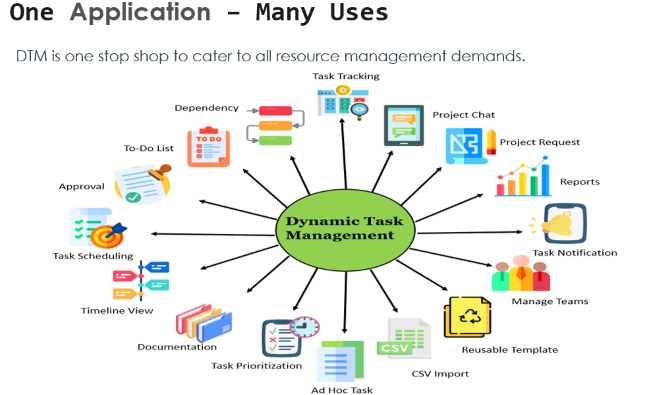
One stop shop to cater to all task management demands
Inspiration
Managing tasks is always a tedious job for us. Seeing one of our clients struggle with a series of mail threads and excels to track their tasks for various departments and business needs made us ponder on solutions. As a result of which DTM was born. In addition to this various ideas started flowing through when we started building DTM and we started trying out various applications with DTM as a built on application.
What it does
The Dynamic Task Management app provides the flexibility to create tasks dynamically and seamlessly integrate the tasks across different departments like Finance, HR, IT, Legal etc. The stand out feature is its ease of use; the app is designed to be user friendly and at the same time uncompromising on its dynamic features. We understood that every problem is unique and would require tailor made solutions to counter it, by providing capability to dynamically create, modify, configure templates, tasks and attributes with ease. DTM is used by an individual, team, or organization to complete projects efficiently by organizing and prioritizing related tasks. This application can be configured to handle tasks of any process like recruitment, event management etc.
Constructs of DTM
Template - defines Model of a process and has the ability to configure tasks and its attributes.
Tasks - Individual process which needs to be completed in order to complete a project.
Project Request - Orchestrate all the tasks created using template
Teams – Manages Teams, Roles and Assignee to whom the tasks will be assigned to
Project Request Features
Task Tracking With several task scheduled simultaneously task tracking might be difficult but with the help of Status view task tracking is made easier.
Project Management It gives overall understanding of project. It consists of project request summary and project progress, project status view, Task count .
Timeline View Its overview of the project deliverable laid out in chronological order.
Teams Features Create New Team We can create teams, assign manager to that team and members. We can also add new roles and assign members to existing roles. Assign Task Functionality We will be able to assign tasks to team members and unassigned work queue. Reassign Task Functionality We will be able to reassign tasks to team members and unassigned work queue.
Template Features Task Scheduling CSV Import Reusing Templates Custom Fields Dependencies Task Prioritization Task Notifications To Do Lists Approval
How we built it
Built on PEGA 8.7 by utilizing most of the OOTB solutions. The development of this solution was divided into four stages:
- Requirement: First we jotted down the difficulties faced when managing tasks in mails and excels. We then tried to bring out the user stories from the business problems
- Design: After the requirements were laid out we the design was finalized and the design include the rich feature of PEGA such as case types, UI, etc.
- Development: The User stories were then assigned to the team members for them to work on
- Testing: Finally the solution was tested E2E to make sure it worked properly
Challenges we ran into
- The major challenge was to compile the features of DTM and our 2 use-cases into one single video of 5 minutes which we overcame with the help of our teammate.
- Other challenge was to build various intuitive portals which will be useful for our customers and we overcame it using the efficient use of skin
- Other challenge was to build a timeline view which we were envisioning. We weren't able to fully build the image that we had in our mind but was able to provide a timeline view which could be highly useful.
Accomplishments that we're proud of
- The major accomplishment that we are proud of is DTM can be used as a stand alone application as well be integrated to any existing PEGA application case types and use then based on the business requirements. We have demonstrated 2 applications in our project.
- We were able to cover and provide a solution which had features that addressed majority of the users problems while handling tasks.
- Design a data model which could be highly reused and Dynamic UI in screens
What we learned
- Many reusable solutions like DTM should be developed so that they could be readily used in our client projects and would be a great value add
- Adding carousel based reports in Portals
- Extensive usage of Skin to build intuitive portals which will be very useful for Managers
- Utilizing Dynamic UI for screens
What's next for Dynamic Task Management
The next steps for DTM is as follows:
- To introduce process mining to the application and predict the pattern for various features in DTM. Based on the predictions suggestions will be made to the users while creating templates.
- To make task creation through a smart shape
- To integrate with various systems such as Workday and other systems based on the business need.
Built With
- pega8.7




Log in or sign up for Devpost to join the conversation.