-
-
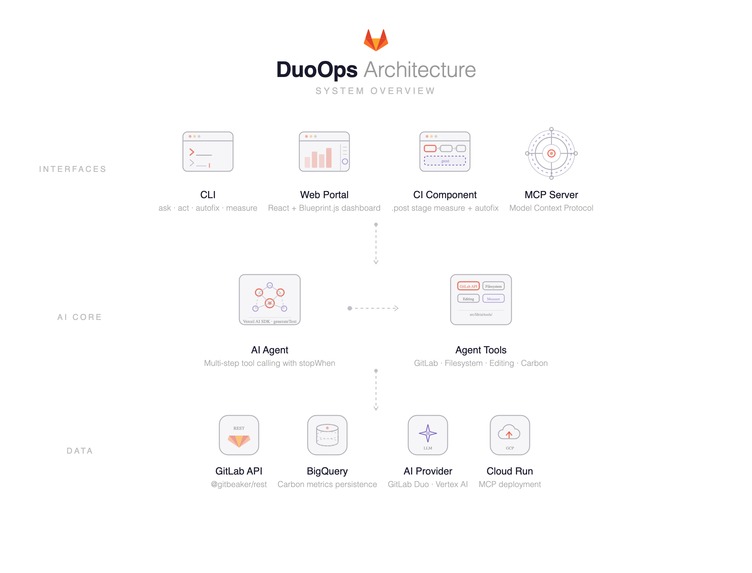
Architecture Diagram
-
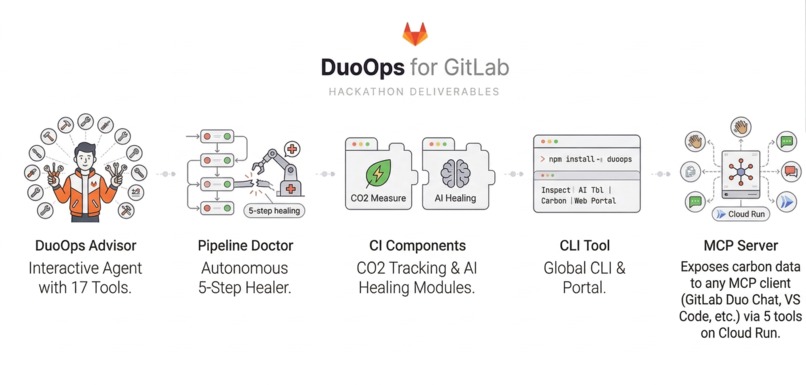
Hackathon Deliverables
-
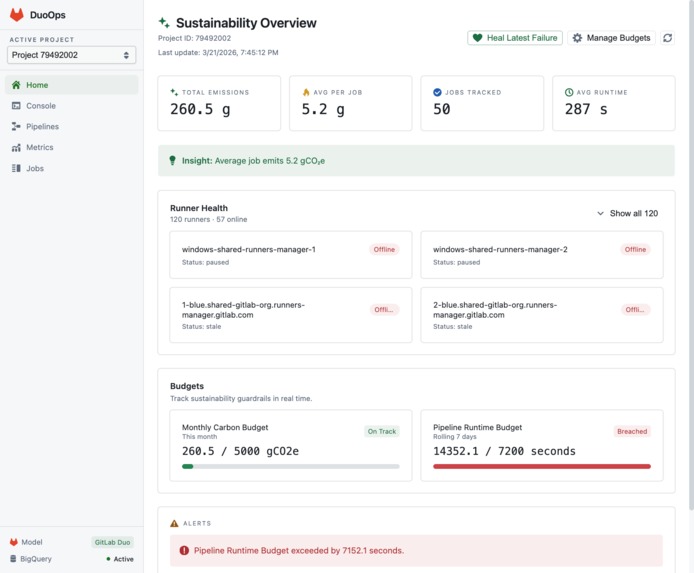
DuoOps Portal
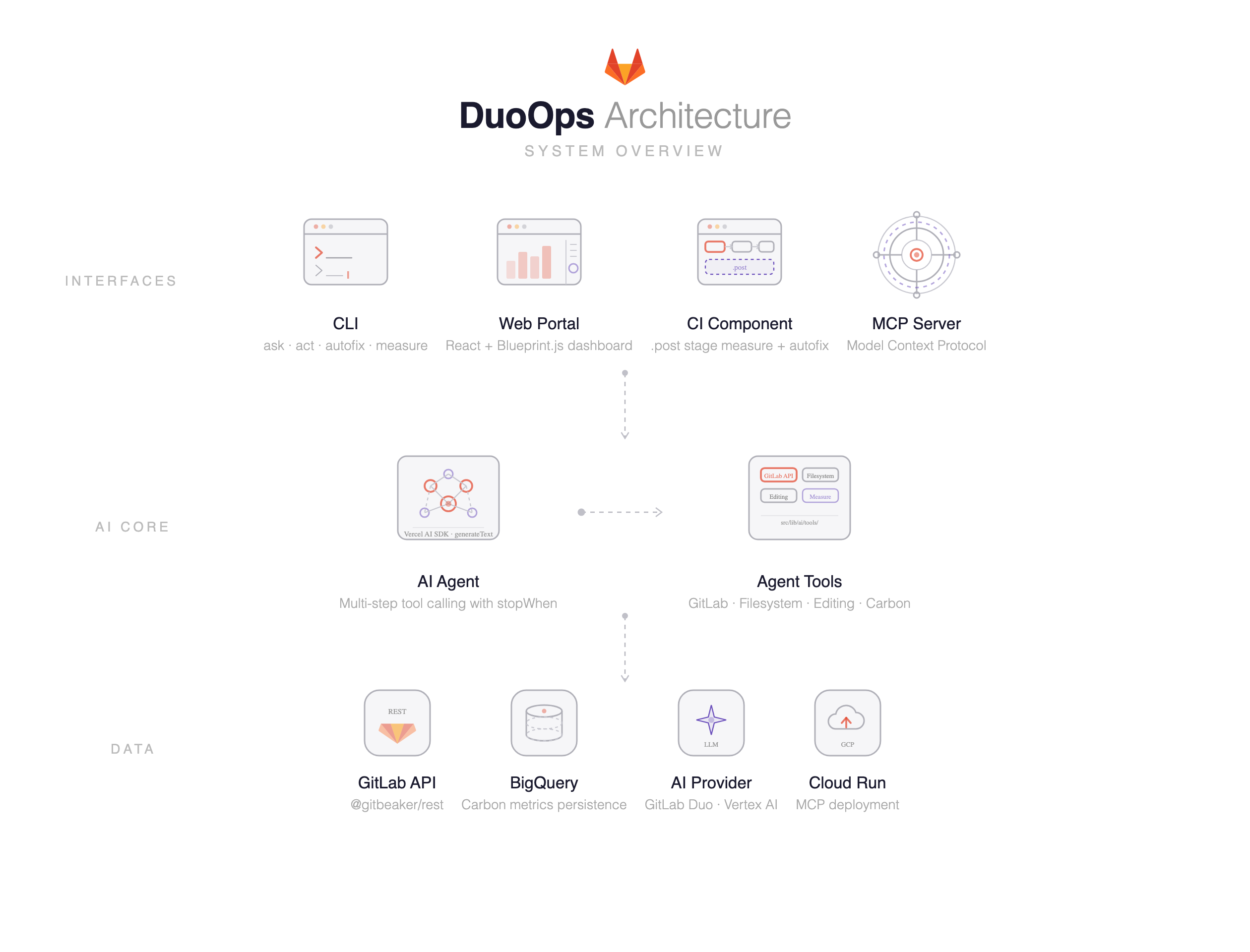
Project Name: DuoOps — Explainable & Sustainable CI
Short Description: AI agents that automatically diagnose failing CI/CD pipelines, apply fix commits, and track carbon emissions — all on the GitLab Duo Agent Platform.
Full Description:
Inspiration
| Problem | Scale |
|---|---|
| Time lost to debugging and maintenance | Developers spend 17+ hours/week (Stripe Developer Coefficient, 2018) |
| Carbon footprint of CI/CD pipelines | An estimated 150 to 995 Mt CO2e in 2024 (arXiv:2510.26413) |
| Failed pipeline retries | Every retry doubles the compute and carbon cost, and nobody tracks it |
When a CI/CD pipeline goes red, the workflow is painfully manual: scroll through job logs, google the error, guess at a fix, push, wait, repeat. Meanwhile, the carbon cost of all that compute is completely invisible.
We wanted to build something that fixes the pipeline and tells you what it cost the planet.
What it does
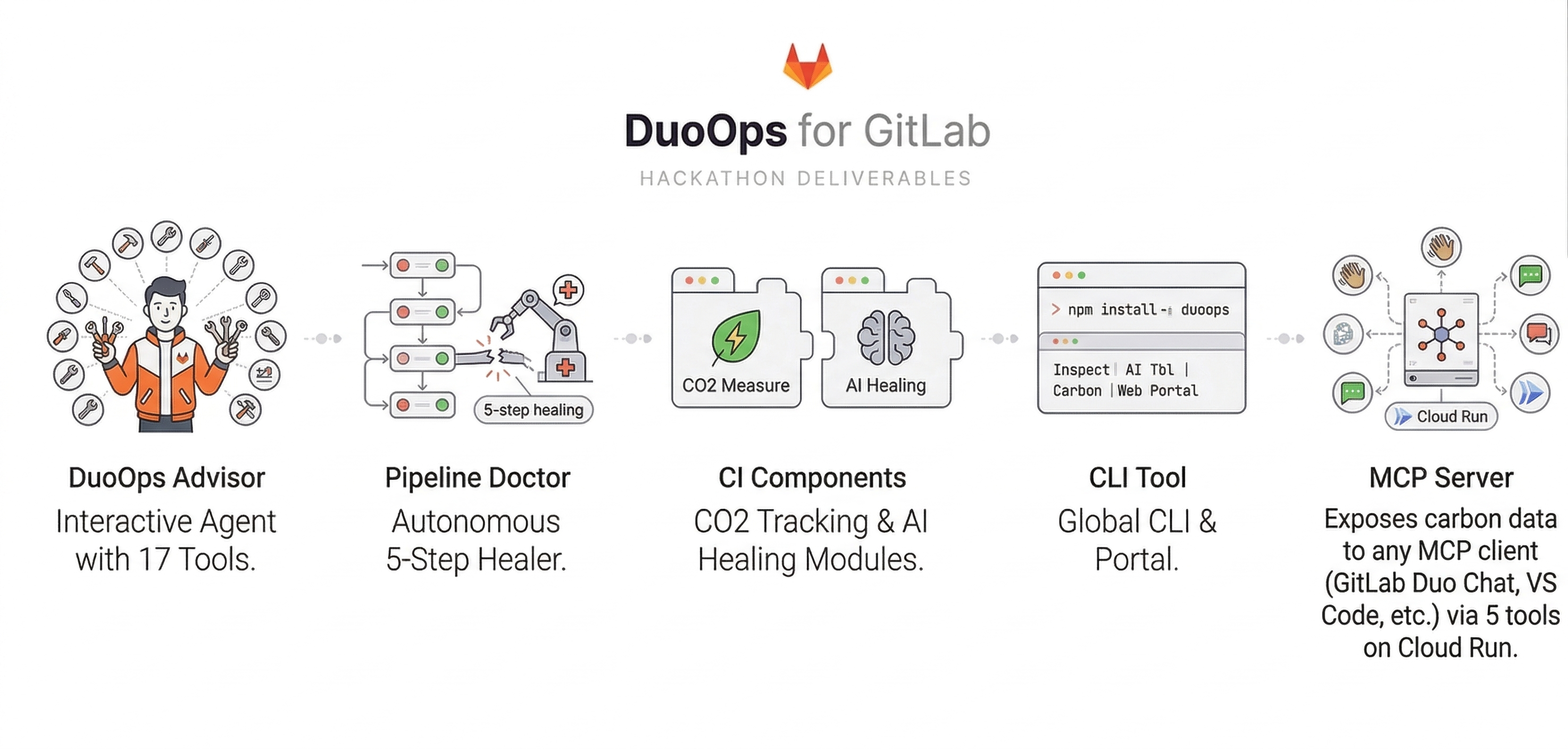
DuoOps is a complete toolkit for sustainable and explainable CI on GitLab. It ships five deliverables:

| Deliverable | What it does |
|---|---|
| DuoOps Advisor | Custom Agent for Duo Chat with 17 platform tools for interactive troubleshooting, code review, and sustainability recommendations |
| Pipeline Doctor | Custom Flow — 4-step autonomous pipeline healer using all 3 Duo component types (OneOff, Agent x 3) with conditional routing |
| CI Components | Drop-in GitLab CI components: one measures per-job CO2 emissions from real CPU/RAM timeseries, the other triggers AI-powered healing on failure |
| CLI Tool | npm install -g duoops for pipeline inspection, AI troubleshooting, carbon measurement, and a local web portal |
| MCP Server | Exposes carbon data to any MCP client (GitLab Duo Chat, VS Code, etc.) via 5 tools on Cloud Run |
DuoOps Advisor (Custom Agent)
Available in GitLab Duo Chat with 17 platform tools for interactive troubleshooting, code review, log inspection, and sustainability recommendations. Select "DuoOps Advisor" in Duo Chat and ask questions about your pipelines.
Pipeline Doctor (Custom Flow)
A 4-step automated pipeline healer on the Duo Agent Platform using all three component types:
| Step | Component Type | What it does |
|---|---|---|
check_failures |
OneOff | Calls get_pipeline_failing_jobs once to check for failures |
diagnose |
Agent | If failures exist: reads logs, CI config, source files, MR diffs to find root cause. If no failures: outputs clean diagnosis and moves on |
apply_fix |
Agent | Edits files, runs CI linter, and creates a fix commit on the MR branch. Skips if nothing to fix |
report |
Agent | Posts structured MR note with root cause, fix details, and sustainability report. If the duoops-measure-analysis CI job ran, includes real emissions data. Otherwise analyzes CI config for optimization opportunities |
The flow uses context:project_id from the ambient runtime — works in any project without hardcoded values. If no pipeline failures are detected, the flow skips diagnosis and fixing, and the report step focuses on sustainability recommendations based on the project's CI config.
Trigger: Mention the DuoOps service account on any MR.
MCP Server
The MCP server makes carbon emissions data queryable from any AI assistant that supports the Model Context Protocol.
| MCP Tool | Description |
|---|---|
get_job_emissions |
CO2e, energy breakdown (CPU + RAM), PUE, and carbon intensity for a specific CI job |
get_pipeline_emissions |
Aggregated emissions across all jobs in a pipeline |
get_project_emissions_summary |
Emissions trends for a project over time |
get_machine_profile |
Hardware specs, TDP, and power profile for a cloud instance type |
get_region_carbon_intensity |
Real-time grid carbon intensity (gCO2/kWh) for a cloud region |
Deployed on Google Cloud Run with OAuth 2.1. To connect it to GitLab Duo Chat, add a .gitlab/duo/mcp.json to your project:
{
  "mcpServers": {
    "duoops-carbon": {
      "type": "http",
      "url": "https://<your-cloud-run-url>/mcp",
      "approvedTools": true
    }
  }
}
Then ask Duo Chat things like "What were the emissions for the last pipeline?" or "Which job used the most energy?" and it calls the MCP tools to answer with real data from BigQuery.
CLI Commands
| Command | Description |
|---|---|
duoops init |
One command to set up agent, flow, trigger config, and CI variables |
duoops ask |
Ask the AI agent questions about your pipelines in plain English |
duoops heal |
Interactive pipeline healing via the web portal |
duoops heal-ci |
Headless diagnosis-and-fix cycle for CI environments |
duoops measure calculate |
Calculate CO2 emissions from CPU/RAM timeseries |
duoops act |
Get AI recommendations on emissions trends from BigQuery |
duoops portal |
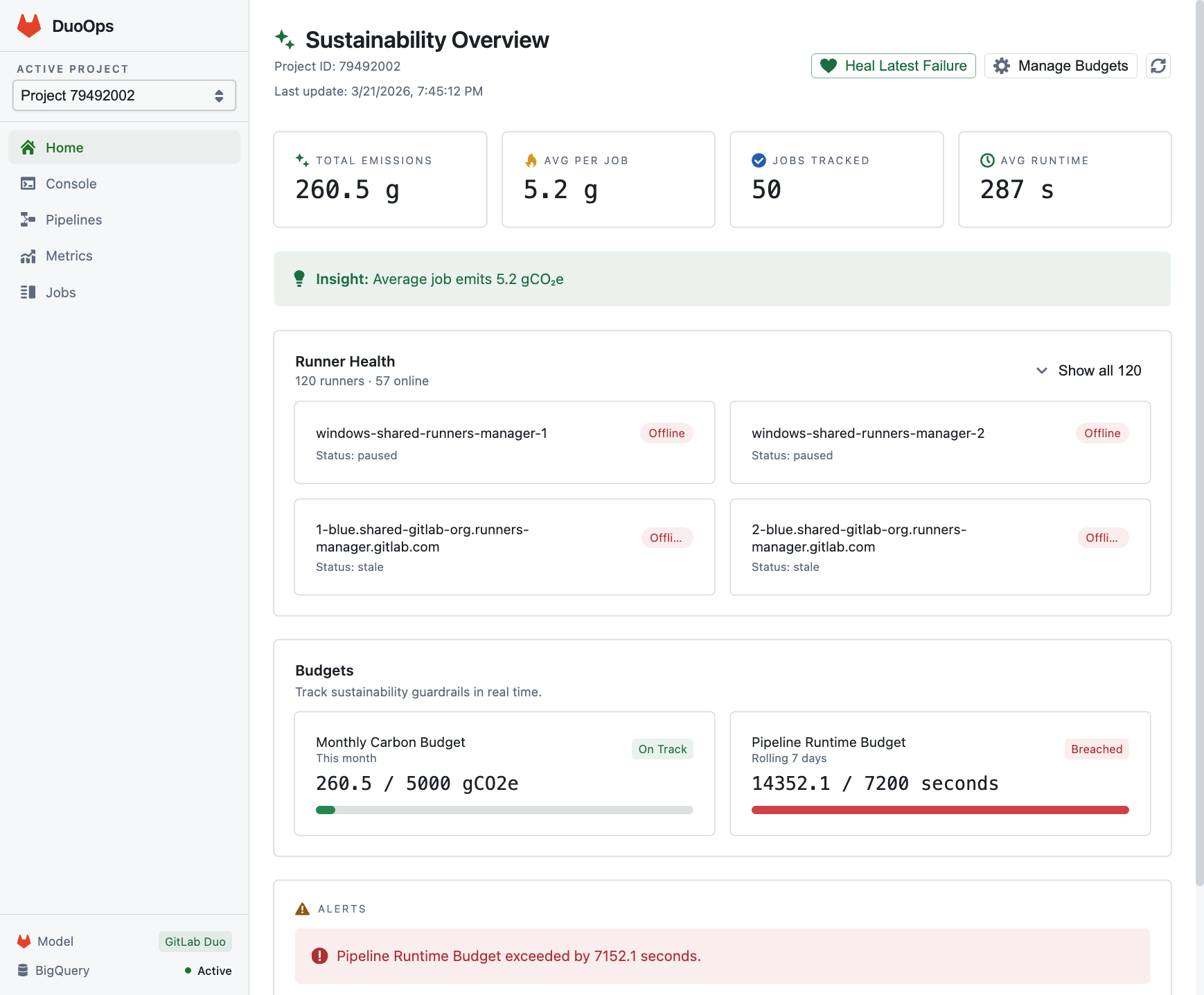
Launch a local React dashboard for metrics and AI chat |
duoops mcp deploy |
Deploy the MCP server to Cloud Run |
Six Interaction Surfaces
| Surface | How it works |
|---|---|
| Duo Chat (Custom Agent) | Ask the DuoOps Advisor directly in Duo Chat |
| Duo Chat (MCP) | Query carbon data through the MCP server in Duo Chat |
| @mention trigger | Comment @duoops on an MR or Issue |
| CLI | Run duoops commands in your terminal |
| Web Portal | Local React dashboard at localhost:58327 |
| CI Components | Include measure and heal components in .gitlab-ci.yml |
How we built it

| Layer | Technology |
|---|---|
| CLI | TypeScript, oclif, published to npm |
| AI Agent | Vercel AI SDK with generateText and stopWhen for multi-step tool calling |
| AI Backends | GitLab Duo (via gitlab-ai-provider) and Google Vertex AI |
| GitLab Integration | @gitbeaker/rest for pipelines, jobs, MRs, file editing, CI linting |
| Carbon Measurement | Methodology from re:cinq and Teads: cubic spline interpolation, live grid carbon intensity from Electricity Maps, region-specific PUE, vCPU correction, scope 3 embodied emissions |
| Data Layer | Google BigQuery for metrics, GCP Cloud Monitoring for CPU/RAM timeseries |
| MCP Server | TypeScript on Cloud Run with OAuth 2.1, 5 tools for carbon data |
| Web Portal | React with Blueprint.js |
| CI Components | GitLab CI component YAMLs for measure and heal |
Challenges we ran into
| Challenge | How we solved it |
|---|---|
| Agent reliability | The AI sometimes explained instead of acting. We added explicit stop conditions, structured output formats, and format validation. |
| Carbon accuracy | CPU power is not linear with utilization. We implemented cubic spline interpolation across 4 TDP data points (0%, 10%, 50%, 100%) and corrected for shared-core vCPU architectures. |
| Conditional flow routing | Pipeline Doctor needs to handle both failing and passing pipelines gracefully. We used a OneOffComponent to check for failures in a single round, then pass the result to the diagnosis agent — preventing retry loops when no failures exist. |
| MCP + Duo Chat integration | Getting OAuth 2.1, Cloud Run deployment, and mcp.json configuration all working together required careful coordination. |
| Massive job logs | CI logs can be huge. We built a sub-agent summarization system that chunks and summarizes long logs before passing them to the diagnostic agent. |
Accomplishments that we're proud of
| Accomplishment | Detail |
|---|---|
| One command setup | duoops init creates the Custom Agent, Custom Flow, External Trigger config, and CI variables. Zero manual YAML editing. |
| Five deliverables | Custom Agent, Custom Flow, CI Components, CLI Tool, MCP Server — all working together as one system. |
| Full Duo Agent Platform coverage | All three component types (OneOff, Agent x 3), a Custom Agent, a Custom Flow, and ambient triggers via context:project_id. Six interaction surfaces. |
| Research-backed carbon methodology | Real monitoring data, cubic spline power modeling, live grid carbon intensity, region-specific PUE, vCPU correction, and scope 3 embodied emissions. |
| End-to-end automation | From @duoops mention to fix commit and MR report with zero human intervention. |
| MCP server with 5 carbon tools | Any MCP client can query per-job emissions, pipeline totals, project trends, machine profiles, and region carbon intensity. |
| Published to npm | npm install -g duoops and you're ready to go. |
What we learned
- The GitLab Duo Agent Platform is powerful but still early. Custom Flows with conditional routing and mixed component types unlock complex multi-step automation that a single agent call cannot achieve.
- Carbon measurement at the CI job level is surprisingly tractable when you have access to cloud monitoring APIs. The hard part is not the math but getting accurate power profiles for each machine type and real-time grid data for each region.
- AI agents work best with structured tools and constrained output formats rather than open-ended instructions. The more deterministic steps you can pull out of the LLM path, the more reliable the overall flow becomes.
- MCP is an excellent abstraction for making domain-specific data accessible to AI assistants. Once the server is deployed, any MCP-compatible client (GitLab Duo Chat, VS Code, etc.) can query it without custom integration work.
What's next for DuoOps
| Feature | Description |
|---|---|
| Carbon budgets | Set per-project or per-pipeline CO2 thresholds and fail pipelines that exceed them |
| Historical trends | Dashboard charts showing emissions over time with regression analysis |
| Multi-cloud support | Extend measurement to AWS CloudWatch and Azure Monitor alongside GCP |
| Smarter fix strategies | Use the agent's history of past fixes to improve diagnosis accuracy over time |
| CI component catalog | Publish measure and heal components to the GitLab CI component hub |
| MCP tool expansion | Add tools for carbon budget status, optimization suggestions, and cross-project comparisons |
Built With
GitLab Duo Agent Platform, Vercel AI SDK, Google Vertex AI, Google BigQuery, GCP Cloud Monitoring, GCP Cloud Run, TypeScript/oclif, React, Blueprint.js, Model Context Protocol
Built With
- bigquery
- cloud-monitoring-api
- cloud-run
- electricitymaps
- gcp
- gitlab
- node.js
- typescript


Log in or sign up for Devpost to join the conversation.