-
-
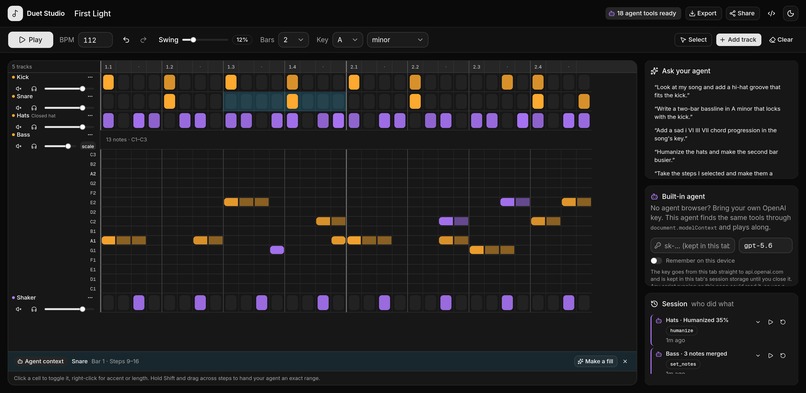
Amber is the human's, violet the agent's. The teal range is a live selection, handed over as edit_selection. Every tool call is logged.
-
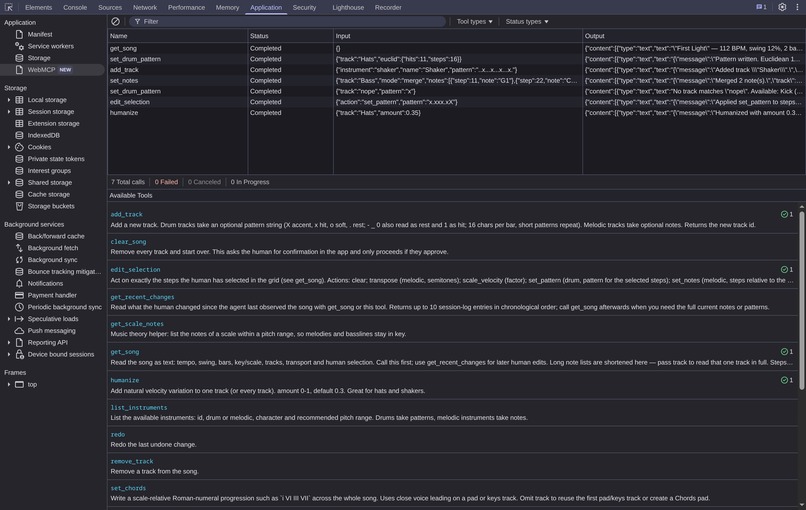
DevTools, Application > WebMCP: live tool calls with input and output, and the 18 tools including the selection-only edit_selection.
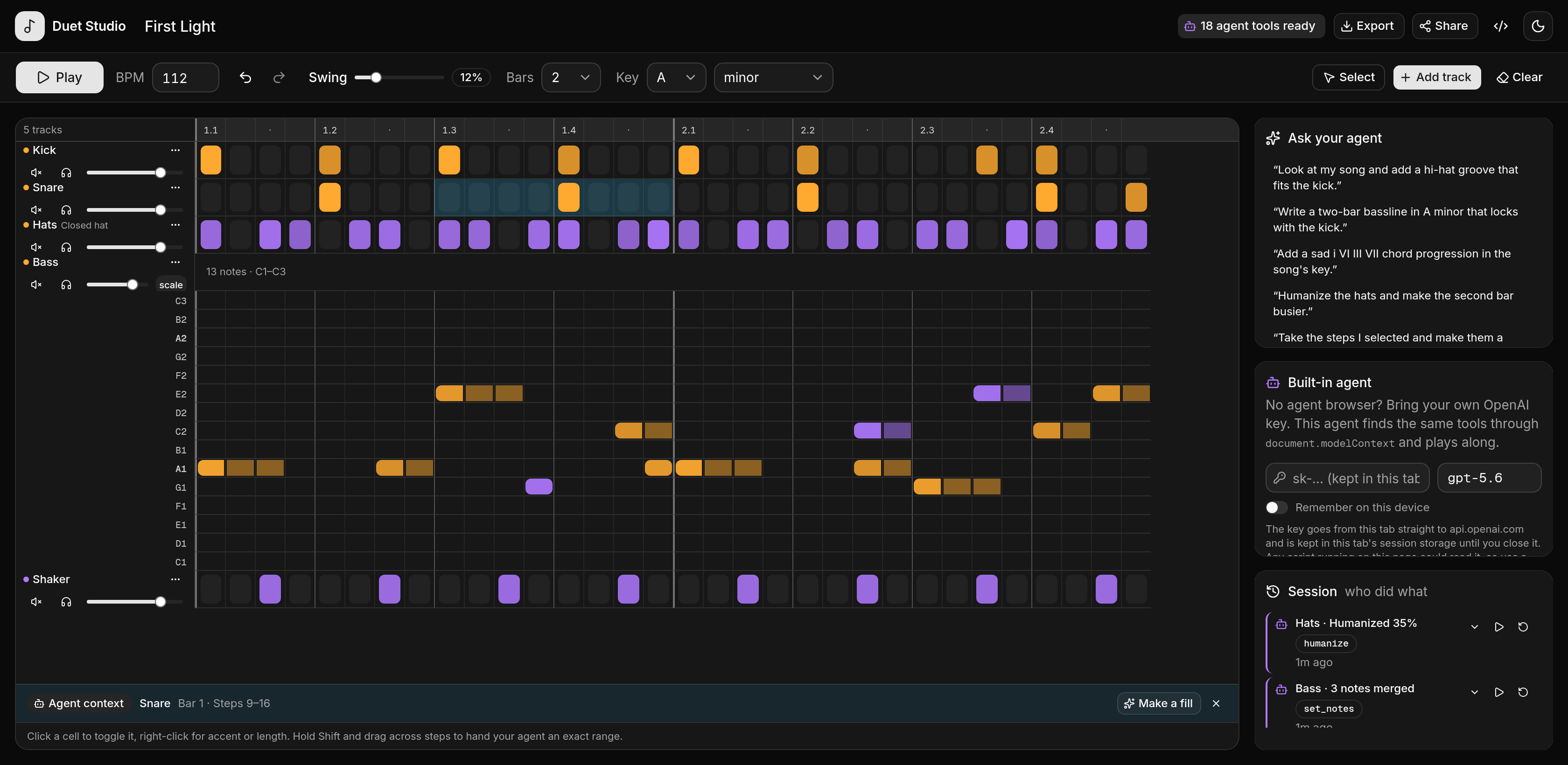
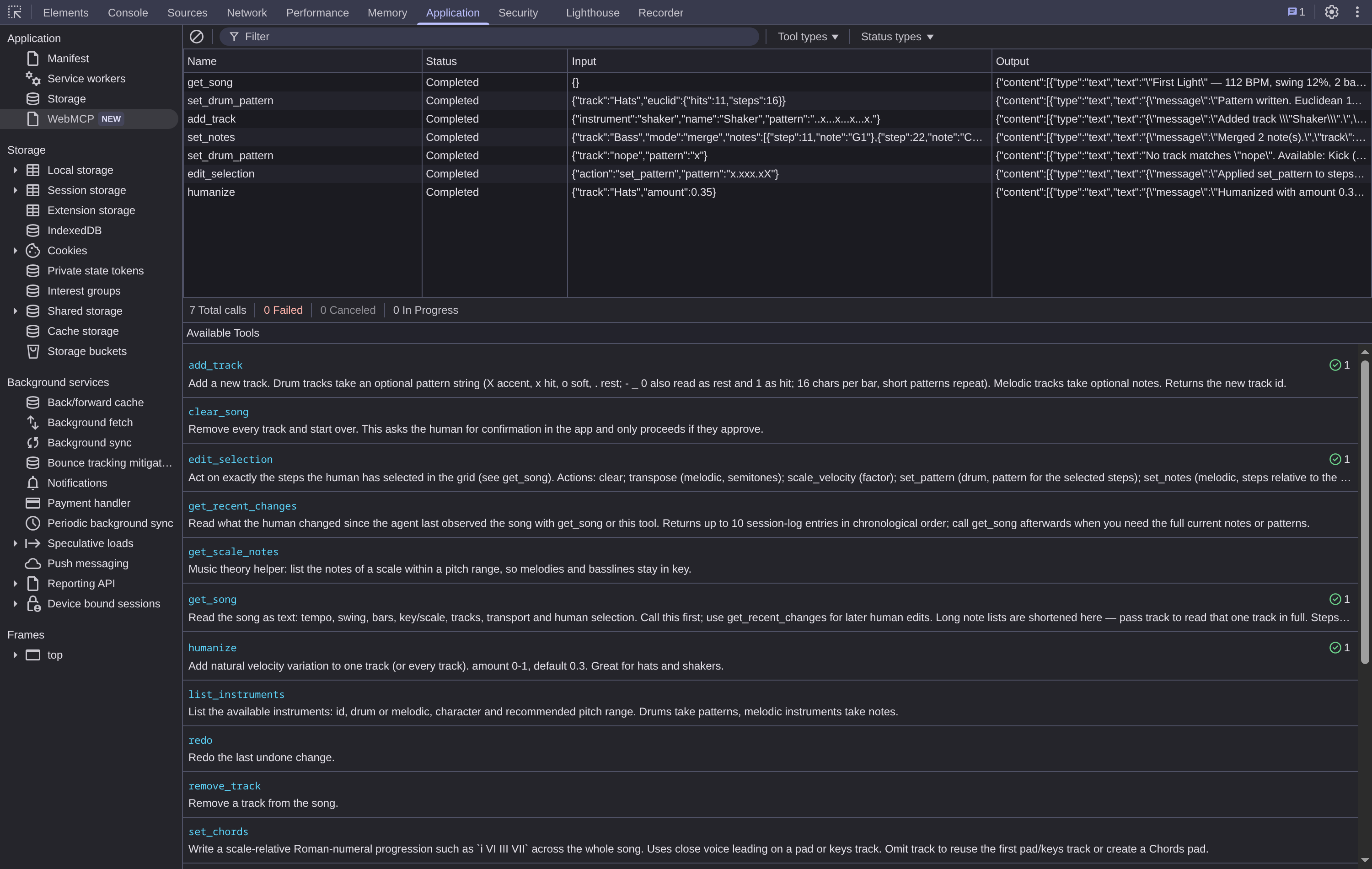
Duet Studio is a step sequencer and piano roll that exposes the song itself to your browser agent — and then lets both of you work on it at once. You tap in a kick, the agent writes the hats, you drag a bass note, the agent adapts the chords — all in one grid, while the loop keeps playing.
Why this use case is a strong fit for WebMCP
Most agent integrations run one turn at a time: the agent produces something, then hands the interface back. A live instrument breaks that model. The loop is playing, the human is tapping in a kick while the agent is writing a hi-hat, and both are editing the same sixteen steps.
Simultaneous editing raises questions a single-turn integration never has to answer. Who authored this note? How does the agent learn what the human changed since its last read? How does the human aim the agent at one region instead of the whole song? What happens when the agent proposes something destructive?
Screenshots and clicks cannot carry any of that — and an agent cannot hear the loop it is editing. So the song has to be a structured, shared document, and the tool surface has to carry authorship, change awareness, scope and consent.
get_song returns the arrangement as a compact text grid plus transport and selection state, so the agent "sees" what the human hears. It also stays inside Chrome's output guidance on a song of any size: it shortens long note lists until the overview fits and points the agent at get_song track="<id>" for one track in full. set_drum_pattern, set_notes, set_chords, humanize and set_tempo let it write musically rather than mechanically — at the level of groove, harmony and dynamics instead of simulating fifty clicks.
The imperative API is what makes the surface honest: the tool set changes with the UI. Shift-drag a range of steps and an eighteenth tool, edit_selection, is registered and scoped to exactly that range; clear the selection and it is unregistered through its AbortSignal. The agent never sees a tool that does not match what is on screen.
Prior art, and what is different here
OpenAI's own WebMCP showcase includes Fieldwork // 12, a browser beat machine where Codex composes a beat, adjusts its groove and shapes sounds through site tools. It is the closest reference point to this project, and the overlap is real: both are browser sequencers driven by WebMCP.
The thesis is different. Fieldwork // 12 shows that an agent can produce a track you then edit. Duet Studio asks what WebMCP needs to look like when both sides edit at once — and everything below follows from that question:
- Provenance in the grid. Every step and every note carries its author; agent cells are violet, human cells amber.
- Selection-scoped tools.
edit_selectionexists only while the human holds a selection. Dynamic registration andAbortSignalunregistration are used as a live collaboration primitive, not as a demo of the API. - Change awareness.
get_recent_changesgives the agent a diff of human activity since its own last read — with the exact step index each edit touched — so the two sides stay in sync without a full re-read. - Approval as part of the tool contract. Destructive tools block on an in-app confirmation the agent cannot bypass, and the result tells it what the human decided.
- Shared history. One commit path, one undo stack and one session log across both actors.
- Harmony, not only rhythm. A piano roll with scales, chord voicing and key-aware helpers alongside the drum grid.
- Host resilience. The page runs against hosts that implement only
document.modelContext.registerTool, proven by a dedicated smoke suite.
How it creates a better user experience
Nothing is hidden behind a chat window. The studio opens on a finished two-bar loop credited to the human, so there is something to react to on the first screen and the agent's first edit stands out against it. The human keeps the transport running, taps in a kick, drags a note, mutes a track — and the agent's edits land in the same grid, tinted violet, while the human's stay amber. Every cell and every note carries its provenance.
- A session log lists each tool call with a one-click revert, and a shared undo history covers both parties.
- Edits are heard on the next sixteenth note; playback never restarts.
- Destructive actions such as
clear_songopen an approve/decline dialog in the app, and the tool result tells the agent what the human decided. - The grid scrolls inside its own panel and the controls wrap, so the studio is usable on a phone as well as on a desktop.
- No account, no sign-in. The studio, the audio and the whole song live in the browser.
It feels like two people at one instrument rather than a form being filled in.
What people and agents can do together that was difficult or impossible before
- Point and delegate. Shift-drag four steps and say "make this a snare fill" — the agent acts on exactly that range, because the range is a tool.
- Compose against a moving target. Ask for a bassline in the song's key and watch it appear while the loop plays; then move a note by hand and let the agent read the change through
get_recent_changesand adapt the chords to it. - Delegate craft, keep taste. Let the agent tidy velocities across the whole kit in one call, then undo just that if you disagree.
- Borrow music theory. Scales, chord voicings and groove conventions come from the agent; direction and the final say stay with the human.
None of this is reachable by screen-scraping a sequencer grid.
How we implemented WebMCP
Each tool is a plain object — name, title, description, JSON schema, execute — in src/lib/webmcp/tools.ts. A React effect registers each one with document.modelContext.registerTool(tool, { signal }), typed with the official webmcp-types, and aborts the signal to unregister on unmount:
document.modelContext.registerTool({
  name: "set_drum_pattern",
  title: "Write drum pattern",
  description: "Write a 16-step pattern onto a drum track",
  inputSchema: { /* ... */ },
  execute: async (input) => { /* ... */ },
}, { signal });
- 18 tools: 17 always available, plus
edit_selection, which exists only while the human holds a selection. - Read tools are annotated
readOnlyHint: true; outputs are capped well under 1,500 characters so a tool result stays cheap to reason about. - Every mutation goes through
commit(actor, label, mutate), which records provenance per cell and per note, feeds the undo history, and appends to the session log. - Errors throw with actionable text —
No track matches "nope". Available: Kick (id 9fIVdodL), Snare (id tO9qZ20b), Hats (id n-D3x3_B)…— and reach the agent asisErrorresults. User-authored text is marked as untrusted content. - Host compatibility is defensive. ChatGPT's in-app browser exposes a plain object with only
registerTool— nogetTools,executeTooloraddEventListener. Everything pastregisterToolis feature-checked, and WebMCP-facing widgets sit inside error boundaries. A dedicated probe (bun run smoke:hosts) injects a minimaldocument.modelContextboth at load and 2.5 s late to prove the page survives it. - A headless Chromium test (
bun run smoke) drives the realgetTools()/executeTool()API to assert registration, titles and annotations, validation errors, the dynamic selection tool, playback, the confirmation flow, a share link that reopens the song in a fresh browser context, output sizes, and a clean console. - The tools are also covered by an eval suite.
evals/duet-studio.jsonholds fourteen cases of what a user would plausibly say plus the tool calls each should produce, in the format of Chrome's ownwebmcp-evalsCLI;bun run evalsexecutes all 21 steps against the live page, no model and no API key required. - A fallback agent ships in the page: with a visitor's own OpenAI key it discovers the same tools through
getTools()and calls them withexecuteTool(), so the WebMCP surface is exercisable in any Chrome with the flag, not only in an agent browser.
Architecture
Next.js 16 App Router, React 19, strict TypeScript, Tailwind CSS 4 and shadcn/ui. Tone.js drives live and offline audio (the sequencer re-reads the song every sixteenth note, which is why agent edits are heard immediately); Tonal handles music theory; Zustand + Zundo hold state and undo history; @tonejs/midi exports MIDI and Tone renders WAV offline. The studio is client-only — the sole server code is a share endpoint that swaps a song for a ten-character /?s=<id> link, size-caps the body and re-parses it before storing; with no blob store connected the browser falls back to a self-contained lz-string link.
How to test it
- Open the live URL in ChatGPT's in-app browser (or Chrome with
chrome://flags/#enable-webmcp-testing). - Click once to unlock audio, press Play.
- Ask: "Read my song and add a hi-hat groove that fits the kick."
- Shift-drag several steps, then ask for a snare fill — watch
edit_selectionappear and disappear with the selection. - Ask the agent to clear the song, then decline the dialog and confirm nothing changed.
Limitations
WebMCP needs ChatGPT's in-app browser or a Chrome build with the testing flag; no Origin Trial token is configured. Browser autoplay policy still requires one human click before an agent can start audio.
Built With
- lz-string
- next.js
- openai-api
- puppeteer
- react
- shadcn/ui
- tailwind-css
- tonal
- tone.js
- typescript
- vercel-ai-sdk
- vercel-analytics
- vercel-blob
- webmcp
- zod
- zundo
- zustand

Log in or sign up for Devpost to join the conversation.