Inspiration
Making five platform versions of the same poster by hand is forty minutes of nobody's favourite work. Retyping every headline in a second language. Aligning twenty objects to a grid. Recolouring a layout to a new brand palette. This is the work designers actually complain about, and it is mechanical enough that a machine could do it correctly.
So why hadn't one?
Because a design document is a JavaScript object graph plus IndexedDB. There is no REST endpoint, no webhook, no export format an agent could round trip through. A server side MCP has nothing to connect to. An agent's only options were guessing at mouse coordinates, scraping the accessibility tree, or shipping a browser extension. All three are brittle, and none of them understand what a layer is.
WebMCP changes the shape of the problem. It puts the tool registry inside the page, so a tool runs in the tab, against live in memory state, using the application's own code. For a design editor that turns out to matter in one very specific way:
The agent can see what you selected.
Not inferred from the DOM. The actual objects under your cursor, right now. An agent that merely generates designs could hand you a picture. It could never know that you just clicked two things and said "make these bigger."
That is the whole idea, and it is not reproducible any other way.
What it does
Duet is a fork of an open-source browser design editor Avnac that adds WebMCP as a layer so a person and an AI agent can operate on the same canvas at the same time.
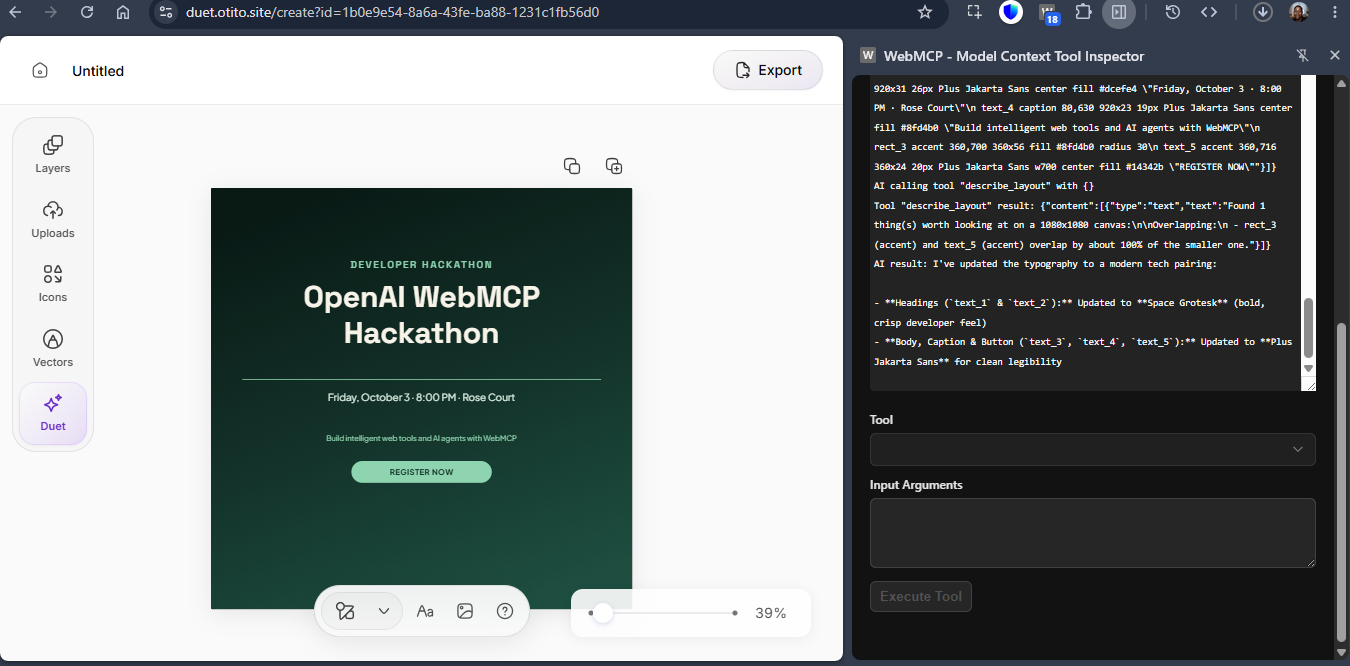
Ask for something, get a real design. Say "design a flyer for my [cool] event" and the agent starts designing in real time using the WebMCP
Point at something without naming it. Select two objects with your mouse, then say "make these bigger and line them up." The agent asks the page what you have highlighted and gets exactly that. This is the moment the idea justifies itself.
Let it check its own work. Ask it to describe the layout and it reports what a person would notice: things that overlap, things outside the frame, edges that are almost but not quite aligned, and text that fails contrast against whatever sits behind it. Ask for an Instagram story version, the canvas grows, and the agent notices that the background no longer covers it and says so precisely.
Approve or reject before anything changes. For anything involving taste, the agent proposes instead of acting. Its suggestions appear on your canvas as a ghosted preview with a dashed outline. You tick the ones you want, add a note back, and hit apply. Nothing lands until you say so, and the agent hears which changes you rejected.
A tool that waits on a human decision inside the tab is the one thing a remote MCP server structurally cannot do.
See exactly what happened. Every tool call is listed with its arguments, timing and result. Not a spinner. Seeing update_many { role: "headline", text: "Happy Birthday, Mum" } is how you tell a machine doing specific work from an animation pretending to.
How we built it
Duet is a fork of Avnac, an open source browser design editor.
Avnac already had agent control of its canvas. It worked the only way that was possible before WebMCP: by embedding one specific AI vendor's SDK. Agent control required an account, an API key, a hosted service in the loop, and a hard dependency in the app's own package file. Only that vendor's agent could drive it. By the time I forked, that integration was paused and unreachable from the interface.
Duet deletes that layer entirely and replaces it with an open browser standard. No account, no key, no vendor, no server. You send any agent the link and the tools are simply there.
Before WebMCP, agent control of a browser design document meant choosing an AI vendor and marrying them. Now it is a property of the page.
Fourteen tools, registered through document.modelContext.registerTool with an AbortController for teardown. The page feature detects and falls back to the deprecated navigator.modelContext. On Chrome 151 the two turn out to be literally the same object.
Decisions that mattered:
- Registered once, reading live state through a ref. The editor's controller is rebuilt on every document change, so registering against it directly would register the whole surface again on every keystroke.
- Errors are returned, never thrown. An unknown id comes back as text naming what was wrong and listing the ids that do exist, so the agent corrects itself without another round trip.
- Every write returns the resulting state, never "ok". A tool that says "done" teaches the agent nothing.
- Readable ids at the tool boundary. The app uses UUIDs internally; the tools speak
text_1andrect_2. Nothing inside the app was rewritten. - Compact output built for a model to read. The scene comes back as a table rather than JSON, because it is read on nearly every turn.
- Descriptions that say when not to reach for a tool. That is where skilful use actually lives.
Ghost previews needed no renderer changes at all. The editor's object component reads only its props, so a proposal renders through that same component in a sibling layer at reduced opacity, with the layer ignoring pointer events so a ghost can never take a click meant for the real object beneath it.
Challenges we ran into
A twenty second wait that hung forever. The proposal flow waits for a human decision. An early version used requestAnimationFrame to let React settle first. That works beautifully until the tab is backgrounded, at which point the callback simply never fires, and an agent driven page is backgrounded constantly. Caught it by actually switching tabs during a test rather than reasoning about it.
The obvious proposal design is the broken one. The natural implementation is a single tool whose promise resolves when the human clicks approve. That hits the agent host's own tool call timeout long before a person finishes deliberating, and reads as a broken tool rather than a patient one. Splitting it into a call that returns immediately with an id and a second call that polls with a bounded wait keeps the human experience identical while making a timeout impossible.
A layout checker that cried wolf. Every template has a background rectangle covering the whole canvas. A naive overlap check therefore reports one overlap per object on a perfectly clean design, and an agent that gets false positives once learns to ignore the tool forever. It now excludes full bleed backgrounds before any check runs, and separately reports the case where a background has stopped covering the canvas.
Testing the implemantaion. I had intially planned on using Chatgpt's in-app broswer to drive the site and allow the agent to test out the tools, but unluckily for me i hit my free use limit on chatGPT so i ahd to improvise. I found and alternative: an extension that allows the user to use Gemini to test the project and connect to the WebMCP client directly.
Silent failures are the whole genre. A tool can work perfectly when you invoke it by hand and never be chosen by an agent, with no error anywhere. That is not a bug you can debug; it is a writing problem.
Accomplishments that we're proud of
Selecting two objects by hand and having the agent know exactly what I meant. Everything else in the project supports that one moment.
The proposal flow. Ghosted previews that track the live document rather than a stale snapshot, per-change approve and reject, a note that goes back to the agent, and the whole batch applying in a single commit. It is the part of the build that could not have existed a year ago.
Being straight about the fork. It would have been easy to scrub every trace and present this as original. Saying "agent control already existed here, through one vendor's SDK, and I replaced it with a browser standard" is a better argument and it happens to be true.
The tool descriptions I iterated multiple times on the tool descriptions before arriving at the current ones, which describe the tool adequately and allow the agent to call the right tool for the right action.
What we learned
Tool descriptions are the product. The difference between a tool an agent uses and one it ignores is almost never the code. A description that says what a tool does is half finished; one that says when to reach for it, and when to reach for something else instead, is the thing being graded.
Give the agent a hand authored starting point. An agent placing objects by coordinate composes badly, because it cannot see the canvas. Templates removed that failure mode completely: the layout is a person's taste, and the agent only fills it in.
Verify in the browser, not in the type checker. Every genuinely interesting bug in this build compiled cleanly. The background tab hang, the role that was silently dropped on save, the review card that read "move to same,620", the ghost that could not be told apart from a real selection. None of them were type errors.
What's next for Duet
- More templates, and template authoring in the app. Six covers the demo; a real user wants their own.
- Multi page documents. The tools currently work on the active page only, which was the right scope for a week but is not the right scope for a product.
- Undo that reaches the agent's work. A human should be able to step back through what an agent did as easily as through their own edits.
- Images the agent can actually place. Right now a person drops an image in and the agent positions it. Passing a generated image through a tool call is still awkward across every client I tried.
- More clients. ChatGPT's built in browser supports WebMCP today, Chrome supports it behind a flag, and Claude Code reaches it through a community bridge. The interesting thing about a browser standard is that this list is somebody else's job to grow.
Built With
- typescript
- webmcp


Log in or sign up for Devpost to join the conversation.