Inspiration
Stevens students face fragmented, inefficient processes when searching for off-campus housing, relying on brokers, scattered WhatsApp groups, and informal networks. This decentralization leads to information overload, missed opportunities, and potential scams. A centralized, student-exclusive marketplace would streamline housing searches, reduce reliance on third parties, and foster trust within the Stevens community. This project, DuckNest, aims to be that centralized platform.
What it does
DuckNest is a Flutter-based mobile application prototype designed to simplify the off-campus housing search for Stevens students. Key features implemented include:
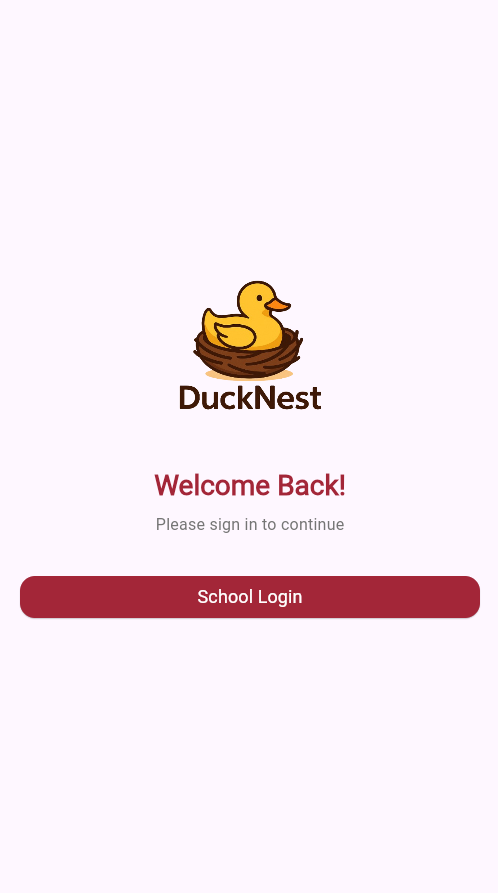
Login: A basic welcome screen simulating a "School Login" entry point (currently navigates directly to the main features without actual authentication).

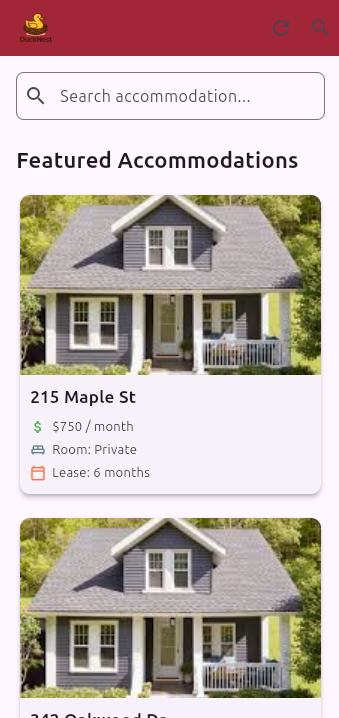
Browse Listings: Fetches and displays housing listings from an API (currently using a mock API endpoint). Each listing is shown in a card format with a preview image, title, monthly cost, room type, and lease duration.

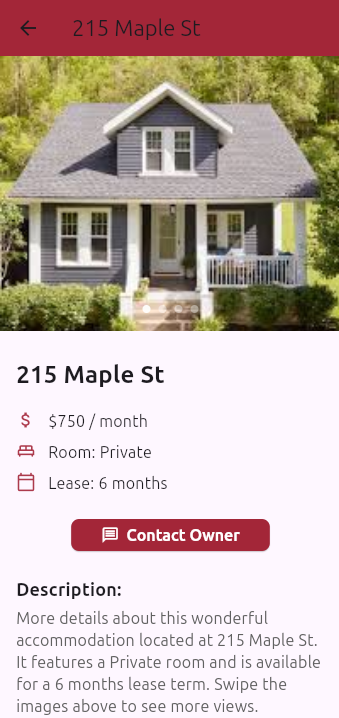
View Details: Users can tap on a listing card to navigate to a detailed view which includes:

    An image slider to view multiple pictures of the accommodation.

    Detailed information (repeating title, cost, room, lease).

    A placeholder description section.

    A "Contact Owner" button that attempts to launch WhatsApp to message the owner (using a phone number expected from the API data).

Text Search: A search bar on the home page allows users to filter the displayed listings based on text input (currently searches titles).

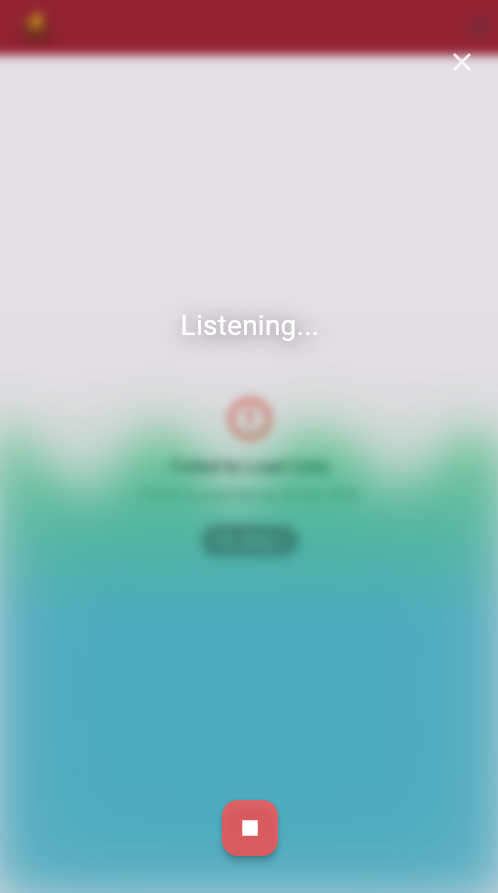
Voice Search: An integrated voice search feature, accessible via a Floating Action Button. Tapping it opens an overlay with:

    A dynamic wave animation reacting to sound input amplitude (using the device microphone).

    Real-time speech-to-text transcription.

    When the voice input is complete, the recognized text is used to populate the main search bar, filtering the listings.

    The overlay presents a blurred view of the underlying home page for context.
How we built it
DuckNest was built using the following technologies and approaches:
Framework: Flutter SDK for cross-platform (iOS/Android) mobile development.

Language: Dart.

UI: Leveraged Flutter's Material Design widgets (Scaffold, AppBar, ListView, Card, TextField, FloatingActionButton, Image, PageView, ElevatedButton, etc.) for the user interface.

Networking: Used the http package to make asynchronous network requests to fetch housing data from a JSON-based mock API (Mocky).

State Management: Primarily used StatefulWidget and the setState mechanism to manage UI updates based on user interaction, API responses (loading, error, success states), and search filtering.

Navigation: Implemented screen transitions using Flutter's Navigator, MaterialPageRoute, and a custom TransparentRoute (extending PageRoute) for the non-opaque voice search overlay.

External Communication: Utilized the url_launcher package to open external applications, specifically WhatsApp for the "Contact Owner" feature.

Voice Interaction:

    speech_to_text: Integrated for converting spoken language into text.

    noise_meter: Used to capture real-time audio input levels (decibels) from the microphone.

    permission_handler: Implemented to request and check microphone permissions required for voice features.

    CustomPainter (WavePainter): Developed a custom painter to draw the dynamic wave visualization based on time and audio amplitude from noise_meter.

    AnimationController: Managed the animation loop for the wave effect.

    highlight_text: Used to visually highlight specific keywords in the recognized speech output.

UI Effects: Applied BackdropFilter with ImageFilter.blur within the custom route to create the blurred background effect when the voice overlay is active.

Assets: Incorporated local image assets (e.g., logo2.png, placeholder.png).
Challenges we ran into
Based on the implemented code, potential challenges likely included:
API Integration & State: Handling the asynchronous nature of fetching data, managing loading indicators, displaying error messages gracefully, and updating the UI correctly based on the API response state (_isLoading, _errorMessage).

Complex Voice Feature Integration: Combining speech_to_text, noise_meter, permission_handler, and a custom CustomPainter animation required careful management of multiple asynchronous streams, state updates (setState), and resource cleanup (dispose) to work correctly and performantly.

Custom UI & Animations: Designing and implementing the custom WavePainter for the audio visualization required understanding Flutter's painting APIs. Creating the smooth, blurred overlay effect involved building a custom TransparentRoute and correctly applying BackdropFilter and transitions.

Image Loading: Handling potentially mixed image sources (network URLs vs. local assets if the API provided both) and implementing robust loading indicators and error placeholders for images (_buildImageWidget, _buildImageErrorPlaceholder).

Permission Handling: Correctly requesting and checking microphone permissions at the right time is crucial for the voice features to function.

State Synchronization: Ensuring the search term from the voice overlay correctly updated the TextEditingController in the main HomePages and triggered the list filtering.
Accomplishments that we're proud of
Successfully fetching data from an external (mock) API and dynamically displaying it as interactive listing cards.

Implementing a functional text-based search feature that filters results in real-time.

Integrating a sophisticated voice search capability featuring:

    Real-time speech-to-text recognition.

    An engaging, sound-reactive wave animation using CustomPainter.

    A seamless user experience with the blurred background overlay.

Creating a detailed view for accommodations, complete with a functional image slider.

Integrating with external applications (WhatsApp) via url_launcher for user convenience (Contact Owner).

Building a multi-page Flutter application with clear navigation flow.

Effectively handling asynchronous operations and providing appropriate user feedback (loading/error states).

Successfully implementing permission handling for core features (microphone).
What we learned
Developing DuckNest provided learning opportunities in several areas:
Building multi-screen Flutter applications and managing navigation (Navigator, PageRoute).

Making asynchronous network calls (http, async/await, Future) and handling JSON data.

Managing state in Flutter applications (StatefulWidget, setState).

Implementing user input handling (TextField, TextEditingController) and list filtering.

Working with device hardware and platform APIs, specifically microphone access (permission_handler, noise_meter) and speech recognition (speech_to_text).

Creating custom UI elements and animations using Flutter's rendering layer (CustomPainter, AnimationController).

Advanced navigation patterns, including creating custom page routes and background effects (PageRouteBuilder, BackdropFilter).

Integrating third-party packages to extend functionality (url_launcher, highlight_text).

The importance of robust error handling and user feedback mechanisms.
What's next for DuckNest
Based on the current prototype and the initial inspiration, logical next steps include:
Real Backend Implementation: Replace the mock API with a dedicated backend (e.g., Firebase, Supabase, custom REST API) to store and serve actual housing data submitted by Stevens students.

User Authentication & Authorization: Implement a secure login system, potentially integrating with Stevens credentials (if feasible) or creating a dedicated account system, ensuring only verified students can access and post listings.

Listing Submission Feature: Develop a UI and backend functionality for authenticated users to create, edit, and manage their own housing listings.

Advanced Filtering & Sorting: Enhance the search functionality with filters for price range, number of bedrooms/roommates, amenities, lease duration, location (perhaps map-based), and sorting options.

User Profiles and Trust Features: Implement user profiles, potentially with review/rating systems for listings or landlords to build community trust.

In-App Messaging: Consider adding a secure messaging system within the app for communication between interested students and listing owners.

Push Notifications: Add notifications for new listings matching saved criteria or for new messages.

Refine Voice Commands: Improve voice search to understand more natural language queries (e.g., "Show me 2 bedroom apartments near campus").

UI/UX Enhancements: Conduct user testing with Stevens students to gather feedback and further polish the user interface and experience.

Deployment: Prepare and deploy the application to the iOS App Store and Google Play Store.

Log in or sign up for Devpost to join the conversation.