-
-
System Architecture
Introduction
DreamVision is a web application that allow user to go from text to 3D model, or from an image to a 3D model. DreamVision harnessed the power of Azure OpenAI to transform simple text description into detailed 3D models.
DreamVision empowers a diverse range of users—from game developers to architects—to convert basic text descriptions into precise, detailed 3D models almost instantly. This innovative technology accelerates production workflows and opens up the field of 3D modeling to those without specialist skills. Whether crafting virtual environments or designing futuristic products, DreamVision serves as your portal to effortless, intuitive 3D model creation, pushing the boundaries of creativity and design.
Application
DreamVision's text-to-3D model generator is a multipurpose tool that serves a wide array of industries, benefiting both professionals and enthusiasts alike. Here are four practical applications for this dynamic technology:
Video Game Development: Game creators can rapidly produce and refine 3D models for characters, environments, and objects by merely providing text descriptions. This speeds up the game creation process, fostering greater creative freedom and reducing reliance on complex modeling skills.
Film and Animation: In the realms of film and animation, DreamVision aids in the swift creation of detailed props, sets, and even background characters. This capability supports quick prototyping of visual concepts, assisting storyboard artists and directors in visualizing scenes more efficiently without waiting for extensive graphics team renders.
Architecture and Interior Design: Architects and interior designers can leverage DreamVision to instantly transform descriptions into intricate 3D models of buildings, interiors, furniture, and décor. This significant time-saving tool allows for quicker design phases and enables clients to see and modify projects in real-time during presentations.
Education and Research: In academic settings, educators can use DreamVision to generate precise 3D models that help students understand complex subjects across biology, engineering, and environmental science. Researchers can also employ this tool to design experimental setups or visualize data in three dimensions, thus improving both the comprehension and presentation of scientific data.
These applications underscore DreamVision's capacity to streamline production, enhance visual communication, and promote innovative methods across diverse sectors.
Testing Insctruction : Testing Text-to-3D
- Open the web application link: https://dreamvision-olive.vercel.app
- Click on the Text-to-3D card
- Input a brief description of an object you want to generate in the box below "Input A Description". Re generate if result is unsatisfactory. Example : "A white wolf standing"
- Click the Generate Button
- Wait around 2 minutes for the model to do it magic
- After 2 minutes, a 3D model should appear in the big black box at the bottom
- Click download button to save the generated model in .glb format
Testing Insctruction : Testing Image-to-3D
- Open the web application link: https://dreamvision-olive.vercel.app
- Click the Image-to-3D tab on the sidebar on the left
- Select the Image of the donut
- Click the Generate button
- After 2 minutes there should be a 3D model of a donut appear in the black box
- (Optional): Upload your own image and click the generate button, make sure the image is a single object with single color background. A 3D model of your image should appear in 2 minutes.
How it works
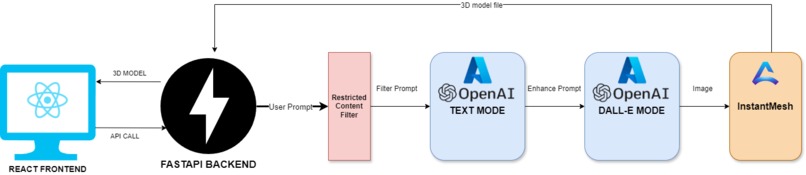
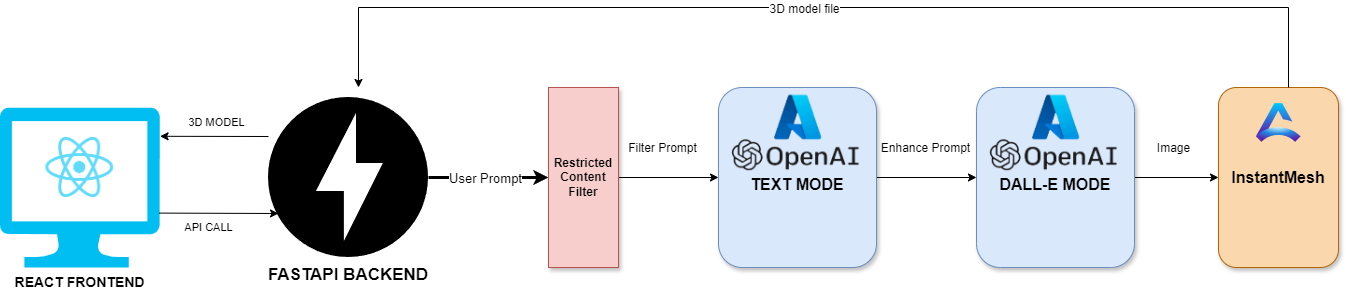
The user will interact with DreamVision via a React web application that let the user input a prompt or an image. The application will call a fast API backend via an endpoint. In the backend, the fast API application will input the user prompt into a restricted content filter to enforce responsible AI principles.
The new filtered prompt will be input into Azure OpenAI chat mode to generate an enhanced prompt. The enhanced prompt will now be used by Azure OpenAI Doll E to generate an image for the 3D model generator.
The image is then sent to Instant Mesh via an API call. Instant Mesh will produce a 3D model from the image that is generated by Azure OpenAI Doll E. And send that model back to the fast API backend and the backend will send it to the React frontend for the user to view or download.

Accomplishments that we're proud of
A fullstack web application that is capable of generating 3D model from text or image.
Challenges
It was particularly difficult to guide the Azure OpenAI to generate a prompt that is capable of guiding DALL-E to generate an image that suitable for the 3D model generator. We have to make sure that the image is a full body view, fixed color background, and only contains one object.
What we learned We learn how to build a dynamic website from React and learn how to use Azure A.I API.
What's next for DreamVision We intend to improve the 3D model generating capability and add the ability to allow user to register and save their the 3D model they generate on our website. In addition, a marketplace to let the users trade 3D model with each other is also something we want to explore.

Log in or sign up for Devpost to join the conversation.