Dream Studio: AI Game Creation for Everyone
An AI-powered browser-based creative editor that helps first-time builders, storytellers, students, and non-programmers turn natural language into playable interactive worlds.
Competition Track
AI, Future Tech & Digital Inclusion
Supporting Angle
Future of Education
Team
Miles — Founder, Product Designer, AI Engineer, Full-Stack Builder
Abstract
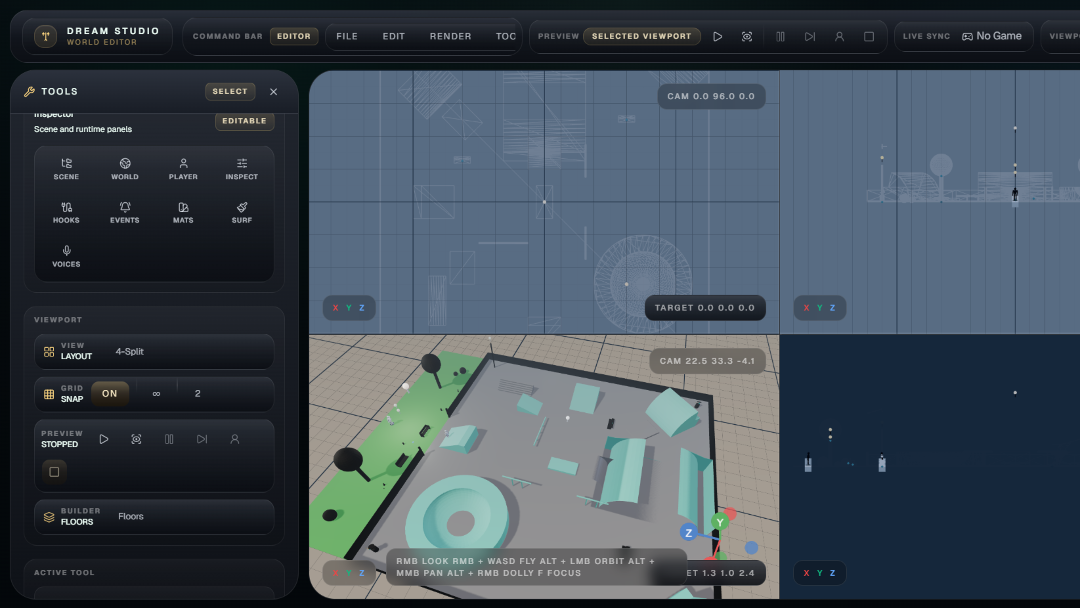
Dream Studio is a browser-based world editor and standalone game creation workspace where an AI agent helps close the gap between a game idea and a playable artifact.
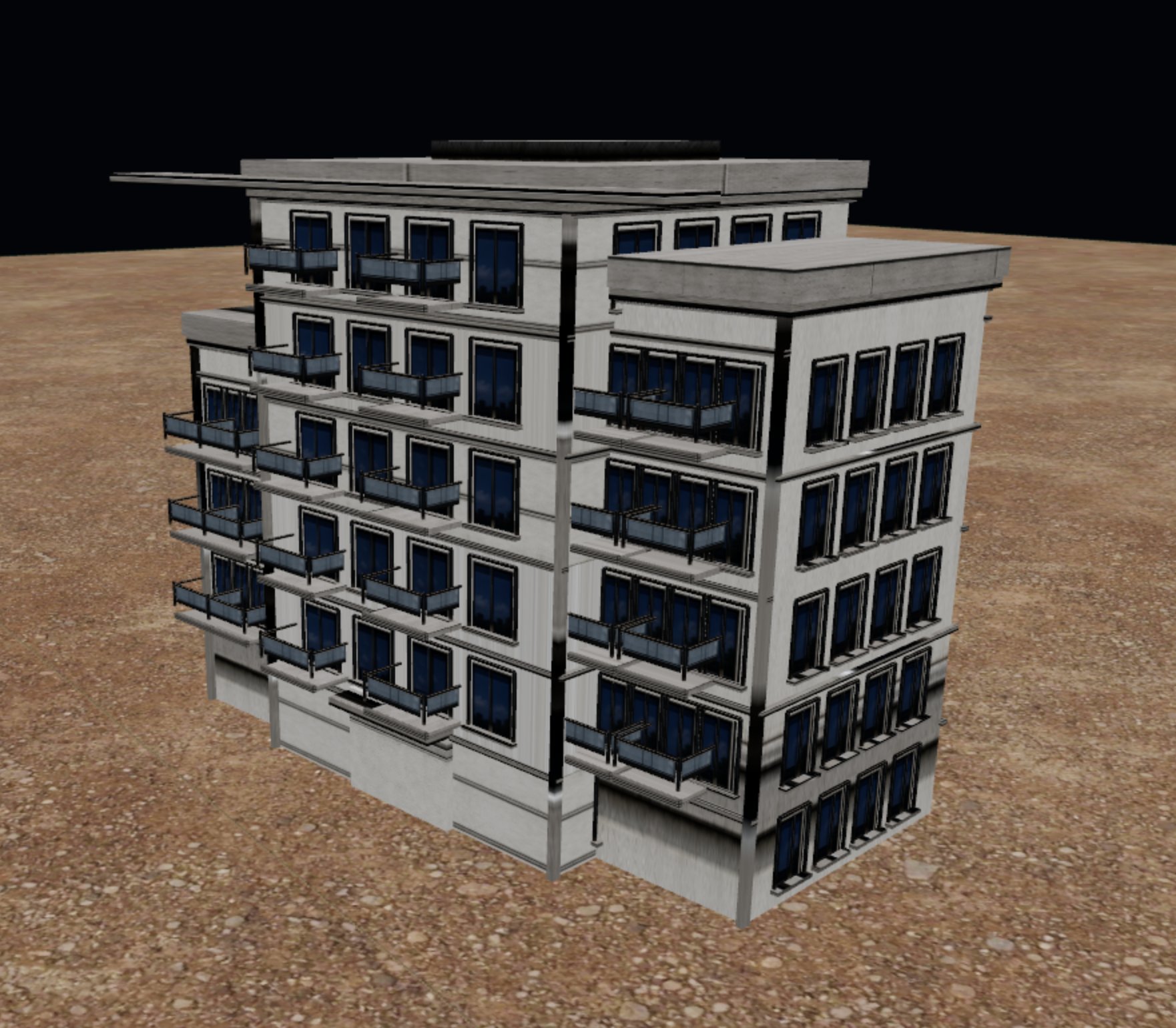
Instead of leaving creators alone with a blank engine screen, the AI layer reasons over the user's request, chooses from 112 structured editor tools, observes tool results, reviews screenshots, and helps produce editable 3D scenes or standalone HTML/CSS/JavaScript games.
The system lets players, solo creators, storytellers, students, and other non-builders describe an idea, generate editable geometry or playable code, inspect the result, refine through natural language, and learn by studying the artifact.
The goal is digital equity through creative access: lowering the barrier between imagination and interactive computing.
My Team
Miles — Solo builder.
Responsibilities:
- Product design
- AI workflow architecture
- Full-stack implementation
- Editor/runtime integration
- Documentation
- Demo preparation
Problem Statement
Someone can spend years playing games and quietly designing their own in their head.
They know the streets they want to drive through, the side quests, the characters, the weather, the jokes, the first mission, the final boss, the feeling of walking into their own version of a GTA-style city, a fantasy village, a survival island, a racing arena, or a puzzle dungeon.
They know what should happen when the player opens a door, talks to an NPC, misses a jump, earns money, steals a car, solves a riddle, or wins the final challenge.
But then they open a professional game engine, and the idea often dies at the first blank project screen.
Before there is a playable prototype, there are barriers:
- Years of programming
- 3D modeling
- Animation
- Asset importing
- Camera control
- Physics
- Debugging
- File organization
- Expensive assets
- Production planning
- Team coordination
- Funding
- Hardware powerful enough to run advanced engines and 3D tools
The first lesson is not creativity. It is setup friction.
This pattern repeats quietly.
A lifelong player wants to make the kind of game they have always dreamed of playing. A solo creator has a story but no programming background. A community group wants an explorable simulation but cannot hire a technical team. A modder wants to move from tweaking other people's worlds to building their own.
A student or teacher may want an interactive lesson, but education is only one case inside a larger access problem. The deeper issue is that many people can imagine playable worlds, but cannot cross the production gap that turns those worlds into software.
The access gap is not only about internet connectivity. The International Telecommunication Union estimates that 2.2 billion people remain offline in 2025, and also emphasizes that affordability and digital skills are essential to meaningful connectivity [1].
Even for people who are online, advanced digital skills such as problem solving and digital content creation develop more slowly than basic use [1].
UNESCO's 2023 Global Education Monitoring Report frames technology in education around access, equity, inclusion, quality, and learner-centered use rather than technology for its own sake [2].
Game creation sits exactly at this intersection.
It is one of the most powerful ways to learn computation, systems thinking, art, storytelling, simulation, and interaction design. Yet the tools are still built for people who already know how to build.
The bottleneck is not imagination.
The bottleneck is the translation layer between a human idea and an editable, inspectable, playable artifact.
What if a browser editor could become that translation layer?
What if a non-builder could describe a world, watch it become real geometry, ask why it works, talk to characters inside it, inspect generated code, and gradually learn the craft by building?
Overall Solution
Dream Studio uses AI as a creative bridge for interactive worldbuilding.
The system has two complementary workspaces:
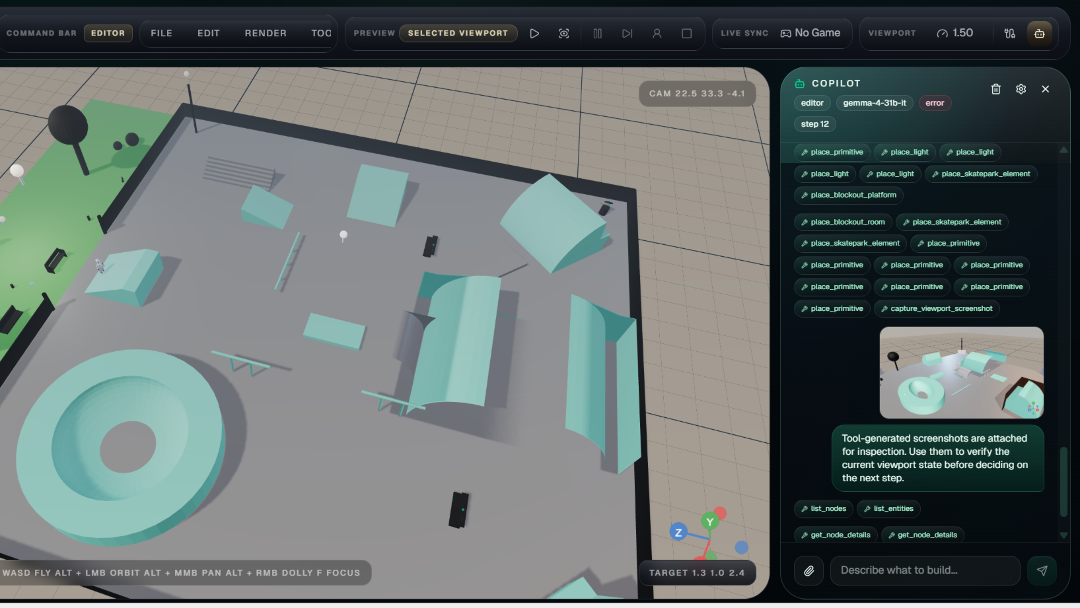
- Copilot
Copilot edits the live 3D editor scene.
It creates and refines editable worlds by calling real editor tools, including:
- Geometry placement
- Mesh editing
- Materials
- Lights
- Entities
- Paths
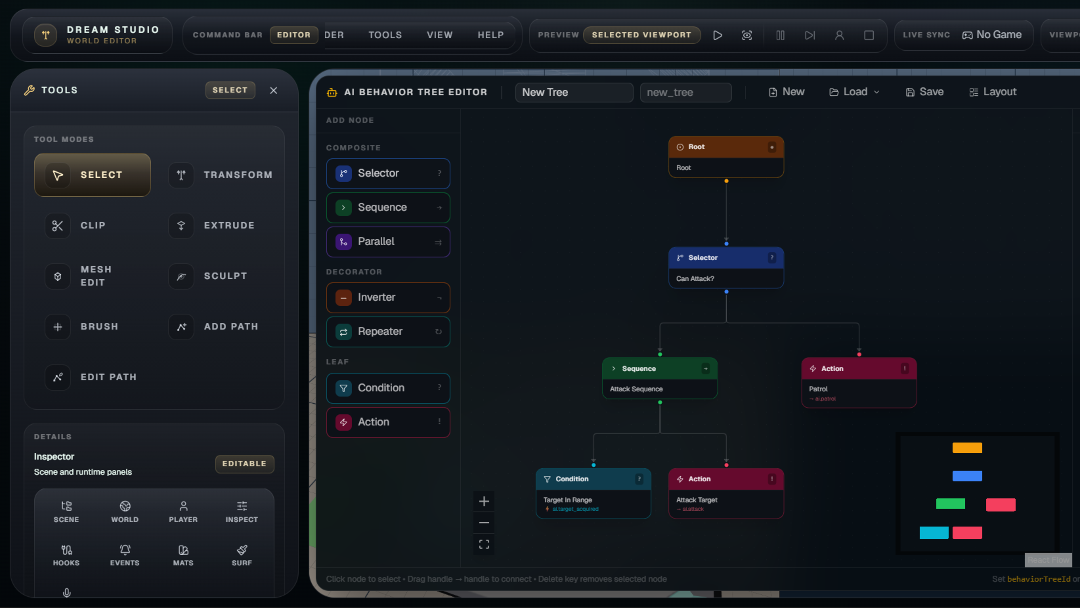
- Gameplay hooks
- Behavior trees
- Surface authoring
- Viewport screenshots
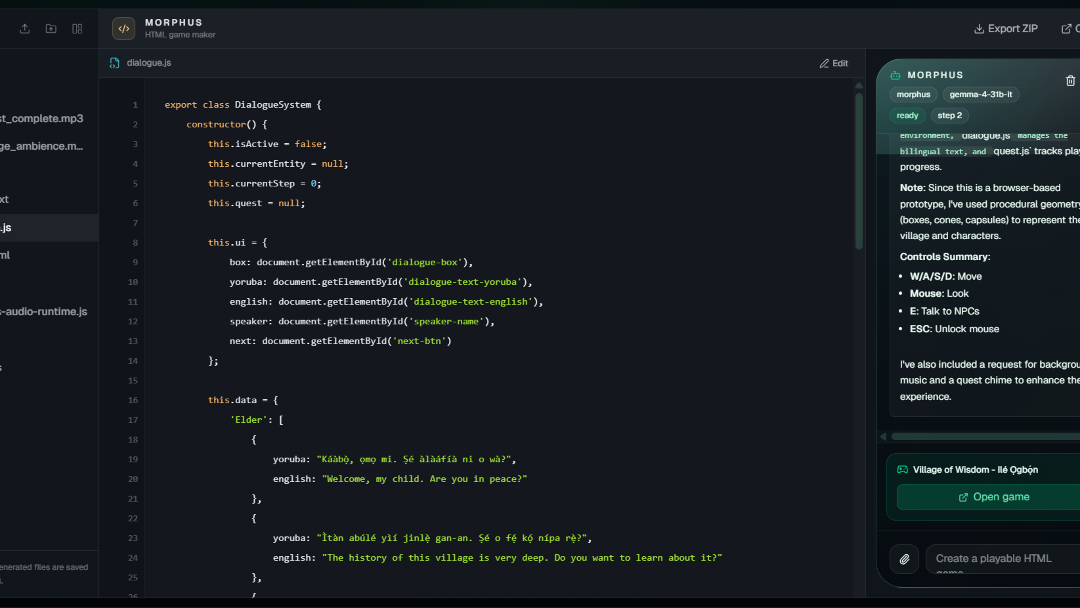
- Morphus
Morphus creates standalone browser games and interactive prototypes as small web projects.
It maintains files, imports assets, previews games, edits code, requests audio approval, and exports ZIP projects.
Typical Workflow
A creator asks:
«“Build a small open-world neighborhood with shops, NPCs, a delivery mission, a garage, and a night-time chase route.”»
Then:
- Copilot asks the AI agent to plan and call editor tools.
- The AI agent places rooms, lights, exhibits, NPCs, and player spawns.
- Copilot captures a viewport screenshot so the AI agent can inspect scale, composition, and placement.
- The creator asks for a playable quiz or minigame.
- Morphus creates a multi-file HTML/CSS/JavaScript game.
- The creator previews, edits, exports, and learns from the generated files.
The output is not a static mockup.
Dream Studio produces editable scenes and runnable artifacts.
How AI Is Used
AI is the default intelligence layer for the editor submission.
Requests flow through:
/api/copilot/generate
The server calls a hosted AI model through the configured provider with:
- Conversation history
- A mode-specific system prompt
- The relevant tool catalog
- Optional images such as viewport screenshots or reference images
- Structured tool results from previous steps
The AI layer helps Dream Studio in four core ways.
- Tool-Using Editor Agent
The AI agent selects from 104 Copilot tools for live editor control.
These tools cover:
- Scene discovery
- Geometry placement
- Mesh topology
- UVs
- Materials
- Surface painting
- Gameplay hooks
- Behavior trees
- Paths
- Articulated assets
- Screenshots
- Game sync
This matters because the AI is not only writing a text plan for the creator.
It helps perform the work by selecting actions from the editor command surface, observing structured tool results, and using those results to continue the task.
- Visual Feedback Agent
Copilot includes a "capture_viewport_screenshot" tool.
After meaningful scene changes, the AI agent can request a screenshot of the active viewport. The screenshot is attached to the next model step, allowing the model to inspect what was actually built before continuing.
The workflow becomes:
plan -> call editor tools -> receive results -> capture screenshot -> inspect -> refine
This is essential for spatial creation.
A level can be technically valid but visually wrong. The AI uses screenshot feedback to help correct layout, scale, lighting, and composition.
- Standalone Game Builder
In Morphus, AI helps creators make playable browser games.
Morphus exposes 8 tools:
- "generate_game_html"
- "morphus_list_files"
- "morphus_search_files"
- "morphus_read_file"
- "morphus_write_file"
- "morphus_create_file"
- "morphus_request_delete_file"
- "morphus_request_rename_file"
This smaller tool surface is deliberate.
Morphus behaves like a coding agent inside a generated project. It searches before reading, reads bounded file slices, writes targeted changes, creates new modules only when needed, and asks before destructive file operations.
- Multilingual Character and Voice Layer
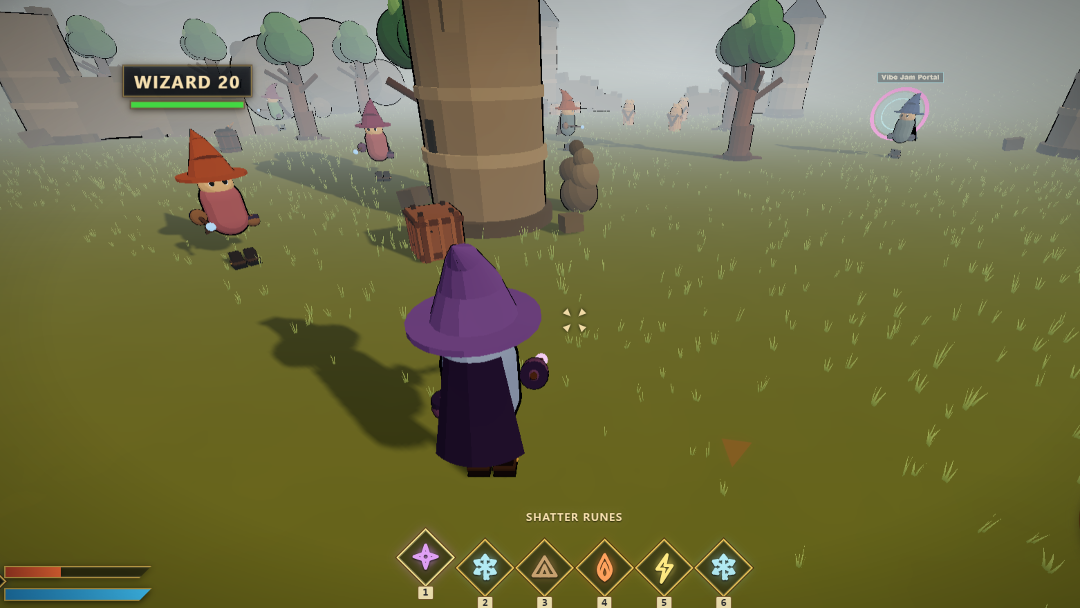
AI also powers NPC preview dialogue.
A creator can define an NPC's character prompt, interact with the NPC inside the viewport, and receive in-character dialogue.
Optional ElevenLabs TTS uses:
eleven_multilingual_v2
This enables multilingual voice-enabled game experiences.
This is content-level multilingual support, not full UI localization yet.
Method: Agentic Editor Architecture
The submitted editor lives in:
apps/editor
It is built with:
- React 19
- TypeScript
- Vite
- Three.js
- React Three Fiber
- Rapier
- Tailwind CSS
- Valtio
- Custom Dream Studio packages
- Google GenAI
- Pinecone
- Gemini embeddings
- ElevenLabs
The method is deliberately not:
«“Generate one big answer.”»
AI helps through a bounded tool-using workflow.
Each model step receives:
- A system prompt
- The conversation
- The relevant tool schema
- Optional visual inputs
- Previous tool results
The model then either answers the creator or calls tools. Dream Studio executes those tools, records the result, and gives the result back to the AI agent for the next step.
This creates a reproducible workflow:
user goal -> AI plan/tool call -> editor execution -> structured result -> optional screenshot/file read -> AI refinement -> playable artifact
Key Implementation Files
System| Files AI model route| "server/copilot-generate-shared.ts", "server/copilot-generate-api.ts", "api/copilot/generate.ts" Client provider| "src/lib/copilot/gemini-provider.ts", "src/lib/copilot/provider.ts", "src/lib/copilot/settings.ts" Agent loop| "src/lib/copilot/agentic-loop.ts" Tool catalog| "src/lib/copilot/tool-declarations.ts" Tool execution| "src/lib/copilot/tool-executor.ts" Mode selection| "src/app/hooks/useCopilot.ts" Copilot UI| "src/components/editor-shell/CopilotPanel.tsx" Morphus UI| "src/components/editor-shell/MorphusWorkspace.tsx" Morphus memory| "src/lib/copilot/morphus-memory.ts" NPC dialogue| "server/npc-chat-shared.ts", "src/lib/preview-npc-chat.ts" Game-code memory| "src/components/morphus-rag/RagIngestionUI.tsx", "api/rag/upsert-game-code.ts", "src/rag/*"
Tool Surface
In the submitted editor slice, Dream Studio exposes 112 structured tools:
[ 112 = 104 + 8 ]
Tool Group| Count| Purpose Copilot tools| 104| Live 3D editor control Morphus tools| 8| Standalone game-file generation and editing Total| 112| Full editor and game creation workflow
Tool categories include:
- Placement and scene construction
- Transforms and selection
- Material creation and assignment
- Scene discovery and node/entity inspection
- Mesh topology editing
- Non-destructive modeling modifiers
- UV unwraps and surface authoring
- Behavior trees
- Gameplay hooks
- Scene paths and events
- Articulated asset creation
- Viewport screenshot capture
- Morphus file operations
- Standalone game artifact registration
The tool design follows a principle:
«Give the AI agent enough authority to act, but keep every action structured, inspectable, and bounded.»
Game-Code Memory
Dream Studio includes a Pinecone-backed game-code memory subsystem.
For the hackathon, I uploaded 1{,}000+ HTML, JavaScript, TypeScript, TSX, CSS, and JSON files containing browser-based game patterns and interactive prototypes.
I considered fine-tuning on this corpus, but the code was too varied, experimental, and inconsistently structured to serve as a clean supervised dataset. Fine-tuning would risk baking noisy patterns into the model.
Instead, I chose a RAG-based approach:
- The backend chunks the code.
- It embeds the chunks with Gemini embeddings.
- It stores vectors in Pinecone.
- It formats retrieved examples as context for the AI model.
This lets the corpus work like a searchable reference library for patterns such as:
- Input handling
- Collision
- Cameras
- Dialogue
- UI
- Inventory
- Physics
- Enemy behavior
- Animation loops
- Level logic
Current Status
Ingestion and search exist.
The next step is exposing retrieval as a first-class Morphus tool so the AI agent can search prior examples before generating or debugging games.
Discussion: Why This Architecture Matters
A beginner does not only need a generated file.
They need a loop:
- Make something
- See it
- Edit it
- Understand it
- Play it
- Repeat
Dream Studio's architecture is built around that loop.
Copilot makes spatial creation inspectable. Morphus makes code generation maintainable. Screenshots make visual verification possible. File tools make iteration safe. Tool results make AI assistance visible and auditable.
Together, these choices let the AI agent help creators move from idea to artifact inside the same workspace.
The impact is not measured only by the games Dream Studio can generate.
It is measured by who gets to start.
A person who has always played games but never had the team, funds, hardware, or technical vocabulary to build one can now create a scene, inspect generated logic, talk to NPCs, preview a playable result, and learn through iteration.
Game creation becomes a path into creative computing instead of a wall in front of it.
Challenges
Scope
Game creation spans geometry, physics, materials, behavior, audio, code, assets, UI, and export.
The system needed typed tools and mode-specific prompts rather than one vague chatbot.
Context Management
Injecting an entire scene into every prompt is brittle.
Copilot instead teaches the AI agent to inspect progressively:
- Settings
- Node lists
- Details
- Topology
- Materials
- Hooks
- Paths
- Events
Only the information needed for the current step is retrieved.
Visual Correctness
Spatial output must be seen.
Screenshot capture became part of the model loop.
Safe Iteration
Morphus projects become multi-file codebases.
Search-first debugging, bounded reads, targeted writes, and approval-gated destructive operations prevent reckless rewrites.
Results and Validation
Code-level validation completed during audit:
npm.cmd run typecheck npm.cmd run typecheck:orchestrator
Both passed.
Architecture Validation from the Submitted Codebase
- A hosted AI model is configured as the default intelligence layer.
- "/api/copilot/generate" routes Copilot and Morphus generation through the server-side AI path.
- 112 tools are declared in the editor tool catalog.
- Copilot and Morphus expose separate tool subsets.
- The screenshot tool returns image attachments for subsequent model steps.
- Morphus persists files and chat state in IndexedDB.
- Pinecone/Gemini embedding memory exists for game-code ingestion and search.
The important result is not a benchmark score.
It is a working interaction pattern:
«The AI agent can act inside a real editor, observe the result of its actions, inspect screenshots or file slices, and continue the task without leaving the creator's workspace.»
That is the technical proof behind the demo.
Limitations
- Dream Studio currently uses hosted AI inference rather than fully local inference.
- Local Ollama or llama.cpp integration is planned.
- The game-code memory subsystem is implemented, but not yet fully autonomous inside Morphus.
- The editor supports multilingual prompts, NPC dialogue, and voice-enabled content, but not full editor UI localization yet.
What's Next
- Add local-first AI model support through Ollama or llama.cpp.
- Expose code retrieval as a first-class Morphus tool.
- Add full editor localization and right-to-left UI support.
References
[1] International Telecommunication Union, Facts and Figures 2025. "https://www.itu.int/itu-d/reports/statistics/facts-figures-2025/" (https://www.itu.int/itu-d/reports/statistics/facts-figures-2025/)
[2] UNESCO, Global Education Monitoring Report 2023: Technology in education: A tool on whose terms? "https://www.unesco.org/gem-report/en/technology" (https://www.unesco.org/gem-report/en/technology)
[3] University of Minnesota Pressbooks, Reports: Introduction to Technical and Professional Communication. "https://pressbooks.umn.edu/techwriting/chapter/4-5-reports/" (https://pressbooks.umn.edu/techwriting/chapter/4-5-reports/)
[4] Miami University Howe Center for Writing Excellence, Scientific/Technical Reports. "https://miamioh.edu/hcwe/handouts/scientific-reports/index.html" (https://miamioh.edu/hcwe/handouts/scientific-reports/index.html)
[5] Devpost, Beyond Tomorrow Summit: Code the Future | Shape the World. "https://beyond-tomorrow-summit.devpost.com/" (https://beyond-tomorrow-summit.devpost.com/)
Built With
- and
- browser-based-game-preview
- css
- custom-3d-editor/runtime-packages
- custom-agentic-tool-calling-system
- elevenlabs-text-to-speech-api
- game
- gemini-embeddings
- google-genai-sdk
- hosted-ai-model-inference
- html
- html/css/javascript
- indexeddb
- javascript
- node.js/typescript-server-routes
- pinecone-vector-database
- rag-based-game-code-memory
- rapier-physics
- react-19
- react-three-fiber
- standalone
- tailwind-css
- three.js
- typescript
- valtio
- vite

Log in or sign up for Devpost to join the conversation.