Inspiration
Random draw tools are simple applications, but they are also a great example of something an AI agent should be able to operate directly.
Instead of having an AI describe what a user should click, I wanted to build an application that exposes its actual capabilities as structured tools that an agent can discover and use.
This led to Drawboard: a random draw application designed from the beginning to be agent-native.
What it does
Drawboard lets users create entries, assign weights, draw one or multiple winners, manage exclusions, and update entries.
Through WebMCP, an AI agent can interact directly with these capabilities.
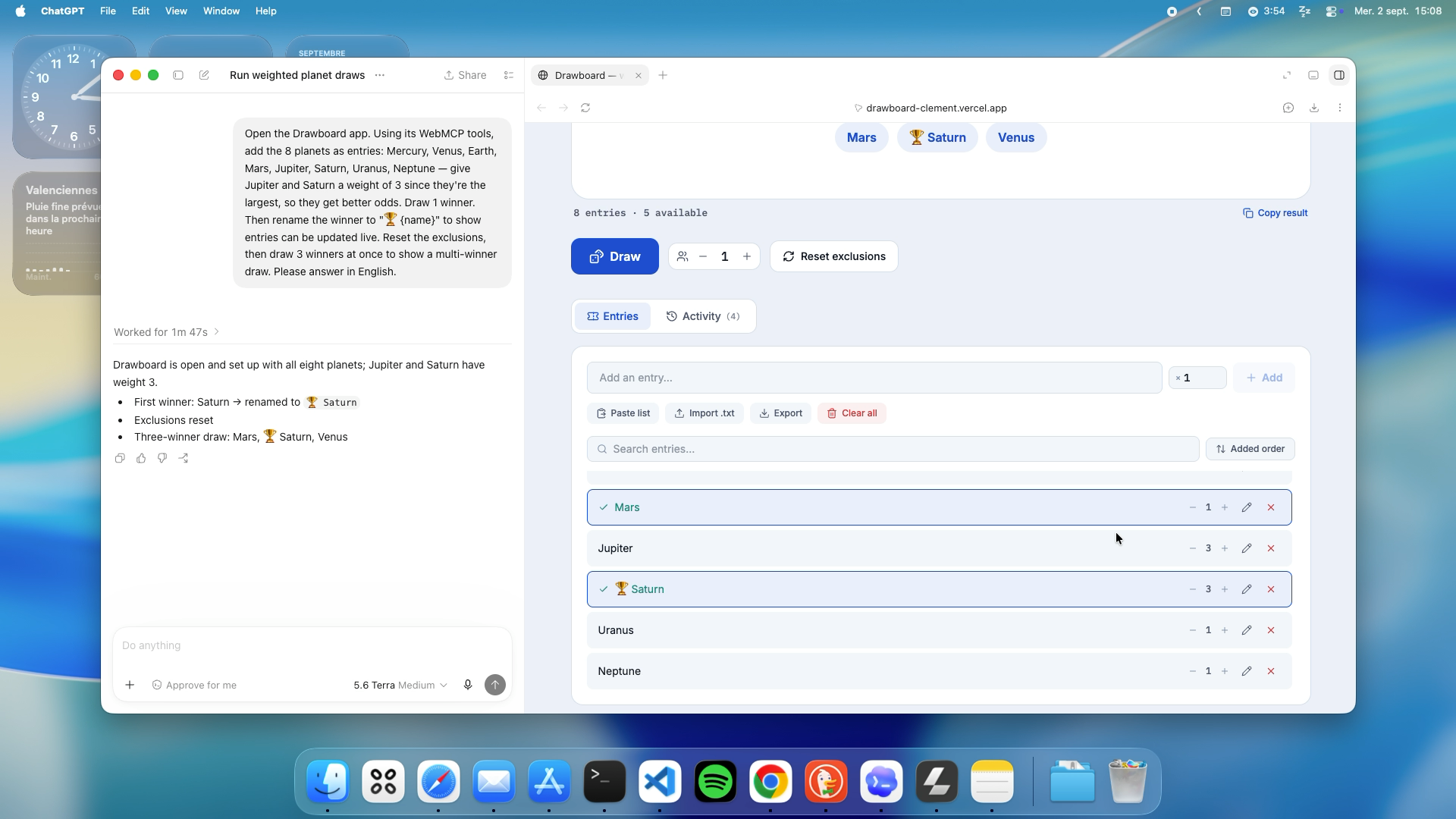
For the demo, the agent:
- Adds all 8 planets as entries.
- Gives Jupiter and Saturn a weight of 3.
- Draws a single winner.
- Renames the winner to
🏆 {name}. - Resets the exclusions.
- Draws 3 winners at once.
The changes happen directly in the application and its actual state.
How we built it
Drawboard was built as a web application with WebMCP integrated directly into its application logic.
The interface and the AI agent use the same underlying application state and functions. WebMCP exposes these capabilities as structured tools rather than requiring the agent to interact through simulated clicks or copied text.
The application exposes tools for actions such as:
- Adding entries
- Drawing winners
- Updating entries
- Resetting exclusions
- Performing multi-winner draws
This makes Drawboard an example of an agent-native web application: the AI can operate the application through its own structured interface while the human can still use the normal UI.
Challenges we ran into
The main challenge was designing tools that represent meaningful application actions rather than simply exposing low-level UI interactions.
We also needed to make sure that actions performed by the agent produced exactly the same state changes as actions performed by a human through the interface.
Weighted draws and multi-winner draws added another layer of complexity because the agent needs to provide structured parameters while the application remains responsible for the actual randomization logic.
Accomplishments that we're proud of
We are particularly proud that the WebMCP integration is not a separate demo layer.
The agent is interacting with the real application state.
A particularly simple but powerful example is the winner update: after drawing a winner, the agent renames the entry and adds a trophy emoji. The change immediately appears in the application.
Drawboard also demonstrates several different types of agent interaction in a single workflow: creating data, using parameters, executing an action, modifying existing data, resetting state, and performing a multi-result operation.
What we learned
We learned that making a website agent-friendly is more than exposing a few buttons as tools.
The most useful WebMCP tools correspond to meaningful operations in the application's domain.
We also learned that sharing the same underlying logic between the human interface and WebMCP makes the application much easier to reason about and keeps agent actions consistent with normal user interactions.
Most importantly, WebMCP changes the relationship between AI agents and websites: instead of the agent merely observing an interface, the website can provide the agent with a structured way to actually use it.
What's next for Drawboard
The next step would be to make Drawboard more flexible and useful for real-world scenarios.
Possible additions include saving and loading draw configurations, importing larger lists, creating reusable draw presets, supporting more advanced weighting rules, and adding additional WebMCP tools for managing complete draw sessions.
The long-term idea is simple: make everyday web applications not only usable by humans, but genuinely usable by AI agents.
Built With
- agentic-ai
- ai-agents
- automation
- javascript
- openai
- react
- webmcp


Log in or sign up for Devpost to join the conversation.