-
-
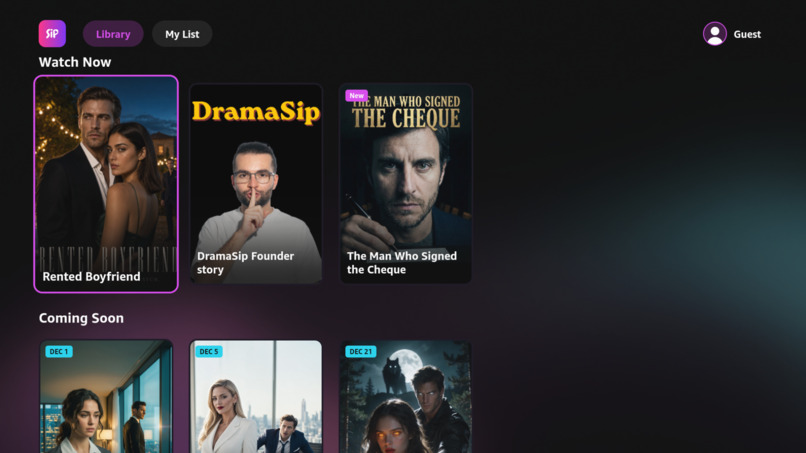
Home screen
-
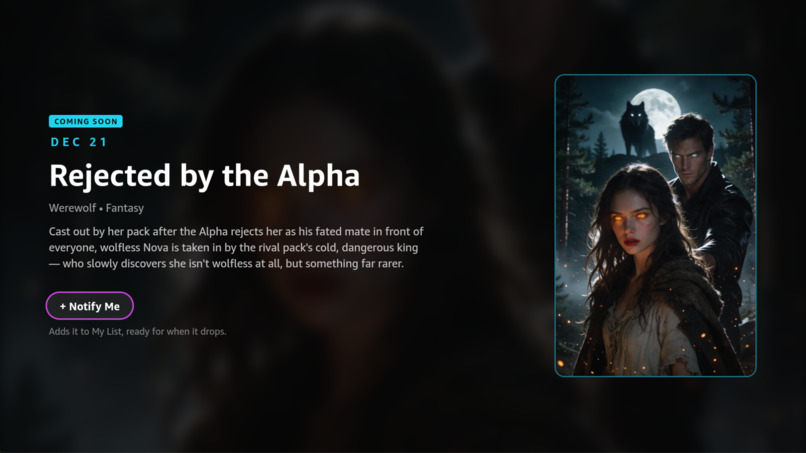
Series details
-
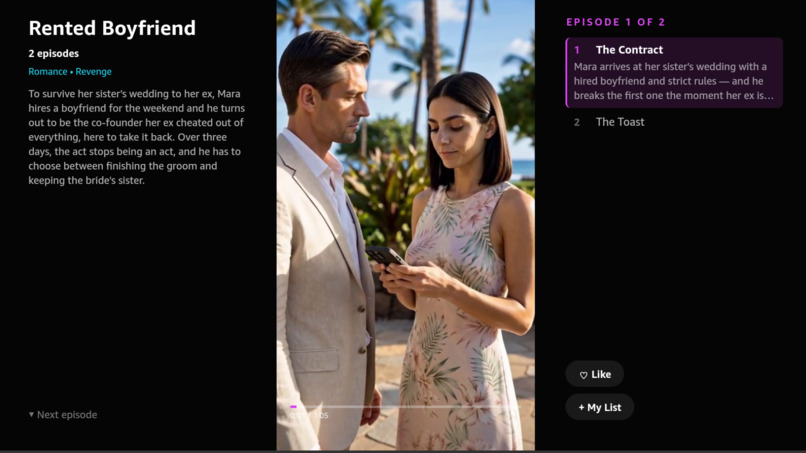
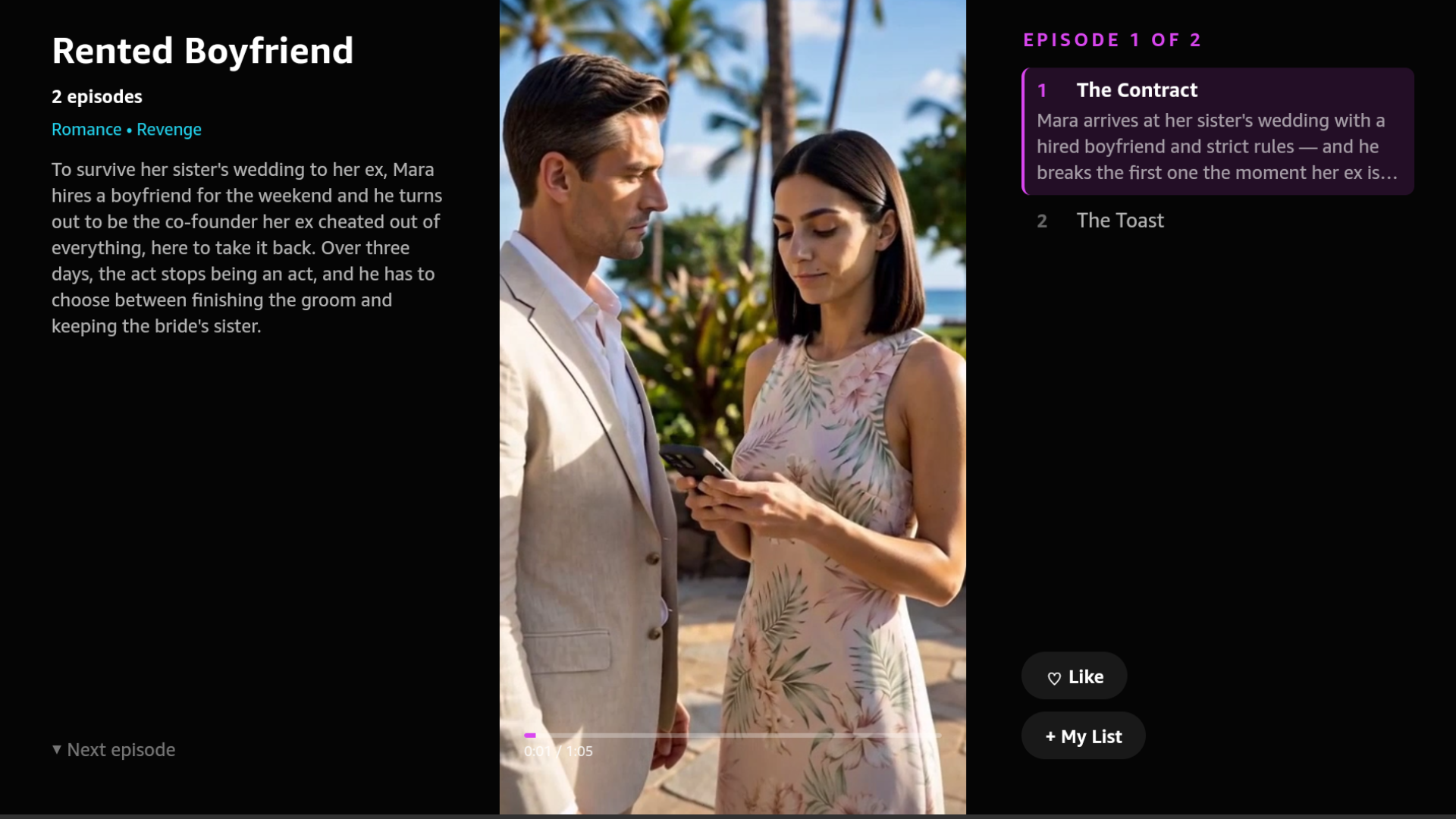
Watch page
-
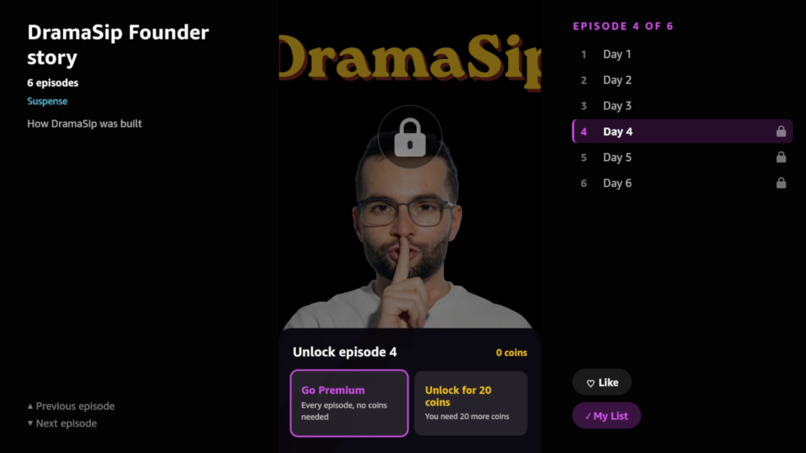
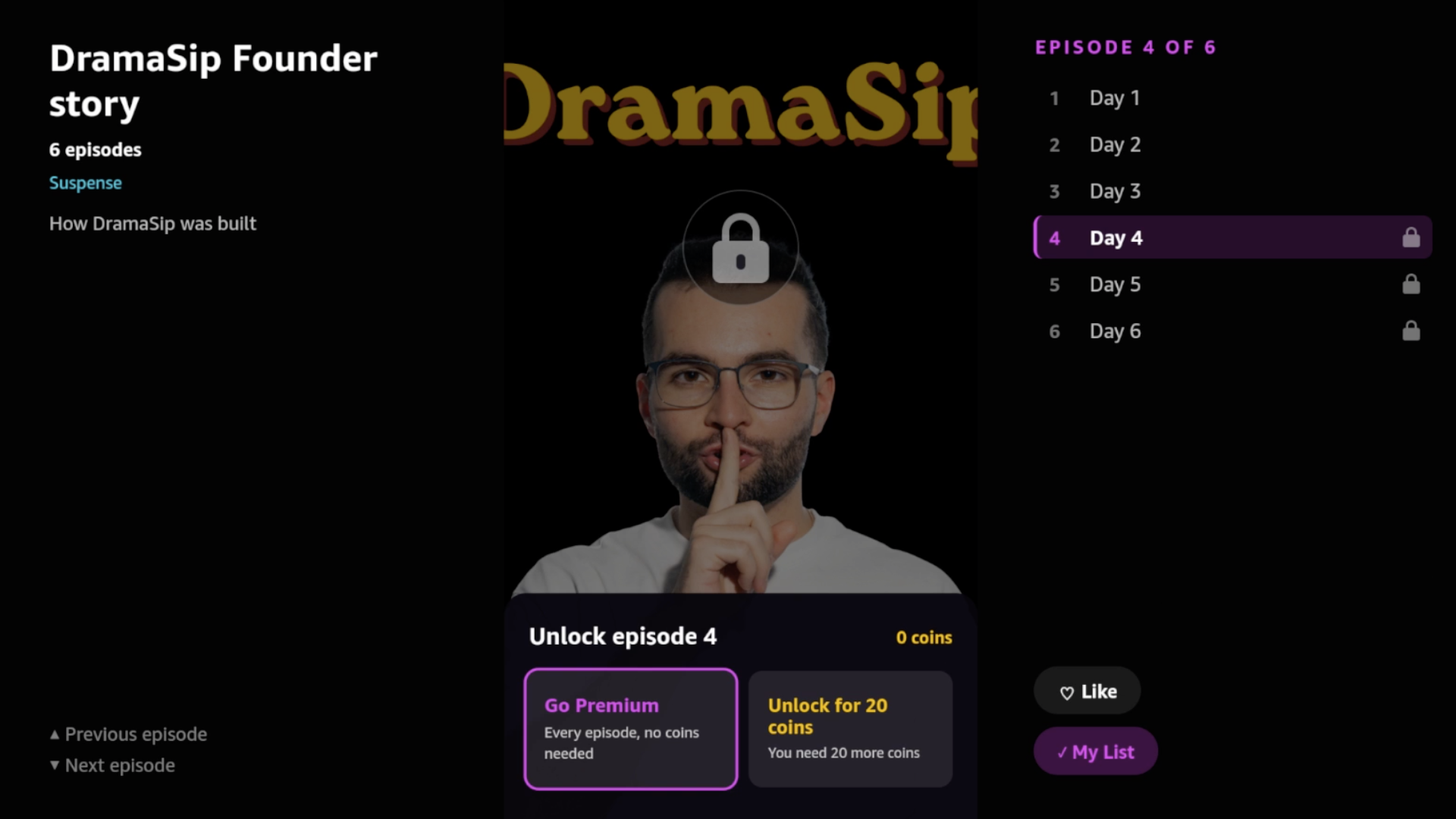
Paywall
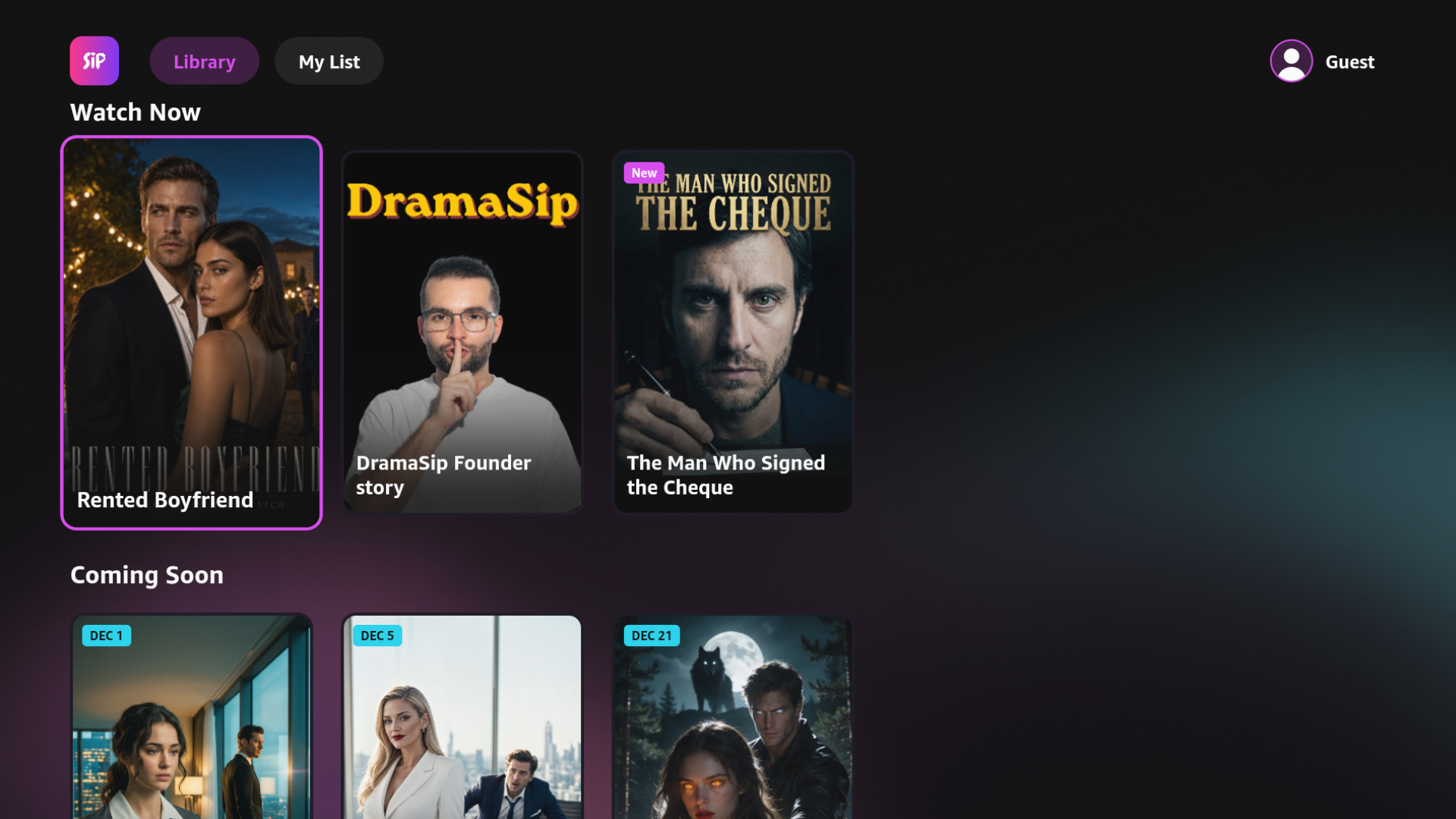
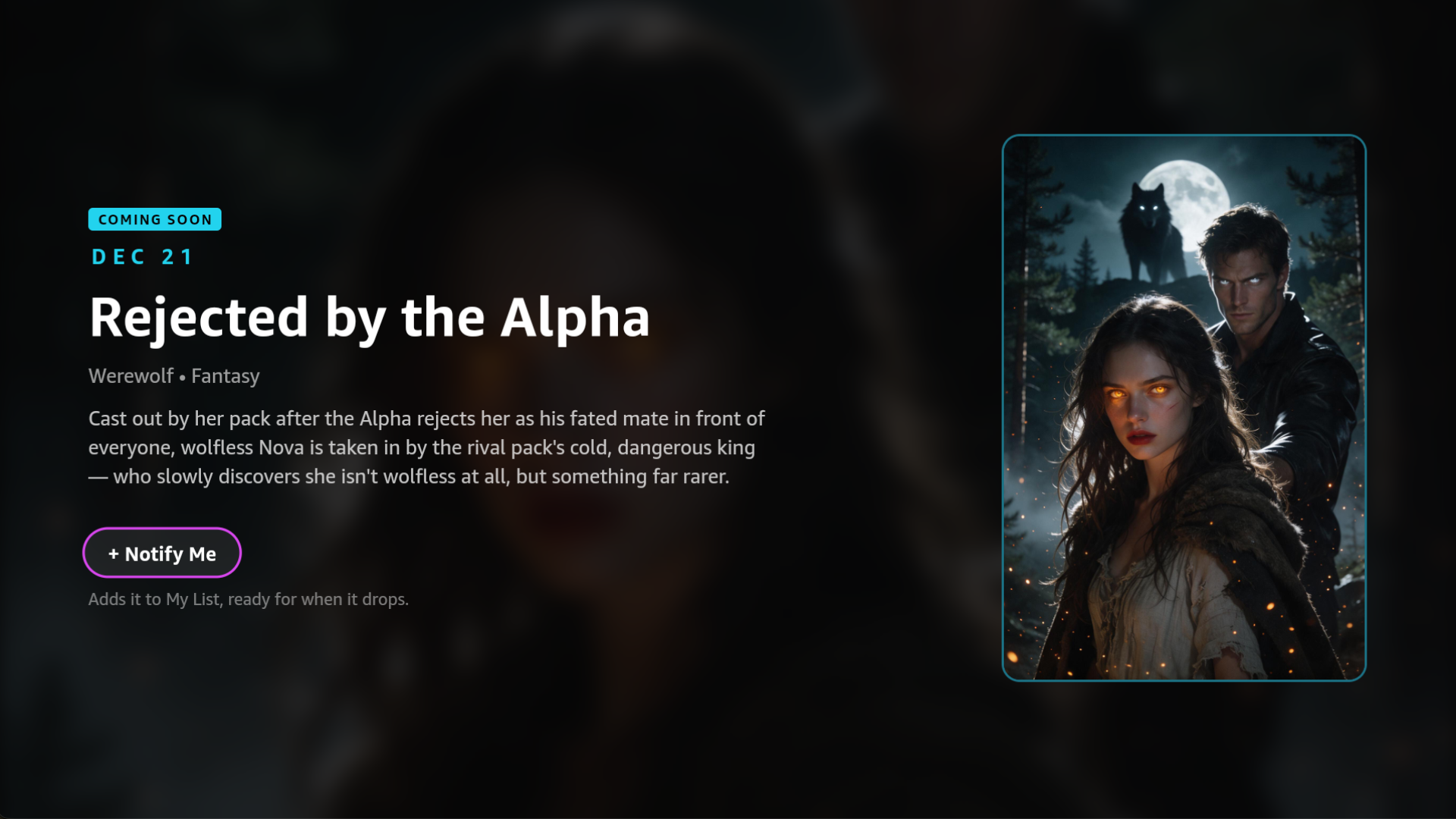
DramaSip is a short drama streaming app, now on the big screen. Binge-worthy series told in 1–2 minute vertical episodes, each one ending on a cliffhanger.
Microdramas are one of the fastest-growing formats in entertainment. US users already spend more time per day in ReelShort (35.7 min) than in Netflix (24.8 min) (Omdia, 2026). But the format lives almost entirely on phones, because the videos are vertical and TVs are not. DramaSip TV is my answer to the question: what does a vertical-first drama look like in the living room?
Where DramaSip comes from
DramaSip started as a mobile app for iOS and Android, built solo during RevenueCat's Shipaton hackathon, where it won 2nd place in the HAMM Award.
The mobile app is live on Google Play, with its own website (dramasip.com), organic users and a full hybrid monetization stack: subscriptions, virtual currency coins and rewarded ads, all through RevenueCat.
What existed before this hackathon:
- The mobile app (iOS + Android, Expo / React Native)
- The Supabase backend
- The RevenueCat setup
- The AI-produced series catalog
What I built during this hackathon (Aug 31 – Oct 23, 2026):
- A brand new TV app, written from scratch, running on Vega OS (Fire TV), Android TV, Apple TV and the web from one shared codebase
- A TV-first watch experience for vertical video (three-column layout, auto-hiding UI, D-pad episode switching, auto-advance)
- Remote control support across all platforms, with key handling normalized between Vega, tvOS, Android TV and a keyboard on web
- Monetization on TV: RevenueCat on Vega (via
@revenuecat/purchases-js-vegaand the Amazon Appstore IAP), plus RevenueCat on Apple TV / Android TV, all sharing one account with mobile - A custom TV paywall and an unlock sheet for locked episodes, designed for a D-pad instead of a touchscreen
Everything the viewer sees on TV was built during the hackathon. The backend and the content were reused, so a viewer's subscription, coins, likes and progress follow them from their phone to their TV.
What inspired me
The idea for DramaSip came from my wife. She showed me the vertical drama apps that had started filling her feed, and she was hooked. After Shipaton, I kept coming back to one question: why does a format built for binge-watching only exist on a 6-inch screen?
Phones are where people discover microdramas. But binge sessions are long, and the living room is where long sessions happen. Nobody had really figured out how to make a vertical series feel native on a horizontal screen. Most attempts just center the video and leave two huge black bars. That felt like an open design problem worth solving, and the Amazon Developer Hackathon was the push to solve it.
How I built it
One codebase, four platforms
I started from Amazon's react-native-multi-tv-helloworld sample and turned it into a monorepo with three packages:
| Package | Runtime | Targets |
|---|---|---|
packages/vega |
React Native for Vega (@amazon-devices/react-native-kepler) |
Fire TV (Vega OS) |
packages/expotv |
Expo SDK 55 + react-native-tvos |
Apple TV, Android TV, Web |
packages/shared |
Plain React Native + TypeScript | Every screen, component, hook, API client, auth and purchases logic |
Roughly 95% of the app code lives in shared. Each platform package is a thin shell: navigation (Amazon's react-navigation packages on Vega, Expo Router on Expo TV) and a handful of platform files picked by extension (.kepler.tsx vs .tsx):
- Video: the Vega W3C Media
VideoPlayerwithKeplerVideoSurfaceViewon Fire TV,expo-videoon Apple TV / Android TV / web - Purchases:
@revenuecat/purchases-js-vegaon Vega,react-native-purchaseson Expo TV - Crash reporting: Sentry on every platform, tagged by TV platform
All layouts are designed on a 1920×1080 base and scaled to the actual screen, so the same UI works on a 720p stick and a 4K TV.
Rethinking the watch screen for vertical video on a TV
This is the screen I spent the most time on. A 9:16 video on a 16:9 screen only uses a fraction of the width. With the video at full screen height, its width is 32% of the screen width. So about two thirds of the screen is empty around the video. Instead of black bars, I turned that space into a three-column layout:
- Left: the series info: title, rating, genres, synopsis
- Center: the vertical video, full height
- Right: the episode list that follows along, and the Like and My List buttons
The UI gets out of the way. Once an episode is playing, both side columns and the progress bar fade out after 5 seconds without a key press, so the viewer is left with just the story. Any key brings them back. The key press that wakes the UI doesn't also trigger an action, so nobody accidentally skips an episode they can't see. Pausing keeps the UI visible.
The mobile swipe, translated to a remote
On mobile, you swipe up for the next episode. On TV, ▼ is the swipe. Pressing down slides the next episode in from below, pressing up slides the previous one in from above, the same motion as the phone's vertical pager.
Making that work with a D-pad took real UX work, because the arrows now have two jobs: changing episodes and moving focus between buttons. The solution is a "the video owns focus" model:
- By default, focus sits on the video itself. ▲ / ▼ change episodes, OK plays / pauses.
- ▶ moves focus to the Like / My List buttons. Inside that stack, ▲ / ▼ move between the two buttons first, and only change episodes when you reach the edge.
- Back steps out one layer at a time: it first shows hidden UI, then returns focus from the buttons to the video, and only then leaves the screen.
- When an episode is locked, an unlock sheet with Premium and Coins side by side takes the video's place. ◀ / ▶ choose, and ▲ / ▼ still switch episodes, so a locked episode never becomes a dead end.
All of this is built with TVFocusGuideView focus traps, so focus never "escapes" into the wrong column.
Seamless binge
- Auto-advance: when an episode ends, the next one starts automatically, so a whole series plays hands-free.
- One player, swapped sources: the player stays mounted and only its source changes between episodes, which keeps transitions fast on lower-powered streaming sticks.
- Watch progress is saved every few seconds, so you can continue where you left off on any device.
Full remote control support
A shared useRemoteKeys hook wraps useTVEventHandler (available in both React Native for Vega and react-native-tvos) and normalizes the differences between platforms: Vega reports OK as enter, tvOS as select; Vega fires on key-down, others on key-up. On web, it falls back to the keyboard (arrows, Enter, Space, media keys). The app supports:
- D-pad navigation on every screen
- ▲ / ▼ to change episodes, OK to play / pause
- ⏪ / ⏩ to skip 10 seconds, with a "+10s" / "−10s" indicator
- Play/Pause media keys
- Back with layered behavior
Monetization on the big screen
The TV app connects to the same RevenueCat project as the mobile app, so the Premium entitlement and the coins virtual currency are shared across phone and TV.
- On Fire TV (Vega): RevenueCat's Vega SDK on top of the Amazon Appstore IAP, with the Premium subscription (weekly / annual) and coin packs (100 / 1,000) configured as Amazon SKUs.
- On Apple TV and Android TV: the standard RevenueCat SDK with App Store / Google Play products.
- Unlocking with coins goes through a Supabase edge function, so the price and balance are always checked server-side.
Since RevenueCat's paywall UI doesn't run on TV, I built a custom TV paywall: Premium plans on the left, and when you arrive from a locked episode, "Unlock for 20 coins" plus coin packs on the right. It closes itself the moment access is granted and drops you back into the episode.
Building with AI
The episodes themselves are produced with AI video models (Seadance, H3 Max), which is how a solo developer can build a drama catalog. The TV app was built with Claude Code connected to the Amazon Devices Builder Tools MCP, which helped with Vega-specific documentation, focus management, the media player, IAP and build / run workflows.
Challenges I faced
Vertical video on a horizontal screen. There's no established pattern for this. The three-column layout, the auto-hiding UI and the "video owns focus" navigation model went through several iterations before the screen felt calm and obvious with just a remote.
One remote, two meanings for every arrow. On a phone, swiping and tapping are separate gestures. On a TV, ▲ / ▼ must both change episodes and move between buttons. Getting the edges right (when does ▼ move to the next button, and when does it change the episode?) required focus traps and careful timing, because some platforms report key-down and others key-up.
Platform quirks across four runtimes.
Testing purchases on Fire TV. In-app purchases on Vega need Appstore DevTest, a signed build and live IAP items in the developer console. I wrote a small script to re-sign Release builds for DevTest so purchases can be tested on a sideloaded build.
What I learned
- A TV is not a big phone. The format translated, but the interaction didn't. The phone's swipe became a single button, and every screen had to be redesigned around focus, not touch.
- Empty space is a feature. The two thirds of the screen that vertical video can't use turned out to be the perfect place for context: series info on one side, episodes and actions on the other, out of sight once the story starts.
- Shared code pays off fast. With almost everything in a shared package, a fix to the watch screen ships to Fire TV, Apple TV, Android TV and web at once.
- Vega is ready for real apps. React Native for Vega, the W3C media player, Amazon IAP and the Builder Tools MCP let me bring a full, monetized product to Fire TV as a solo developer in a few weeks.
- Cross-device entitlements matter. Because phone and TV share one RevenueCat project, a viewer who subscribes on their phone is already Premium on their TV.
What's next
- Publishing on the Amazon Appstore for Fire TV, followed by Google Play (Android TV) and the App Store (Apple TV)
- Sign in with your phone: a QR code on the TV that links to your mobile account, so the couch is one scan away from your coins and Premium
- Voice and Alexa: "Alexa, play the next episode of…" to make the binge fully hands-free
- Streaming formats and preloading: HLS / DASH on Vega and preloading the next episode, for instant switching like on mobile
- More stories: the catalog is the product, and the TV is where a whole series gets watched in one evening
Built With
- amazon-appstore-iap
- amazon-devices-builder-tools
- android-tv
- apple-tv
- expo.io
- fire-tv
- react-native
- react-native-for-vega
- react-native-tvos
- revenuecat
- sentry
- supabase
- typescript
- vega-os

Log in or sign up for Devpost to join the conversation.