Inspiration
Seven AI detectors labelled 61.22% of 91 human-written TOEFL essays as AI-generated on average, while essays by US eighth graders were classified almost perfectly (Liang et al., 2023). If you write in a second language and get flagged, all you can show is the essay, and the detector has already misread it.
A record of how the essay was written is a different kind of evidence. It is collected while you write, and it can't be recovered from the finished text. Google Docs version history and Grammarly Authorship already keep such records, but both need an account and store the record on the company's servers, so the reader has to trust that service. Drafttrail keeps the record in one file that the teacher checks in their own browser, with no account and nothing uploaded.
What it does
Drafttrail is one web page with four tabs.
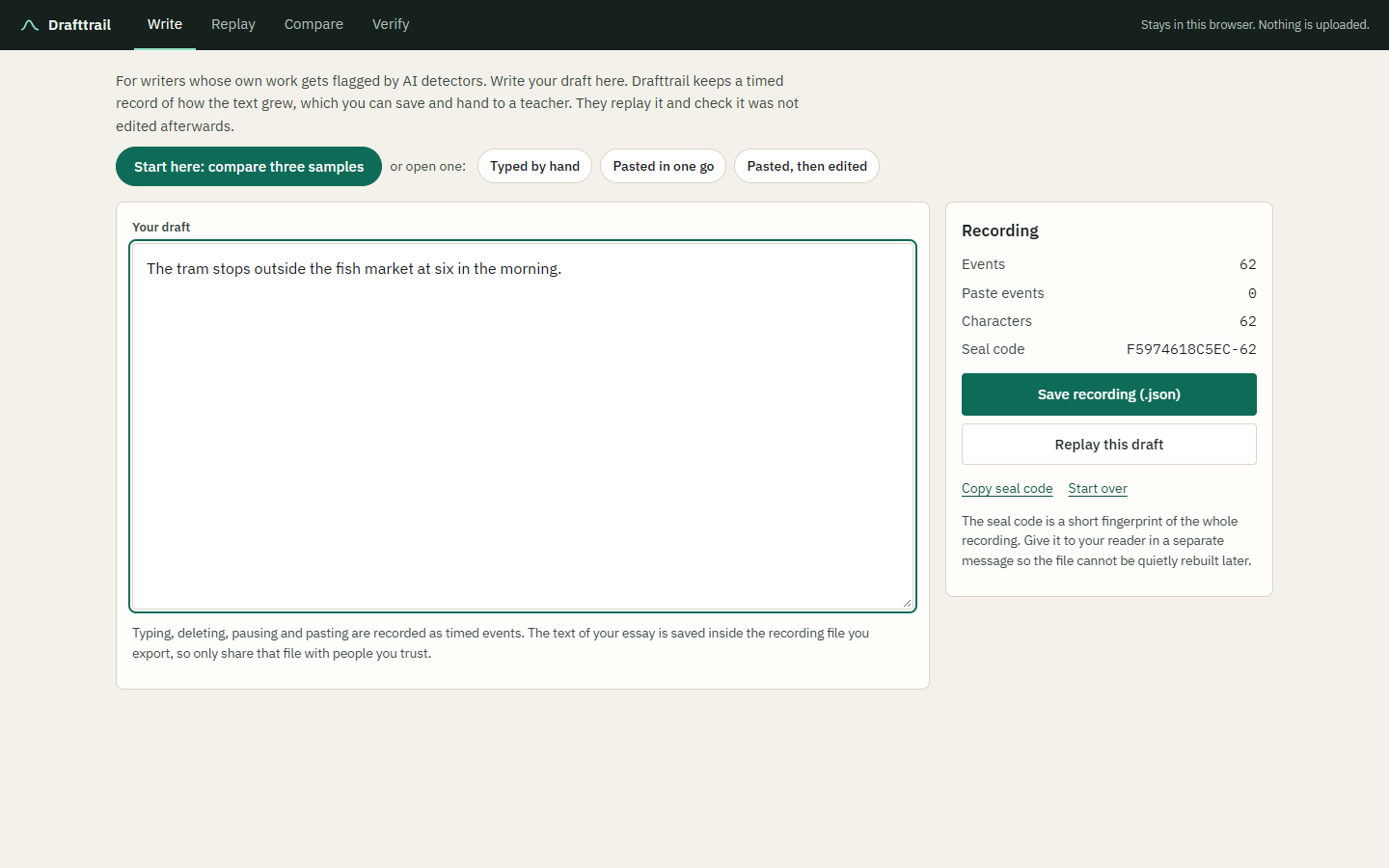
The Write tab is a plain text box. Every change becomes an event with a time, a position, the characters removed and added, and a label: typed, deleted, pasted, moved or other. The draft autosaves in the browser, and you can save the recording as a file.
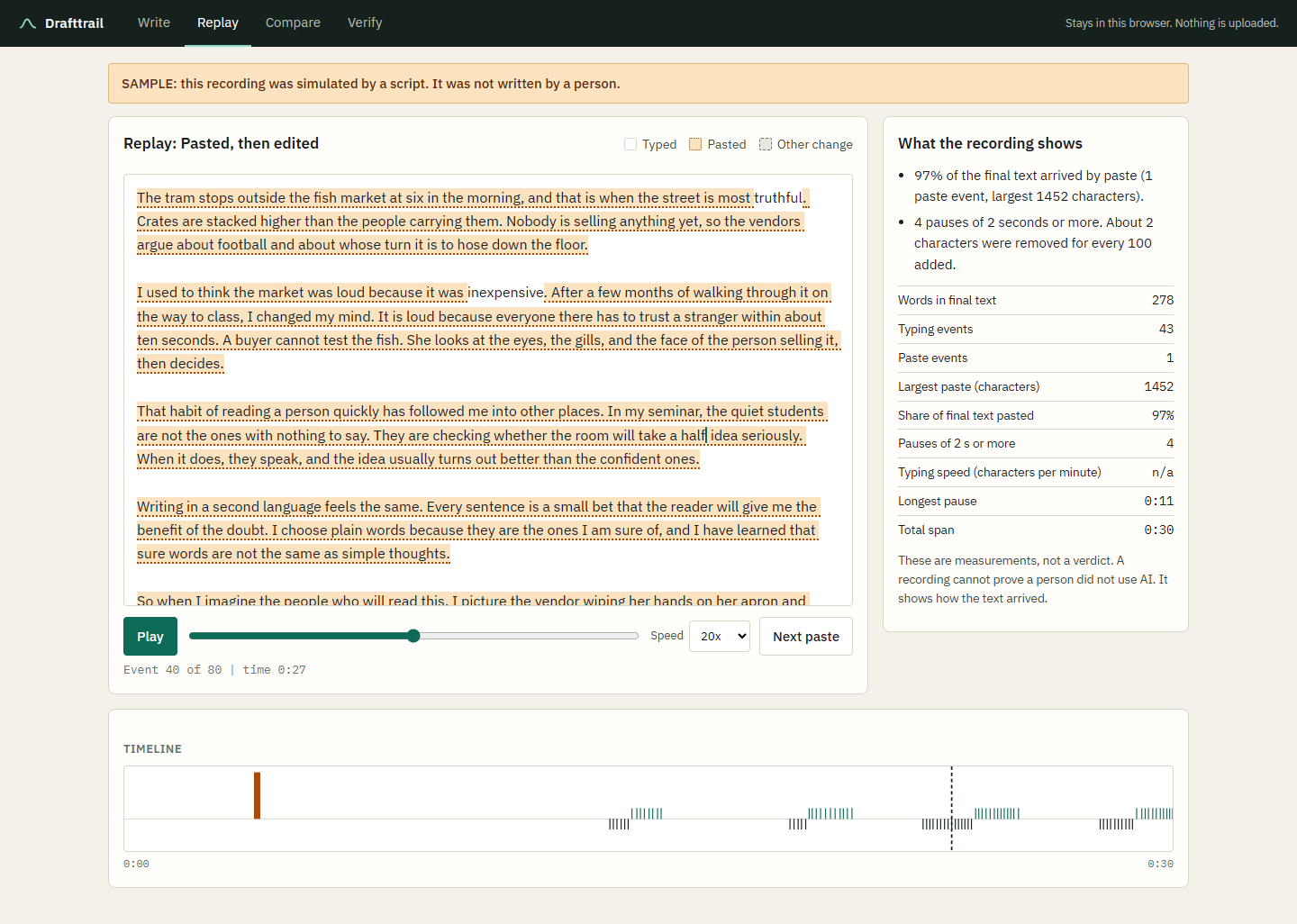
In Replay you play the draft back or drag through it. Pasted text is shaded and underlined. A recording opens on its first paste, so a reader sees it right away; "Next paste" steps through the rest. A timeline shows when the writing happened.
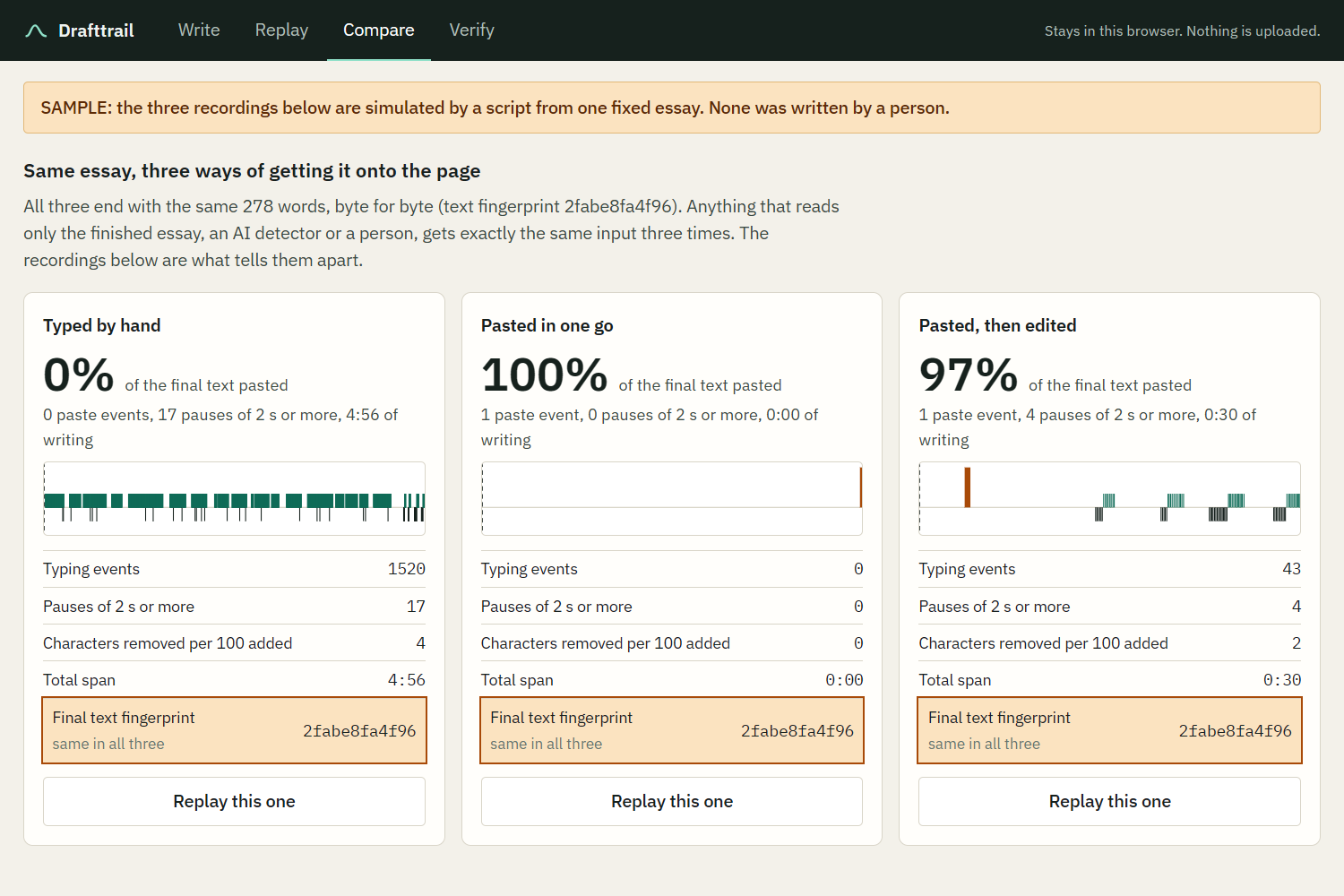
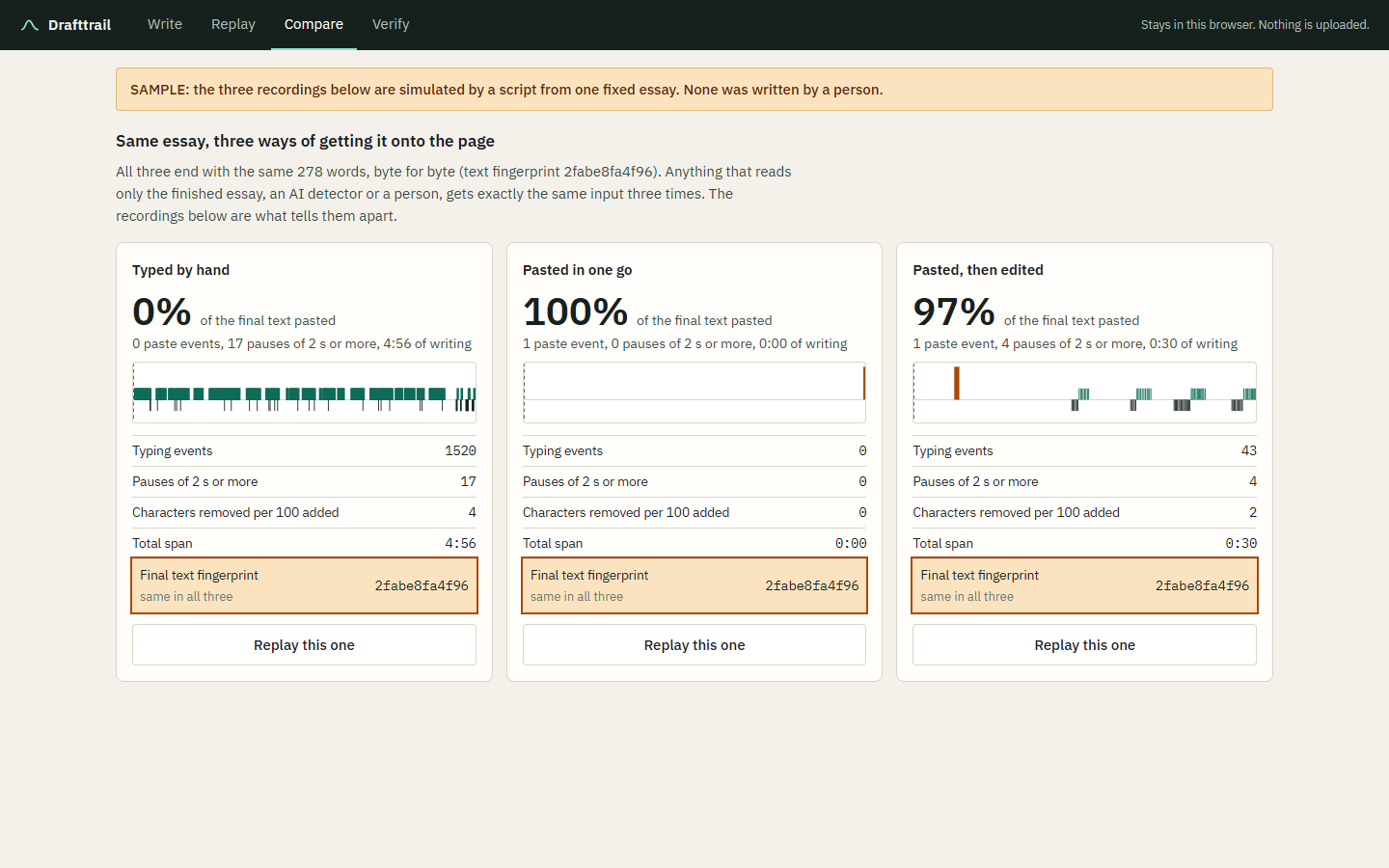
Compare shows three sample recordings whose final text is byte-for-byte identical (same SHA-256). One was typed over 4 minutes 56 seconds, one was pasted in one go, and one was pasted and then had four words changed. Anything that reads only the finished essay, an AI detector or a person, gets exactly the same input three times. The recordings show 0%, 100% and 97% of the text pasted.
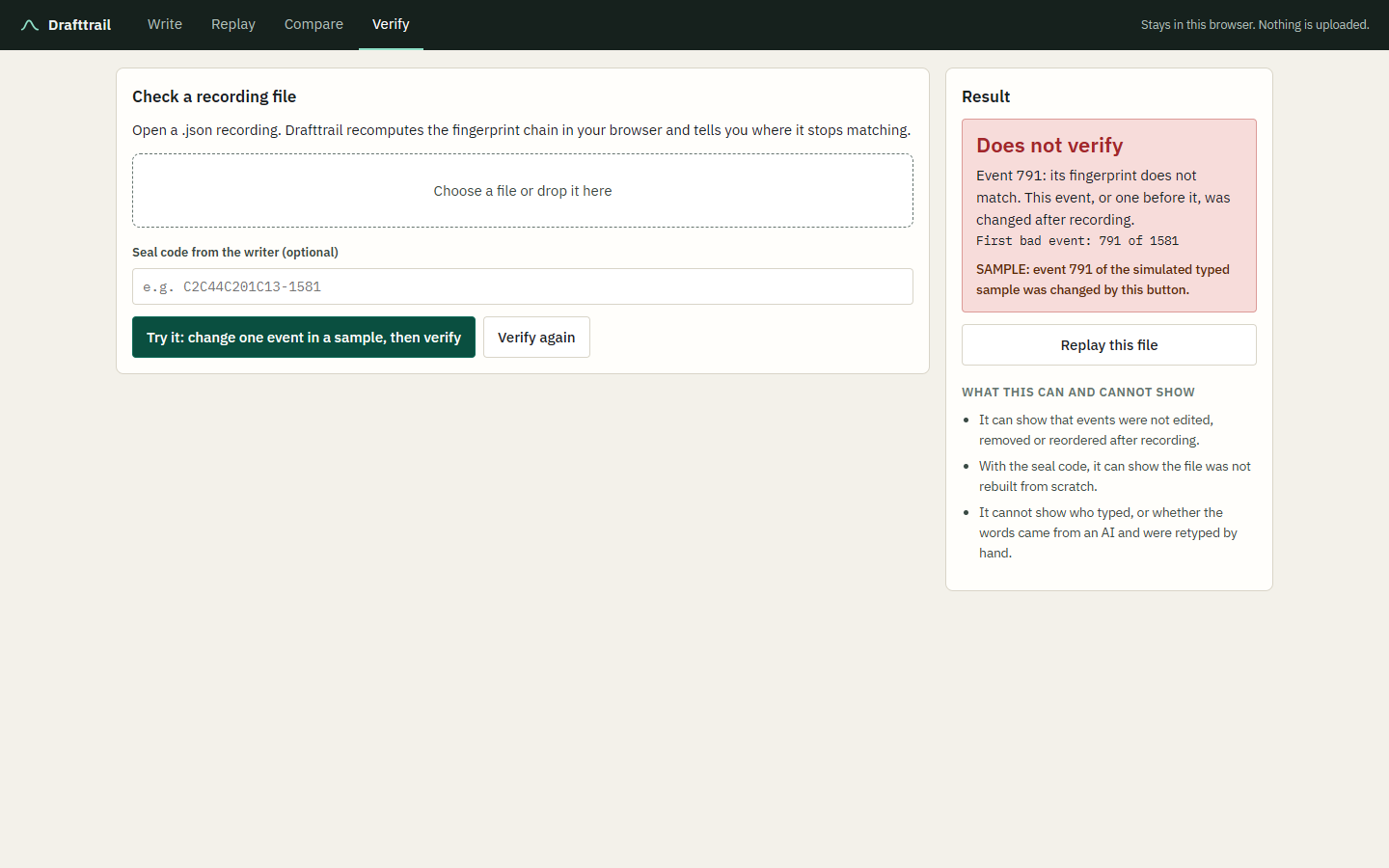
In Verify, the teacher opens a saved file. Each event stores a SHA-256 fingerprint of itself plus the previous fingerprint. Change, remove or reorder an event and the check fails at that event. A short seal code, sent separately from the file, catches a file that was rebuilt from scratch.
The three samples are generated by a script with seeded random timing. They are marked as simulated inside the file and on every screen that shows them.
What it cannot do
It cannot show who was at the keyboard. Someone can retype AI text by hand and it will look like typing. Without the seal code, a person who controls the file can recompute the whole chain. The page reports counts and times and never gives a verdict.
A recording contains the full text and the writer's typing rhythm, so it is personal data. Nobody should be required to use Drafttrail; the writer decides whether to share a recording and with whom.
How I built it
Plain HTML, CSS and JavaScript, no build step and no runtime libraries. Hashing uses the browser's Web Crypto API, and the fonts ship with the page, so it makes no requests to any other host. The recorder compares each new value of the text box with the previous one, keeps the smallest edit, and takes the label from the browser's inputType (for example insertFromPaste). Events are hashed in order through a promise queue so fast typing can't reorder them. The same functions run in the browser and in Node, so the tests check the code the page actually uses.
What I tested, and what the tests changed
- 14 unit tests (Node's built-in runner): the diff, the labels, rebuilding each sample's saved text, single-event edits caught at that event, removal, reordering and truncation, a full rebuild with and without the seal code, IME input, resuming a draft.
- Tamper run on the typed sample (1,581 events): 300 random single-field edits, all 300 caught at the edited event. Median check time 22 ms on a laptop. Relabelling the one-shot paste as typing is caught at event 1.
- Browser tests in Chrome 157 with real keyboard and clipboard input through Playwright: typing with a backspace correction, an outside paste, cutting and moving your own sentence, cutting and moving pasted text, saving and verifying the file with its seal code, a wrong seal code, the tamper demo, the sample screens, and a check that the page sends nothing to other hosts. All pass.
The first browser run failed one check. When a writer cut one of their own sentences and pasted it elsewhere in the draft, 48.4% of the final text was shown as pasted. Moving your own sentences around is ordinary writing, so this would have hurt the people the tool is for. Now a paste of text that is already in the draft, or was just cut from it, is recorded as a move, and replay gives the moved text the colour it had before. A second test makes sure this can't hide an outside paste: paste text in, cut it, paste it back, and it still shows as pasted. The same scenario now shows 0% pasted.
Challenges
The hardest call was what the page should say about a recording. A "likely human" or "likely AI" label would repeat the detectors' mistake in a new place, so the page sticks to counts and times and lists what it can't show.
Accomplishments
I'm proudest of the Compare tab: three files with the same final text and different histories show the problem without me having to argue it.
What I learned
Browsers already label where input came from (inputType), so detecting a paste is the easy part. The hard part was the opposite: recognising when a paste is the writer's own text without opening a loophole.
What's next
A teacher view that opens several recordings at once, and testing with real writers. So far all human-like timing in this project comes from the simulated samples.
Credits for reused tools and assets
- IBM Plex Sans and IBM Plex Mono fonts (SIL Open Font License 1.1), bundled from the Fontsource packages with their license.
- Playwright (
playwright-core, Apache-2.0) for browser tests and to record the demo video; FFmpeg to convert the video. - Code was written with help from Claude Code (Anthropic), an AI coding assistant. The sample essay used in the simulated recordings was drafted with Claude for this project.
- Research cited: Liang, Yuksekgonul, Mao, Wu and Zou (2023), arXiv:2304.02819.
Team
Solo project. I did the research, design, code, tests and video.
Built With
- css
- ffmpeg
- html
- javascript
- node.js
- playwright
- web-crypto-api
