-
-
Architecture Diagram
-
Live Translation UI
-
Live Translation UI
-
Document Translation
-
Document Translation
Inspiration
I've worked with research papers in Mandarin, Japanese, and English throughout my career, and the experience of reading a foreign-language document has always felt the same: open a browser tab with Google Translate, copy-paste paragraph by paragraph, lose all the formatting and context, and still not understand domain-specific terms because the translation lacks nuance.
The problem isn't that translation tools are inaccurate — they've gotten remarkably good at raw text. The problem is that they're disconnected from the reading experience. You're constantly context-switching between the document and the translator, and the output gives you words without understanding.
When Google announced the Gemini Live API with native audio models, I saw an opportunity to rethink what a translation tool could be. What if the translator could see your document, hear your questions, and speak translations back — all in real time, with the cultural awareness to explain why a term was translated a certain way? And what if, during a live cross-language conversation, it could show you a picture of something you've never seen before, because some things simply can't be conveyed with words alone?
That's Dr. Lingua: a translation agent that bridges knowledge gaps, not just language gaps.
What it does
Dr. Lingua is a real-time AI translation agent with two modes:
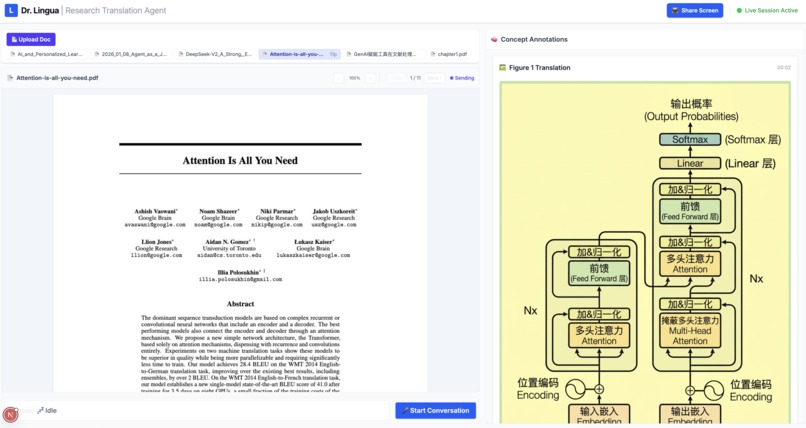
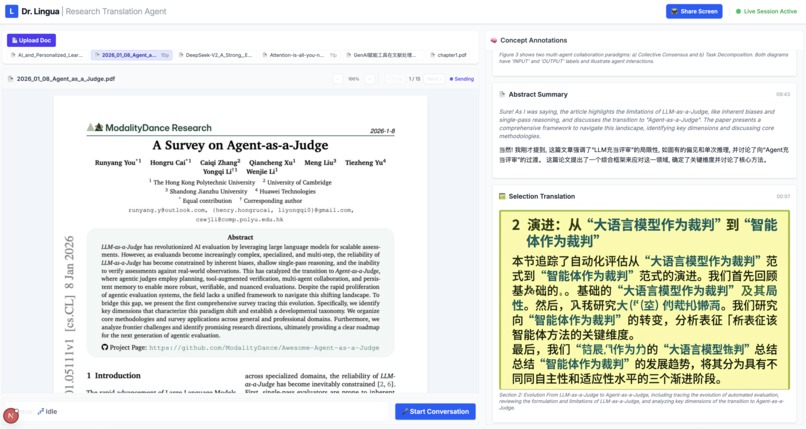
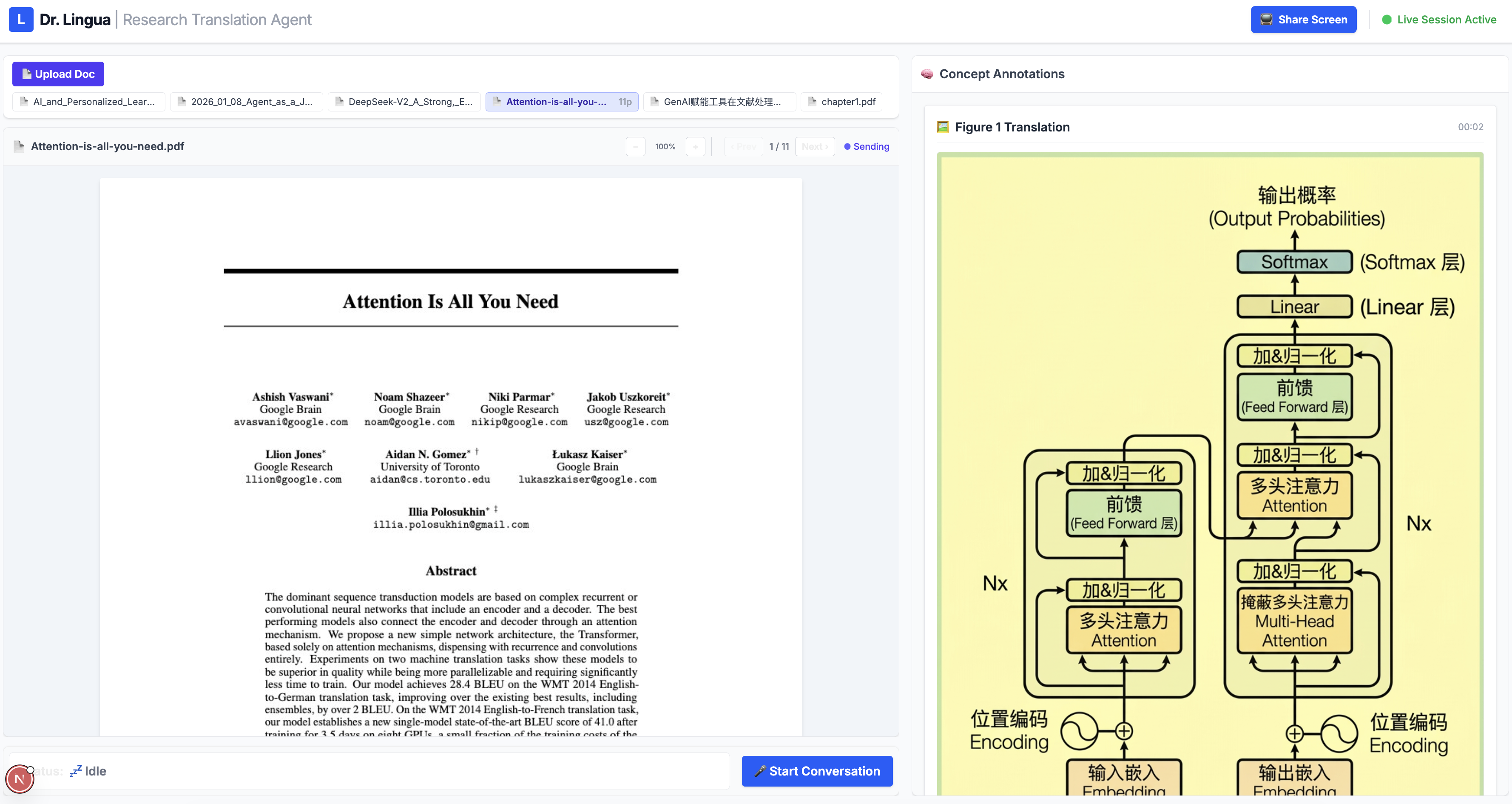
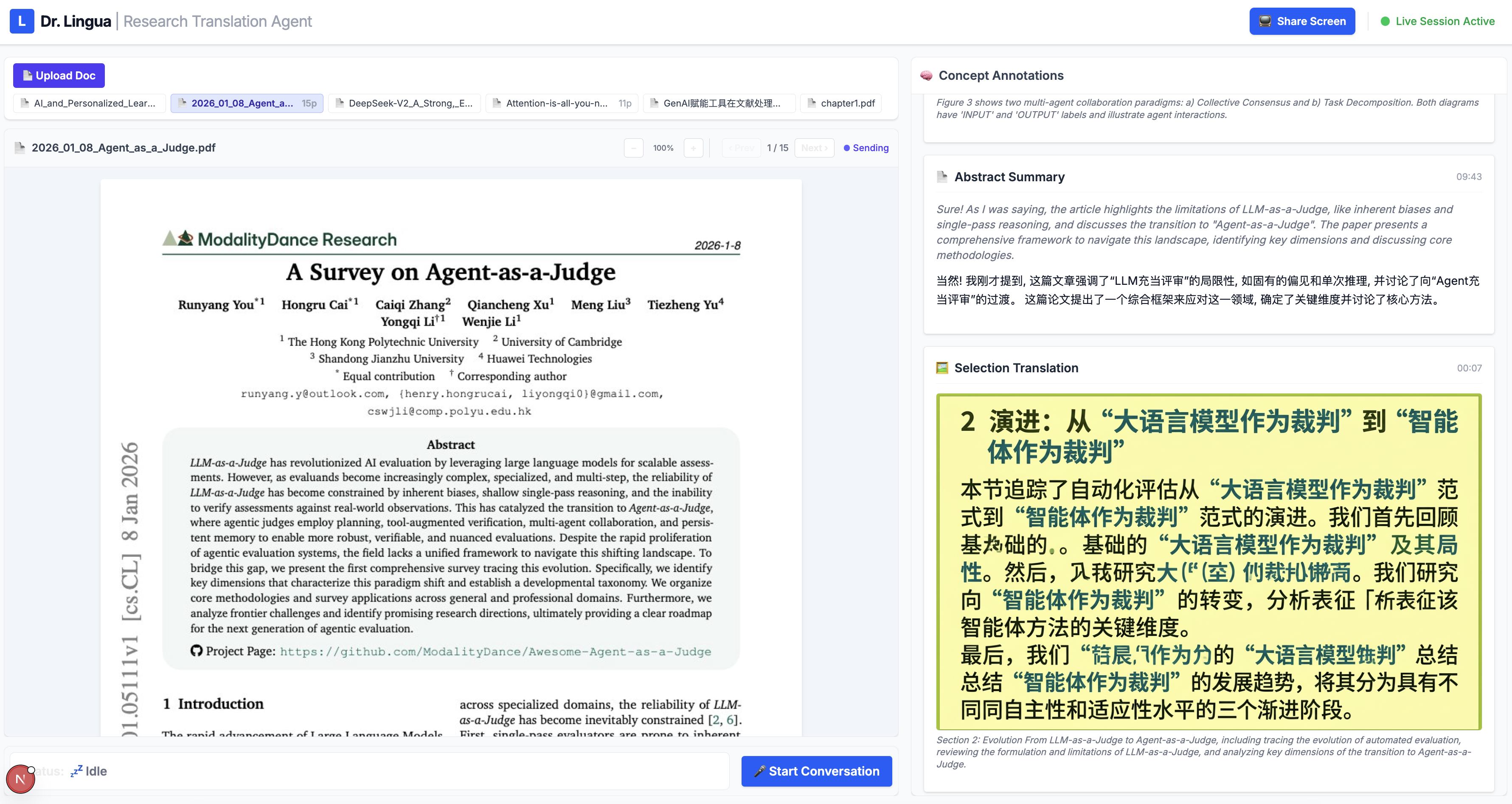
Document Translation — Users upload a research paper, contract, or technical document, and Dr. Lingua sees it through a live document viewer. The user speaks naturally — "What does this paragraph say?" or "Translate that table for me" — and the agent responds with a spoken translation while simultaneously displaying written annotations in a side panel. For tables, charts, and diagrams where spatial layout matters, the agent uses Gemini image generation to produce a fully translated version of the page, preserving the original formatting with all text replaced in the target language. Users can also draw a selection box around a specific region for targeted translation.
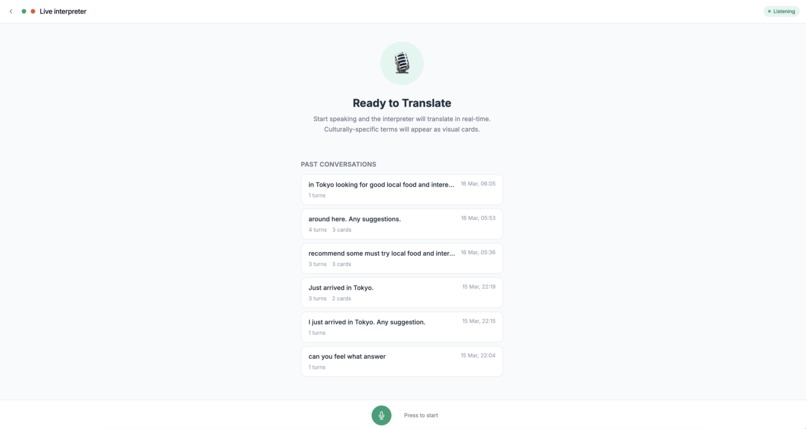
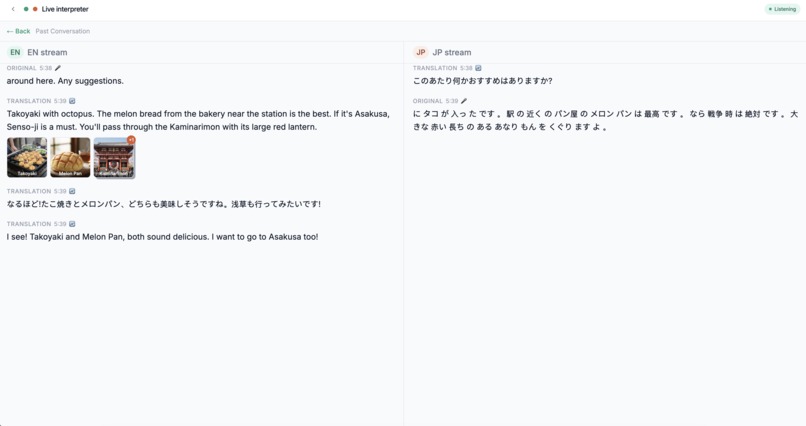
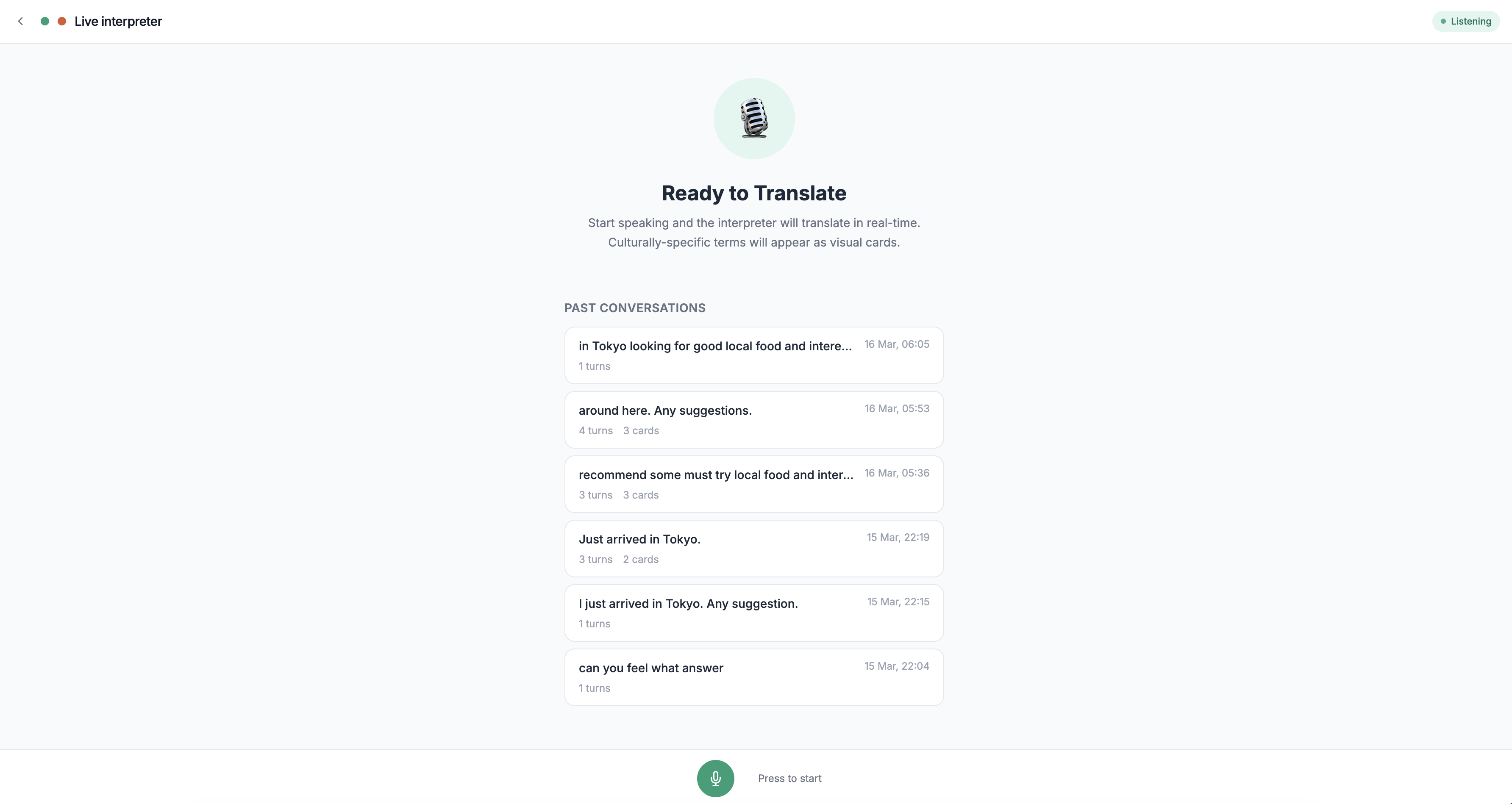
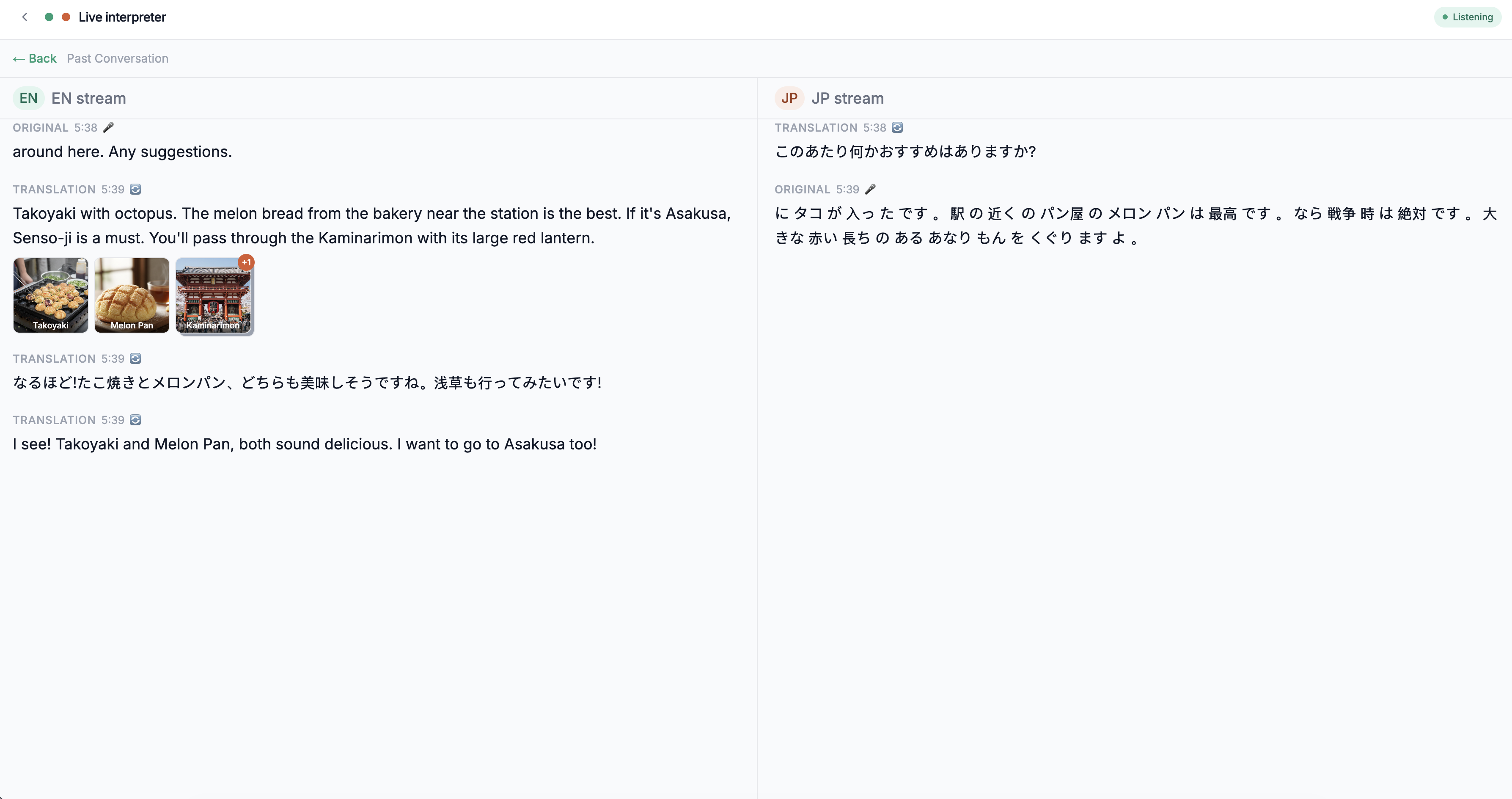
Live Conversation — An invisible real-time interpreter for English↔Japanese conversations. Dr. Lingua listens to each speaker, detects which language they're using, and speaks the translation in the other language. When a speaker mentions a culturally-specific noun that the listener wouldn't recognize even after hearing the translation — a regional dish, a local landmark, a cultural object — the agent autonomously generates a visual card with an AI-produced image and a brief explanation, without interrupting the flow of conversation.
Both modes feature barge-in support (users can interrupt mid-translation), live transcription of both speakers, and a warm, culturally-aware persona that adapts its register to match the source material.
How I built it
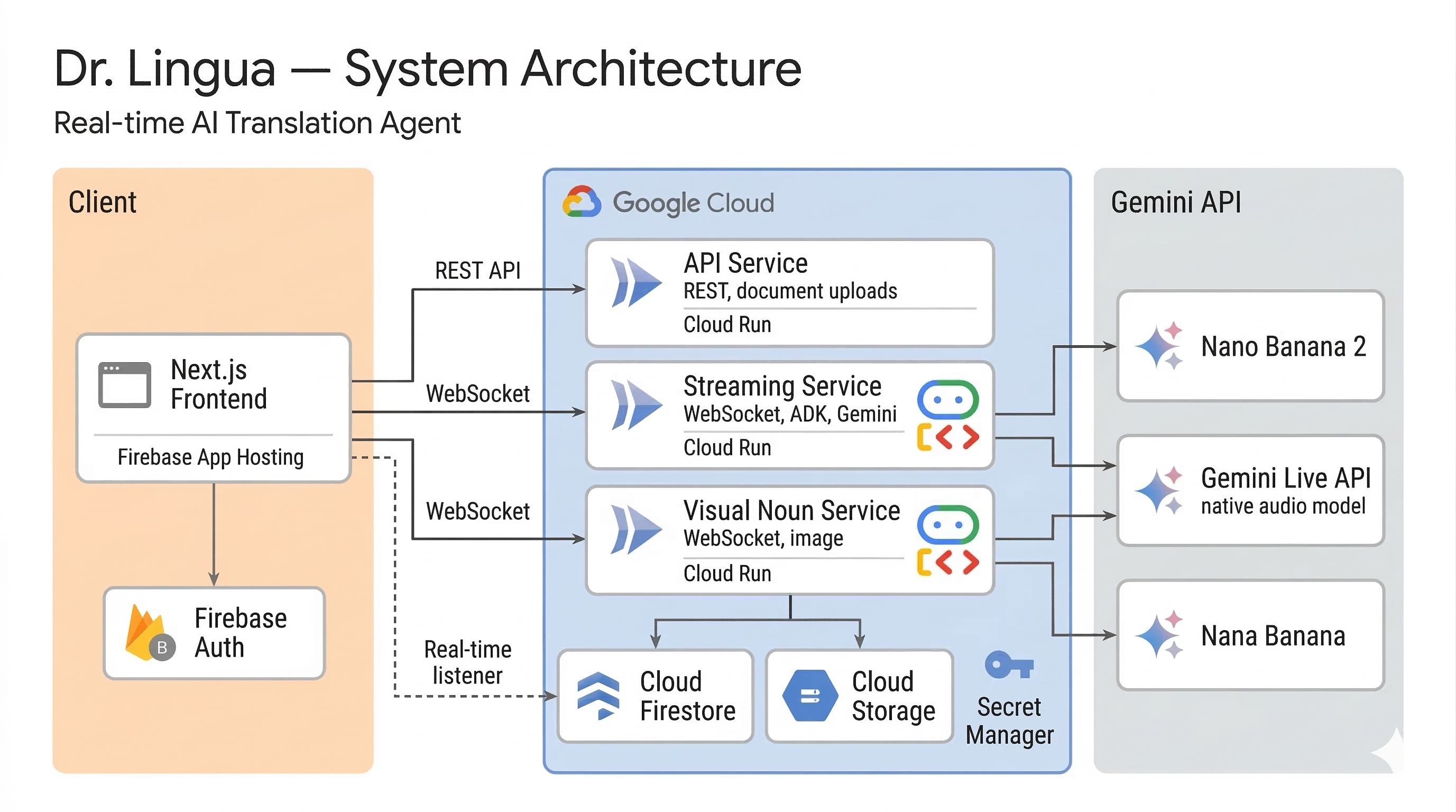
The system is built around one core principle: CPU-bound operations must never block the real-time audio loop.
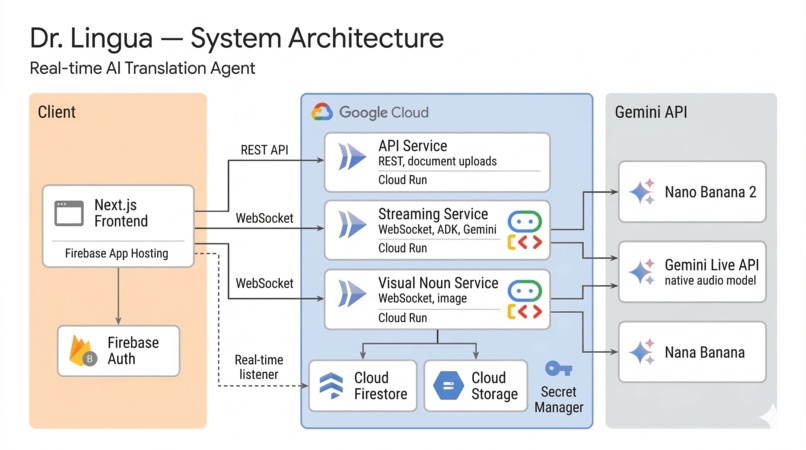
Frontend — A Next.js 15 application (React 19, TypeScript, Tailwind CSS) with two pages: /translate for document translation and /conversation for live interpretation. Each establishes its own WebSocket connection to its respective backend. Audio capture uses Web Audio API with AudioWorklet for raw PCM at 16kHz — the exact format Gemini's native audio model requires. The document viewer renders uploaded PDFs/images with a draggable selection overlay, and an annotation panel subscribes to Firestore onSnapshot for real-time translation card updates as they arrive from the backend.
Backend — Three containerized Python (FastAPI) microservices, deployed to Cloud Run via Terraform:
Streaming Service — Runs ADK's
Runner.run_live()in a WebSocket endpoint. Usesasyncio.TaskGroupto run upstream (browser audio/frames →LiveRequestQueue) and downstream (ADK events → browser audio/transcriptions) concurrently, with a sharedasyncio.Eventfor coordinated shutdown. The agent has three tools:save_translation(Firestore write),translate_page(full-page image translation via Gemini image generation), andtranslate_selection(crops to user-drawn region, then translates).API Service — Stateless REST server handling document uploads to Cloud Storage, conversation history CRUD, and signed URL generation. Scales to zero when idle.
Visual Noun Service — Independent WebSocket server for the interpreter mode. Its
show_visual_nountool uses a customNonBlockingFunctionToolsubclass declaringBehavior.NON_BLOCKING, so image generation runs asynchronously without pausing the audio translation stream.
Infrastructure — Cloud Firestore (translations, conversations, real-time listeners), Cloud Storage (documents, generated images, v4 signed URLs), Firebase Anonymous Auth (frictionless identity), Secret Manager (API key injection), and Firebase App Hosting (Next.js SSR). The entire stack is defined in Terraform.
Both agents use Gemini's native audio model (gemini-2.5-flash-native-audio), which processes listen→translate→speak in a single pass — eliminating the latency of a traditional STT→translation API→TTS pipeline.
Challenges I ran into
The audio encoding gauntlet. Getting audio flowing correctly between the browser, WebSocket, and Gemini required exact precision: 16-bit PCM at 16kHz mono for input, 24kHz for output, base64-encoded in JSON frames. Any mismatch produces silence or static with no useful error message. I spent an entire day on this before getting the first successful audio round-trip.
Gemini Live API connection drops. The Live API occasionally drops WebSocket connections mid-session, especially during long document sessions with continuous frame input. I implemented auto-reconnect with up to 5 retries in the downstream task, plus SessionResumptionConfig to maintain conversation context across reconnections. The key insight was that reconnection must happen inside the run_live() loop, not by restarting the entire WebSocket session.
Blocking tool calls killing audio. In the interpreter mode, a standard (blocking) tool call for image generation freezes the audio stream for 3–5 seconds. Discovering and implementing the NON_BLOCKING behavior declaration on the tool — along with skip_summarization to prevent the agent from re-speaking the result — was the breakthrough that made Visual Noun viable as a real-time feature.
Image translation fidelity. Gemini image generation sometimes alters layout elements or misses small text when translating full document pages. I scoped the feature to include selection-based translation so users can target specific regions (a table, a chart) rather than relying on full-page translation for everything.
Accomplishments that I'm proud of
True single-pass audio translation. No STT, no translation API, no TTS — Gemini hears the source language and speaks the target language directly. The result feels genuinely conversational rather than robotic.
Visual Noun running without interrupting speech. The agent decides on its own when a term needs a visual reference, generates an image in the background, and delivers it to the frontend — all while continuing to speak the translation without a single stutter. This required a custom NonBlockingFunctionTool subclass and careful tool context configuration, and seeing it work in real time feels like a glimpse of what multimodal agents will routinely do.
Three independent microservices that never call each other. The streaming, API, and visual noun services communicate entirely through Firestore and Cloud Storage. Either service can be redeployed, scaled, or restarted without affecting the others. This shared-nothing architecture was faster to build and more robust than service-to-service orchestration.
Zero-friction authentication. Firebase Anonymous Auth means judges can open the app and start translating in under 3 seconds — no sign-up, no email, no password. Documents and translations persist across page refreshes via the anonymous UID.
Infrastructure as Code from day one. The entire Google Cloud deployment — three Cloud Run services, IAM bindings, Secret Manager secrets — is defined in Terraform, making the deployment reproducible and the architecture auditable.
What I learned
Gemini's native audio model changes everything about translation architecture. The traditional pipeline chains three separate systems — speech-to-text, translation, text-to-speech — each adding latency and discarding context. Native audio collapses this into a single pass, preserving tone, pacing, and emotion. This single insight eliminated an entire class of complexity.
Separate your real-time path from everything else. PDF uploads starving the audio event loop was a real bug I hit. The fix — dedicated services with shared data stores instead of shared processes — is a pattern I'll carry to every real-time application going forward.
LiveRequestQueue is a one-shot resource. Always create a fresh queue per session. Always call close() in a finally block. Never reuse across reconnections. This wasn't obvious from the documentation and cost me hours of debugging silent quota consumption.
NON_BLOCKING tools will become a standard pattern. Any multimodal agent that combines voice with visual output will need tools that execute without pausing the audio stream. The combination of Behavior.NON_BLOCKING and skip_summarization is a pattern I expect to see widely adopted.
Context window compression is non-negotiable for vision + audio. Continuous document frames fill Gemini's context within minutes. Configuring a sliding window (trigger at 120K tokens, compress to 60K) plus session resumption made long sessions viable.
What's next for Dr. Lingua - Real Time AI Translation
More language pairs for Live Conversation. The interpreter mode currently supports English↔Japanese. The architecture — a dedicated Cloud Run service per language pair with its own ADK agent — scales naturally to additional pairs like English↔Mandarin, English↔Korean, and English↔Spanish.
Incremental "translate on the go" mode. Currently the agent waits for the speaker to finish before translating. By disabling server-side VAD and implementing client-side phrase boundary detection (sending ActivityStart/ActivityEnd signals at natural pauses of 300–800ms), Dr. Lingua could translate sentence by sentence as the speaker talks — like a professional simultaneous interpreter.
Persistent glossary per document domain. The agent could maintain a per-domain terminology glossary in Firestore that accumulates across sessions. When a user translates their third machine learning paper, Dr. Lingua would already know the preferred translations for domain-specific terms and stay consistent.
Action Sketch for spoken directions. When someone gives spoken directions in conversation ("Take the Yamanote Line to Shibuya, then walk past Hachiko"), the agent could render a Google Maps route visualization in real time — turning spoken navigation into a visual map overlay.
Multi-user conversation mode. Extending the interpreter beyond two speakers to support group conversations — like a UN interpreter booth — by routing audio streams through a central orchestrator that fans out to parallel translation agents, each producing output in a different target language.
Built With
- cloud-firestore
- cloud-storage
- docker
- docker-compose
- fastapi
- firebase-app-hosting
- firebase-auth
- gemini-image-generation
- gemini-live-api
- google-adk
- google-cloud-run
- google-genai-sdk
- hcl
- javascript
- next.js
- python
- react
- secret-manager
- tailwind-css
- terraform
- typescript
- webaudio
- websocket

Log in or sign up for Devpost to join the conversation.