Inspiration
Gmail will stop you if you write "see attached" and forget the file. But it happily lets you send the wrong file: last week's draft instead of the final version, an invoice with a different total than your email, or a proposal written for one client sent to another. These mistakes are embarrassing at best, and at worst they leak confidential information. I wanted something that actually reads the attachment and asks: does this match what you just wrote?
What it does
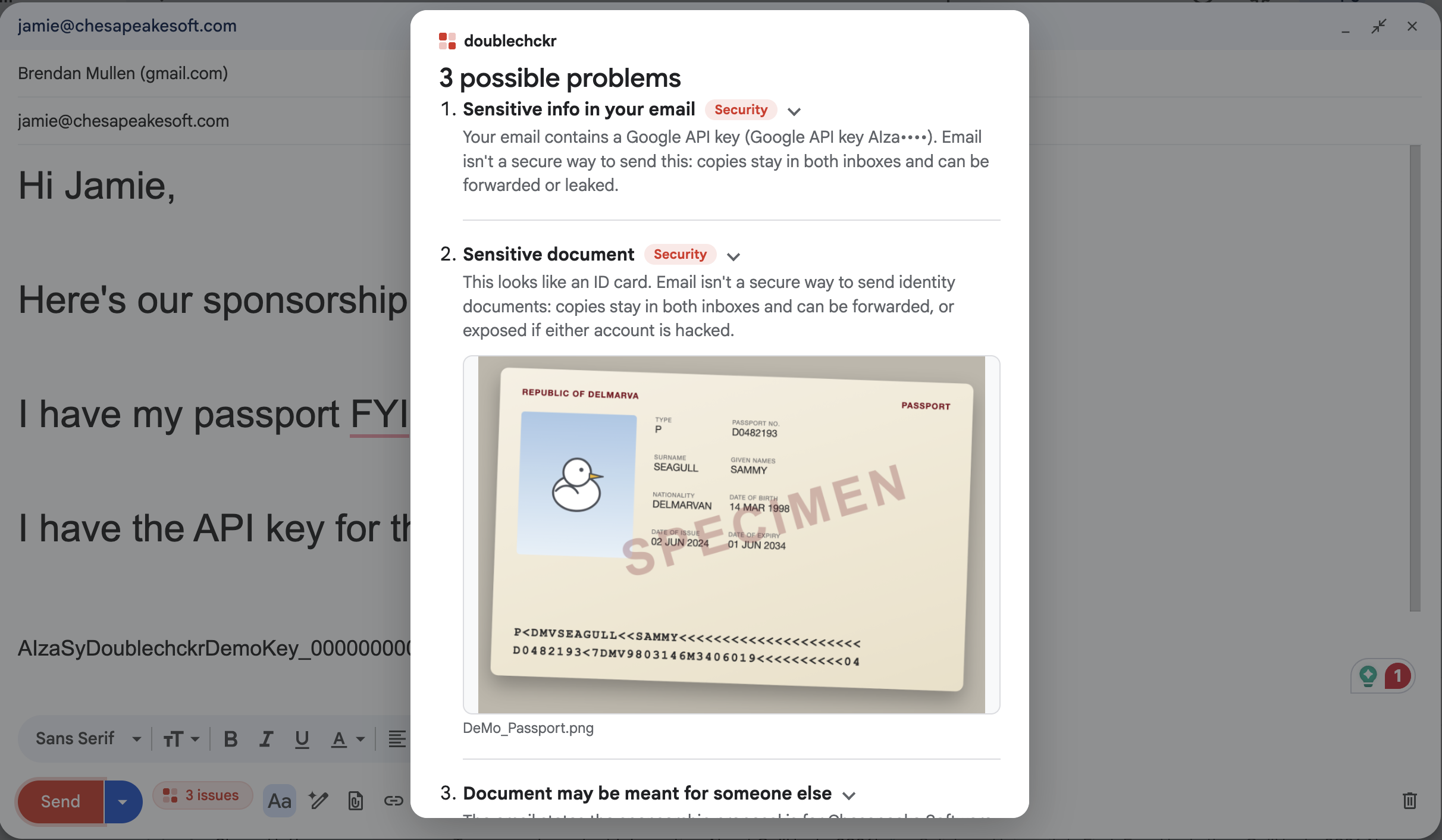
doublechckr runs inside Gmail. The moment you attach a file, it reads it and checks it against your email. If something's off, it blocks Send and shows you exactly why, with the evidence highlighted on the page. It catches: a possible wrong document, outdated versions, mismatched facts between attachment and email, the wrong recipient, and things that shouldn't be emailed at all like, credit card numbers, Social Security numbers and API keys typed into the email or a PDF, plus photos of passports, IDs and credit cards. A live badge next to Send shows the draft's status (checking, verified, or issues), and the Send button turns red when there's a problem. Send anyway is always one click away.
How I built it
doublechckr is a Chrome extension and the pipeline is as follows:
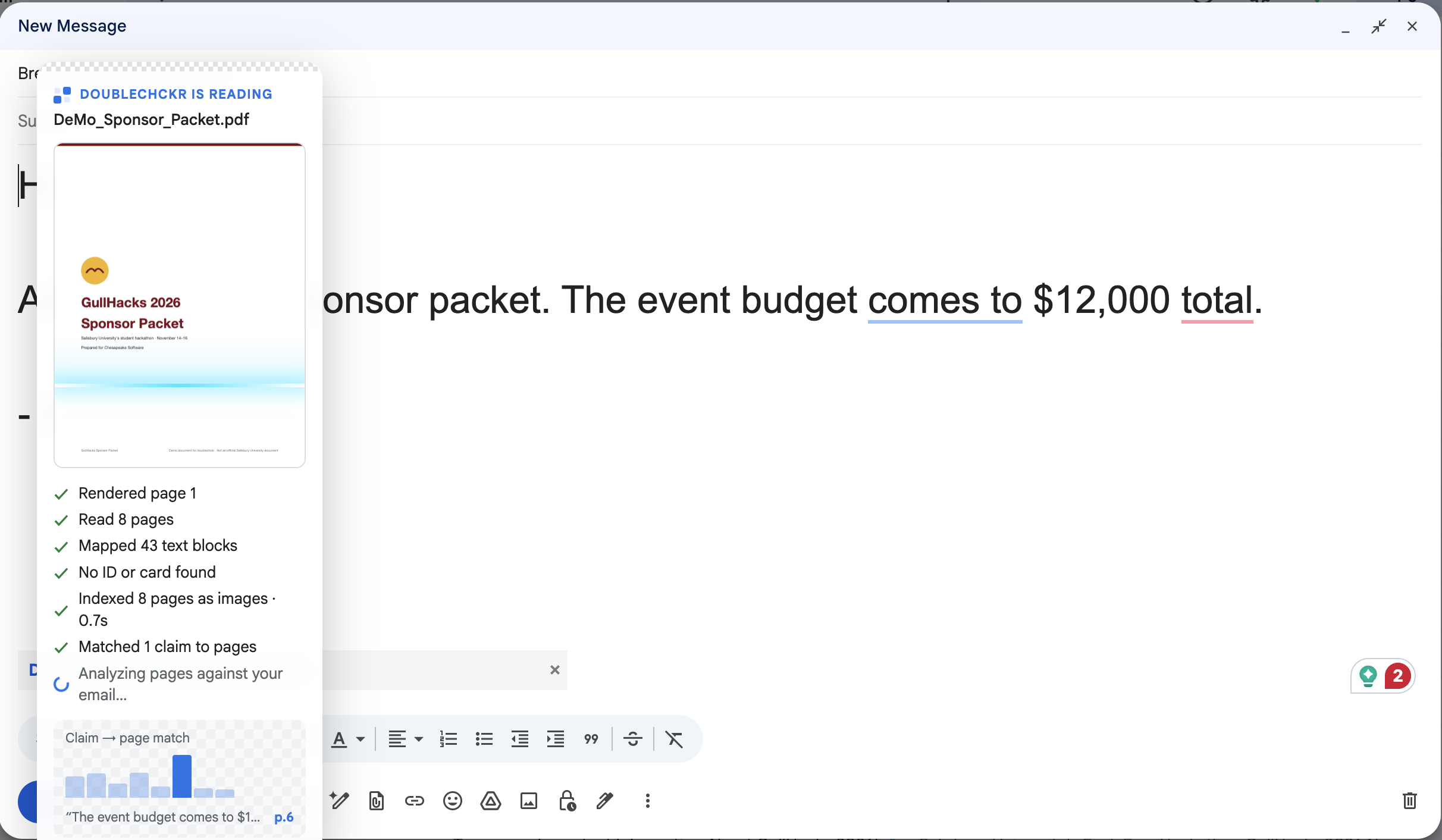
Capture: content scripts catch the file the moment it's picked or dropped, before Gmail uploads it. Read: PDF.js extracts each page's text and the position of every word, on the user's laptop. Privacy screen: photos and picture-only pages are first sent only as small, blurred thumbnails, so Gemini can recognize a passport or credit card by its layout without being able to read it. If it is one, nothing readable is ever sent. Vision index: each page is rendered as an image and embedded with Gemini Embedding 2, one vector per page, based on what the page looks like. Claims and retrieval (vision-based RAG): the email is split into checkable claims ("the budget is $12,000"). Each claim is embedded as a search query and matched to its best page by cosine similarity. For long documents, the AI reads only page 1 plus the retrieved pages, so a picture-only page buried on page 15 of 20 still gets found. Analysis: Gemini Flash gets the retrieved pages (images and text) and returns structured JSON findings, with a quote from the email and from the document for each. Verification: my own code fact-checks the AI. Every quote must actually exist in the email or document, or the finding is dropped. Verified quotes are mapped back to word positions on the page, which is how the warning draws a red box around the exact evidence. Local security checks: card numbers (validated with the Luhn checksum), SSNs and API keys (Google, OpenAI, Anthropic, GitHub, AWS, Slack, Stripe) are detected on the laptop with no AI, and hidden or blacked out before anything is sent to Gemini. Send guard: Send clicks and Cmd/Ctrl+Enter are intercepted before Gmail sees them.
Challenges we ran into
- Gmail isn't built to be extended. Grabbing files mid-upload, finding the real message body (Gmail's AI writing box looks like one), and intercepting Send without breaking Gmail all took a lot of trial and error.
- Multiple attachments. Each file was checked on its own, so with a proposal and a passport attached, each check reported the other as "missing." Each check now knows about the other attachments. Speed. Running the AI with large multi-page documents slowed processing, so we use embedding techniques to solve this.
Accomplishments that we're proud of
- Vision RAG that finds picture-only pages. In a 20-page handbook where the event dates exist only as a picture on page 15, retrieval found page 15 and the AI caught the mismatch.
- Catching what text can't see: a DRAFT watermark that isn't in the PDF's text, a total read off a spreadsheet screenshot, an amount from a scanned invoice.
- AI checked by code. Every finding is backed by a verified quote and a highlighted spot on the page, never just "the AI says so."
- Privacy by design. Secrets are caught and hidden locally, and photos are screened blurred before anything readable leaves the laptop.
What we learned
- Multimodal embeddings make vision-based RAG practical without hosting a model.
- LLM output should be verified, not trusted, and the verifier needs to be forgiving in the right ways (spacing, dashes, capitals) and strict in the right ways.
- In a security tool, what you send to the AI matters as much as what the AI finds.
What's next for doublechckr
- Finer-grained retrieval: splitting pages into tiles to better handle busy pages and to box evidence on picture-only pages.
- More file types: Word, Excel and Google Drive attachments.
