-
-
Prototype


Inspiration
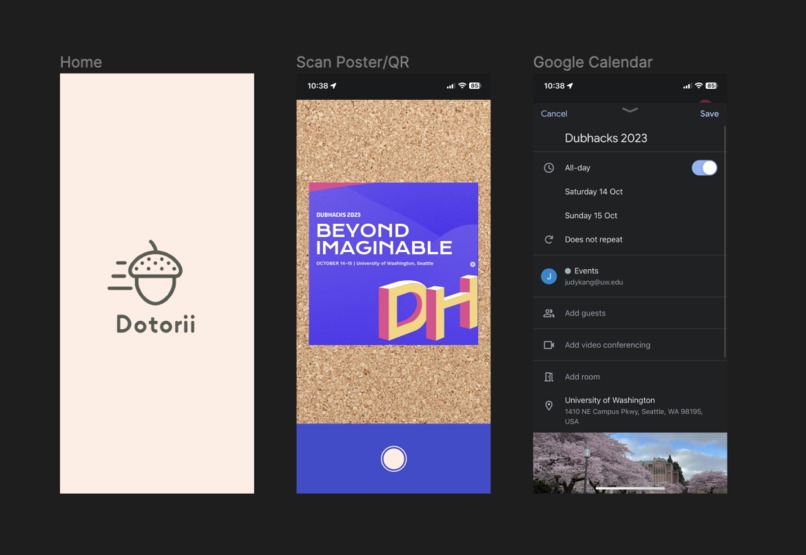
We drew inspiration for Dotorii from the daily challenges of managing busy schedules and the missed opportunities that came with manual event entry. We envisioned a solution that empowers users to effortlessly capture event details by simply taking a photo of a poster or scanning a QR code, and seamlessly integrates this information into their Google Calendar.
The motivation was to eliminate the time-consuming task of manually entering event information, allowing users to engage more fully with their surroundings and never miss out on exciting experiences. Furthermore, our vision extends to inclusivity, ensuring that even individuals with low vision can easily access and benefit from the app, fostering a more inclusive experience for all.
What it does
Simply point and shoot! Take a photo of event posters or scan QR codes, and watch as the app automatically populates your Google Calendar with all the important details, saving you time and effort.
How we built it
Our team developed a Swift-based Vision API that harnesses OCR (Optical Character Recognition) technology to scan posters and extract raw text information. We integrated OpenAI's API into our project, allowing us to send the raw text extracted from the poster to ChatGPT, which accurately identifies and extracts event-specific information such as date, time, location, and event name. To automate even creation, we've developed a Python code that takes the extracted event information from ChatGPT and populates your Google Calendar. We have also incorporated voice output using Siri's functionality so that the visually impaired and dyslexic can also use the app.
Challenges we ran into
- Google Calendar Integration: Integrating with Google Calendar was a complex task due to the necessity of Google authentication. Handling user authentication, authorization, and securely accessing the Google Calendar API presented its own set of obstacles.
- OCR Accuracy: Ensuring high accuracy in the OCR text extraction process was challenging. Some text was not in straight lines, and different font styles complicated the process, making it crucial to fine-tune the OCR technology for real-world use.
- Generative AI Prompting: Building expectations with generative AI through prompting was a unique problem to solve. You want to receive key points of the data received that can be transformed back into code for your program to use was crucial in making the entire implementation smoother.
Accomplishments that we're proud of
- Dotorii simplifies event management by automating the process of adding events to your Google Calendar, saving users time and effort.
- Siri's voice output feature ensures that Dotorii is inclusive, allowing the visually impaired or dyslexic individuals to easily access and benefit from the app.
What we learned
- Implementing Google Calendar API to gain write access to your calendar
- Prompting OPENAI's API to output the desired data in a workable format
- Integrating Apple's Vision AI to recognize texts using OCR technology.
- Converting QR codes into regular texts/links
- Understanding how a visually impaired individual or a dyslexic individual interacts with posters and event invites.
What's next for Dotorii
- Be the eyes for the future: We believe dotorii has a larger use case than mere posters and QR codes recognition. The ability generative AI provides developers is far beyond just figuring out code syntax and chat compatibility. Being able to have an AI in the app that infers based on images they see and runs useful commands broadens the use case of dotorii to become the eyes for recognizing medication, reading documents, figuring out grocery price differences across neighborhoods, and so much more.
- Improved Integration: We want to strengthen our integration with various calendar platforms beyond Google Calendar. This will provide users with the flexibility to choose their preferred calendar application, ensuring a seamless experience tailored to individual preferences.
- Customization Options: We understand that users have unique preferences when it comes to organizing their calendars. Future updates will include more customization options, allowing users to tailor the app to their specific needs and preferences.
- Enhance UI and feedback-Driven Improvements: We are plan to continuously refine the app based on user feedback, so that the overall user experience is even more accessible and enjoyable to use, as well as adding the option to upload images.
