Smart Influencer Hub - Digital Identity Studio
A powerful AI-powered application that helps create personalized video content using your digital identity. The app combines LoRA training, multi-model video generation, and advanced scene composition to create professional-quality videos.
Features
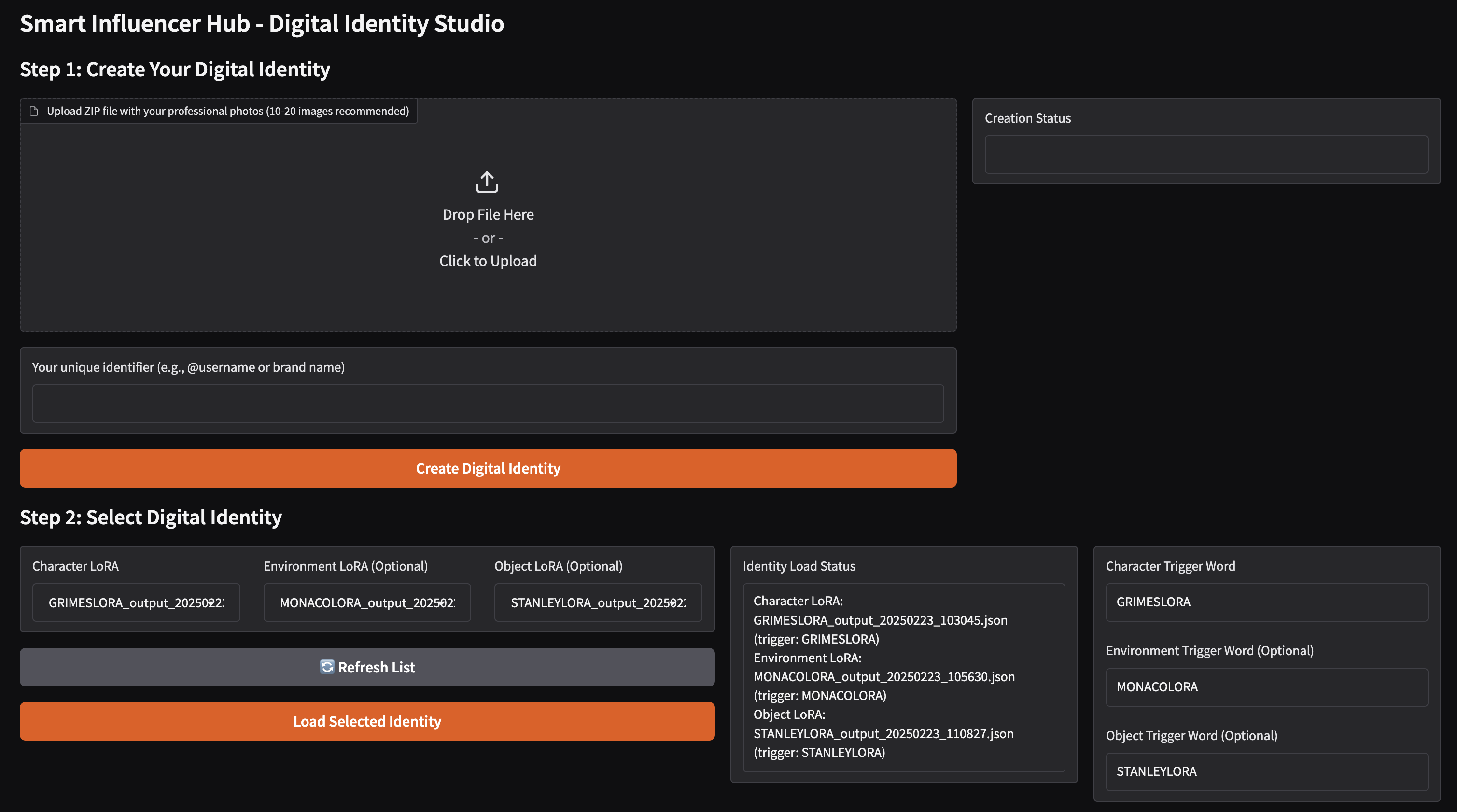
- 🎭 Digital Identity Creation: Train personalized LoRA models from your photos
- 🎬 Professional Video Generation: Create high-quality videos with multiple scenes
- 🎨 Multi-LoRA Support: Combine character, environment, and object models
- 🎵 Audio Integration: Optional background music and sound effects
- 🤖 AI-Powered: Uses multiple AI models (Gemini/Claude) for content generation
- 🎥 Multiple Video Engines: Support for Luma, LTX, and FAL video generation
System Architecture
1. High-Level Application Flow
graph TD
    A[Start] --> B[Gradio Web Interface]
    B --> C[Step 1: Create Digital Identity]
    B --> D[Step 2: Select Identity]
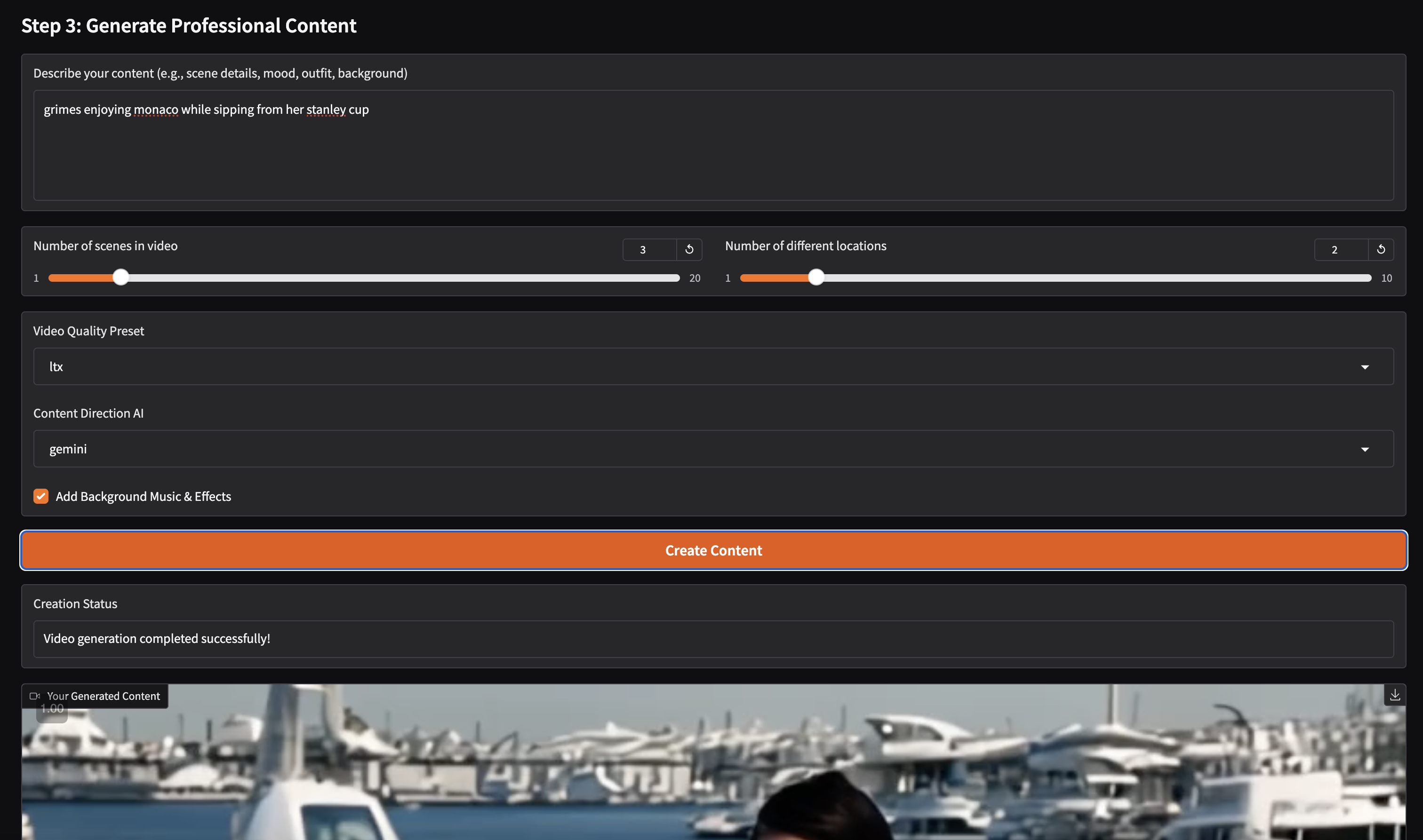
    B --> E[Step 3: Generate Content]

    C --> C1[Upload Photos ZIP]
    C --> C2[Set Trigger Word]
    C1 --> C3[Train LoRA Model]
    C2 --> C3

    D --> D1[Select Character LoRA]
    D --> D2[Select Environment LoRA]
    D --> D3[Select Object LoRA]

    E --> E1[Input Script/Description]
    E --> E2[Configure Parameters]
    E --> E3[Generate Video]

    E3 --> F[Final Video Output]
2. LoRA Training Process
sequenceDiagram
    participant User
    participant UI as Gradio Interface
    participant Trainer as LoRA Trainer
    participant Storage as File Storage

    User->>UI: Upload ZIP file
    User->>UI: Enter trigger word
    User->>UI: Click "Create Digital Identity"
    UI->>Trainer: Initialize LoRA training
    Trainer->>Trainer: Process images
    Trainer->>Trainer: Train LoRA model
    Trainer->>Storage: Save LoRA config
    Storage->>UI: Return config filename
    UI->>User: Display completion status
3. Video Generation Pipeline
graph LR
    A[Script Input] --> B[Scene Analysis]
    B --> C[Generate Metadata]
    C --> D[Generate Scenes]

    D --> E[First Frame Generation]
    D --> F[Video Generation]
    D --> G[Sound Effects]

    E --> H[Multi-LoRA Processing]
    H --> F

    F --> I[Video Stitching]
    G --> I

    I --> J[Final Video]
4. Scene Generation Process
flowchart TD
    A[Script] --> B[LLM Analysis]
    B --> C{Generate Components}

    C --> D[Physical Environments]
    C --> E[Scene Metadata]
    C --> F[Movement Descriptions]
    C --> G[Camera Instructions]

    D --> H[Scene Assembly]
    E --> H
    F --> H
    G --> H

    H --> I[Video Generation Engine]
    I --> J[Luma]
    I --> K[LTX]
    I --> L[FAL]
5. Component Data Flow
graph TD
    subgraph UI[Gradio Interface]
        A[Input Forms]
        B[Status Display]
        C[Video Preview]
    end

    subgraph Processing[Backend Processing]
        D[LoRA Training]
        E[Video Generation]
        F[Scene Generation]
        G[Multi-LoRA Inference]
    end

    subgraph Storage[File Storage]
        H[LoRA Configs]
        I[Generated Videos]
        J[Temporary Files]
    end

    A --> D
    D --> H
    H --> G
    G --> E
    F --> E
    E --> I
    I --> C
    E --> B
Setup
Clone the repository:
git clone https://github.com/dylanler/smart-influencer-hub.git
cd smart-influencer-hub
Install dependencies:
pip install -r requirements.txtSet up environment variables (.env):
ELEVEN_LABS_API_KEY=your_key
GEMINI_API_KEY=your_key
ANTHROPIC_API_KEY=your_key
LUMAAI_API_KEY=your_key
FAL_API_KEY=your_key
Run the application:
python lora_video_app_future.py
Usage
Create Digital Identity:
- Upload 10-20 professional photos in a ZIP file
- Set a unique trigger word for your identity
- Wait for LoRA training completion
Select Identity:
- Choose your trained character LoRA
- Optionally select environment and object LoRAs
- Load the selected identity configuration
Generate Content:
- Write your content description/script
- Configure scene parameters
- Choose video quality preset
- Enable/disable sound effects
- Generate your professional video
Technical Components
Frontend:
- Gradio web interface
- Real-time status updates
- Video preview capabilities
AI Models:
- LoRA for fine-tuning stable diffusion
- Multiple video generation engines
- LLM integration for content analysis
Processing:
- Multi-LoRA inference
- Scene generation and analysis
- Video stitching and post-processing
Storage:
- LoRA configuration management
- Generated video storage
- Temporary file handling
Requirements
See requirements.txt for a complete list of dependencies.
Directory Structure
smart-influencer-hub/
├── lora_video_app_future.py    # Main application file
├── video_generation_reference_future.py  # Video generation logic
├── requirements.txt            # Dependencies
├── .env                       # Environment variables
├── trained_lora_config/       # Trained LoRA models
├── generated_videos/          # Output videos
└── lora_inference_images/     # Generated images
Contributing
Contributions are welcome! Please feel free to submit a Pull Request.
License
This project is licensed under the MIT License - see the LICENSE file for details.
Acknowledgments
- ElevenLabs for the hackathon opportunity
- Luma AI for video generation capabilities
- Gradio team for the web interface framework

Log in or sign up for Devpost to join the conversation.