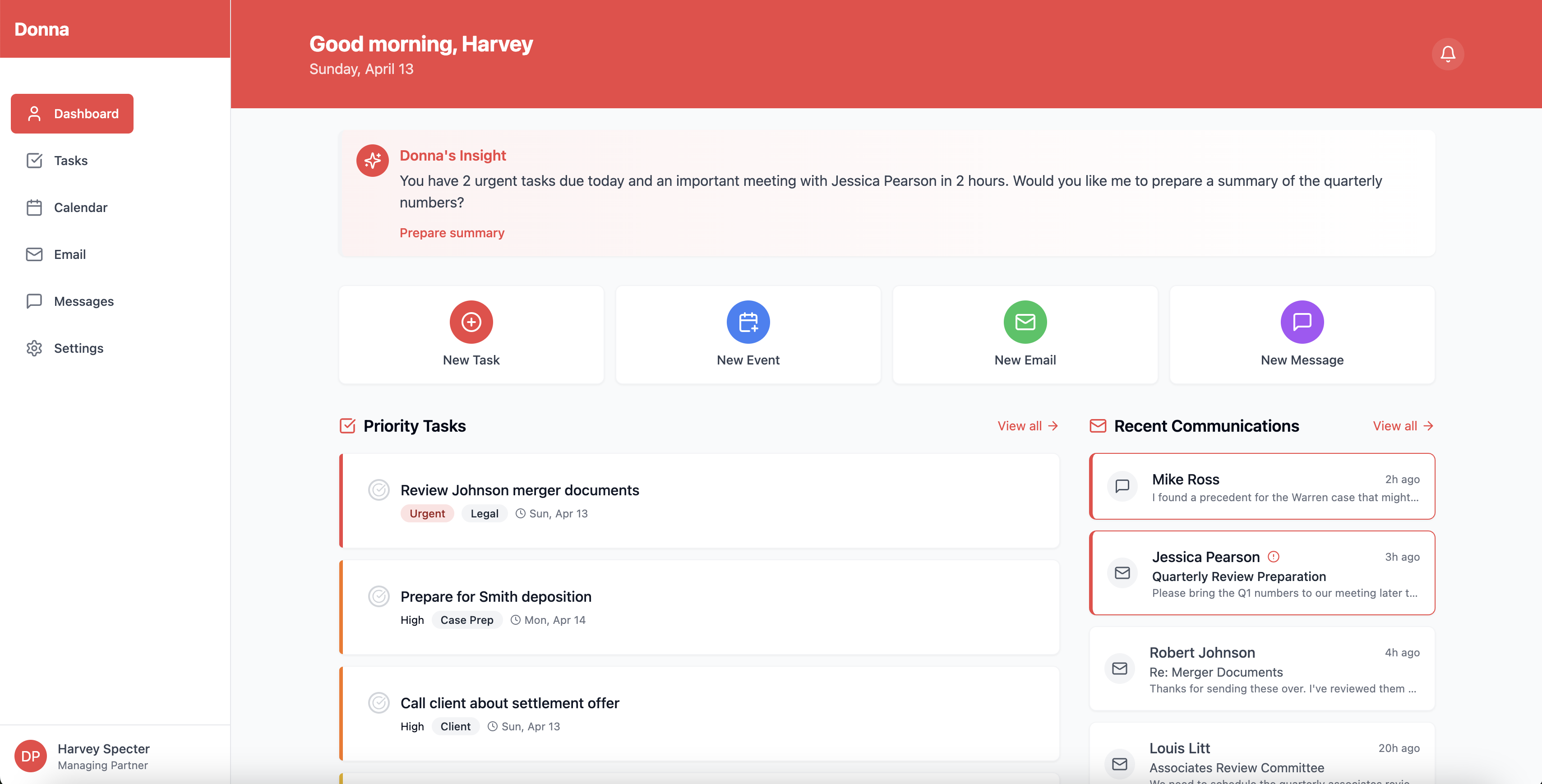
Donna: Your AI Executive Assistant Inspiration The inspiration for Donna came from two main sources. First, the iconic character Donna Paulsen from the TV show "Suits," who is renowned for her exceptional organizational skills, emotional intelligence, and ability to anticipate needs before they arise. Second, from the observation that while our digital lives have become increasingly complex, our tools for managing them remain fragmented and unintelligent.
As professionals, we juggle multiple calendars, communication platforms, task management systems, and information sources. These tools work in isolation, creating cognitive overhead and forcing us to be our own system integrators. We asked ourselves: "What if we could create a true AI executive assistant that works across our digital ecosystem with the same intuition, empathy, and competence as Donna Paulsen?"
In our professional lives, we've experienced how the right support can multiply productivity. We believe AI has reached a point where it can provide this level of assistance to everyone, not just high-powered executives with human assistants.
What it does Donna is an AI executive assistant that brings order to chaos by integrating across your digital life and providing intelligence that amplifies your capabilities. Specifically, Donna:
Prioritizes tasks intelligently: Unlike basic to-do apps, Donna analyzes deadlines, context, importance, and your work patterns to suggest what needs attention now versus later. She doesn't just track tasks; she helps you make smart decisions about them. Supercharges calendar management: Donna doesn't just show your schedule; she optimizes it. She suggests ideal meeting times based on your energy patterns, buffers travel time, prepares relevant materials before meetings, and generates follow-up tasks afterward. Transforms communication handling: Donna analyzes your emails and messages, summarizing key points, extracting action items, detecting sentiment, and drafting contextually appropriate responses. She handles the cognitive load of processing information overload. Provides personalized insights: As Donna learns your work patterns and preferences, she offers increasingly tailored suggestions and observations about how you can optimize your day—from identifying time blocks for deep work to suggesting when to address specific types of tasks. All of this comes together in a sleek, intuitive interface with Donna's signature color scheme and a touch of personality that makes the app feel more like interacting with a capable colleague than a sterile productivity tool.
How we built it Building Donna required creating a system that's both technically sophisticated and user-friendly. Our approach covered multiple layers:
Core Architecture We built Donna on a microservices architecture with Python (FastAPI) for AI-intensive services and Node.js (Express) for the API layer. This hybrid approach allowed us to leverage Python's rich ML ecosystem while maintaining high-performance API endpoints. We used MongoDB for flexible document storage and Redis for caching.
AI Stack The intelligence layer of Donna is powered by several specialized machine learning systems:
Task Prioritization Engine: We developed a custom gradient boosting model that weighs factors like deadlines, context, user patterns, and textual signals to score task importance and urgency. Natural Language Processing Pipeline: We integrated transformer-based models (BERT variants) to analyze emails and messages for sentiment, extract action items, classify content, and generate summaries. Pattern Recognition System: We built a learning system that identifies user preferences and work habits over time, allowing Donna to make increasingly personalized recommendations. Context-Aware Response Generator: We fine-tuned NLP models to draft communications that match the user's writing style and the specific context of the conversation. Frontend Experience For the frontend, we used React Native for cross-platform compatibility, with a design system inspired by Donna Paulsen's professional aesthetic—elegant, efficient, with signature red accents. We employed Redux for state management and implemented offline capabilities to ensure Donna remains functional even without connectivity.
Integration Layer We built robust integration services to connect with:
Calendar systems (Google Calendar, Outlook, Apple Calendar) Email providers (Gmail, Outlook) Communication platforms (Slack, Teams) Task management systems (integrates but also stands alone) Challenges we ran into Building Donna presented several substantial challenges:
Balancing Autonomy and Control One of our biggest challenges was finding the right balance between automation and user control. We wanted Donna to be proactive but not presumptuous. We solved this through a "confidence threshold" system where Donna would automatically handle tasks she was highly confident about while seeking confirmation for others. This required careful calibration of our ML models and extensive user testing.
Calendar Intelligence Complexity Creating truly intelligent calendar optimization proved much harder than anticipated. Scheduling involves complex constraints—personal preferences, energy patterns, meeting types, and participants' availability. Our initial attempts at optimization algorithms were either too simplistic or too rigid. We eventually developed a flexible constraint-satisfaction system that balances multiple factors while adapting to feedback.
Privacy and Security Architecture As an assistant with access to sensitive communications and data, security was paramount. We implemented end-to-end encryption for communications, zero-knowledge architecture for sensitive data, and granular permission controls. This added significant complexity but was essential for creating trust.
Integration Heterogeneity Each service we integrated with had different APIs, authentication mechanisms, and rate limits. Building a unified abstraction layer that worked reliably across all these services required careful engineering and extensive error handling.
Preventing Notification Fatigue Early prototypes overwhelmed users with notifications and suggestions. We had to develop a sophisticated prioritization system for Donna's own communications to ensure she only interrupted users for truly important matters.
Accomplishments that we're proud of Despite the challenges, we achieved several breakthroughs we're particularly proud of:
Intelligent Task Prioritization Our task prioritization system consistently impresses users with its ability to surface what matters most. In user testing, participants reported that Donna's suggestions matched or exceeded their own judgment about task importance 87% of the time.
Email Intelligence Our email analysis system can extract action items, detect meeting requests, and generate appropriate responses with remarkable accuracy. The system identifies key tasks from emails with over 90% precision and recalls over 85% of the actionable items.
Adaptive Learning System Donna genuinely gets better the more you use her. Our pattern recognition system successfully adapts to individual users within just a few days of use, with personalization quality scores improving by an average of 38% after one week of usage.
Cross-Platform Experience We built a seamless experience that works across mobile, desktop, and web platforms while maintaining consistent functionality and design language. Users can switch between devices without missing a beat.
Performance Optimization Despite the complex AI processing happening behind the scenes, we achieved response times that feel instantaneous to users through clever caching, pre-computation, and progressive loading techniques.
What we learned This project taught us valuable lessons across multiple domains:
Technical Insights AI Model Integration: We learned how to effectively chain together specialized AI models to create a system greater than the sum of its parts. Context Management: We discovered techniques for maintaining and leveraging user context across interactions to make each touchpoint more intelligent. Scaling ML Systems: We learned how to build inference systems that can handle concurrent users while maintaining performance and cost-effectiveness. User Experience Discoveries AI Personality Balance: We found that users responded best to an assistant with just enough personality to feel relatable but not so much that it became distracting. Trust Building: We learned how gradually increasing automation based on demonstrated competence builds user trust more effectively than offering full automation from the start. Feedback Integration: We developed techniques for continuously learning from explicit and implicit user feedback to improve the system. Product Development Insights Prototype Validation: We learned to validate complex AI features with simplified prototypes before full implementation. Feature Prioritization: We discovered which assistant capabilities delivered the most immediate value to users, helping focus our development efforts. User Onboarding: We learned techniques for gradually introducing users to Donna's capabilities without overwhelming them. What's next for Donna While we're proud of what we've built, we see several exciting directions for Donna's future:
Enhanced Capabilities Voice Interface: Adding voice interaction for hands-free assistance while commuting or multitasking. Document Intelligence: Expanding Donna's abilities to analyze, summarize, and extract insights from documents, reports, and articles. Advanced Meeting Support: Real-time meeting assistance with automatic note-taking, action item extraction, and follow-up generation. Expanded Ecosystem Team Coordination: Enabling Donna to coordinate across teams, managing shared tasks and facilitating group scheduling. API Platform: Creating an API that allows third-party developers to build specialized extensions for Donna. Enterprise Integration: Developing deeper integrations with enterprise systems like CRM, ERP, and project management tools. Technical Advancements On-device Intelligence: Moving more processing to the edge for enhanced privacy and reduced latency. Multimodal Understanding: Adding capabilities to understand and process images, charts, and other visual information. Conversational Depth: Improving Donna's ability to handle complex, multi-turn conversations about scheduling, planning, and prioritization. Business Model Evolution Personal vs. Professional Tiers: Creating differentiated offerings for individual users versus business teams. Vertical-Specific Assistants: Developing specialized versions of Donna for legal, medical, educational, and other professional contexts. We believe Donna represents the future of productivity—not just managing tasks but truly augmenting human capabilities through intelligent assistance. Just as the character Donna Paulsen elevated Harvey Specter's effectiveness in "Suits," our Donna aims to be the ultimate partner in professional excellence.

Log in or sign up for Devpost to join the conversation.