-
-
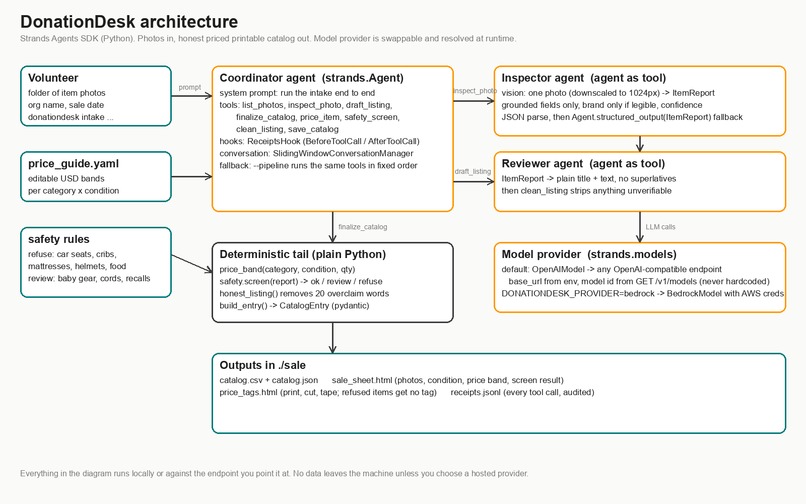
Architecture diagram
Inspiration
Community sales run on volunteers, and the slowest job at any of them is intake. Somebody has to look at a pile of donations and decide what each thing is, what condition it is in, what to charge, and whether the sale is even allowed to sell it. Car seats, cribs, mattresses and helmets are refused almost everywhere. Baby gear needs a recall check. Anything with a cord needs a look. That first pass takes hours, it is done by whoever showed up, and the tags that come out of it are inconsistent.
I have spent this year selling my own household items online with a vision agent doing the first draft of every listing, and the pattern works. DonationDesk takes that pattern and points it at the people who need it most: the friends-of-the-library group, the church rummage sale, the school fundraiser, the neighborhood swap day. One agent, one folder of phone photos, a printable catalog the whole crew can use.
What it does
A volunteer photographs each donated item with a phone and runs one command on the folder. DonationDesk:
Lists the photos and inspects each one with a vision agent. The Inspector reports only what it can see: name, category, condition, visible flaws, visible features, quantity, the brand only if it is legible, a list of things a photo cannot prove (works, complete, size), and a confidence score.
Drafts a plain listing title and one or two sentences a shopper can trust.
Prices every item from the organization's own editable price guide (category bands times a condition multiplier). The agent never invents a price.
Screens every item against the refuse and review rules community sales use. Car seats, cribs, mattresses, helmets, food and firearms are refused with the reason printed on the sheet. Baby gear, heaters, corded window coverings, opened cosmetics and bicycles are flagged for a volunteer check. Powered items get a "plug it in and note tested or untested" reminder.
Runs an honesty pass that removes twenty overclaim words (mint, rare, vintage, works great, like new and friends) and appends "Not verified: ..." to every listing.
Writes four files: sale_sheet.html with photo, description, condition, price band and screen result for every item; price_tags.html to print, cut and tape (refused items get no tag); catalog.csv and catalog.json; and receipts.jsonl, a line for every tool call the agent made so the organization can audit the run.
Photos never leave the machine unless the organization chooses a hosted model provider.
How we built it
Python, Strands Agents SDK 1.55.
Three agents. The Coordinator is a strands.Agent with eight tools and a single instruction: run the intake for this folder end to end. Two of its tools are other agents (the agents-as-tools pattern): inspect_photo wraps the Inspector, a vision agent that receives an image content block and returns a pydantic ItemReport, parsed from JSON with Agent.structured_output as the fallback; draft_listing wraps the Reviewer, a text agent that writes the listing copy. The remaining tools are plain @tool functions: list_photos, price_item, safety_screen, clean_listing, save_catalog and finalize_catalog.
A ReceiptsHook implements the Strands HookProvider interface on BeforeToolCallEvent and AfterToolCallEvent and writes the audit log. All three agents use SlidingWindowConversationManager.
The model provider is swappable and nothing is hardcoded. By default the app uses the Strands OpenAIModel provider against any OpenAI-compatible endpoint (a local engine, a hosted gateway, or Amazon Bedrock's OpenAI-compatible endpoint) and reads the model id from GET /models at runtime. Set DONATIONDESK_PROVIDER=bedrock and it uses the Strands BedrockModel provider with your AWS credentials.
The pricing, screening and honesty steps are deterministic Python on purpose. The agents look and write; the rules decide. That keeps the outputs auditable and lets an organization change the price guide or the refusal list without touching a prompt.
The demo and all development ran on a single local 35B mixture-of-experts model on a Mac mini, roughly 10 to 15 seconds per photo. 22 offline tests run in under a second with the two LLM agents replaced by canned reports; one live smoke test runs against whatever endpoint is configured.
Challenges
Getting a small local model to return the exact schema. The first live run came back with item_name instead of name. The fix was to put the exact keys in the Inspector's system prompt and keep Agent.structured_output as a second chance, so the same code works on providers that ignore JSON instructions but support tool calling.
Phone photos are big. A 12 megapixel JPEG is megabytes of base64 and prompt-size guards reject it. Every photo is downscaled to 1024px before it reaches the model. Condition is still obvious at that size.
Tool-call hiccups in the loop. On one run the coordinator emitted two tool calls concatenated in one input. Strands surfaced the validation error to the agent as a tool result and the agent retried correctly on the next step. That recovery is in the receipts file for anyone to read.
Photos that are not items. A test photo of a person came back as "person, condition good". The safety screen now flags people and vehicles as "retake the photo of the item only".
Accomplishments
A volunteer can go from a folder of photos to printed price tags in one command, with every refusal explained, every price traceable to a line in a YAML file, and every tool call logged. The whole thing is 8 source files and 22 tests.
What we learned
Agents are best at looking and writing. Pricing, refusal rules and honesty checks belong in code the organization can read and change. The receipts hook turned out to be the feature volunteers care about most: it answers "why did it say that" without anyone opening a prompt.
What's next
A phone-first web form so a volunteer can shoot and upload from the sale floor. A recall lookup tool against the CPSC database for anything in the baby and kids category. Multi-photo items (a second photo of the flaw). A per-organization price guide learned from what actually sold at their last sale. And an AgentCore deployment so a small nonprofit can run it without installing anything.

Log in or sign up for Devpost to join the conversation.