-
-
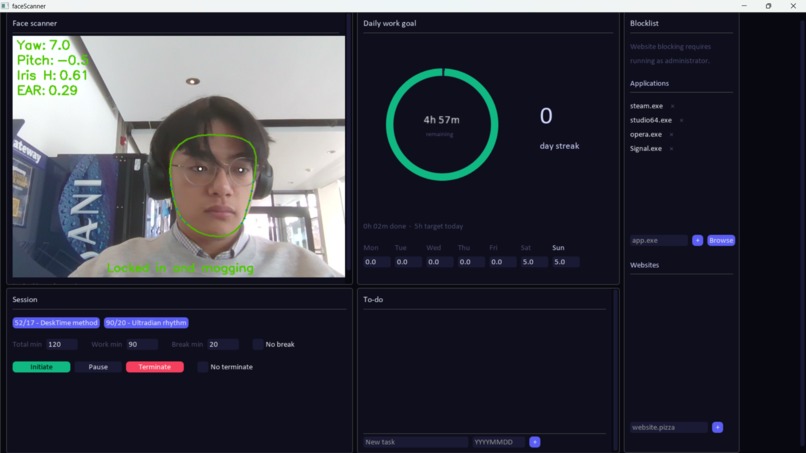
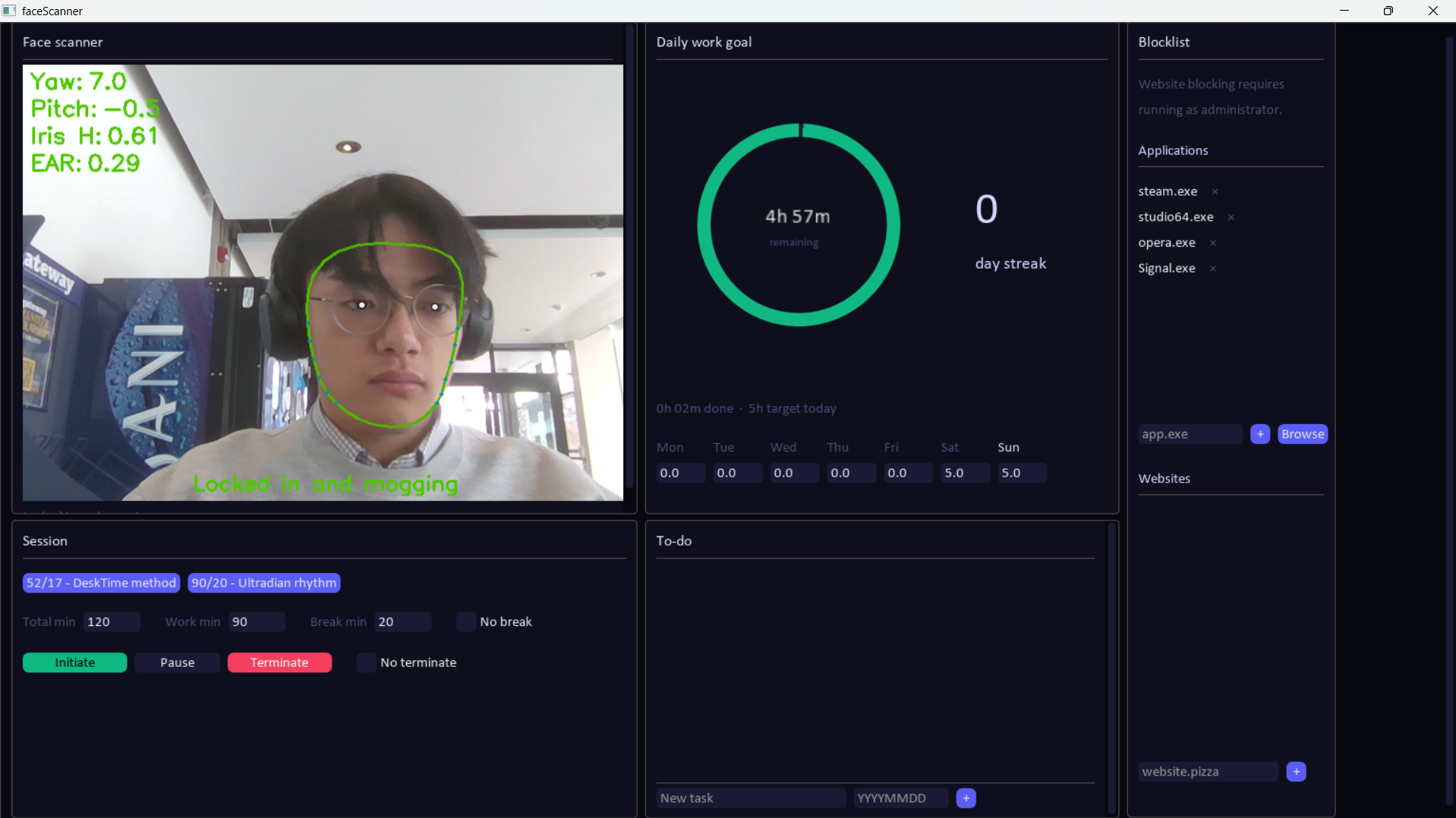
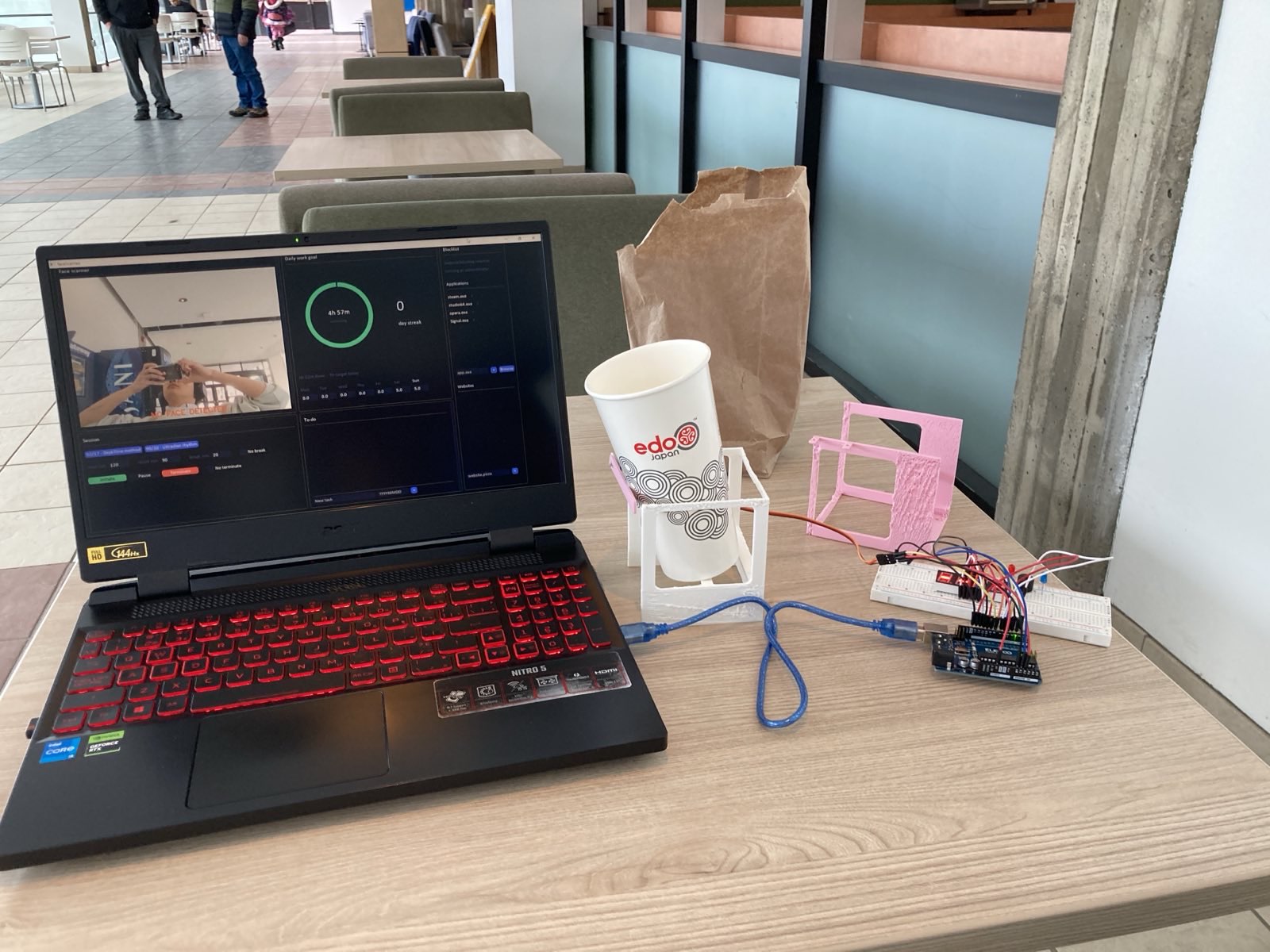
Main UI Screen. Daily progress, study session setter, blacklisted applications and websites.
-
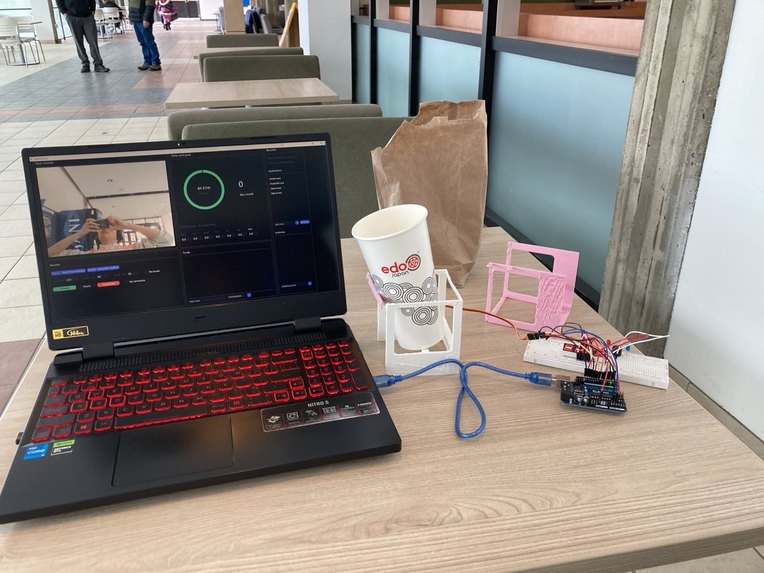
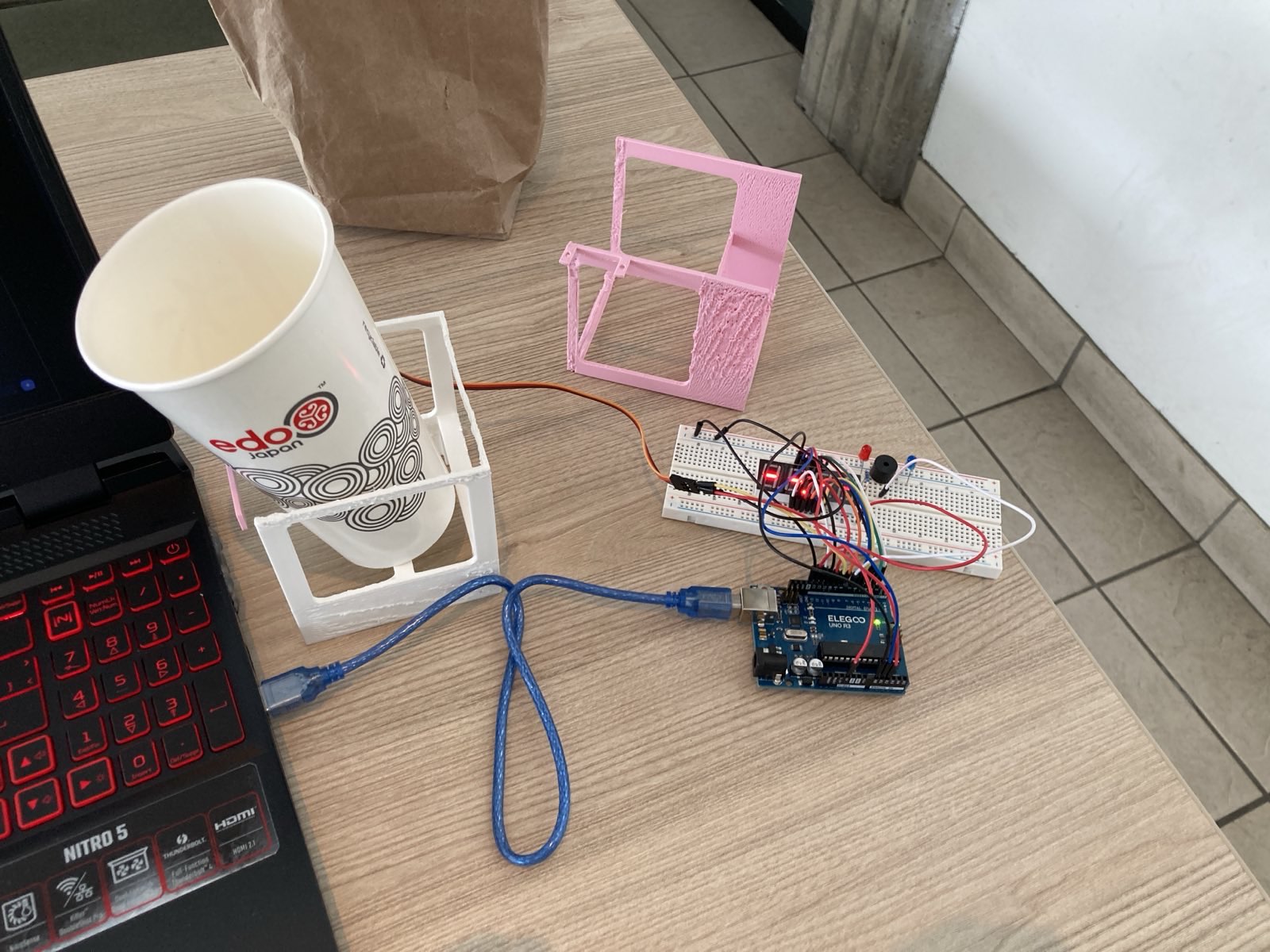
Everything put together
-
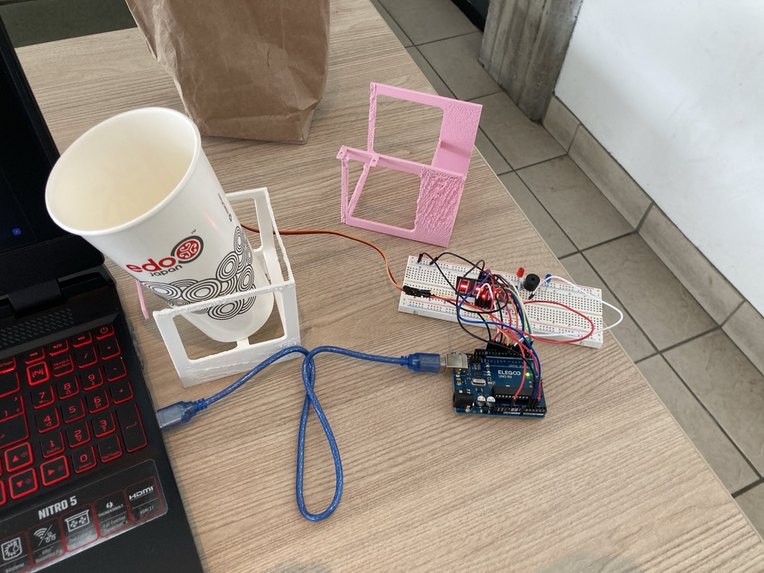
Hardware with 4 modules. Servo motor, Passive Buzzer, Red LED and 5641AS 4 digit 7 segment display
Inspiration
We all had those computer sessions where we stare at the screen for hours at a time only to do actual work for a fraction of that time. Look away for one second and suddenly you're on a YouTube rabbit hole. Perhaps you find yourself scrolling nonstop. We wanted to build a "digital tap on the shoulder" to gently remind us when our focus slips.
Humans are genuinely bad at weighing long-term consequences against immediate rewards. You know you should not be on instagram reels. You know it and yet here you are 40minutes deep into doom-scrolling. The problem is not willpower, it is that the cost of distraction feels abstract while the dopamine hit is right now. My little brother takes medication for ADHD just to get through a school day. Watching him fight his own brain to do things that should be simple was a big part of why this felt worth building.
The solution we kept coming back to was making the short-term consequence real and visible. A cup of water, or glitter, or whatever you decide to load the servo with, sits balanced above your setup. Look away long enough and it tips. It is not serious damage. It is just annoying enough to matter, which is exactly the kind of aversive signal that actually rewires behavior over time instead of just making you feel guilty about it later.
What it does
The app uses your webcam to track head rotation, iris position, and eye aspect ratio in real time, all processed locally with no data leaving your machine. If your gaze leaves the screen for longer than the countdown, it escalates through an audible BUZZER, a screen FLASH, and then the servo fires. Sessions are built around two research-backed focus protocols. The Ultradian 90/20 method mirrors the brain's natural 90-minute high-focus window followed by a mandatory 20-minute recovery, aligning work sessions with the cognitive rhythms your brain is already running on. The DeskTime 52/17 method came from a study tracking the actual behavior of the most productive workers, who turned out to work with intense focus for 52 minutes and then fully disconnected for 17. NO SCROLLING BETWEEN THOSE 17 MINUTES. I learned this the hard way.
The UI is intentionally minimalistic. Less visual noise means fewer off-ramps for your attention. The goal is not to be a productivity suite you spend time interacting with. It is training wheels. You use it long enough that structured, focused work becomes the default mode, you internalize the rhythm, and then you do not need it anymore. Seriously though, I would actually use this no joke.
How we built it
The video pipeline runs on Python with OpenCV handling camera capture and frame processing, and MediaPipe providing the face landmark model that gives us 478 facial landmarks per frame plus a transformation matrix we decompose to extract clean yaw and pitch angles. Iris position is calculated by comparing the horizontal center of the iris cluster against the eye corner positions to produce a normalized ratio. Eye closure uses the Eye Aspect Ratio formula, which drops sharply when the eye closes regardless of face position or distance from the camera.
The interface is built with DearPyGui, a GPU library that lets us render the live camera feed as a texture and redraw all the session metrics every frame. Arduino handles the hardware over serial: a custom sketch multiplexes a four-digit seven-segment display, drives the servo, and controls the buzzer and LED, with beep frequency scaling up as the countdown hits the final five seconds. The blocklist system kills banned processes via psutil every three seconds and rewrites the Windows hosts file on session start to redirect blocked domains to localhost across every browser.
Challenges we ran into
Vertical iris tracking was cut entirely. The vertical position of the iris changes too much with natural blinking and small head tilts, and the false positive rate made the system feel punishing for normal eye movement rather than genuine distraction. Horizontal tracking alone turned out to be sufficient when combined with head pitch, so we pulled it.
Calibrating the thresholds was more iterative than expected. Too strict and the system fires constantly during normal glances at a notebook or a second monitor. Too lenient and people can stare at their phone without triggering it. The current defaults are a reasonable middle ground and all the threshold constants are exposed at the top of the file so anyone can tune them for their own setup and sitting distance.
The worst was the 3D print failing friday overnight so we had nothing physical we could work on Saturday morning. Along with the popcorn ceiling like texture that kept persisting across prototypes.
Accomplishments that we're proud of:
The privacy guarantee is airtight. The face landmark model runs entirely on device, no frame is transmitted anywhere, and no biometric data touches a network. For something that watches your face all day that matters a lot, and it was a non-negotiable design constraint from the start.
The hardware escalation ended up feeling more satisfying than expected. The buzzer starting slow and accelerating to twenty pulses per second in the final five seconds creates a genuine sense of urgency that the software-only version completely lacked. Pairing that with the physical consequence of the servo made the whole thing feel real in a way a notification on your phone never does.
What we learned:
Biometric processing at real-time frame rates is more tractable than it sounds when you pick the right tools. MediaPipe handles like a lot of the heavy lifting of landmark detection. The transformation matrix approach to yaw and pitch proved far more stable than working with raw landmark deltas, which drift as the face moves relative to the camera. Keeping the gaze logic in Python and offloading the display multiplexing to Arduino kept both layers independently debuggable.
The hosts file approach to website blocking taught us that operating at the DNS layer is significantly more robust than anything at the application layer. It does not matter which browser someone uses or whether they have a plugin installed. The redirect happens before any network request is made. Running as administrator is required, but the tradeoff is a block that genuinely cannot be worked around by just switching browsers.
What's next for Don't Stop Locking In:
A focus analytics dashboard showing session history, distraction frequency, and productivity trends over time would give users something to actually reflect on rather than just a daily pass or fail. Pairing that with the streak system, where consecutive days of hitting your goal unlock longer break windows or alternative session protocols, adds the kind of positive reinforcement loop that complements the aversive one.
A calibration step where you look at the corners of your screen to map your specific monitor size and sitting position to the detection thresholds would improve accuracy for anyone whose setup differs from the defaults. Support for designating specific applications as focus-compatible rather than blocked entirely would also make the tool practical for people who need access to, say, a reference PDF or a communication tool during a work session without the system treating it as a distraction.


Log in or sign up for Devpost to join the conversation.