Inspiration
We wanted to build something that made digital literacy feel less like a lecture and more like an adventure. Kids are constantly exposed to fake links, weak passwords, impersonators, scams, and AI-generated content, but most safety lessons are taught through slides or warnings. Our goal was to turn those lessons into moments players could experience directly: making choices, seeing consequences, and learning what made something unsafe.
We chose Roblox because it is already familiar to younger audiences. Instead of asking players to read a long guide about online safety, we built a story- driven obby where each section teaches one safety concept through gameplay.
What It Does
Our game is a kid-friendly Roblox obby about avoiding scams and rescuing Grandma. The player moves through multiple themed areas, each focused on a different digital literacy skill.
The game teaches:
- How to compare real and fake URLs
- Why strong passwords are safer than familiar or predictable passwords
- How impersonators can pressure people into sharing private information
- Why requests for money, passwords, locker codes, addresses, or unlocked devices are red flags
- How AI-generated images can include visual mistakes or unrealistic details
- How to slow down, verify, and make safer choices online
Each lesson is built into the world. Players jump across safe and fake-link platforms, choose stronger passwords to pass doors, talk to suspicious versions of an in game friend, carry real or fake artwork through a museum, and receive immediate feedback when they make a safe or unsafe choice.
How We Built It
Learning Goals
- We started by defining the core digital safety lessons we wanted young players to take away from the game.
- Our main learning goals were:
- Players should be able to create and recognize strong passwords.
- Players should be able to identify trustworthy links and avoid suspicious ones.
- Players should be able to recognize when someone online is pretending to be a person they know in order to get personal information.
- Players should understand that AI-generated images can appear anywhere online and should not always be trusted at face value.
Game Format and Audience
- From there, we brainstormed different game formats and mechanics that could make these topics engaging and understandable for a younger audience.
- We landed on the idea of teaching through short, interactive minigame sections inside a larger obby-style experience.
- Our main audience is children ages 8 to 13, a group that responds strongly to stimulation, immediate feedback, and clear goals.
- Because of that, we chose to structure the game as an obby.
- The obstacle-course format helped us keep the pace fast, the objectives clear, and the learning interactive, while still making the game feel playful and rewarding.
Prototyping and Grayboxing
- Our process began with grayboxing.
- We built rough versions of minigames and level sections first, focusing on gameplay flow and learning outcomes rather than visual polish.
- This let us test ideas quickly, throw out weaker concepts, and refine the ones that best supported our educational goals.
- Once the structure was working, we added more functionality, including dialogue systems, object interaction and pickup mechanics, checkpoint and respawn systems, and quiz-based progression.
Story and Progression
- We wanted the game to feel like one coherent story rather than a disconnected set of lessons.
- To make the experience more immersive and relatable, we built the narrative around a simple but familiar idea: the player’s grandma has been scammed and captured, and the player has to save her by learning how to stay safe online.
- That framing gave us a fun emotional hook while connecting the lessons to real-life risks that children may see happen to people around them.
Interactive Learning Sections
- Each section teaches a different safety concept through a different interaction.
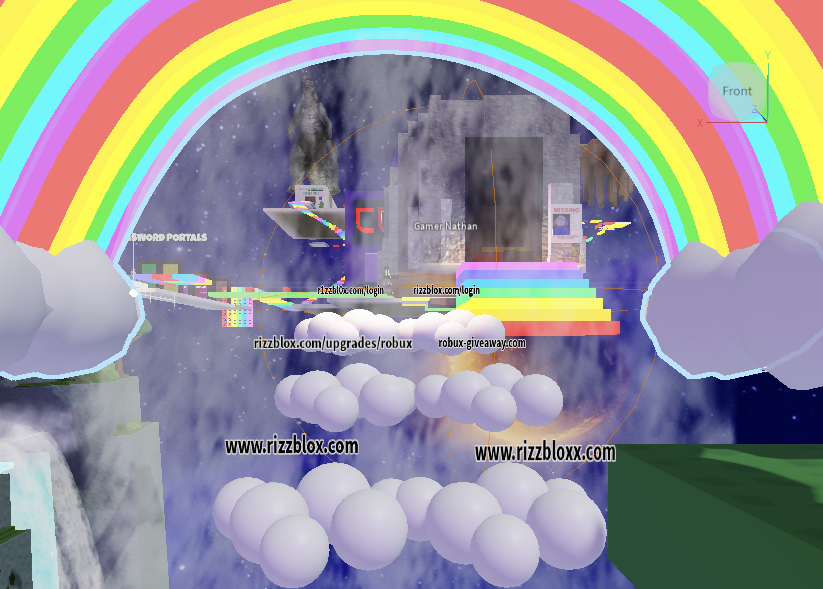
- In the fake link section, players cross cloud platforms labeled with real and suspicious URLs, learning to notice extra letters, lookalike characters, and suspicious reward claims.
- In the password section, players compare weak and strong passwords through a door challenge.
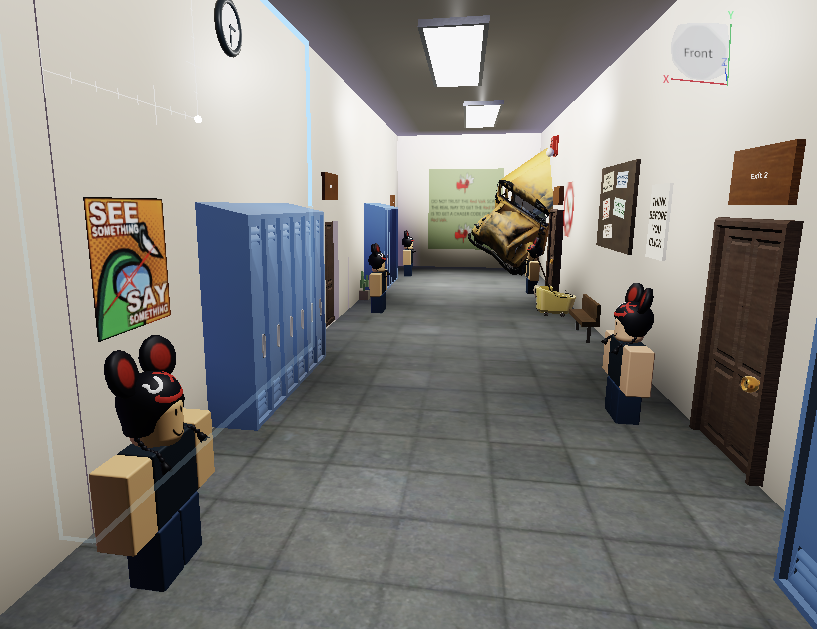
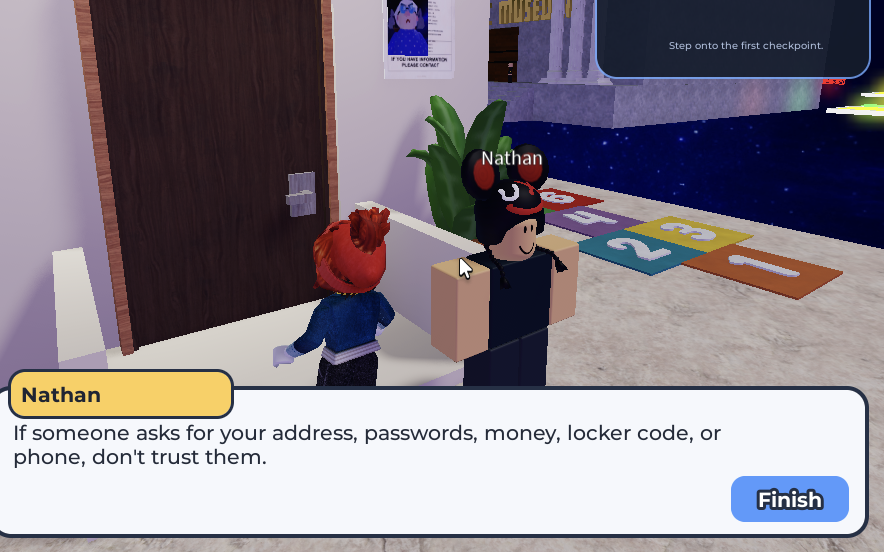
- In the imposter hallway, players talk to different versions of Nathan and decide whether the request is safe or trying to steal private information.
- In the museum, players carry paintings to doors and learn that AI-generated images can look convincing while still containing visual clues that something is wrong.
Implementation
- To support the gameplay, we built several connected systems inside Roblox Studio.
- Most interactions are driven by proximity prompts, so players can talk to NPCs, open doors, pick up paintings, and trigger choices directly inside the world.
- Those interactions connect to custom UI screens for dialogue, scam feedback, quiz questions, and task progression, which let us explain each lesson without pulling the player completely out of the game.
- We used conditional scripts to track player progress and change the world based on what the player had done.
- For example, after the player talks to Student Nathan, the next door becomes available.
- In the imposter hallway, each Nathan can update from an interactable character into a rejected scammer with different hover text.
- In the museum, the game checks which painting the player is carrying, accepts the real one, and punishes AI-generated fakes with a scam warning and respawn.
- We also built progression systems around checkpoints, respawns, and feedback overlays.
- Checkpoints keep players from losing too much progress, while feedback screens explain why a fake link, weak password, scam response, or AI image was unsafe.
- This helped us connect platforming, dialogue, object puzzles, and quiz sections into one continuous Roblox experience.
Challenges We Ran Into
- Learning Roblox Studio: We were new to Roblox development, so we had to quickly learn how Workspace objects, server scripts, local scripts, RemoteEvents, ProximityPrompts, UI, collisions, checkpoints, and player state fit together.
- Building doors correctly: Doors were surprisingly difficult, especially embedding them cleanly into walls while making sure they blocked players, opened at the right time, and worked with scripts and prompts.
- Handling 3D object behavior: Some mechanics were harder than expected because objects did not always behave the way we imagined in 3D space, like paintings rotating around the wrong axis or collisions between objects interfering with movement and interactions.
- Organizing a growing Roblox project: As we added more rooms, NPCs, doors, UI screens, scripts, and assets, keeping everything organized became a challenge. We had to be careful with folder structure, object names, and script references so one renamed or moved object did not break a whole interaction.
What We’re Proud Of
We are especially proud that the game is genuinely fun while still teaching important digital safety concepts. Even as adults, we had a blast testing out the game. We are also proud of the feedback loop, because when players make a wrong choice, the game explains why it was unsafe instead of just telling them they were wrong.
Accessibility And Younger Players
We made several design choices with younger players in mind. We intentionally focused on readability, clear feedback, and simple interaction patterns.
- Dialogue is broken into short pieces for readability
- Important feedback appears in large UI overlays
- Many lessons are repeated through both gameplay and text
Players are guided by familiar characters, hover prompts, large signs, and immediate consequences.
What We Learned
- How detail-oriented game design really is
- Small choices, especially wording, can make the difference between a lesson feeling clear or confusing. That was especially important for an educational game, where players need to understand not just the answer, but why it is correct.
- The value of putting every idea on the page during brainstorming
- Starting with rough concepts and testing them quickly helped us figure out which mechanics were actually fun, effective, and appropriate for our audience.
- Technicality of Roblox Studio
- How UI, scripts, checkpoints, physics, and player interactions all work together
What’s Next
- More accessibility features
- slower dialogue
- optional narration
- larger UI mode
- more audio cues
- slower dialogue
- More scam scenarios
- more real-world examples
- more AI image challenges
- more real-world examples
- Progress screen
- shows which digital safety skills the player has learned
- shows which digital safety skills the player has learned
- Beta testing
- testing with real users and iterating based on their feedback
- testing with real users and iterating based on their feedback
- Consistent Design
- streamlining color and design choices to stick with a theme
- streamlining color and design choices to stick with a theme
Built With
- codexcli
- lua
- robloxstudio

Log in or sign up for Devpost to join the conversation.