-
-
screenshot 2
-
screenshot 1
-
flow diagram


Inspiration
The inspiration behind creating Dolly Chef stemmed from the common struggle many people face when trying to learn a new recipe. Watching lengthy YouTube videos or sifting through numerous online articles can be time-consuming and overwhelming. I wanted to simplify the process and provide a seamless solution for individuals seeking to explore new culinary horizons.
Dolly Chef was envisioned as an innovative food assistant, powered by cutting-edge technology, to make cooking more accessible and enjoyable. My goal was to eliminate the hassle of searching for recipes and provide a straightforward way to generate recipes with the necessary ingredients. By leveraging the capabilities of the Dolly-v2 model, we aimed to create a virtual chef that could understand natural language queries and offer comprehensive recipe suggestions.
What it does
The Dolly Chef app is a powerful tool that utilizes various technologies and data sources to provide a seamless recipe generation and answering experience. Here's a breakdown of its key functionalities:
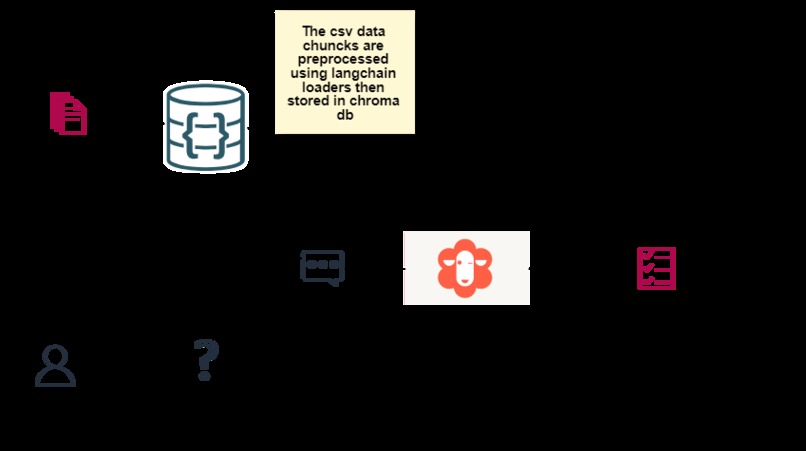
1.Recipe Data Acquisition: The app queries recipe data from Kaggle, a popular platform for sharing datasets. It leverages language langchain loaders and ChromaDB, which is a database optimized for large-scale language modeling. This data serves as a comprehensive knowledge base for the recipe-related information required by the app.
2.Language Model and Sentence Transformers: The app integrates the Databricks/Dolly-v2-3b model, which is a language model specifically designed for conversational AI applications. This model enables the app to understand natural language queries and generate coherent and contextually relevant recipe answers.
5.The chatbot also utilizes Sentence Transformers from Hugging Face, which are powerful models trained to encode sentences into numerical representations, enabling similarity-based searches and ranking of recipe answers.
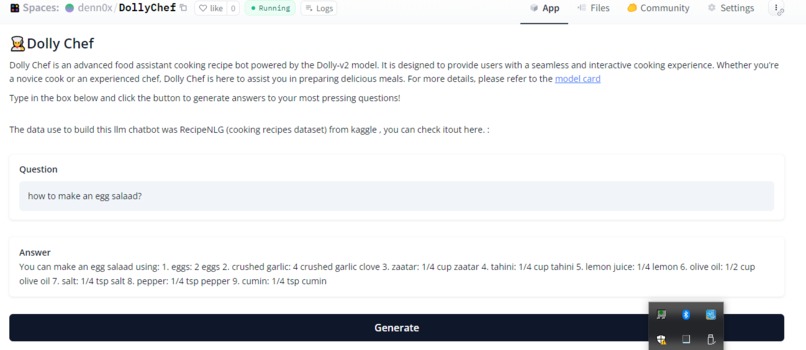
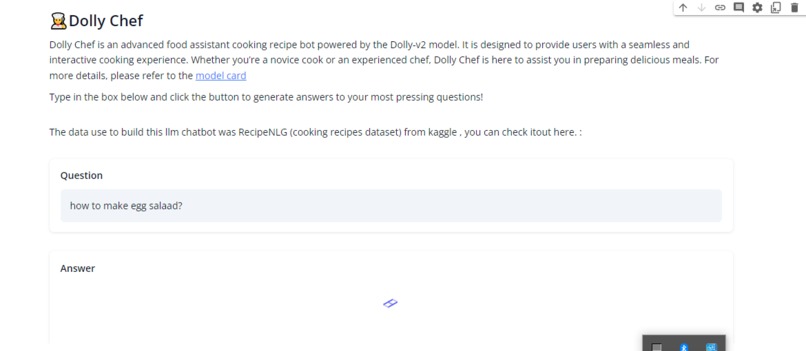
6.User Interface with Gradio: The app features a user-friendly interface built with Gradio. Gradio is a Python library that simplifies the creation of customizable UI components for machine learning models. The Dolly Chef app's UI provides separate input fields for users to enter their recipe-related queries and another field to display the generated recipe answers.
7.Recipe Generation and Answering: When a user submits a query through the app's interface, the underlying technology processes the query using the Dolly-v2-3b model. The model leverages the recipe data and the power of language understanding to generate recipe answers that address the user's specific query.
8.Contextual Recipe Answers: The app's recipe answers are designed to be contextually relevant and informative. They may include step-by-step instructions, ingredient lists, cooking tips, variations, dietary considerations, and more, depending on the nature of the user's query.
How we built it
To build the Dolly Chef bot, I followed these steps:
1.Data Acquisition: I started by acquiring the RecipeNLG dataset from Kaggle, which provides a comprehensive collection of cooking recipes. This dataset served as the foundation for the recipe-related information in the bot. I used langchain loaders to load and preprocess the data, ensuring it was in a suitable format for further processing.
2.Data Storage: Next, I utilized ChromaDB, a database optimized for large-scale language modeling, to store and manage the recipe data. ChromaDB allows efficient retrieval and querying of the dataset, which is crucial for generating recipe answers in a timely manner.
3.Bot Script Creation: I developed the core functionality of the Dolly Chef bot using Python. Leveraging the power of cloud GPUs, I utilized the Google Cloud platform to create the bot script. This ensured that the bot could handle complex natural language processing tasks and generate recipe answers with speed and accuracy.
4.Integration of Language Models: To enable conversation and generate recipe answers, I incorporated the Databricks/Dolly-v2-3b language model into the bot script. This language model is specifically designed for conversational AI applications and ensures that the bot can understand and respond to user queries effectively.
5.Utilizing Sentence Transformers: Additionally, I integrated Sentence Transformers from Hugging Face into the bot. These models allowed for encoding and comparing sentence representations, enabling similarity-based searches and ranking of recipe answers. This enhanced the relevance and accuracy of the generated recipe answers.
6.User Interface Development: To provide a user-friendly experience, I created the bot's interface using Python's Gradio library. Gradio simplified the process of building a UI and allowed users to interact with the bot by entering their recipe queries and receiving the generated recipe answers.
7.Deployment and Testing: After completing the development phase, I deployed the Dolly Chef bot to a huggingface spaces. This ensured that the bot was accessible and could handle multiple user requests simultaneously. I conducted thorough testing to verify the bot's functionality, responsiveness, and accuracy in generating recipe answers.
Challenges I ran into
One of the challenges I encountered while building the Dolly Chef bot was the requirement for a powerful GPU to run the language model effectively. The model's computational requirements exceeded the capabilities of my local computer's CPU, necessitating the use of a cloud GPU.
To overcome this challenge, I researched and compared various cloud GPU options, selecting a provider that offered the necessary computational power within my budget. I familiarized myself with the cloud provider's documentation and resources to set up the required infrastructure effectively. Furthermore, I optimized the code and leveraged GPU-accelerated libraries and frameworks to maximize the performance of the language model during inference.

Log in or sign up for Devpost to join the conversation.