-
-
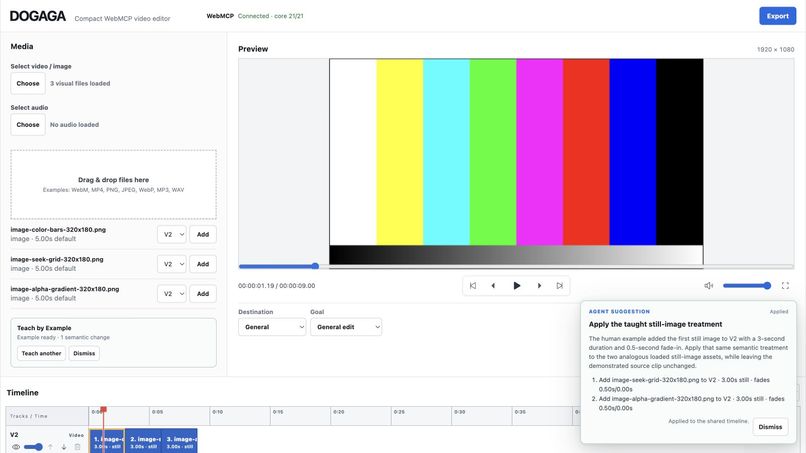
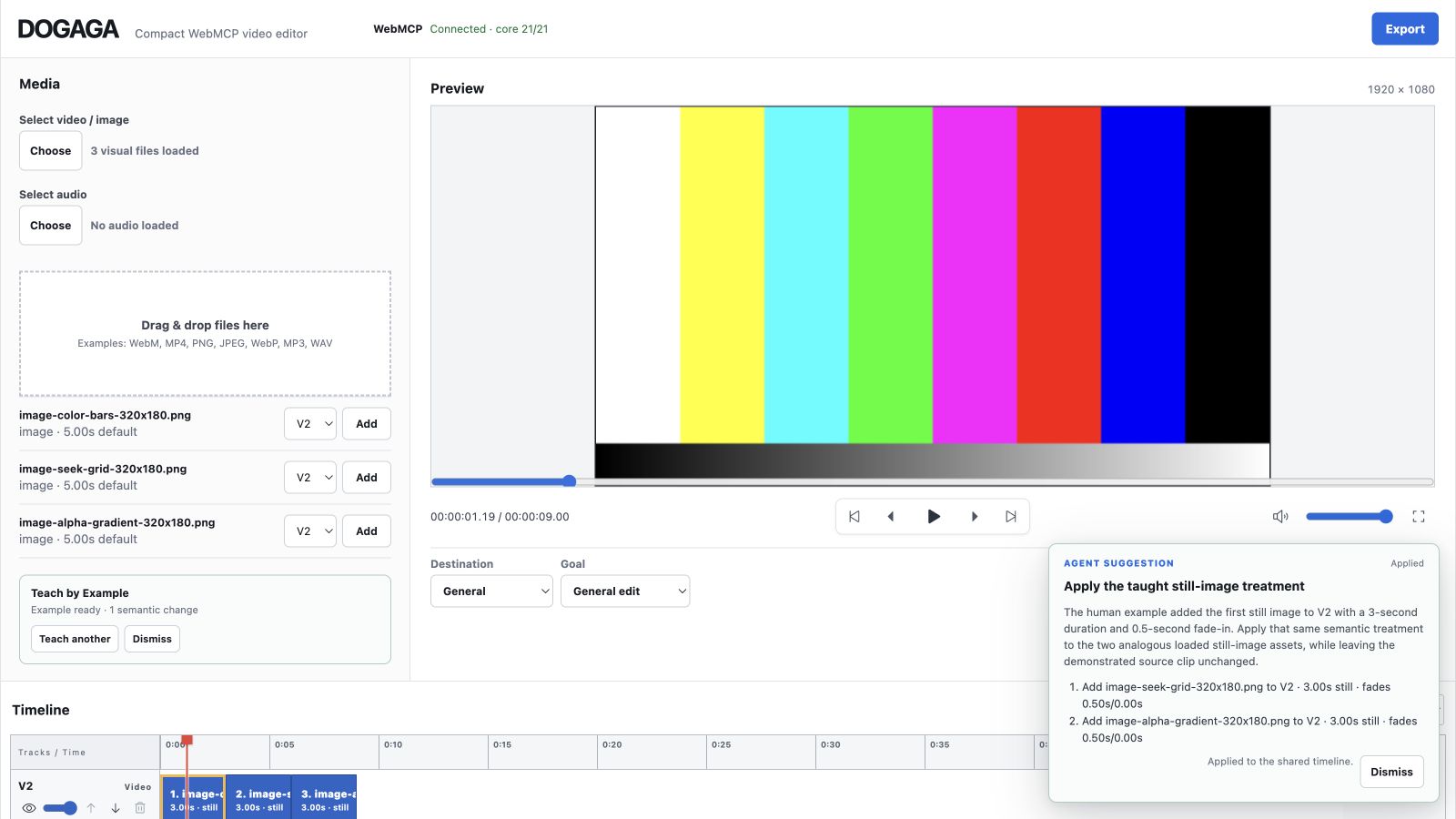
DOGAGA's live editor with WebMCP connected: Teach by Example, an applied agent suggestion, actual Preview, and the shared timeline.
Inspiration
Video editing is visual, but editing intent is semantic. Meaning lives in operations such as track order, clip timing, fades, opacity, still-image duration, canvas settings, and transitions—not only in pixels or DOM controls.
AI-assisted creative tools often place an agent beside the editor rather than inside the editor's structured state. The agent may generate instructions, click the interface indirectly, or operate through a separate backend. After either side edits, the other side may no longer know the real project state or the human's intent.
DOGAGA explores a page-native alternative: the open web application exposes its live semantic editing state and actions through WebMCP while the person keeps the normal visual editor and final approval.
What it does
DOGAGA is a compact, local-first browser video editor where the human UI and a WebMCP agent operate on the same live timeline.
Its collaboration loop is:
- Human teaches by performing a normal edit in the visual editor.
- DOGAGA captures semantic meaning from the supported before/after change.
- The agent generalizes that treatment to analogous current assets through a reviewable Edit Plan.
- The human approves or rejects the proposal before the timeline changes.
For example, a person can load three still images, click Teach agent, add the first image to V2, set it to three seconds with a 0.5-second fade, and stop teaching. DOGAGA exposes the completed semantic demonstration through get_project_state. When the person asks, “Do the same to the other still images,” the agent can propose the corresponding operations. The app shows that plan without mutating anything; only the person's Apply action commits it.
The same live project then powers actual Preview and browser-native Export. There is no fixed hackathon scene, agent-only timeline, remote editing backend, hidden replay, or fake preview.
Why WebMCP is a strong fit
WebMCP lets the page define an explicit contract for agent-readable state and semantic actions. The agent does not have to infer a timeline from screenshots or guess which DOM element represents a trim, fade, track, or still-image duration.
This creates a better user experience because people can communicate intent through editing itself instead of translating every creative choice into a prompt. The agent receives safe, structured meaning; it can reason over current assets and propose a generalization; the person retains visible control and final approval.
This human-agent workflow was difficult with conventional UI automation. Mouse-coordinate or DOM macro replay captures mechanics, not meaning. A separate MCP server can also create a second copy of the project that drifts from the open editor. DOGAGA keeps the visual UI, agent state, Preview, and Export synchronized in one page-owned project.
How we built it
DOGAGA uses React, TypeScript, and Vite and is deployed on Cloudflare Pages.
A single EditorController and command executor power both human editing and all WebMCP mutations. The page registers typed tools with document.modelContext.registerTool() through use-webmcp-tool.
The canonical editor state contains safe asset descriptors, video/audio tracks, clips, canvas settings, transitions, and playhead state. Collaboration metadata includes a small Project Brief, the completed humanDemonstration, and a reviewable editPlan.
Local File objects and object URLs are kept separately in a session-only runtime media map. They are deliberately excluded from agent-visible state. WebMCP sees only safe asset IDs and descriptors—never absolute paths, file handles, object URLs, media pixels, or private Teach by Example snapshots.
DOGAGA exposes 23 WebMCP tools: 21 core/collaboration tools plus add_image_clip and set_still_duration. Direct mutation tools share the UI executor. propose_edit_plan validates a complete multi-step proposal without mutating the timeline. Human Apply revalidates and commits atomically; Reject leaves the project unchanged.
Preview uses browser-native video/audio elements and canvas composition. Export uses Canvas, Web Audio, and MediaRecorder, prefers MP4 when supported, and falls back to WebM. Normal editing and export do not upload source media to a DOGAGA server.
Product capabilities
The submitted public app supports:
- local video, PNG/JPEG/WebP still-image, and audio loading
- multiple video and audio tracks
- still-image display duration and transparent PNG overlays
- split, trim, reorder, delete, and cross-track clip movement
- playback speed, visual fades, and cross dissolves
- track opacity/visibility, audio mute, and clip volume
- actual multi-layer Preview with play, pause, and seek
- 16:9, 9:16, 1:1, and 4:5 canvases with contain/cover fitting
- browser-native composited video/audio Export and download
- Project Brief, Teach by Example, and reviewable agent Edit Plans
Challenges we ran into
The hardest architectural constraint was preserving one real source of truth. WebMCP could not become a second editor state, and human actions could not bypass the same validation used by agents.
Local-first privacy added another constraint: the agent needs enough structured context to edit intelligently, but local file handles, paths, object URLs, and media contents must remain private.
Browser-native media also required careful synchronization. Preview and Export must reflect the same clip timing, track ordering, fades, image duration, audio mixing, and canvas settings. Still images introduced separate semantics from videos while still needing to participate in the same layered timeline and export path.
Finally, Teach by Example had to capture meaning rather than input events. DOGAGA compares supported semantic before/after state, exposes only the completed safe result, and routes any generalization through the existing reviewable Edit Plan path.
Accomplishments that we're proud of
- A real public editor rather than a challenge-only demo
- One shared state and executor for the human UI and 23 WebMCP tools
- Semantic Teach by Example with explicit human approval
- Actual multi-layer Preview and browser-native Export
- Local-first media boundaries that keep source files out of agent state
- Non-mutating proposal validation and atomic Apply
- Transparent PNG and still-image support across editing, Preview, Export, and WebMCP
- A reproducible public repository with MIT licensing and reviewer instructions
What we learned
The most useful agent interaction is not always “do this for me.” In creative work, a person may communicate intent more naturally by demonstrating one example. WebMCP can turn that visual interaction into structured semantics without reducing it to a fragile macro.
We also learned that human control works best when it is part of the product state: proposals are visible, reviewable, and separate from committed edits. The agent can reason broadly while the person keeps authorship over what becomes real.
What was built during the Challenge
DOGAGA existed before August 25, 2026, and the public repository history documents that prior work. During the Challenge period it was meaningfully extended with the WebMCP shared-state architecture and completed compact production path, including:
- page-native WebMCP registration and typed command schemas
- agent-safe editor state and privacy boundaries
- actual local-media Preview connected to shared state
- Cloudflare Pages deployment
- browser-native Export
- canonical multi-track video/audio editing
- speed, fades, split, cross-dissolves, opacity/visibility, and multi-audio mixing
- Project Brief and non-mutating
propose_edit_plan - still-image and transparent-PNG support
- Teach by Example semantic demonstrations
- the final 23-tool WebMCP surface
The repository's dated commit and pull-request history distinguishes this Challenge-period work from the earlier project.
What's next
DOGAGA is intentionally compact. Next steps include persistent project save/relink, richer timeline positioning, waveforms, captions and lyrics, image motion, and more advanced effects. The current release focuses on a small but genuinely usable local-first editor and a clear human-agent collaboration model.
Try it
Open the live app in ChatGPT's in-app browser or Chrome with WebMCP enabled:
- Live app: https://dogaga.pages.dev
- Source and setup instructions: https://github.com/yo4e/DOGAGA
Recommended flow: load three local still images, teach one 3-second faded V2 treatment, ask the agent to do the same to the other images, review and Apply the proposed plan, then Preview or Export the shared result.
Built With
- canvas-api
- cloudflare-pages
- html5-video
- mediarecorder
- open-source
- react
- typescript
- vite
- vitest
- web-audio-api
- webmcp

Log in or sign up for Devpost to join the conversation.