-
-

Extension icon
-
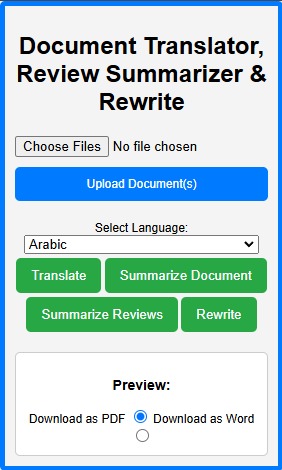
Screen Shot of the extension

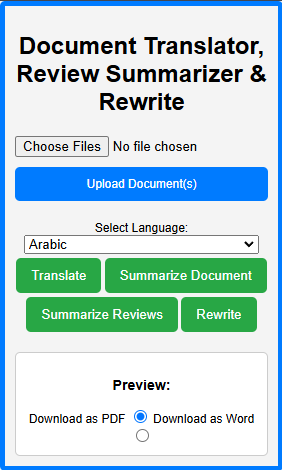
Document Translator & Summarizer Chrome Extension
Inspiration
The idea for the Document Translator & Summarizer extension came from the growing need to process and manipulate documents directly in the browser. As a student and professional, I often encounter lengthy documents, foreign language content, and complex reports. Translating, summarizing, or rephrasing these documents manually is time-consuming. I wanted to create a tool that would make it easier to translate, summarize, and rewrite documents without leaving the browser.
Additionally, I noticed that many e-commerce sites (like Amazon and eBay) have large numbers of reviews, and summarizing them could save users valuable time. This led me to create an extension that would help users extract and summarize reviews directly from those sites.
What it does
The Document Translator & Summarizer extension provides users with the following key features:
- Translate Documents: Upload a document (PDF, DOCX, etc.) and translate it into your preferred language.
- Summarize Documents: Quickly summarize large documents to get the main points, saving you time.
- Rewrite Documents: Reword paragraphs or sentences to improve clarity, simplify complex language, or make the text unique.
- Review Summarization: Extract and summarize product reviews from e-commerce websites such as Amazon and eBay.
This extension allows users to perform these tasks directly within the browser, offering a seamless experience with minimal setup.
How I built it
Frontend:
- The user interface is built using HTML, CSS, and JavaScript. The popup allows users to upload documents, choose actions (translation, summarization, or rewriting), and view or download the processed content.
- I used JavaScript to handle user interactions, send data to the backend, and display results in the popup.
Backend:
- For the backend, I used Node.js and Express, serving as the API that processes documents and interacts with the Google Gemini API for translation, summarization, and rewriting.
- The Multer library was used for handling file uploads, while the Google AI File Manager API facilitated managing document files sent to the Gemini API for processing.
Integration:
- The Chrome extension interacts with the active tab to extract and process content, using custom right-click context menu options for ease of use.
- After processing the document, the extension allows users to download the output in either PDF or Word format, using the jsPDF and docx libraries.
Challenges I ran into
Handling Large Documents:
- One of the main challenges was ensuring that large documents (such as PDFs or Word files) could be processed efficiently. Managing file size limitations and ensuring the extension remained responsive were critical.
API Integration:
- Interfacing with the Google Gemini API required handling a variety of text inputs and ensuring the model’s responses were parsed correctly. I had to experiment with different prompt formulations to ensure accurate translations and summaries.
Cross-Site Content Extraction:
- Extracting reviews from e-commerce sites like Amazon and eBay was challenging due to varying HTML structures. Each site required specific content extraction logic, which required constant testing and debugging.
User Privacy:
- Ensuring that the extension handled user data securely was another challenge. I made sure that document content was processed temporarily and not stored, addressing privacy concerns by writing a clear Privacy Policy.
Testing and Debugging:
- Testing the extension across different browsers, websites, and file types was time-consuming. There were several instances where the extension failed to extract data from certain pages, which required debugging and refining the content extraction logic.
Accomplishments that I'm proud of
- Seamless Integration: I was able to successfully integrate the Google Gemini API for translation, summarization, and rewriting directly in the browser without requiring the user to open external applications.
- Multi-functionality: I built an extension that handles multiple tasks (translation, summarization, rewriting) and supports file formats like PDF and DOCX, which is something that many existing solutions don't offer in a single tool.
- E-commerce Review Summarization: Extracting reviews directly from e-commerce sites and providing instant summaries added significant value for users who frequently shop online.
- User-Focused Design: The interface is intuitive, providing a seamless experience where users can upload, process, and download documents with minimal effort.
What I learned
- Chrome Extension Development: Building an extension taught me the nuances of interacting with the browser, using Chrome Extension APIs, and managing content scripts efficiently.
- API Integration and NLP: Interfacing with the Google Gemini API helped me learn more about natural language processing (NLP) and how AI models can be leveraged for tasks like text translation and summarization.
- Backend Development: I gained valuable experience in setting up a backend using Node.js and Express, managing file uploads, and working with external APIs.
- User Privacy and Security: I learned the importance of transparent privacy policies and secure handling of user data, ensuring that sensitive data isn't stored unnecessarily.
What's next for Document Translator & Summarizer Chrome Extension
- Additional Site Support: I plan to add support for extracting and summarizing reviews from more e-commerce sites (e.g., Walmart, Best Buy).
- Voice Integration: I aim to integrate voice features, allowing users to dictate the content they want to summarize or translate.
- Offline Mode: I am considering adding an offline mode where the extension can work without requiring an active internet connection.
- Improved AI Capabilities: I will explore additional AI models and refine the prompts for better results in translation, summarization, and rewriting.
Built With
- css
- docx.js:-for-generating-downloadable-pdfs-and-word-documents.-git
- germini
- html
- javascript
- multer
- node.js

Log in or sign up for Devpost to join the conversation.